

- Posts: 221
- Thank you received: 8
show product in subcategory by "group by category" setting
3 years 10 months ago #347314
by sadaf3d
Hello
This is a simplified version of my problem:
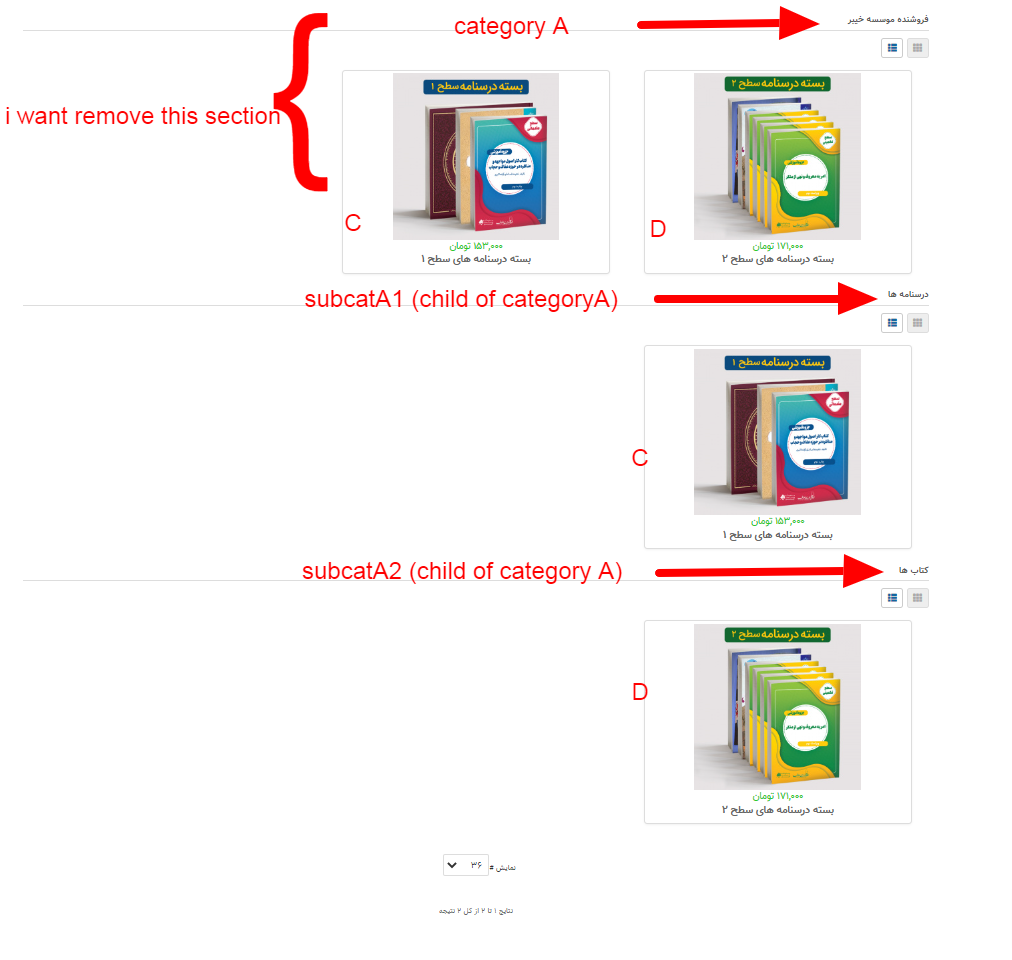
I have a category called A and I have two subcategories called subA1 and subA2. I have two products named C and D. I set up a menu to display the products (hikashop Product Listing menu). In the menu settings, I set the value of "main category" to A and put product C in subA 1 and product D in subA 2. I also set the sub "element filter" value to "Grouped by category". When I check the front of the site, it does not display any products. If I put those two products C and D in category A with the aforementioned settings(don't remove from it's subcategory subA1 and subA2), the front of the site will display three parts of category A, category subA 1, and category subA2 with repeated product. I want to have a parent category that does not have any products and all products are placed in its subcategories and the menu created by me will intelligently display the products in their own categories.
This is a simplified version of my problem:
I have a category called A and I have two subcategories called subA1 and subA2. I have two products named C and D. I set up a menu to display the products (hikashop Product Listing menu). In the menu settings, I set the value of "main category" to A and put product C in subA 1 and product D in subA 2. I also set the sub "element filter" value to "Grouped by category". When I check the front of the site, it does not display any products. If I put those two products C and D in category A with the aforementioned settings(don't remove from it's subcategory subA1 and subA2), the front of the site will display three parts of category A, category subA 1, and category subA2 with repeated product. I want to have a parent category that does not have any products and all products are placed in its subcategories and the menu created by me will intelligently display the products in their own categories.
Please Log in or Create an account to join the conversation.

3 years 10 months ago #347318
by nicolas
Replied by nicolas on topic show product in subcategory by "group by category" setting
Hi,
You should indeed not need to add C and D to A, only to A1 and A2.
This works fine for me on my local computer.
Here is a screenshot of a products listing menu item settings to do that:
i.imgur.com/5HspLLK.png
And the result:
i.imgur.com/ftAGEtX.png
So if that doesn't work on your end, I would need to see screenshots of your settings as well as knowning the version number of your HikaShop.
You should indeed not need to add C and D to A, only to A1 and A2.
This works fine for me on my local computer.
Here is a screenshot of a products listing menu item settings to do that:
i.imgur.com/5HspLLK.png
And the result:
i.imgur.com/ftAGEtX.png
So if that doesn't work on your end, I would need to see screenshots of your settings as well as knowning the version number of your HikaShop.
Please Log in or Create an account to join the conversation.
3 years 10 months ago - 3 years 10 months ago #347388
by sadaf3d
Replied by sadaf3d on topic show product in subcategory by "group by category" setting
hello and excuse me for late to reply.
The problem still persists.
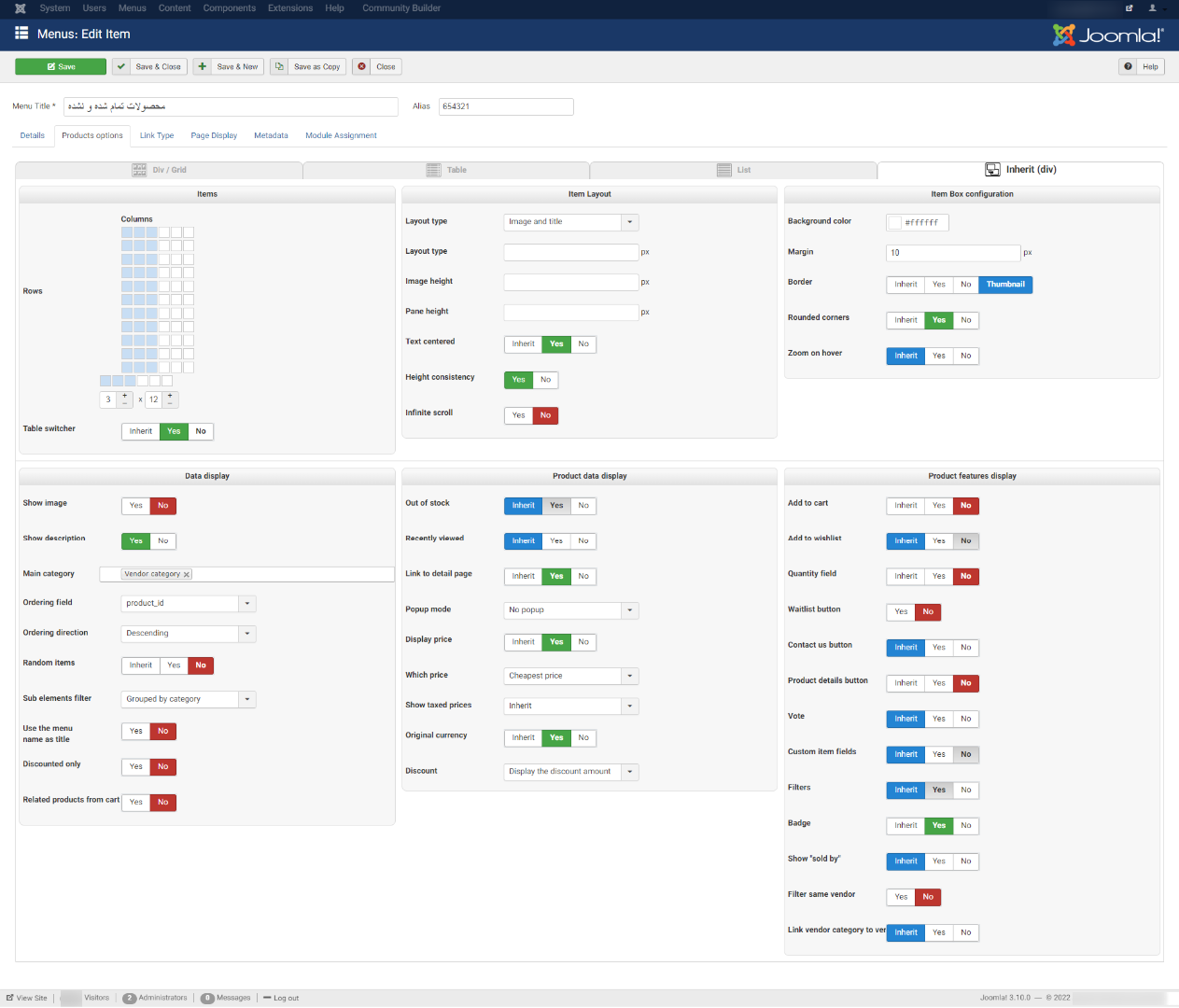
i use product category and it seems it work correctly and it seems problem with Vendor category.also i update hikashop to 4.6.2.
The problem still persists.
i use product category and it seems it work correctly and it seems problem with Vendor category.also i update hikashop to 4.6.2.
Last edit: 3 years 10 months ago by sadaf3d.
Please Log in or Create an account to join the conversation.
3 years 10 months ago #347423
by nicolas
Replied by nicolas on topic show product in subcategory by "group by category" setting
Hi,
I'm not sure what could be the problem.
Could you provide a backend access and a FTP access so that we could look into the situation and do some debugging to better understand what could be the issue ?
If so, please provide that along with a link to this thread via our contact form:
www.hikashop.com/support/contact-us.html
I'm not sure what could be the problem.
Could you provide a backend access and a FTP access so that we could look into the situation and do some debugging to better understand what could be the issue ?
If so, please provide that along with a link to this thread via our contact form:
www.hikashop.com/support/contact-us.html
Please Log in or Create an account to join the conversation.
3 years 10 months ago #347431
by sadaf3d
Replied by sadaf3d on topic show product in subcategory by "group by category" setting
i do that as soon as possible. i must create a test for you. original site has persian language and maybe hard for you
Please Log in or Create an account to join the conversation.
3 years 10 months ago - 3 years 10 months ago #347480
by sadaf3d
Replied by sadaf3d on topic show product in subcategory by "group by category" setting
it is ready to test:
lmssazan.ir/pl
is my implemented problem. i send you admin user pass and also ftp.
if you change product A and product B from its category you can see the result.
lmssazan.ir/pl
is my implemented problem. i send you admin user pass and also ftp.
if you change product A and product B from its category you can see the result.
Last edit: 3 years 10 months ago by sadaf3d.
Please Log in or Create an account to join the conversation.
3 years 10 months ago #347519
by nicolas
Replied by nicolas on topic show product in subcategory by "group by category" setting
Hi,
Thanks. The FTP access works, however, the backend access doesn't. So I'm not able to change the categories of the products.
Could you double check the backend access ?
Thanks. The FTP access works, however, the backend access doesn't. So I'm not able to change the categories of the products.
Could you double check the backend access ?
Please Log in or Create an account to join the conversation.
3 years 9 months ago #347596
by sadaf3d
Replied by sadaf3d on topic show product in subcategory by "group by category" setting
hi
I apologize for the wrong password, but I had sent the correct email 10 minutes after that wrong email.is it possible check that?
I apologize for the wrong password, but I had sent the correct email 10 minutes after that wrong email.is it possible check that?
Please Log in or Create an account to join the conversation.
3 years 9 months ago #347597
by nicolas
Replied by nicolas on topic show product in subcategory by "group by category" setting
Hi,
Thanks, I was able to access the backend now.
I found the issue: when using setting the "sub element filter" setting of a menu/module to "group by categories" for a listing of product with the "main category" set to the main vendor category, the products wouldn't be found unless they were both linked to the sub category and the main vendor category. I fixed this so that it is not necessary, as it was already the case for normal categories. I tested the solution on your website with the FTP access and I can confirm it works fine now. We'll also include the patch for the next version of HikaShop.
Thanks, I was able to access the backend now.
I found the issue: when using setting the "sub element filter" setting of a menu/module to "group by categories" for a listing of product with the "main category" set to the main vendor category, the products wouldn't be found unless they were both linked to the sub category and the main vendor category. I fixed this so that it is not necessary, as it was already the case for normal categories. I tested the solution on your website with the FTP access and I can confirm it works fine now. We'll also include the patch for the next version of HikaShop.
The following user(s) said Thank You: sadaf3d
Please Log in or Create an account to join the conversation.
3 years 9 months ago #347601
by sadaf3d
Replied by sadaf3d on topic show product in subcategory by "group by category" setting
ok thank you for fix my problem but this site is a testing site. can you say when you release the next version of hikashop?
Please Log in or Create an account to join the conversation.
3 years 9 months ago #347602
by nicolas
Replied by nicolas on topic show product in subcategory by "group by category" setting
Hi,
I've added the patch as a hot fix on our end.
So download the install package of HikaShop on our website and install it on yours and you'll have the patch.
I've added the patch as a hot fix on our end.
So download the install package of HikaShop on our website and install it on yours and you'll have the patch.
The following user(s) said Thank You: sadaf3d
Please Log in or Create an account to join the conversation.
3 years 6 months ago #350819
by sadaf3d
Replied by sadaf3d on topic show product in subcategory by "group by category" setting
is it possible say me where need to modify? because i can not update my hikashop and need this solution to resolve that problem.
if you say me which file need to modify i can do that.
thank you (i understand that it may be difficult for you after this time)
if you say me which file need to modify i can do that.
thank you (i understand that it may be difficult for you after this time)
Please Log in or Create an account to join the conversation.
3 years 6 months ago #350827
by nicolas
Replied by nicolas on topic show product in subcategory by "group by category" setting
Hi,
The fix was added in the function getChildren of the file administrator/components/com_hikashop/classes/category.php
The fix was added in the function getChildren of the file administrator/components/com_hikashop/classes/category.php
The following user(s) said Thank You: sadaf3d
Please Log in or Create an account to join the conversation.
Time to create page: 0.236 seconds