

- Posts: 75
- Thank you received: 1
2 Different messages confirmed and bevestigd.
11 years 8 months ago - 11 years 8 months ago #189580
by wilfried
2 Different messages confirmed and bevestigd. was created by wilfried
-- HikaShop version -- : 2.3.5
-- Joomla version -- : 3.3.6
-- Browser(s) name and version -- : latest IE, FF and Chrome
Hello,
I am now testing with customers with a VAT ID and where the VAT is reverse charged.
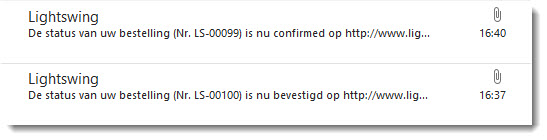
When I create an order in my Hika environment (still test) the payment plugin sets the order on confirmed and the client gets a message which says that the order is bevestigd (dutch for confirmed). See picture mail from 16:37
The message has the following invoice data:
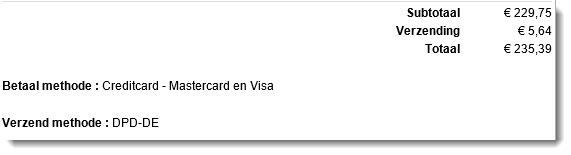
When the order is set to confirmed by hand instead of letting the payment plugin do this, the customer gets a message that the order is confirmed (confirmed in english) see mail from 16:40
When I look into the mail I see that the invoice data shows an extra line namely the one with the amount of VAT (MwSt Freiung in this case because it is a test with a german client), This behavior is exactly what I want, I want this line in my invoice. |It seems to be mandatory as well.
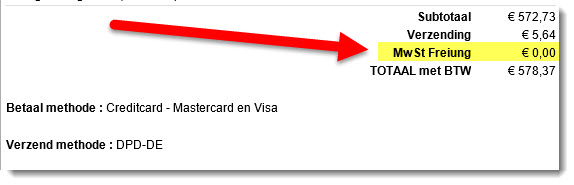
Now the question arises what is the difference with the payment plugin setting the order on confirmed and me doing it in the back-end manually?
Hope someone can explain this for me and hand me a solution.
Thx in advance.
Kind regards, Wilfried
-- Joomla version -- : 3.3.6
-- Browser(s) name and version -- : latest IE, FF and Chrome
Hello,
I am now testing with customers with a VAT ID and where the VAT is reverse charged.
When I create an order in my Hika environment (still test) the payment plugin sets the order on confirmed and the client gets a message which says that the order is bevestigd (dutch for confirmed). See picture mail from 16:37
The message has the following invoice data:
When the order is set to confirmed by hand instead of letting the payment plugin do this, the customer gets a message that the order is confirmed (confirmed in english) see mail from 16:40
When I look into the mail I see that the invoice data shows an extra line namely the one with the amount of VAT (MwSt Freiung in this case because it is a test with a german client), This behavior is exactly what I want, I want this line in my invoice. |It seems to be mandatory as well.
Now the question arises what is the difference with the payment plugin setting the order on confirmed and me doing it in the back-end manually?
Hope someone can explain this for me and hand me a solution.
Thx in advance.
Kind regards, Wilfried
Last edit: 11 years 8 months ago by wilfried. Reason: SOLVED
Please Log in or Create an account to join the conversation.

11 years 8 months ago #189657
by nicolas
Replied by nicolas on topic 2 Different messages confirmed and bevestigd.
Hi,
It's the same email template which is used by HikaShop in both cases.
So with the same data, you should get the same result.
If you manually change the status of an order which has been confirmed automatically, do you also get the tax line in the email ?
I think that you will not, meaning that the difference doesn't come from confirming the order automatically or not, but from the fact that the system found a tax rate for one order and not the other.
Could you do a screenshot of your tax rules displayed in the menu System>Taxes ?
It's the same email template which is used by HikaShop in both cases.
So with the same data, you should get the same result.
If you manually change the status of an order which has been confirmed automatically, do you also get the tax line in the email ?
I think that you will not, meaning that the difference doesn't come from confirming the order automatically or not, but from the fact that the system found a tax rate for one order and not the other.
Could you do a screenshot of your tax rules displayed in the menu System>Taxes ?
Please Log in or Create an account to join the conversation.
11 years 8 months ago - 11 years 8 months ago #189753
by wilfried
Replied by wilfried on topic 2 Different messages confirmed and bevestigd.
I also thought that the same template is used.
Strange on all the new orders I now make for testing, I don't see the VAT 0% line anymore. Yesterday I had some orders and invoices but I can't get that anymore. If you want to see them I can send them to you via PM.
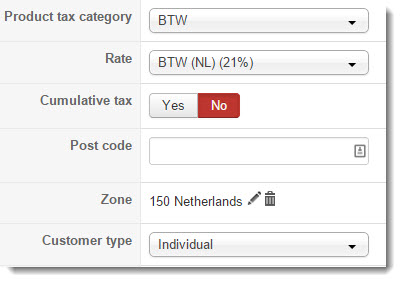
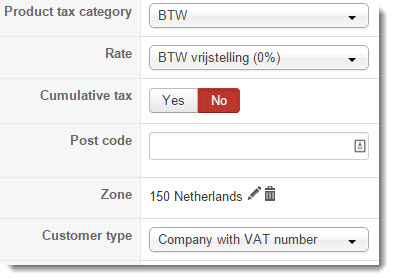
Here are the VAT configurations.
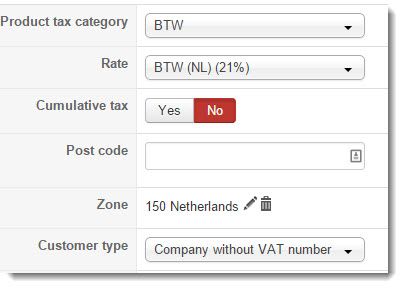
So what I want is that the VAT is shown also if it is 0%.
Kind regards Wilfried
Strange on all the new orders I now make for testing, I don't see the VAT 0% line anymore. Yesterday I had some orders and invoices but I can't get that anymore. If you want to see them I can send them to you via PM.
Here are the VAT configurations.
So what I want is that the VAT is shown also if it is 0%.
Kind regards Wilfried
Last edit: 11 years 8 months ago by wilfried.
Please Log in or Create an account to join the conversation.
11 years 8 months ago #189760
by nicolas
Replied by nicolas on topic 2 Different messages confirmed and bevestigd.
Hi,
Then a simple cause of that would be that the order with the 0% tax line has an address in the netherlands and that the other roder without the 0%tax line has an address outside the netherlands since you didn't create any 0% tax rule for the countries outside the netherlands.
Then a simple cause of that would be that the order with the 0% tax line has an address in the netherlands and that the other roder without the 0%tax line has an address outside the netherlands since you didn't create any 0% tax rule for the countries outside the netherlands.
Please Log in or Create an account to join the conversation.
11 years 8 months ago - 11 years 8 months ago #189796
by wilfried
Replied by wilfried on topic 2 Different messages confirmed and bevestigd.
Oeps my mistake. I didn't show you all my tax rules.
I have created the 3 tax rules per country for every country the same as the one from the netherlands I have showed you.
So there are also 3 taxrules for germany.
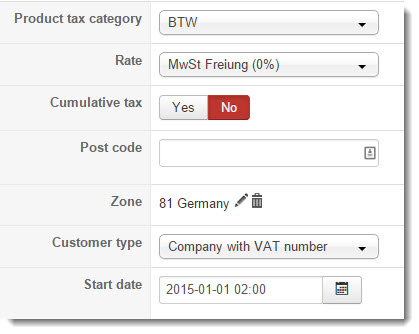
Here is the 0% rule.
kind regards,
Wilfried
I have created the 3 tax rules per country for every country the same as the one from the netherlands I have showed you.
So there are also 3 taxrules for germany.
Here is the 0% rule.
kind regards,
Wilfried
Last edit: 11 years 8 months ago by wilfried.
Please Log in or Create an account to join the conversation.
11 years 8 months ago - 11 years 8 months ago #189808
by wilfried
Replied by wilfried on topic 2 Different messages confirmed and bevestigd.
I have done some heavy testing now and I cannot make any sense of it.
I have unpublished tax rules that where not used or where strange and left from the initial setup.
That didn't work.
I have made a lot of orders on the site and look what a strange behavior I get.
All the orders are created with the same user tester4. This is a customer with a VAT number.
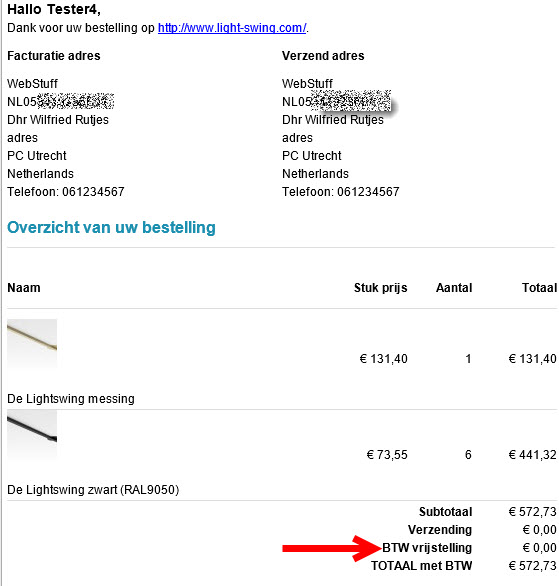
I have made an order with a combination where I saw the line "BTW vrijstelling € 0,00" in the past.
The result is that I see the 0% VAT line.
Is it the amount or what I was thinking. So I created an order where the order amount is above 500 euro's with "De Lightswing wit"
No 0% VAT line!
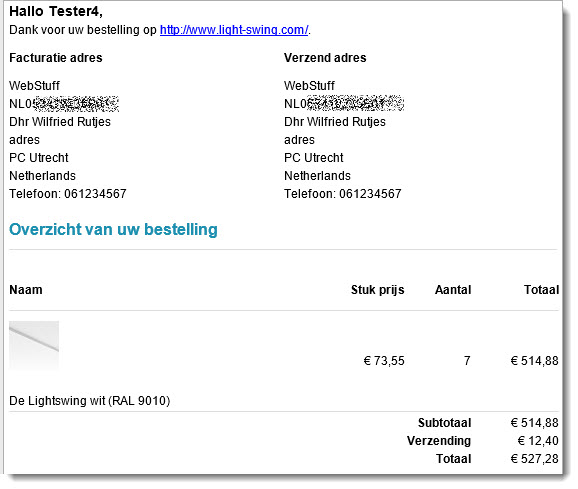
I also created an order with one other product "De Lightswing wit"
No 0% VAT line
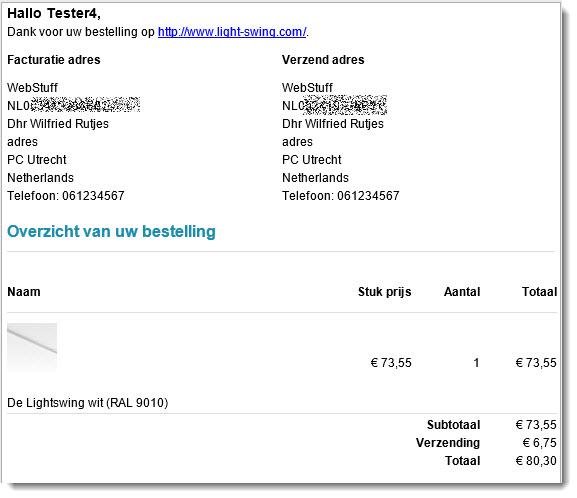
Was it the shipment rule then? You never know.....
So I re created the order where I had succes with another shipment rule.
The 0% VAT line is shown. So it has nothing to do with the shipment rules....
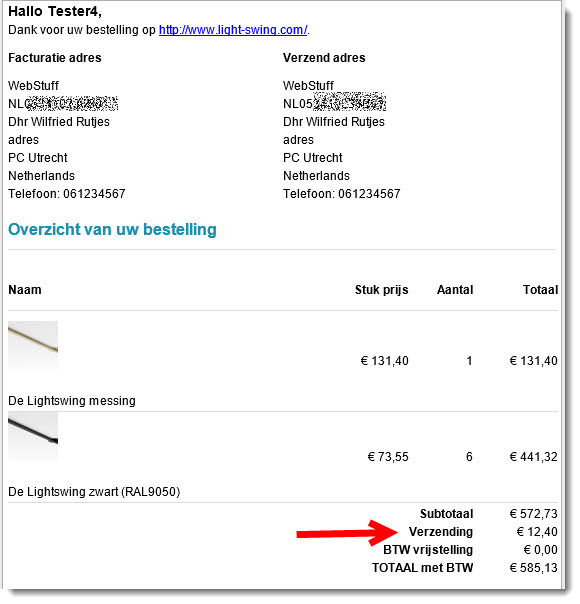
Is it the product "De Lightswing messing"?
So I ordered 1
NO 0% VAT line
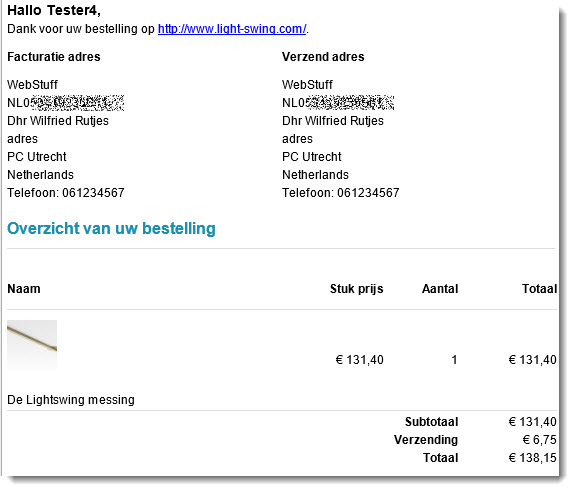
Aha is it the amount then with that product? So I ordered 7 of them.
A hit. I get the 0% VAT line
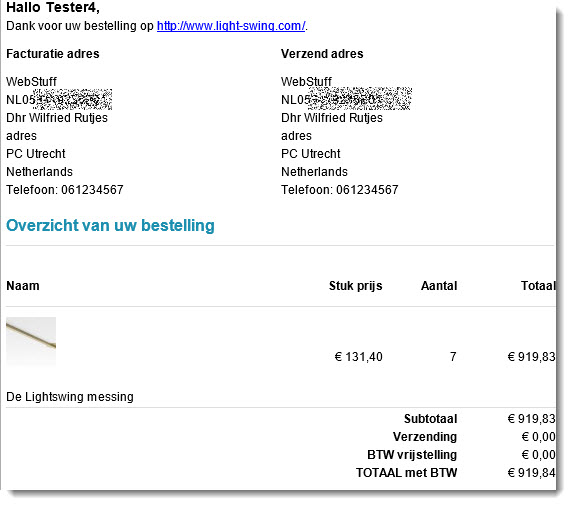
So I compared 2 products with eachother (De Lightswing wit and De Lightswing messing) but I can't see any difference then the descriptions and the price.
Then another huge order with "De Lightswing wit"
No luck, NO 0% VAT line
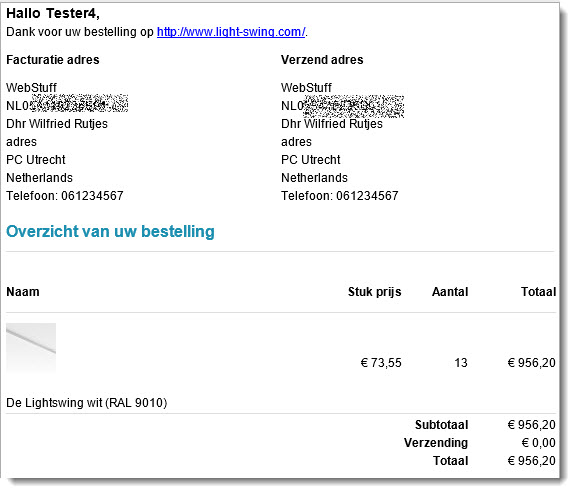
I really don't have a clue where to look.
Kind regards Wilfried
I have unpublished tax rules that where not used or where strange and left from the initial setup.
That didn't work.
I have made a lot of orders on the site and look what a strange behavior I get.
All the orders are created with the same user tester4. This is a customer with a VAT number.
I have made an order with a combination where I saw the line "BTW vrijstelling € 0,00" in the past.
The result is that I see the 0% VAT line.
Is it the amount or what I was thinking. So I created an order where the order amount is above 500 euro's with "De Lightswing wit"
No 0% VAT line!
I also created an order with one other product "De Lightswing wit"
No 0% VAT line
Was it the shipment rule then? You never know.....
So I re created the order where I had succes with another shipment rule.
The 0% VAT line is shown. So it has nothing to do with the shipment rules....
Is it the product "De Lightswing messing"?
So I ordered 1
NO 0% VAT line
Aha is it the amount then with that product? So I ordered 7 of them.
A hit. I get the 0% VAT line
So I compared 2 products with eachother (De Lightswing wit and De Lightswing messing) but I can't see any difference then the descriptions and the price.
Then another huge order with "De Lightswing wit"
No luck, NO 0% VAT line
I really don't have a clue where to look.
Kind regards Wilfried
Last edit: 11 years 8 months ago by wilfried.
Please Log in or Create an account to join the conversation.
11 years 8 months ago #189812
by wilfried
Replied by wilfried on topic 2 Different messages confirmed and bevestigd.
In the attachments the data of the products De Lightswing wit and De Lightswing messing.
Wilfried
Wilfried
Please Log in or Create an account to join the conversation.
11 years 8 months ago #189840
by wilfried
Replied by wilfried on topic 2 Different messages confirmed and bevestigd.
I just went in the order section of Hikashop and I changes the order state of the order again back to confirmed (it had an other state) and had this emailed to me.For the record I have not changed any setting after the last addition to this incident ticket.
I now have the 0% VAT line on an order that did not have that line before.
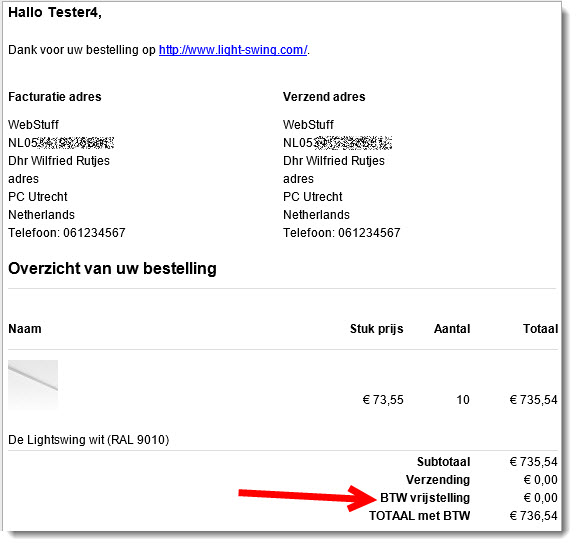
Flabbergasted that's what I am.
Do you know where to look now?
If you want to test on my system please let me know and I set up a login account for you so you can see it for yourself.
kind regards,
Wilfried
I now have the 0% VAT line on an order that did not have that line before.
Flabbergasted that's what I am.
Do you know where to look now?
If you want to test on my system please let me know and I set up a login account for you so you can see it for yourself.
kind regards,
Wilfried
Please Log in or Create an account to join the conversation.

11 years 8 months ago #189853
by Jerome
Jerome - Obsidev.com
HikaMarket & HikaSerial developer / HikaShop core dev team.
Replied by Jerome on topic 2 Different messages confirmed and bevestigd.
Hi,
In the email preload ; you will find a little line
This check define if the taxes will be displayed or not.
Regarding the rounding options that you can have ; it is possible that the price_value and the price_value_with_tax are not exactly the same (3 or 5 digits after the coma) and then it display the tax details.
Because the tax details are "0" ; it might be possible that it provide the same value for the two elements.. And then do not display the details of the taxes.
Best for you will be to edit the email in order to force the display of the taxes.
It could be also useful to change the check in order to use a bccomp, like
Regards,
In the email preload ; you will find a little line
Code:
if($data->cart->full_total->prices[0]->price_value!=$data->cart->full_total->prices[0]->price_value_with_tax) {
Regarding the rounding options that you can have ; it is possible that the price_value and the price_value_with_tax are not exactly the same (3 or 5 digits after the coma) and then it display the tax details.
Because the tax details are "0" ; it might be possible that it provide the same value for the two elements.. And then do not display the details of the taxes.
Best for you will be to edit the email in order to force the display of the taxes.
It could be also useful to change the check in order to use a bccomp, like
Code:
if(bccomp($data->cart->full_total->prices[0]->price_value, $data->cart->full_total->prices[0]->price_value_with_tax, 2)) {
Regards,
Jerome - Obsidev.com
HikaMarket & HikaSerial developer / HikaShop core dev team.
Please Log in or Create an account to join the conversation.
11 years 8 months ago #189872
by wilfried
Replied by wilfried on topic 2 Different messages confirmed and bevestigd.
Hello Jerome,
I have found that line in Order creation notification and in Order status notification. I changed it in both e-mails but the e-mail still doesn't display the 0% VAT line.
Do I have to do something else to let it display the taxes all the time?
kind regards, Wilfried
I have found that line in Order creation notification and in Order status notification. I changed it in both e-mails but the e-mail still doesn't display the 0% VAT line.
Do I have to do something else to let it display the taxes all the time?
kind regards, Wilfried
Please Log in or Create an account to join the conversation.
11 years 8 months ago #189874
by Jerome
Jerome - Obsidev.com
HikaMarket & HikaSerial developer / HikaShop core dev team.
Replied by Jerome on topic 2 Different messages confirmed and bevestigd.
Hi,
Well, if you want to force the display of the tax ; the best is to place
Regards,
Well, if you want to force the display of the tax ; the best is to place
Code:
if(true) {
Jerome - Obsidev.com
HikaMarket & HikaSerial developer / HikaShop core dev team.
Please Log in or Create an account to join the conversation.
11 years 8 months ago #189904
by wilfried
Replied by wilfried on topic 2 Different messages confirmed and bevestigd.
Hello Jerome,
That works fine, Thanks.
So I changes the original line from
to
I now also use your invoice plugin. Where should I change something to get the same result?
Hope to hear from you.
Kind regards Wilfried
That works fine, Thanks.
So I changes the original line from
Code:
if($data->cart->full_total->prices[0]->price_value!=$data->cart->full_total->prices[0]->price_value_with_tax) {
Code:
if(true) {
I now also use your invoice plugin. Where should I change something to get the same result?
Hope to hear from you.
Kind regards Wilfried
Please Log in or Create an account to join the conversation.
11 years 8 months ago #189933
by Jerome
Jerome - Obsidev.com
HikaMarket & HikaSerial developer / HikaShop core dev team.
Replied by Jerome on topic 2 Different messages confirmed and bevestigd.
Hi,
With the PDF Invoice ; you will have to create an override for the "invoice.php" file (you will find several thread which explain how doing that) and replace the line
By
to always display the taxes even if they are null.
Regards,
With the PDF Invoice ; you will have to create an override for the "invoice.php" file (you will find several thread which explain how doing that) and replace the line
Code:
if($taxes > 0){
Code:
if(true){
Regards,
Jerome - Obsidev.com
HikaMarket & HikaSerial developer / HikaShop core dev team.
The following user(s) said Thank You: wilfried
Please Log in or Create an account to join the conversation.
11 years 8 months ago #189947
by wilfried
Replied by wilfried on topic 2 Different messages confirmed and bevestigd.
You are a magician . It all works perfectly now .
Thanks a lot!!!
kind regards, WIlfried
Thanks a lot!!!
kind regards, WIlfried
Please Log in or Create an account to join the conversation.
Time to create page: 0.450 seconds