

- Posts: 28
- Thank you received: 3
Wrong rates from TaxCloud on products with variants
9 years 1 week ago #279370
by itsyourit
Wrong rates from TaxCloud on products with variants was created by itsyourit
-- HikaShop version -- : 3.1.1
-- Joomla version -- : 3.8.0
-- PHP version -- : 5.6.30
-- Browser(s) name and version -- : Firefox 55.0.3
I recently set out to implement TaxCloud for a site using HikaShop Business.
Everything with the integration seems to be smoothed out except display & calculation of taxes on products that have variants (with characteristics).
When testing it, it was noticed that the checkout page shows the tax rate, but the calculated tax is a different rate. For example, a shirt is $25 and the rate for clothing for my address is 3%. It shows this rate, but calculates it at 7%.
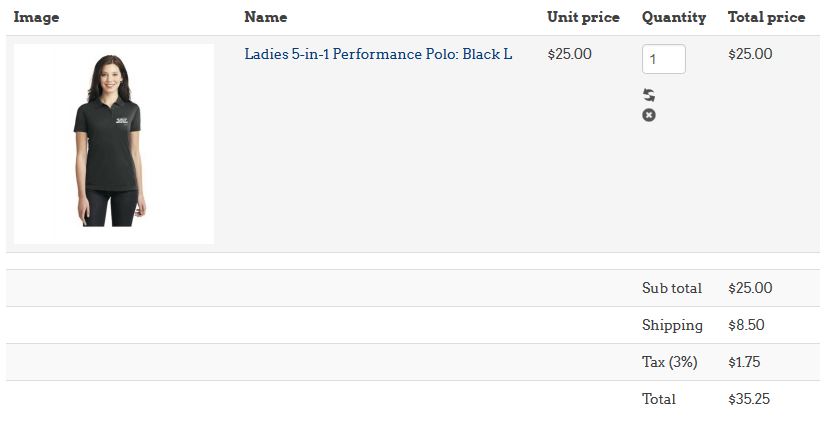
3% of $25 should be 0.75, while 7% of $25 is 1.75 which is what shows. For the shirt, it has the TIC 20010 and I've un-set any tax categories from the product. In the variants, there's no option to set tax category or TIC.
I tested this calculation with a product, removing all characteristics. The base product showed the proper tax rate and the charge applied was accurate. I added the characteristic back & recreated the variants, and the issue came back.
Is there somewhere I'm missing to set the TIC on variants? Shouldn't they inherit it? I feel like I'm missing something, but I can't find it. Please help!
-- Joomla version -- : 3.8.0
-- PHP version -- : 5.6.30
-- Browser(s) name and version -- : Firefox 55.0.3
I recently set out to implement TaxCloud for a site using HikaShop Business.
Everything with the integration seems to be smoothed out except display & calculation of taxes on products that have variants (with characteristics).
When testing it, it was noticed that the checkout page shows the tax rate, but the calculated tax is a different rate. For example, a shirt is $25 and the rate for clothing for my address is 3%. It shows this rate, but calculates it at 7%.
3% of $25 should be 0.75, while 7% of $25 is 1.75 which is what shows. For the shirt, it has the TIC 20010 and I've un-set any tax categories from the product. In the variants, there's no option to set tax category or TIC.
I tested this calculation with a product, removing all characteristics. The base product showed the proper tax rate and the charge applied was accurate. I added the characteristic back & recreated the variants, and the issue came back.
Is there somewhere I'm missing to set the TIC on variants? Shouldn't they inherit it? I feel like I'm missing something, but I can't find it. Please help!
Please Log in or Create an account to join the conversation.
9 years 1 week ago #279372
by itsyourit
Replied by itsyourit on topic Wrong rates from TaxCloud on products with variants
I did find this old forum topic talking about errors with TaxCloud for products that had variants. Perhaps it is related, instead of error message it just defaults the TIC.
www.hikashop.com/forum/taxes/868569-taxc...characteristics.html
www.hikashop.com/forum/taxes/868569-taxc...characteristics.html
Please Log in or Create an account to join the conversation.

9 years 1 week ago - 9 years 1 week ago #279472
by nicolas
Replied by nicolas on topic Wrong rates from TaxCloud on products with variants
Hi,
I've checked on our end and the TaxCloud plugin doesn't support variants. It can only handle products without variants.
So I've made some modifications to it which should help on that end so that it automatically uses the TIC of the main product when searching for the taxes of a variant.
Here is a new version of the TaxCloud plugin with the changes:
Please install it on your website and try again. Let us know how it goes. Hopefully, we can include these changes in the next version of HikaShop.
I've checked on our end and the TaxCloud plugin doesn't support variants. It can only handle products without variants.
So I've made some modifications to it which should help on that end so that it automatically uses the TIC of the main product when searching for the taxes of a variant.
Here is a new version of the TaxCloud plugin with the changes:
This attachment is hidden for guests.
Please log in or register to see it.
Please log in or register to see it.
Please install it on your website and try again. Let us know how it goes. Hopefully, we can include these changes in the next version of HikaShop.
Last edit: 9 years 1 week ago by nicolas.
The following user(s) said Thank You: itsyourit
Please Log in or Create an account to join the conversation.
9 years 1 week ago #279479
by itsyourit
Replied by itsyourit on topic Wrong rates from TaxCloud on products with variants
Thank you Nicolas. That change would be perfect for a fix. I appreciate the quick work.
I have installed the zip and when testing it, I don't see any change in the calculated tax. It still shows 3% (for clothing TIC in my county) but is calculating at 7% (standard sales tax in my county).
I don't have caching enabled. Am I missing a step or does the fix need adjustment?
I have installed the zip and when testing it, I don't see any change in the calculated tax. It still shows 3% (for clothing TIC in my county) but is calculating at 7% (standard sales tax in my county).
I don't have caching enabled. Am I missing a step or does the fix need adjustment?
Please Log in or Create an account to join the conversation.
9 years 6 days ago #279587
by nicolas
Replied by nicolas on topic Wrong rates from TaxCloud on products with variants
Hi,
I don't understand what you mean by " It still shows 3% (for clothing TIC in my county) but is calculating at 7% (standard sales tax in my county)."
You're talking about which page ? Could you provide some screenshots ?
I don't understand what you mean by " It still shows 3% (for clothing TIC in my county) but is calculating at 7% (standard sales tax in my county)."
You're talking about which page ? Could you provide some screenshots ?
Please Log in or Create an account to join the conversation.
9 years 6 days ago - 9 years 6 days ago #279601
by itsyourit
Replied by itsyourit on topic Wrong rates from TaxCloud on products with variants
Nicolas, I mean the update you attached did not change anything with how the tax was calculated.
During checkout, the summary shows the product cost as $25, says Tax (3%) $1.75. The tax should be calculated at 3% rate, that is correct. But the dollar amount ($1.75) is 7% rate.
The sales tax rates are different in different counties. It is 7% for general goods & services. Clothing has a 3% sales tax rate. The products have been assigned the proper TIC values. They list the correct tax rate to apply. But the calculated number doesn't match the rate. If I remove the characteristics (and therefore remove variants) the base product shows Tax (3%) and then calculates it at $0.75.
I would provide another screenshot but it's the same as above. If there's anything specific you want a pic of I'm happy to provide it.
During checkout, the summary shows the product cost as $25, says Tax (3%) $1.75. The tax should be calculated at 3% rate, that is correct. But the dollar amount ($1.75) is 7% rate.
The sales tax rates are different in different counties. It is 7% for general goods & services. Clothing has a 3% sales tax rate. The products have been assigned the proper TIC values. They list the correct tax rate to apply. But the calculated number doesn't match the rate. If I remove the characteristics (and therefore remove variants) the base product shows Tax (3%) and then calculates it at $0.75.
I would provide another screenshot but it's the same as above. If there's anything specific you want a pic of I'm happy to provide it.
Last edit: 9 years 6 days ago by itsyourit. Reason: added note about variants
Please Log in or Create an account to join the conversation.
9 years 5 days ago #279603
by nicolas
Replied by nicolas on topic Wrong rates from TaxCloud on products with variants
Hi,
Well, I don't see why it wouldn't work with the patches I've added to it.
Could you provide a link to the product page you're using for your tests, a backend access so that we can check your settings and a FTP access so that we can add debug if necessary in order to understand the situation ?
If so, please use our contact form along with a link to this thread:
www.hikashop.com/support/contact-us.html
Well, I don't see why it wouldn't work with the patches I've added to it.
Could you provide a link to the product page you're using for your tests, a backend access so that we can check your settings and a FTP access so that we can add debug if necessary in order to understand the situation ?
If so, please use our contact form along with a link to this thread:
www.hikashop.com/support/contact-us.html
The following user(s) said Thank You: itsyourit
Please Log in or Create an account to join the conversation.
9 years 5 days ago #279702
by itsyourit
Replied by itsyourit on topic Wrong rates from TaxCloud on products with variants
Hi Nicolas, I have sent the requested info through the contact form. Please email me if you have any questions about setup.
Please Log in or Create an account to join the conversation.
8 years 11 months ago #280098
by nicolas
Replied by nicolas on topic Wrong rates from TaxCloud on products with variants
Hi,
Sorry for the delay. I'm trying to use the FTP account you provided but it doesn't work for me:
monosnap.com/file/MdQQgoS9OM3sPFGk1OI1gDOtj4SwNU
Apparently there is an issue with the connection to the FTP server (maybe an IP address restriction ?).
Could you have a look ?
Sorry for the delay. I'm trying to use the FTP account you provided but it doesn't work for me:
monosnap.com/file/MdQQgoS9OM3sPFGk1OI1gDOtj4SwNU
Apparently there is an issue with the connection to the FTP server (maybe an IP address restriction ?).
Could you have a look ?
Please Log in or Create an account to join the conversation.
8 years 11 months ago #280105
by itsyourit
Replied by itsyourit on topic Wrong rates from TaxCloud on products with variants
Hi Nicolas, I have sent you a PM with a work-around. Thank you for continuing to look into this.
Jeff
Jeff
Please Log in or Create an account to join the conversation.
8 years 11 months ago - 8 years 11 months ago #280107
by nicolas
Replied by nicolas on topic Wrong rates from TaxCloud on products with variants
Hi,
Here is a new version of the plugin with some more patches. I've done the changes on your website and it seems to work fine now.
Here is a new version of the plugin with some more patches. I've done the changes on your website and it seems to work fine now.
This attachment is hidden for guests.
Please log in or register to see it.
Please log in or register to see it.
Last edit: 8 years 11 months ago by nicolas.
The following user(s) said Thank You: itsyourit
Please Log in or Create an account to join the conversation.
8 years 11 months ago #280664
by itsyourit
Replied by itsyourit on topic Wrong rates from TaxCloud on products with variants
Thank you Nicolas, this seems to be working nicely. Greatly appreciate your help with this.
Please Log in or Create an account to join the conversation.
8 years 11 months ago - 8 years 10 months ago #282135
by itsyourit
Replied by itsyourit on topic Wrong rates from TaxCloud on products with variants
Hi Nicolas,
I'm having another problem that I think is related to this patch. When creating a new product, after clicking to "save" it loaded a blank white screen. I checked the Joomla /administrator error_log after some testing and found this log entry:
The testing:
After trying to create the new product, it was not in the products list to edit or delete. I tried to create the product again, and change the tax settings. It failed and returned the page with an alert stating that the alias was already in use. I entered a custom alias and it said the product code was already in use.
I was able to find and remove these "ghost" products using HikaShop's System -> Mass Actions, searching for the latest product IDs and removing the elements after a test which displayed the results.
You can see in the screenshots that there are products with ID up to 254. In the mass action filtering products with an ID >= 255, you can see it returned one with the ID 262. This was after I removed previous attempts.
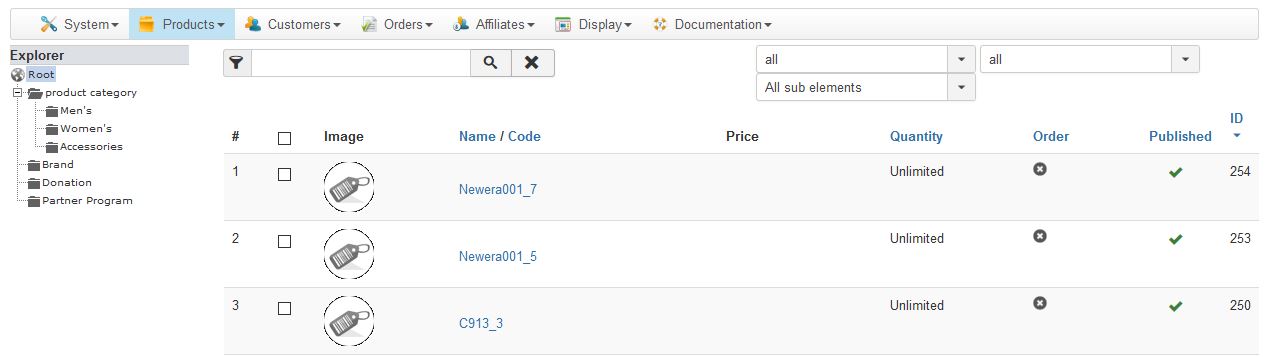
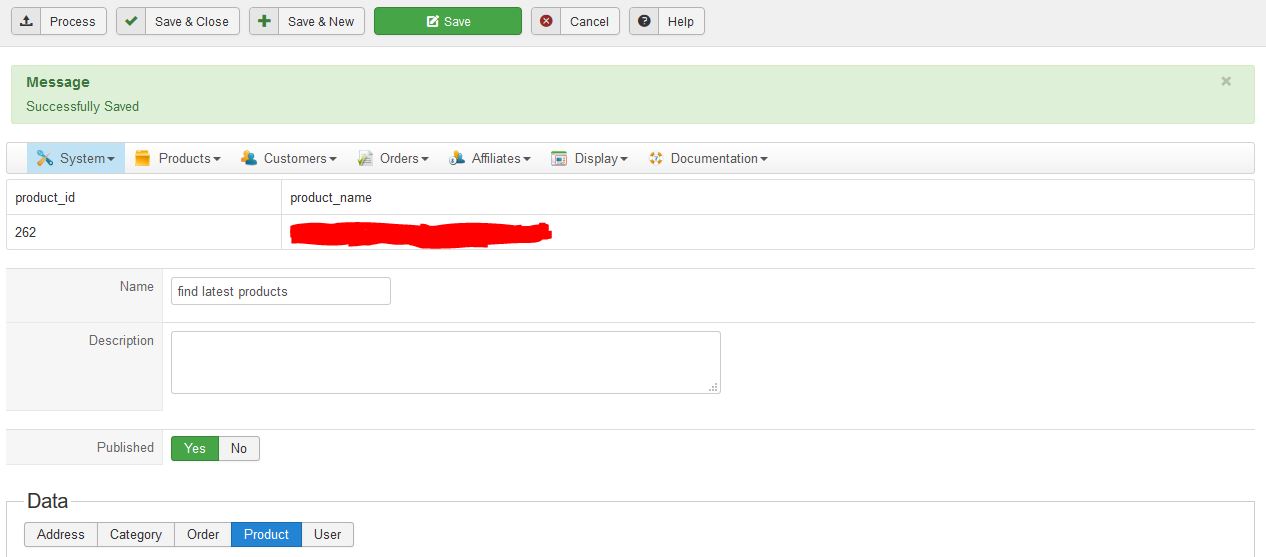
Seems there is something not quite right with the TaxCloud plugin after using this patch. Can you advise & assist?
I'm having another problem that I think is related to this patch. When creating a new product, after clicking to "save" it loaded a blank white screen. I checked the Joomla /administrator error_log after some testing and found this log entry:
Code:
PHP Fatal error: Class 'hikaInput' not found in /public_html/plugins/hikashop/taxcloud/taxcloud.php on line 672
The testing:
After trying to create the new product, it was not in the products list to edit or delete. I tried to create the product again, and change the tax settings. It failed and returned the page with an alert stating that the alias was already in use. I entered a custom alias and it said the product code was already in use.
I was able to find and remove these "ghost" products using HikaShop's System -> Mass Actions, searching for the latest product IDs and removing the elements after a test which displayed the results.
You can see in the screenshots that there are products with ID up to 254. In the mass action filtering products with an ID >= 255, you can see it returned one with the ID 262. This was after I removed previous attempts.
Seems there is something not quite right with the TaxCloud plugin after using this patch. Can you advise & assist?
Last edit: 8 years 10 months ago by itsyourit.
Please Log in or Create an account to join the conversation.
8 years 10 months ago #282146
by nicolas
Replied by nicolas on topic Wrong rates from TaxCloud on products with variants
Hi,
The class hikaInput was introduced in HikaShop 3.2.0 to improve compatibility with Joomla 3.8.
The TaxCloud plugin I patched and gave here was taken from HikaShop 3.2.0.
Since you're using Joomla 3.8, I would recommend updating your HikaShop.
If you can't, then replace the HikaInput you find in the plugin code by JInput and it should work fine too.
The class hikaInput was introduced in HikaShop 3.2.0 to improve compatibility with Joomla 3.8.
The TaxCloud plugin I patched and gave here was taken from HikaShop 3.2.0.
Since you're using Joomla 3.8, I would recommend updating your HikaShop.
If you can't, then replace the HikaInput you find in the plugin code by JInput and it should work fine too.
Please Log in or Create an account to join the conversation.
8 years 10 months ago - 8 years 10 months ago #282221
by itsyourit
Replied by itsyourit on topic Wrong rates from TaxCloud on products with variants
Thank you. My update access had expired so I tried making the suggest replacement. There were multiple instances of HikaInput that I had to change to JInput. Creating a product still failed after making the adjustment. The error log entry:
Rather than try and fix further issues, I just renewed the subscription and will try it after updating. Hopefully the patch you applied will remain untouched.
Edit: change log for HikaShop 3.2.1 notes the patch for TaxCloud was added as an improvement.
Code:
PHP Fatal error: Call to a member function getInt() on null in /public_html/plugins/hikashop/taxcloud/taxcloud.php on line 672
Rather than try and fix further issues, I just renewed the subscription and will try it after updating. Hopefully the patch you applied will remain untouched.
Edit: change log for HikaShop 3.2.1 notes the patch for TaxCloud was added as an improvement.
Last edit: 8 years 10 months ago by itsyourit.
Please Log in or Create an account to join the conversation.
8 years 10 months ago #282224
by nicolas
Replied by nicolas on topic Wrong rates from TaxCloud on products with variants
Hi,
Yes, if you update, you'll get automatically the patch and it will won't create the problem since hikaInput will be available.
And regarding the replacing, I've had a closer look at it and I think that changing :
hikaInput::get()
to:
JFactory::getApplication()->input
should work.
Yes, if you update, you'll get automatically the patch and it will won't create the problem since hikaInput will be available.
And regarding the replacing, I've had a closer look at it and I think that changing :
hikaInput::get()
to:
JFactory::getApplication()->input
should work.
Please Log in or Create an account to join the conversation.
Time to create page: 0.303 seconds