
- Posts: 196
- Thank you received: 15
Price with and without TAX in the mail
- StudioPrzyLesie
-
 Topic Author
- Offline
Less
More
7 years 8 months ago #303397
by StudioPrzyLesie
Price with and without TAX in the mail was created by StudioPrzyLesie
Hi,
How to configure email settings so that the seller will be informed about the price of products with tax and without tax?
How to configure email settings so that the seller will be informed about the price of products with tax and without tax?
Please Log in or Create an account to join the conversation.

7 years 8 months ago #303407
by nicolas
Replied by nicolas on topic Price with and without TAX in the mail
Hi,
You mean that you want to display the unit price with AND without taxes in the order admin notification/payment notification emails that the administrator receives when the order is created/confirmed ?
In that case, that would require customization of the "preload" version of these emails via the menu System>Emails as there is no option you can just activate/change to do that.
You mean that you want to display the unit price with AND without taxes in the order admin notification/payment notification emails that the administrator receives when the order is created/confirmed ?
In that case, that would require customization of the "preload" version of these emails via the menu System>Emails as there is no option you can just activate/change to do that.
Please Log in or Create an account to join the conversation.
- StudioPrzyLesie
-
Topic Author
- Offline
Less
More
- Posts: 196
- Thank you received: 15
7 years 8 months ago #303412
by StudioPrzyLesie
Replied by StudioPrzyLesie on topic Price with and without TAX in the mail
Hi Nicolas,
Any hint how to do it? I found how to change the content of an email with a price without TAX:
Simply add the line:
$config->set('price_with_tax',0);
after:
$config =& hikashop_config();
How to change to display two prices (with and without)?
Any hint how to do it? I found how to change the content of an email with a price without TAX:
Simply add the line:
$config->set('price_with_tax',0);
after:
$config =& hikashop_config();
How to change to display two prices (with and without)?
The following user(s) said Thank You: marto42
Please Log in or Create an account to join the conversation.
7 years 8 months ago #303415
by nicolas
Replied by nicolas on topic Price with and without TAX in the mail
Hi,
That will require more complex modifications as the email doesn't support that.
You would have to change:
to:
just to get the unit and the total price of each product with and without taxes.
That will require more complex modifications as the email doesn't support that.
You would have to change:
Code:
if($config->get('price_with_tax')){
$unit_price = $currencyHelper->format($item->order_product_price+$item->order_product_tax,$data->cart->order_currency_id);
$total_price = $currencyHelper->format($item->order_product_total_price,$data->cart->order_currency_id);
$subtotal += $item->order_product_total_price;
}else{
$unit_price = $currencyHelper->format($item->order_product_price,$data->cart->order_currency_id);
$total_price = $currencyHelper->format($item->order_product_total_price_no_vat,$data->cart->order_currency_id);
$subtotal += $item->order_product_total_price_no_vat;
}
Code:
$unit_price = $currencyHelper->format($item->order_product_price+$item->order_product_tax,$data->cart->order_currency_id);
$total_price = $currencyHelper->format($item->order_product_total_price,$data->cart->order_currency_id);
$subtotal += $item->order_product_total_price;
$unit_price .= ' '. $currencyHelper->format($item->order_product_price,$data->cart->order_currency_id);
$total_price .= ' '. $currencyHelper->format($item->order_product_total_price_no_vat,$data->cart->order_currency_id);
Please Log in or Create an account to join the conversation.
- StudioPrzyLesie
-
Topic Author
- Offline
Less
More
- Posts: 196
- Thank you received: 15
7 years 8 months ago #303466
by StudioPrzyLesie
Replied by StudioPrzyLesie on topic Price with and without TAX in the mail
Great - it looks very good 
Thanks!!!
Thanks!!!
Please Log in or Create an account to join the conversation.
- StudioPrzyLesie
-
Topic Author
- Offline
Less
More
- Posts: 196
- Thank you received: 15
3 years 7 months ago #349871
by StudioPrzyLesie
Replied by StudioPrzyLesie on topic Price with and without TAX in the mail
Hello,
I'm back on topic.
I wrote recently that I had a problem with orders. The problem turned out to be an overwritten template. It's possible that the above entry was causing the error.
What the override should look like for the new version of hika.
By the way, how to add a logo to an email in the alternative_* template?
Tomek
I'm back on topic.
I wrote recently that I had a problem with orders. The problem turned out to be an overwritten template. It's possible that the above entry was causing the error.
What the override should look like for the new version of hika.
By the way, how to add a logo to an email in the alternative_* template?
Tomek
Please Log in or Create an account to join the conversation.
3 years 7 months ago #349872
by nicolas
Replied by nicolas on topic Price with and without TAX in the mail
Hi,
When you do an override, the whole code is saved.
The piece of code you changed there was not a problem, and you still can do the same modification. The problem was with some other piece of code in there.
To add a logo to an email, you first want to upload the image on your website. Then, you can add an img tag in the email or in the template based on where you want to display it in the email.
When you do an override, the whole code is saved.
The piece of code you changed there was not a problem, and you still can do the same modification. The problem was with some other piece of code in there.
To add a logo to an email, you first want to upload the image on your website. Then, you can add an img tag in the email or in the template based on where you want to display it in the email.
Please Log in or Create an account to join the conversation.
- StudioPrzyLesie
-
Topic Author
- Offline
Less
More
- Posts: 196
- Thank you received: 15
3 years 7 months ago - 3 years 7 months ago #349899
by StudioPrzyLesie
Replied by StudioPrzyLesie on topic Price with and without TAX in the mail
Hi Nicolas,
override works - thank you.
Logo
I have a record in the template
but the logo is not showing up.
In the previous template it worked
What should be the record for it to work here?
So that the logo is on the same line as the word "Order"
will you help?
override works - thank you.
Logo
I have a record in the template
Code:
?><table class="w600" border="0" cellspacing="0" cellpadding="0" width="600" style="margin:0px;font-family: Arial, Helvetica, sans-serif;font-size:12px;line-height:18px;">
<tr>
<td class="w20" width="20"></td>
<td class="w560 pict" style="text-align:left; color:#575757" width="560">
<div id="title" style="font-family: Arial, Helvetica, sans-serif;font-size:12px;line-height:18px;">
<img src="{VAR:LIVE_SITE}images/grafika/polgasket_logo_mail.png" border="0" alt="" style="float:left;margin-right:4px;"/>
<h1 class="hika_template_color" style="font-size:16px;font-weight:bold; border-bottom:1px solid #ddd; padding-bottom:10px">
{TXT:ORDER_TITLE}
</h1>
but the logo is not showing up.
In the previous template it worked
What should be the record for it to work here?
So that the logo is on the same line as the word "Order"
will you help?
Last edit: 3 years 7 months ago by StudioPrzyLesie.
Please Log in or Create an account to join the conversation.
3 years 7 months ago #349903
by nicolas
Replied by nicolas on topic Price with and without TAX in the mail
Hi,
Try using the full URL of the image, without the {VAR:LIVE_SITE} tag.
Try using the full URL of the image, without the {VAR:LIVE_SITE} tag.
Please Log in or Create an account to join the conversation.
- StudioPrzyLesie
-
Topic Author
- Offline
Less
More
- Posts: 196
- Thank you received: 15
3 years 7 months ago #349926
by StudioPrzyLesie
Replied by StudioPrzyLesie on topic Price with and without TAX in the mail
Doesn't display
Code:
?><table class="w600" border="0" cellspacing="0" cellpadding="0" width="600" style="margin:0px;font-family: Arial, Helvetica, sans-serif;font-size:12px;line-height:18px;">
<tr>
<td class="w20" width="20"></td>
<td class="w560 pict" style="text-align:left; color:#575757" width="560">
<div id="title" style="font-family: Arial, Helvetica, sans-serif;font-size:12px;line-height:18px;">
<img src="https://www.polgasket.pl/images/grafika/polgasket_logo_mail.png" border="0" alt="" style="float:left;margin-right:4px;"/>
<h1 class="hika_template_color" style="font-size:16px;font-weight:bold; border-bottom:1px solid #ddd; padding-bottom:10px">
{TXT:ORDER_TITLE}
</h1>
<h2 class="hika_template_color" style="font-size:12px;font-weight:bold; padding-bottom:10px">
{TXT:ORDER_CHANGED}
</h2>
</div>
Please Log in or Create an account to join the conversation.
3 years 7 months ago #349927
by nicolas
Replied by nicolas on topic Price with and without TAX in the mail
Hi,
So, in which email did you make that change ?
Do you see the image if you use the "preview" button ?
Could you provide a screenshot of the resulting email ?
So, in which email did you make that change ?
Do you see the image if you use the "preview" button ?
Could you provide a screenshot of the resulting email ?
Please Log in or Create an account to join the conversation.
- StudioPrzyLesie
-
Topic Author
- Offline
Less
More
- Posts: 196
- Thank you received: 15
3 years 7 months ago #349938
by StudioPrzyLesie
Replied by StudioPrzyLesie on topic Price with and without TAX in the mail
Hi,
This is an email: admin notification.
Template: alternative_green.

This is an email: admin notification.
Template: alternative_green.
Please Log in or Create an account to join the conversation.
3 years 7 months ago #349940
by nicolas
Replied by nicolas on topic Price with and without TAX in the mail
Hi,
Can you provide a backend access to the website so that we can check the situation ?
Can you provide a backend access to the website so that we can check the situation ?
Please Log in or Create an account to join the conversation.
3 years 7 months ago #349954
by nicolas
Replied by nicolas on topic Price with and without TAX in the mail
Hi,
You added the img tag inside the div with the "title" id but in your template, you've added CSS to hide the images in that div:
i.imgur.com/7px9hlm.png
Remove that CSS or move the img tag elsewhere and it will display in the email.
You added the img tag inside the div with the "title" id but in your template, you've added CSS to hide the images in that div:
i.imgur.com/7px9hlm.png
Remove that CSS or move the img tag elsewhere and it will display in the email.
Please Log in or Create an account to join the conversation.
- StudioPrzyLesie
-
Topic Author
- Offline
Less
More
- Posts: 196
- Thank you received: 15
3 years 7 months ago #349974
by StudioPrzyLesie
Replied by StudioPrzyLesie on topic Price with and without TAX in the mail
Nicolas,
thanks for support.
Now everything works properly.
Tomek
thanks for support.
Now everything works properly.
Tomek
Please Log in or Create an account to join the conversation.
2 years 10 months ago #357161
by marto42
Replied by marto42 on topic Price with and without TAX in the mail
This code not work correctly, a use 5.0.0 busines edition and latest joomla 4.4.1.
But the code of comments before yours work perfect!
But the code of comments before yours work perfect!
Please Log in or Create an account to join the conversation.
2 years 10 months ago #357162
by nicolas
Replied by nicolas on topic Price with and without TAX in the mail
Hi,
So it's all good for you ?
So it's all good for you ?
Please Log in or Create an account to join the conversation.
2 years 10 months ago #357218
by marto42
Replied by marto42 on topic Price with and without TAX in the mail
Yes, everything is OK.
Please Log in or Create an account to join the conversation.
2 years 10 months ago - 2 years 10 months ago #357288
by marto42
Replied by marto42 on topic Price with and without TAX in the mail
Hello,
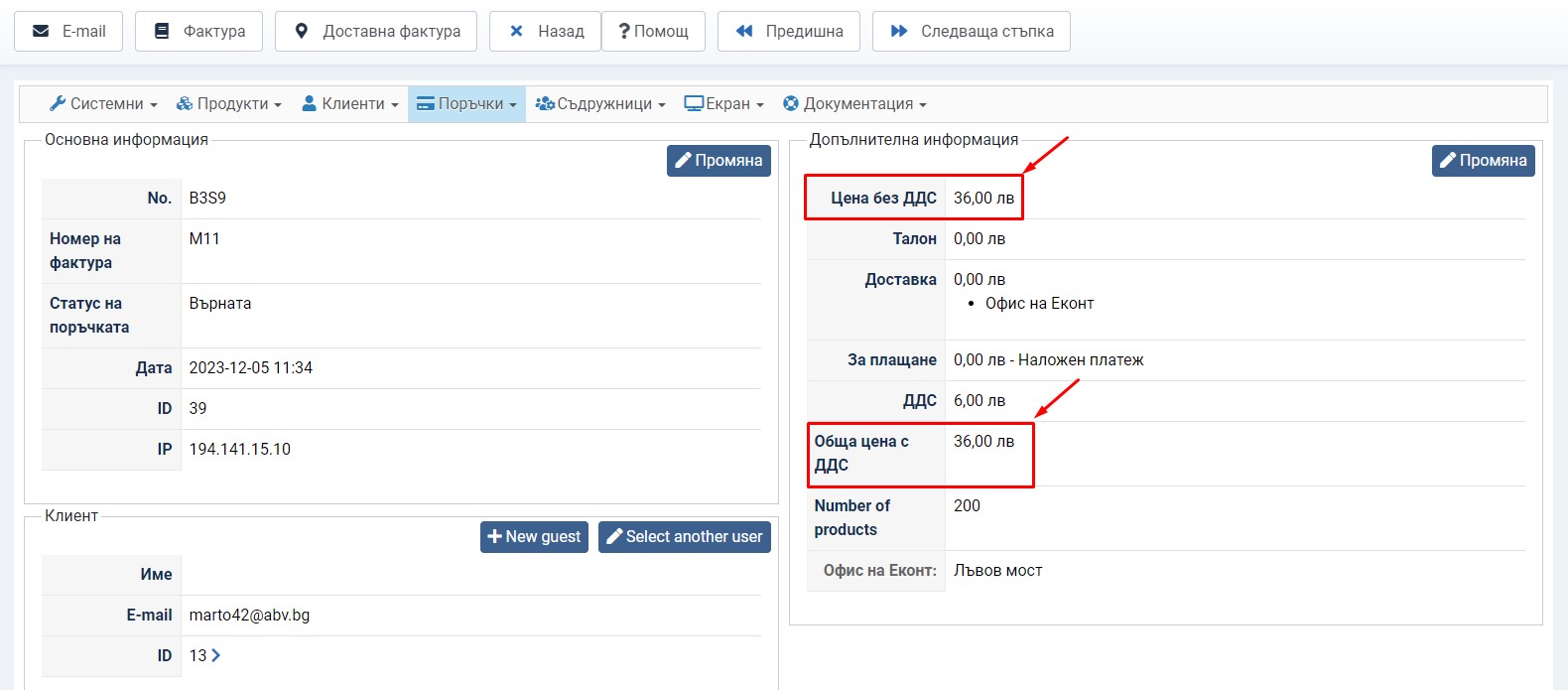
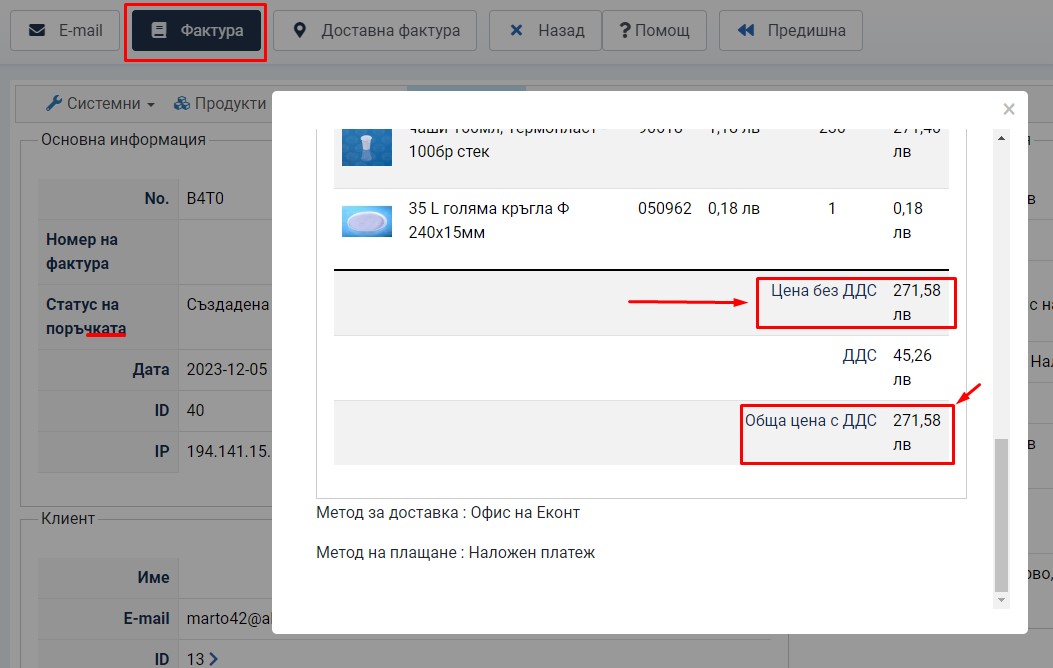
please help me for invoice and for order too.
The price is same with and witouth taxes.
I need of some code to edit invoice view.
Please see attachments!
Thanks.
p.s. It is important to me to include it in future version. Thanks!
please help me for invoice and for order too.
The price is same with and witouth taxes.
I need of some code to edit invoice view.
Please see attachments!
Thanks.
p.s. It is important to me to include it in future version. Thanks!
Last edit: 2 years 10 months ago by marto42.
Please Log in or Create an account to join the conversation.
- StudioPrzyLesie
-
Topic Author
- Offline
Less
More
- Posts: 196
- Thank you received: 15
2 years 10 months ago #357305
by StudioPrzyLesie
Replied by StudioPrzyLesie on topic Price with and without TAX in the mail
Hi Nicolas,
the same topic, but is it possible to split the transport costs with and without tax?
Tom
the same topic, but is it possible to split the transport costs with and without tax?
Tom
Please Log in or Create an account to join the conversation.
Time to create page: 0.526 seconds