

- Posts: 47
- Thank you received: 4
Stars not showing after update
10 years 8 months ago #226356
by amigo
Stars not showing after update was created by amigo
-- url of the page with the problem -- :
leza-shaving.com/en/straight-razors/thiers-issard-singing-en
-- HikaShop version -- : 2.6.1
-- Joomla version -- : 3.4.8
-- PHP version -- : 5.4.45
-- Browser(s) name and version -- : Firefox
After I updated Hkashop from 2.6.0 to 2.6.1 all stars below and above the product disappeared.
-- HikaShop version -- : 2.6.1
-- Joomla version -- : 3.4.8
-- PHP version -- : 5.4.45
-- Browser(s) name and version -- : Firefox
After I updated Hkashop from 2.6.0 to 2.6.1 all stars below and above the product disappeared.
Please Log in or Create an account to join the conversation.

10 years 8 months ago #226357
by Jerome
Jerome - Obsidev.com
HikaMarket & HikaSerial developer / HikaShop core dev team.
Also helping the HikaShop support team when having some time or couldn't sleep.
By the way, do not send me private message, use the "contact us" form instead.
Replied by Jerome on topic Stars not showing after update
Hi,
You're using an override for the HikaShop front-end CSS.
The voting system received few modifications which require some CSS rules.
Please add that code in your CSS override file :
Regards,
You're using an override for the HikaShop front-end CSS.
The voting system received few modifications which require some CSS rules.
Please add that code in your CSS override file :
Code:
.hk-rating {
margin:auto;
display:inline;
}
.hk-rating a { cursor: pointer; background-color: transparent !important; }
.hk-rate-star {
width:16px;
height:16px;
font-size:2px;
display:inline-block;
text-decoration:none;
vertical-align:bottom;
background-image:url('../images/star.gif') !important;
background-repeat:no-repeat;
}
.hk-rate-star.state-full { background-position:left top; }
.hk-rate-star.state-mid { background-position:left -16px; }
.hk-rate-star.state-empty { background-position:left -32px; }
.hk-rate-star.state-hover { background-position:left -48px !important; }
Regards,
Jerome - Obsidev.com
HikaMarket & HikaSerial developer / HikaShop core dev team.
Also helping the HikaShop support team when having some time or couldn't sleep.
By the way, do not send me private message, use the "contact us" form instead.
Please Log in or Create an account to join the conversation.
10 years 8 months ago #226396
by amigo
Replied by amigo on topic Stars not showing after update
Thank you, it worked.
I coudn't modify CSS ovverride file via joomla, it showed 404 error. So did it via FTP and it worked fine.
Thanks
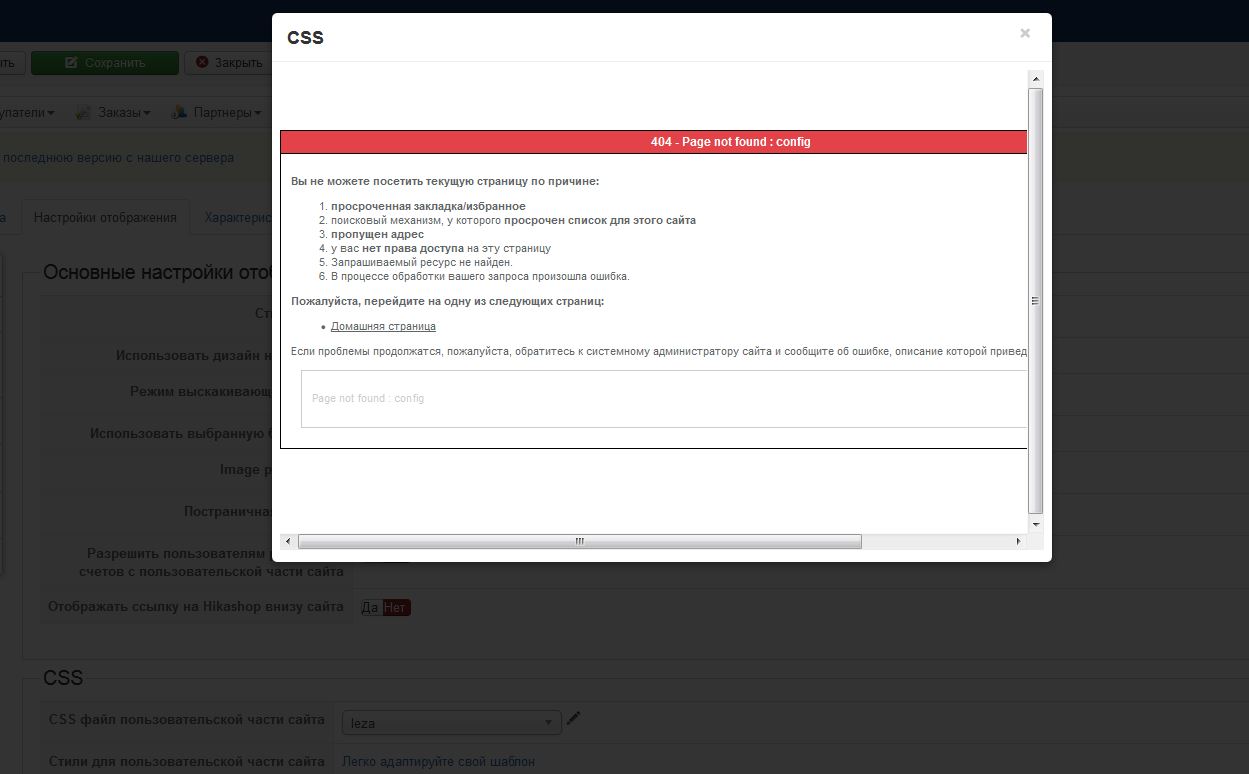
I coudn't modify CSS ovverride file via joomla, it showed 404 error. So did it via FTP and it worked fine.
Thanks
Please Log in or Create an account to join the conversation.

10 years 7 months ago #230682
by gioxd
Replied by gioxd on topic Stars not showing after update
Good, you're getting better 
Please Log in or Create an account to join the conversation.

10 years 7 months ago - 10 years 7 months ago #230769
by dennisg
Replied by dennisg on topic Stars not showing after update
I have the same problem, where exactly is teh CSS overide file i need to update?
Last edit: 10 years 7 months ago by dennisg.
Please Log in or Create an account to join the conversation.
10 years 7 months ago #230770
by dennisg
Replied by dennisg on topic Stars not showing after update
The stars goes missing when i install com_hikamarket_multivendor_v1.6.7_2016-01-08_18-21-24 on com_hikashop_business_v2.6.1_2016-01-31_02-28-23.tar
Please Log in or Create an account to join the conversation.
10 years 7 months ago #230772
by dennisg
Replied by dennisg on topic Stars not showing after update
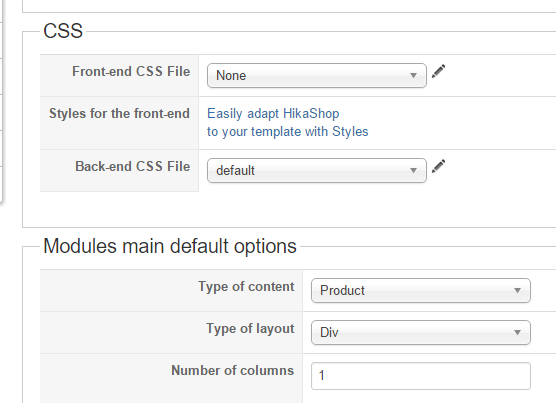
My config in Hika with the CSS looks like this for the front end CSS. So dont now what to do?
Please Log in or Create an account to join the conversation.
10 years 7 months ago #230795
by Jerome
Jerome - Obsidev.com
HikaMarket & HikaSerial developer / HikaShop core dev team.
Also helping the HikaShop support team when having some time or couldn't sleep.
By the way, do not send me private message, use the "contact us" form instead.
Replied by Jerome on topic Stars not showing after update
Hi,
If you do not have any HikaShop CSS file for the front-end ; it would explain why you do not seen any star.
Please read my post above about the required CSS rules.
Regards,
If you do not have any HikaShop CSS file for the front-end ; it would explain why you do not seen any star.
Please read my post above about the required CSS rules.
Regards,
Jerome - Obsidev.com
HikaMarket & HikaSerial developer / HikaShop core dev team.
Also helping the HikaShop support team when having some time or couldn't sleep.
By the way, do not send me private message, use the "contact us" form instead.
Please Log in or Create an account to join the conversation.
10 years 7 months ago #230857
by dennisg
Replied by dennisg on topic Stars not showing after update
That is what it looks like after a clean install with templazas biksport quickstart with hikashop and the stars are there until upgrading to 2,6,1 and installing hikamarket.
my solution for now is to stay with 2,6,0 and latest hikamarket, same setup as the picture above but with stars...
my solution for now is to stay with 2,6,0 and latest hikamarket, same setup as the picture above but with stars...
Please Log in or Create an account to join the conversation.
10 years 7 months ago #230859
by Jerome
Jerome - Obsidev.com
HikaMarket & HikaSerial developer / HikaShop core dev team.
Also helping the HikaShop support team when having some time or couldn't sleep.
By the way, do not send me private message, use the "contact us" form instead.
Replied by Jerome on topic Stars not showing after update
Hi,
Please add the CSS rules I gave in the post above into your template CSS file.
Regards,
Please add the CSS rules I gave in the post above into your template CSS file.
Regards,
Jerome - Obsidev.com
HikaMarket & HikaSerial developer / HikaShop core dev team.
Also helping the HikaShop support team when having some time or couldn't sleep.
By the way, do not send me private message, use the "contact us" form instead.
Please Log in or Create an account to join the conversation.
10 years 7 months ago - 10 years 7 months ago #230928
by dennisg
Replied by dennisg on topic Stars not showing after update
Thanx for the help Jerome, i got i to work but i had to change the url for the star.gif to /media/com_hikashop/images/star.gif for them to show.
I put the code in my templates default css file, the stars is now yellow and red instead of black and white and slightly misaligned but i get to that
but i still wonder why a "clean" install get that error?
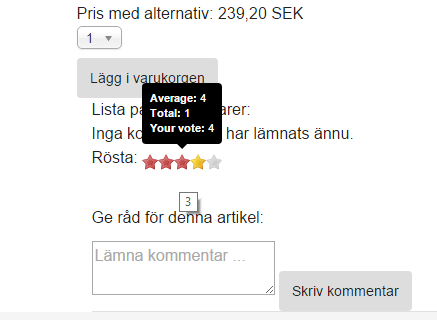
I put the code in my templates default css file, the stars is now yellow and red instead of black and white and slightly misaligned but i get to that
but i still wonder why a "clean" install get that error?
Last edit: 10 years 7 months ago by dennisg.
Please Log in or Create an account to join the conversation.

10 years 7 months ago #230934
by nicolas
Replied by nicolas on topic Stars not showing after update
Hi,
Because it's not a "clean" install.
Your template quick start package disables the frontend CSS file of HikaShop so that the template can define all the CSS of HikaShop.
However, with new versions of HikaShop (and new/improved features), we add new CSS code in the frontend CSS file of HikaShop. And your template didn't add these changes on their end and since they're disabling the frontend CSS file of HikaShop, you get missing bits of CSS necessary for the proper display of the new/improved features).
Because it's not a "clean" install.
Your template quick start package disables the frontend CSS file of HikaShop so that the template can define all the CSS of HikaShop.
However, with new versions of HikaShop (and new/improved features), we add new CSS code in the frontend CSS file of HikaShop. And your template didn't add these changes on their end and since they're disabling the frontend CSS file of HikaShop, you get missing bits of CSS necessary for the proper display of the new/improved features).
The following user(s) said Thank You: dennisg
Please Log in or Create an account to join the conversation.

10 years 5 months ago #237825
by vanway
Replied by vanway on topic Stars not showing after update
had the same problem, and it worked adding that code to the Front-end CSS File.
Thank you!
Thank you!
Please Log in or Create an account to join the conversation.
Time to create page: 0.329 seconds