
HikaShop 6.6.0 gives your shop a mobile application. It is free, it runs your shop from your phone, and you connect it by scanning a QR code. It rests on a real API, which anything else you write can use too. The release also puts the whole checkout on a product page, rebuilds the affiliate page your partners see, brings HikaShop to the command line, adds several languages to a WordPress shop, imports your categories, and draws every graph itself instead of asking Google. It also fixes a security issue in the Bambora (Beanstream) payment plugin. In total this release brings 12 new features, 44 improvements, and 86 bug fixes.
Here is a look at the highlights of this release.
- The HikaShop application
- A real API for your shop
- Ordering without leaving the product page
- A real dashboard for your affiliates
- HikaShop from the command line
- Several languages on WordPress
- Importing your categories
- Your graphs, drawn by HikaShop
- A security fix for the Bambora payment plugin
- Bug fixes and other improvements
HikaShop Business now has a mobile application, free, which runs your shop from your phone, your tablet or any browser. You connect it to your site by scanning a QR code: the new "App Devices" page of the System menu creates a single use pairing code, and the application exchanges it for its own key, so your password is never typed into it. Each device you connect is listed on that page with the date it was last used and can be revoked on its own, which is what you do when a phone is lost or when an employee leaves.
Rather than list its screens, here is what it is for.
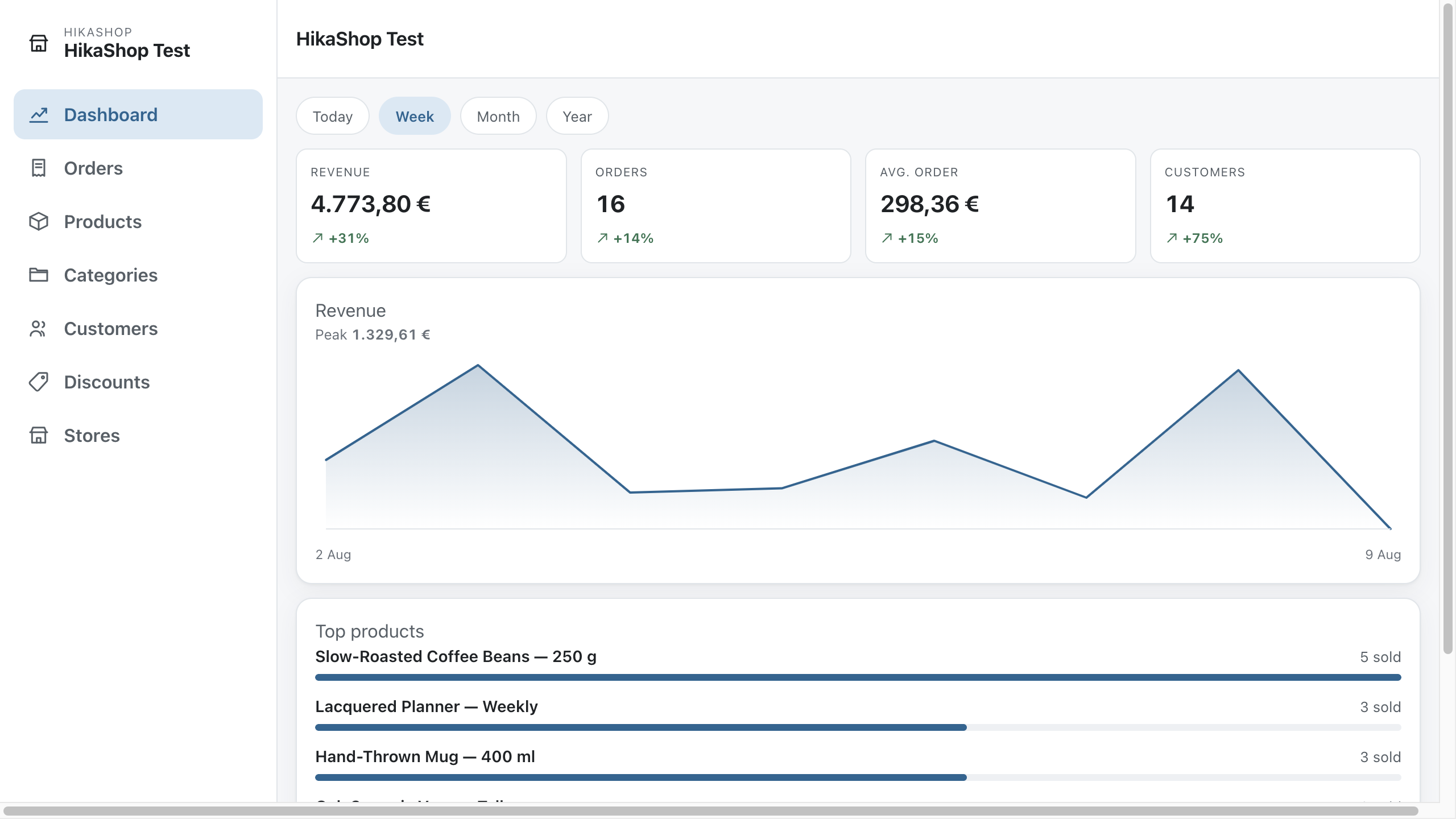
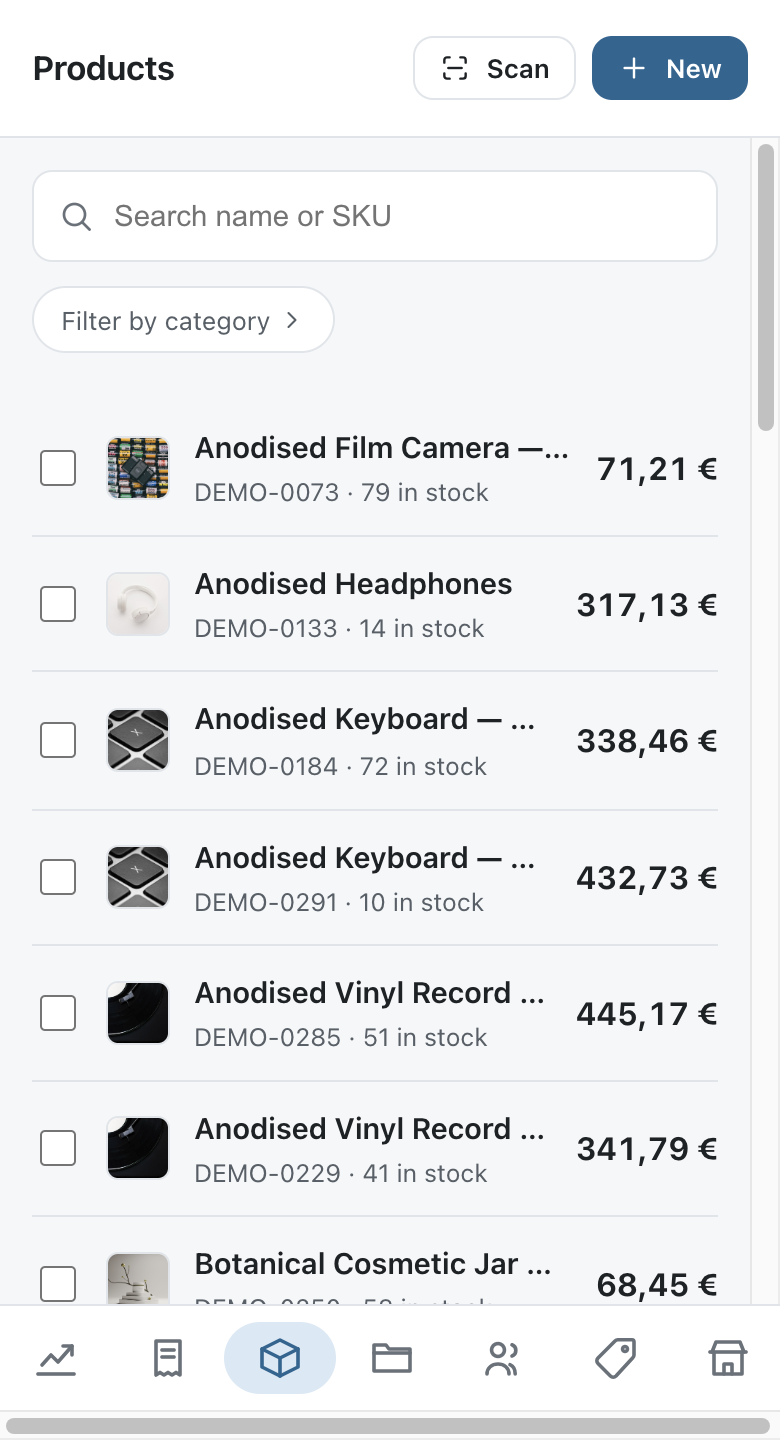
You are a web agency, and your clients are not technical. You build their shop, and then they call you to change a price or read an order. Pair their phone with the application and they get a plain interface with their orders, their products and their customers, without the Joomla or WordPress administration around it. What each person may see and change is decided by the access levels of the site and by the Access levels tab of the HikaShop configuration, so you can hand a client an application which does exactly what you want it to do, and nothing else.
You run several shops. Several sites can be paired with the same application and you switch between them from the menu, so the orders of the day for all of them are a tap apart instead of three logins apart.
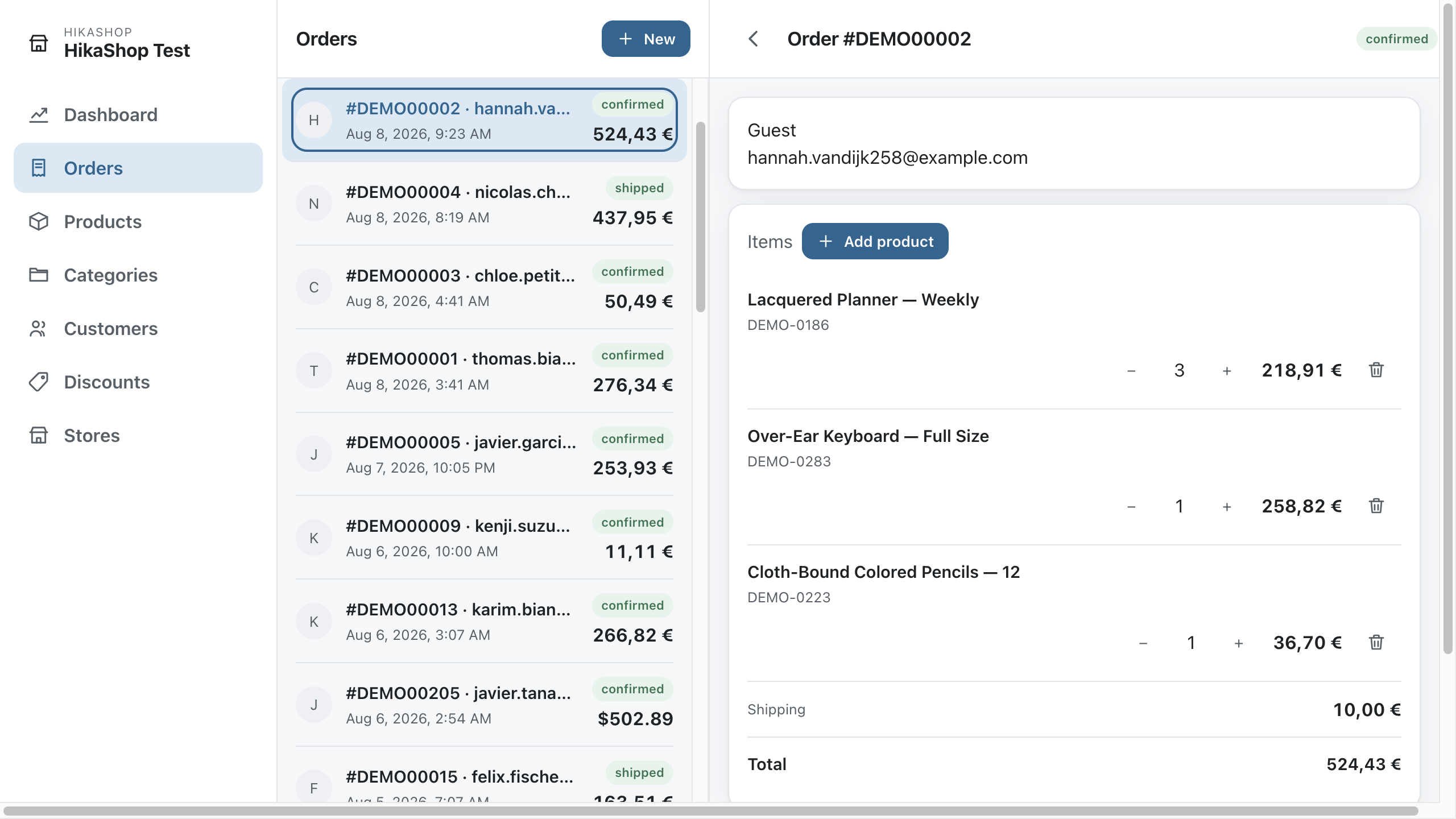
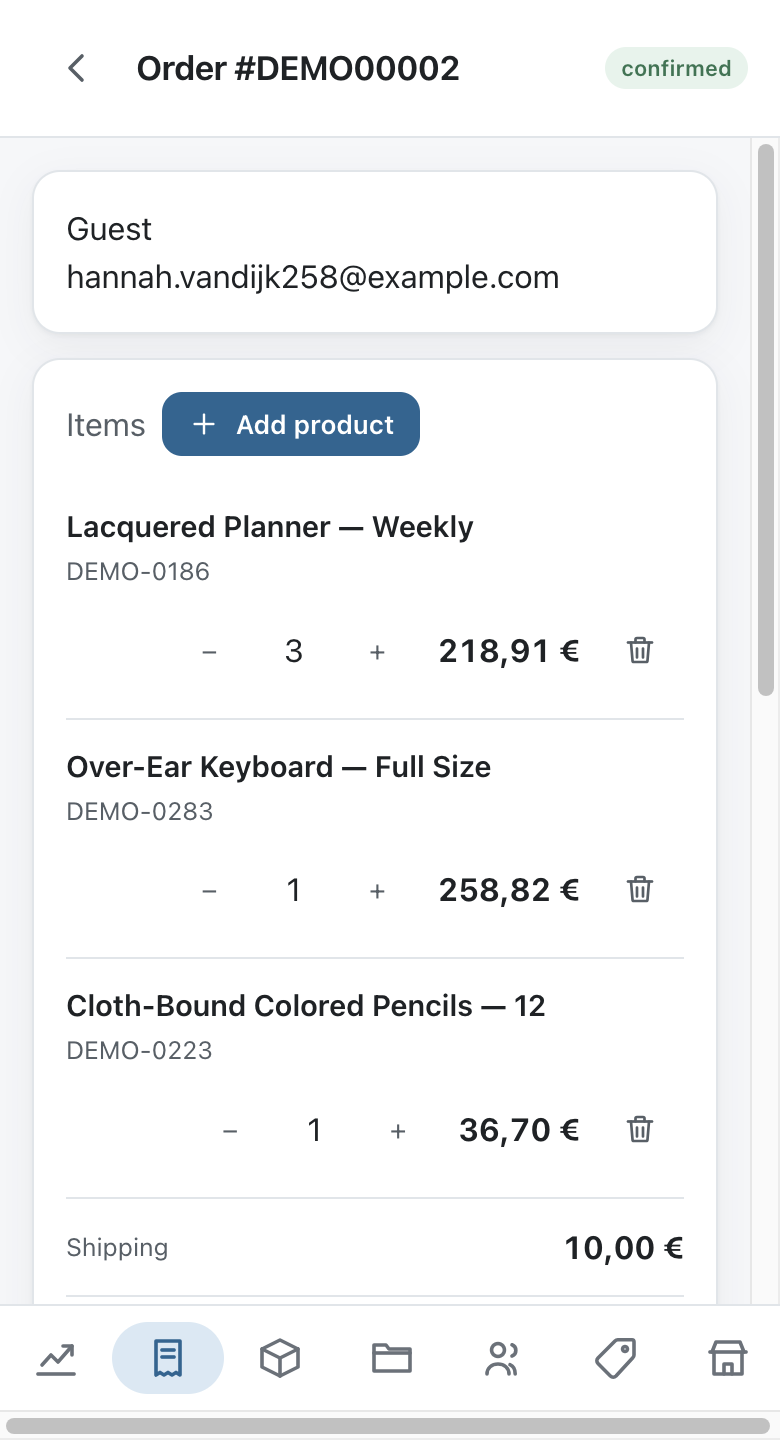
You want to know about a sale as it happens. The application sends a notification when an order arrives, and another when a product runs low on stock. From the notification you open the order, read it, change its status, edit its address, its lines or its shipping and payment fees, or create an order by hand for a customer who called you.
You do your stock counts with a phone or a tablet. Scan a barcode with the camera of your device, or with a barcode reader, and the product opens: correct the quantity as the goods come in or go out, without looking anything up. The mass actions you have set to appear on a listing of your backend are available in the application too, so your own bulk operations come with you into the aisle.
The application is not needed to run your shop and changes nothing on your site until you pair a device with it.
Where to get it. On Android, get it on Google Play, or install the latest release yourself if you would rather not go through the store. On a computer, or on any phone, open the web version, which installs itself from your browser menu and behaves the same way. The application is free and open source under the same licence as HikaShop, and its code, its issues and its releases are on GitHub.
The application does not talk to a private channel: it uses the Connector API, and so can anything else you write. It is a REST API over JSON, served by your own site, with 79 endpoints covering your products with their variants, prices, images, files and translations, your categories, your customers and their addresses, your orders with their lines, fees, addresses, statuses and coupons, your discounts, your zones, your settings, your dashboard figures and your mass actions.
Authentication is the same pairing the application uses: a device exchanges a single use code for its own key, each key is listed and revocable in your backend, and no password is stored anywhere. That makes it as suitable for a script, a stock system, a point of sale or an ERP as it is for the application. The documentation of every endpoint, with a real request and a real response for each, ships with the plugin.
The "Product page" menu item type can now carry the whole checkout on the page itself. A new "One page checkout" tab on the menu item turns it on and gives you the list of checkout blocks displayed under the product, with the same drag and drop editor as the checkout of your configuration, but for this page only: the checkout of the rest of your shop is not affected.
The page opens with the product already counted in, showing its price, its taxes, its shipping cost and its total, without anything being written in your database until the customer actually orders, so a visitor who only looks at the page does not leave an abandoned cart behind. Changing the quantity, the options or the custom fields updates the totals, the shipping methods and the payment methods on the spot, and there is no "Add to cart" button to press.
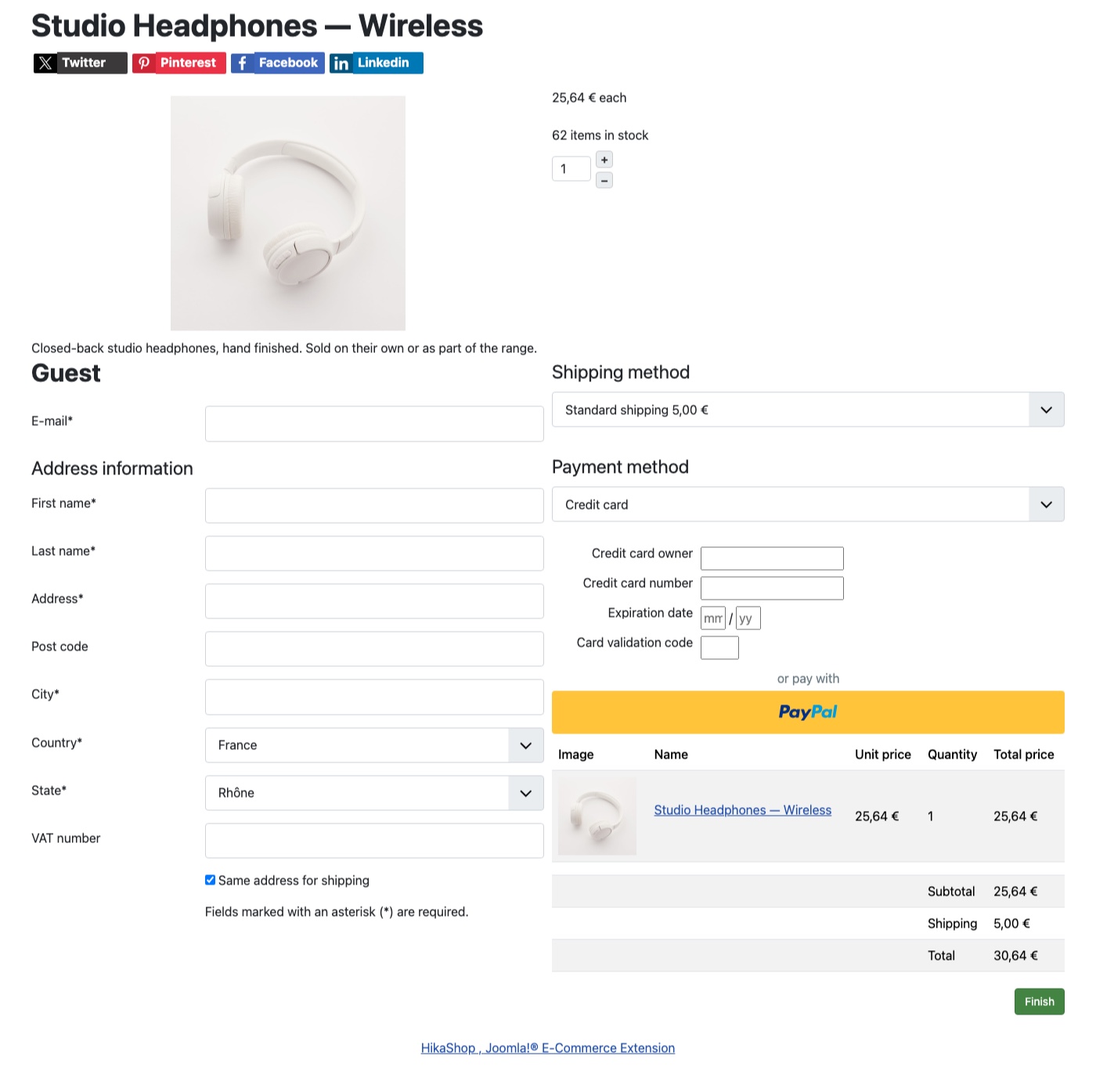
Your customers are identified as guests, with their email address and their delivery address asked directly on the page, unless they are already logged in, in which case nothing is asked of them. The order button, whose text you can change, creates the order and sends the customer to the payment as usual.
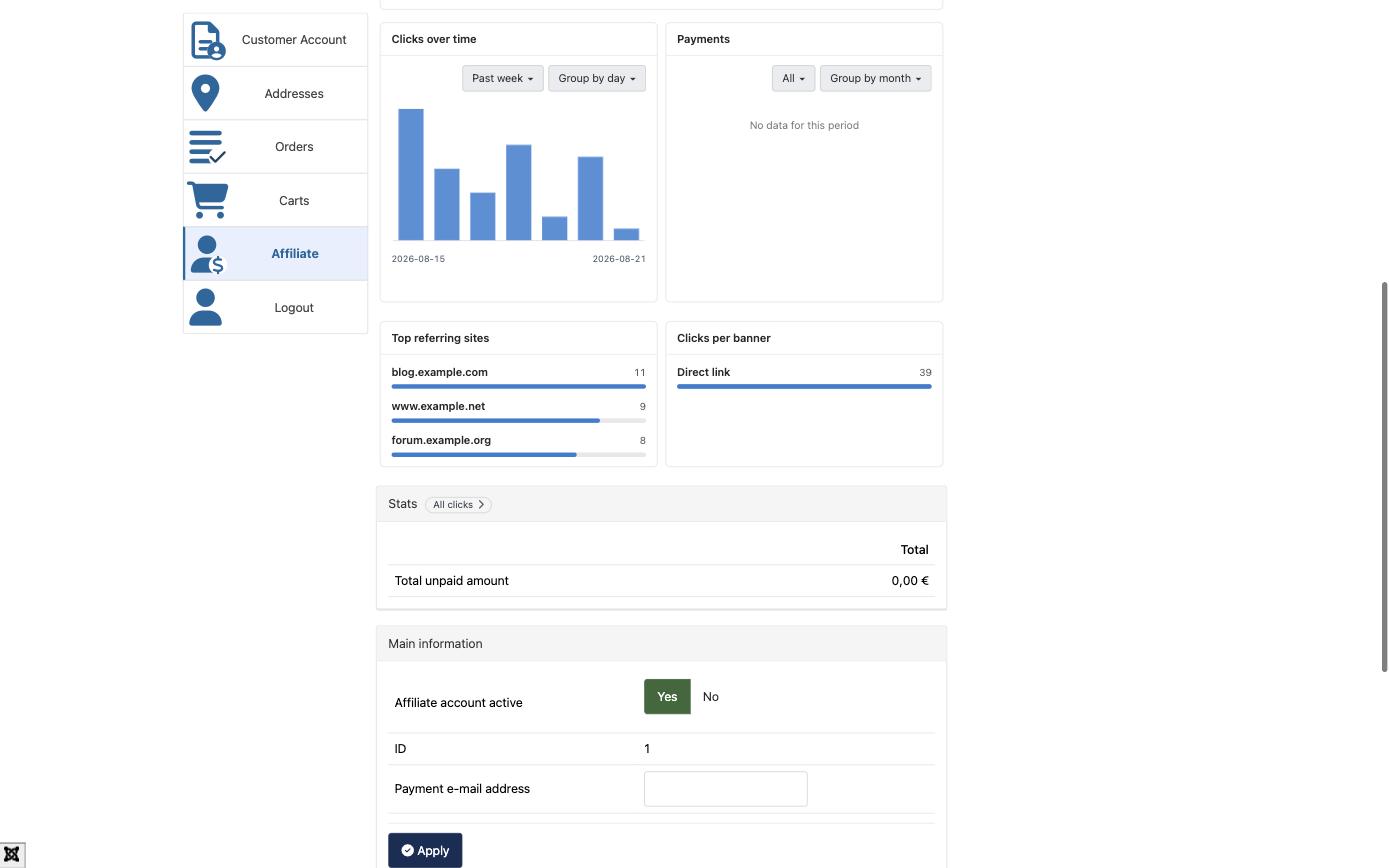
The affiliate program page your partners see has been rebuilt. It used to show the same handful of totals since the day they joined, with no way to tell whether this month was better than the last one. It now opens on a dashboard: your partner picks a period, today, this week, this month or this year, and everything on the page follows it. The commission earned, the clicks, the sales and the leads of that period are each shown next to the same length of time immediately before, so the direction is visible at a glance.
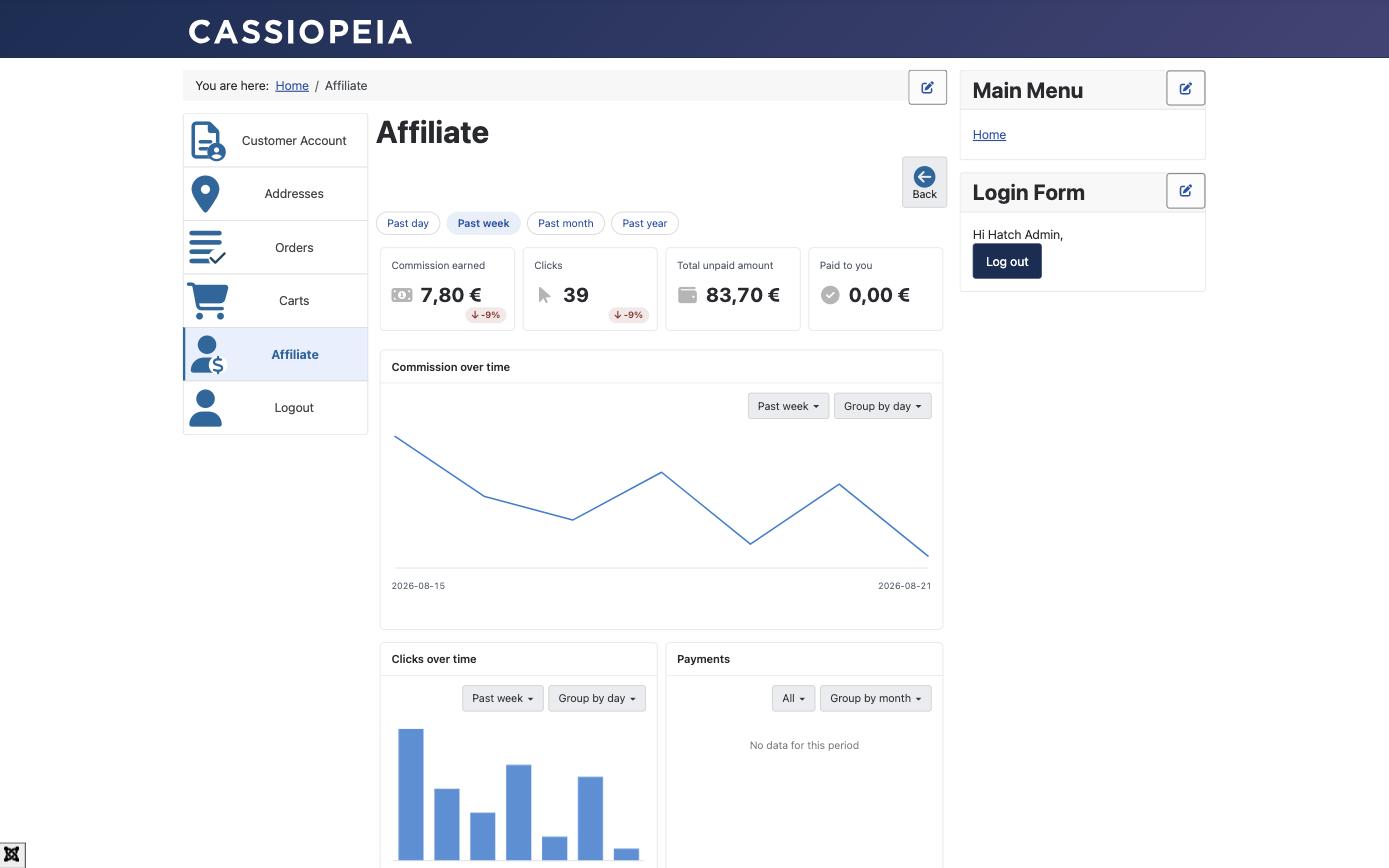
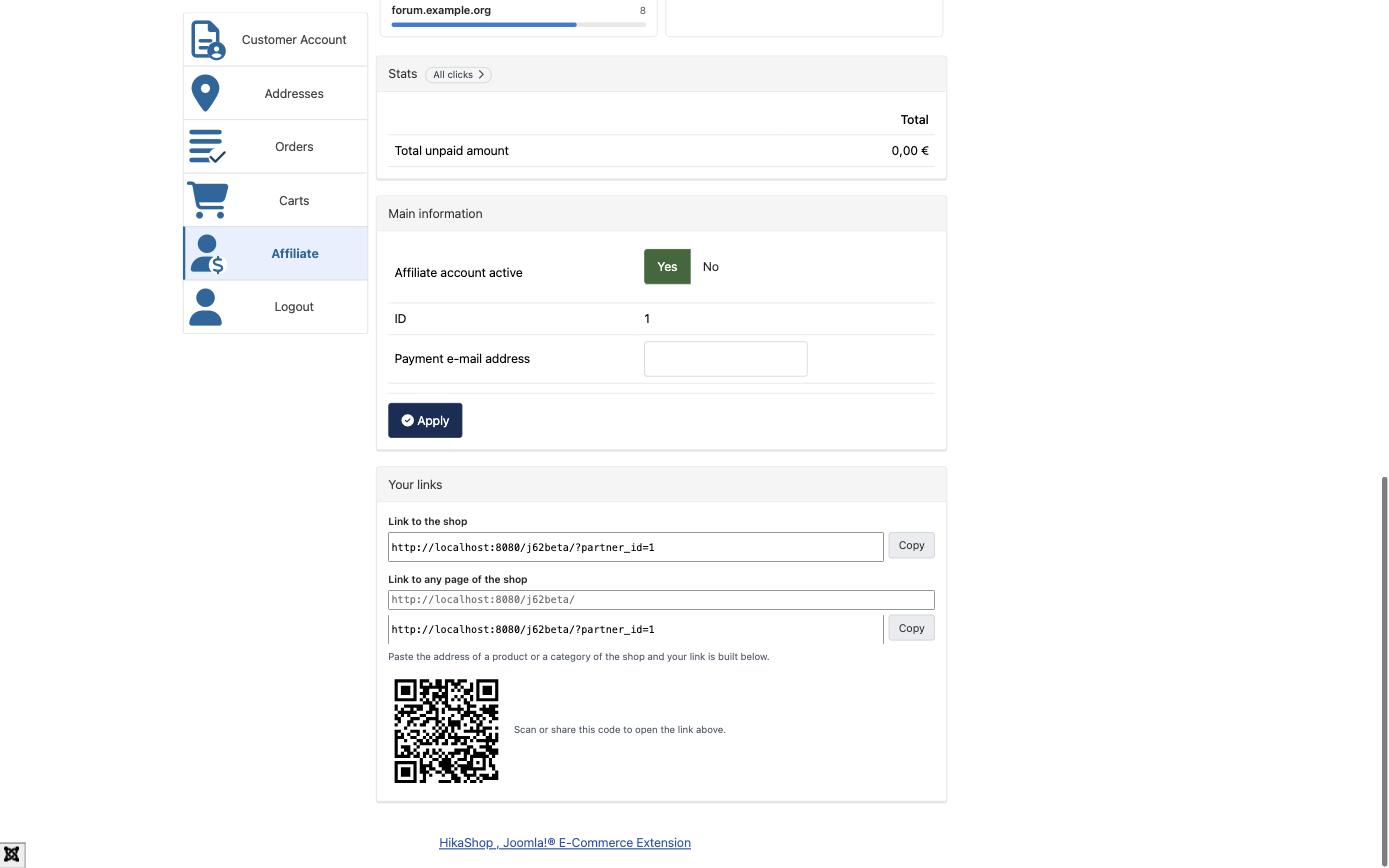
The page also gives your partners the tools they were missing: their affiliate link ready to copy, a field where they paste any page of your shop and get their link to it, a QR code for it, and a copy button on the HTML of every banner you offer. Their clicks, leads and sales open as real pages of their account rather than in a popup, so they can be read on a phone. Nothing needs to be configured.
HikaShop can now be managed from a command line, so that your shop can be driven from a terminal, a cron entry or a deployment script without opening your backend. It uses the command line each platform already provides: the Joomla console, with commands such as php cli/joomla.php hikashop:product:list, and WP-CLI on WordPress, where the same command is written wp hikashop product list. Nothing travels over the network, since the commands run inside your own site, so there is no key to create and nothing to open to the outside.
You can list, read, create, change and delete your products, orders, customers, categories and coupons, set a stock level or a price, change the status of an order and notify the customer, run your mass actions, run the scheduled tasks, read and change a configuration setting, empty the caches and bring your database up to date after restoring a backup.
There is a second reason we built this. A command line which prints JSON or CSV on demand and returns a different exit code depending on whether the record was missing, the request was wrong or the account was not allowed is exactly what an AI assistant needs to work on a shop: ask it to find the products which have been out of stock for a month, to correct a price, to re-run yesterday's failed cron, and it can do that with the same commands you would type, on your own server, under an account whose access levels you decide. Together with the Connector API above, that gives an assistant two clean ways in, instead of clicking through your backend.
On a WordPress 7.1 shop there is a third. WordPress 7.1 ships a registry of the things a site can do, which an assistant reads over the REST API or over MCP, and HikaShop registers itself in it. Every command of the list above appears there under the same name, so an assistant connected to your WordPress site discovers your shop on its own: it can list your products, read an order, ask what is running low, without you writing a line of glue.
What an assistant could undo is offered; what it could not is not. Reading your shop, correcting a price, setting a stock level, moving an order to another status: all offered. Deleting a product, a customer, a category or a discount, and running a mass action, are registered but kept out of what an assistant is shown until you decide otherwise, which is the same line the command line draws when it asks you to confirm those five, whoever asks has to be able to administer the site, and each ability then asks for the same access level as the backend screen it belongs to: reading your orders answers to the order view level, changing one to the order manage level, deleting a product to the product delete level. An assistant reaches exactly as far as the person it acts for reaches in your backend, and no further. A shop on an earlier WordPress, or on Joomla, exposes nothing through this route: there is no such registry to register with, and the command line, the Connector API and the MCP server below remain the ways in.
And on any shop, Joomla or WordPress, there is a fourth, which existed before but was hard to reach and is now the one we would point you at first. Your mass actions can be exposed directly to an assistant over MCP, the protocol assistants use to talk to a tool: you build the action once in your backend, tick the trigger, and it becomes something an assistant can call by name, with the arguments you declared. This release rebuilds that server. It used to lean on an outside library which had fallen a full revision behind the protocol, and the newest revision removes the opening handshake and the notion of a session, which is exactly what that library was built on, so following it meant waiting for somebody else to redesign it. HikaShop now speaks the protocol itself, the current revision and the older ones at once, deciding on each request which one the assistant is using. A recent assistant and an older one both work against the same address, and there is nothing to configure for either.
The practical effects are worth naming. The endpoint asks for an API key before it answers anything, which it should always have done. It refuses a request that a web page in a browser tries to make to it. It answers a request and closes, rather than holding the connection open, which is what made some assistants appear to hang. And the install package is about 1 MB and a thousand files lighter, because the twenty-two libraries the old server dragged in are gone. The same rebuild lets the agentic checkout of the UCP plugin work from an assistant for the first time: its tools were declared and listed, but never actually received what they were called with, so a checkout arrived with no products in it.
On WordPress, your shop can now have more than one language. HikaShop reads the list of languages from the multilingual plugin your site uses, either Polylang or WPML, and lets you translate the names, the descriptions and your own custom fields of your products and your categories, exactly as on Joomla. Nothing needs to be configured: install the multilingual plugin you prefer, add your languages to it, and the translation tabs appear in HikaShop.
Until now a WordPress shop was always treated as having a single language, whatever plugin was installed, and the translations you could type were never displayed. Your translations belong to HikaShop and are stored by HikaShop, so moving from one multilingual plugin to another, or removing one, does not lose them; they are also kept outside the plugin folder, so updating HikaShop cannot delete them. The application can translate your content on a WordPress shop too, since it goes through the same place.
Your categories can now be imported from a CSV or XML file, with a new "Import" button on the categories listing. It opens the same wizard as the import of the orders: the first step takes your file, or CSV content pasted in the page, and the second step displays the columns of your file with their first values and matches them with the columns of HikaShop for you.
A category is recognized by its id, its namekey or its name, so a file exported through a mass action can be filled in a spreadsheet and loaded back to update the descriptions, the SEO texts, the access levels, the images and your own category fields in one go. A file can also describe a whole tree at once: a row can name its parent category instead of giving its id, and the rows are saved in the order needed even when a category is listed before its parent. The imports of the sub zones and of the payment and shipping methods were rebuilt on the same wizard, and the export of a mass action now lets you choose the order of the columns and their header names.
Every graph HikaShop draws is now drawn by HikaShop itself instead of by the Google Charts service: the graphs and the map of your backend dashboard, the widgets of your reports, the chart of the values of a custom field, and the affiliate graphs shown further up this page, which are a good look at what they are now. Nothing is requested from Google anywhere in HikaShop anymore, which removes a third party from your administration and the consent question which came with it.
The graphs gained the figures of the point your mouse is on, they follow the dark mode of your backend, and the numbers behind each drawing can now be read by a screen reader. The map is drawn from country outlines shipped with HikaShop, so it also works on a server with no access to the outside. They animate when they appear, a curve traced from left to right, columns rising from zero, and a visitor whose system is set to reduce animations gets the finished graph straight away. A report can also be displayed as bars now, which existed but was never offered when building one.
This release fixes a high severity vulnerability in the Bambora (Beanstream) payment plugin, reported to us through the Joomla security team. On the shops concerned, someone who knew the id of an order could have that order marked as paid without any payment having been made. Very few shops are affected: you are concerned only if your shop takes payments through Bambora and the "Hash method" setting of that payment method is set to "None". A shop which does not use that plugin was never exposed, whatever version it runs, and a payment method set to MD5 or SHA1, which is what our documentation recommends, was not exposed either.
If that is your case, we advise updating as soon as possible, and the issue can also be closed from your back-end alone in the meantime. Everything is explained in our security advisory: how to tell whether your shop is affected, what we changed, and what to do if you cannot update right away.
On top of the features highlighted above, HikaShop 6.6.0 ships with many other things for a total of 12 new features, 44 improvements, and 86 bug fixes. Here is a selection of the additional improvements worth mentioning.
Notable additional improvements:
- Variants your customers can see and link to: when a product listing is filtered by a characteristic, the image of each product changes to the image of the variant that matches, so your customers see the red one when they filter on red. An address ending with
?hikashop_char=redopens the product page with that variant already selected, values can be combined, and the links of a filtered listing carry the selected value automatically. - Exclusions in your discounts and coupons: a discount or a coupon can now exclude specific products, categories and user groups, so it can apply to your whole shop except one category or a few products, without listing everything else.
- Protection from the page caches: a page cache keeps the page built for one visitor and serves it to the next ones, which handed the cart and the security token of one visitor to another and prevented them from ordering. HikaShop now detects the configurations where that happens and tells you what to change.
- The whole category tree in your menus: the category menus and modules can display your whole tree instead of stopping after two levels, and the "Main category" setting of the category and product menus and modules now accepts several categories instead of only one.
- A price unit label: a new setting on the product edit page lets you add a short text after the price, for example "/ kg" or "per litre", in place of the default "each".
- Old carts removed by the cron: the carts left untouched for longer than the "Cart retaining period" of your configuration are now actually removed, by the cron of HikaShop.
- Exports you can shape: the "Export a csv file" mass action now outputs the columns in the order you choose and with the header names you want, and a mass action on your categories can export their images.
- Accessibility: a broad pass over your shop and your backend, so that both are easier to use with a keyboard and with a screen reader, and so that the small controls are large enough to be tapped without aiming.
- Singular and plural: about thirty messages which give a number of things are now written in the singular or in the plural depending on that number, instead of always using the plural or hedging with a "(s)". Languages which need more than the two forms of English can give the form of their grammar for each number.
- NETS removed: the NETS payment plugin is not included in HikaShop anymore. It integrated the Netaxept platform, which Nexi has replaced by Nexi Checkout, and a Nexi Checkout plugin is available on our marketplace.
The 86 bug fixes include an order placed twice when the last step of the checkout was slow to answer, a session tax zone which was never set for a customer who logs in, custom fields whose name carries capital letters losing their value on a shop migrated from Joomla 3, an "Add to cart" button which did nothing at all when the request failed, HikaShop installed from the command line ending up without any of its bundled plugins, PHP 8.4 and 8.5 deprecations on the taxes page and along the checkout, and a payment method saved without one of its settings leaving its plugin reading a value which was not there.
As always, we recommend updating to benefit from all fixes and improvements. You can download the update from your member area or use the one-click update button in your HikaShop configuration page.
For the complete list of changes, see the full changelog.