
HikaMarket Vendor Map
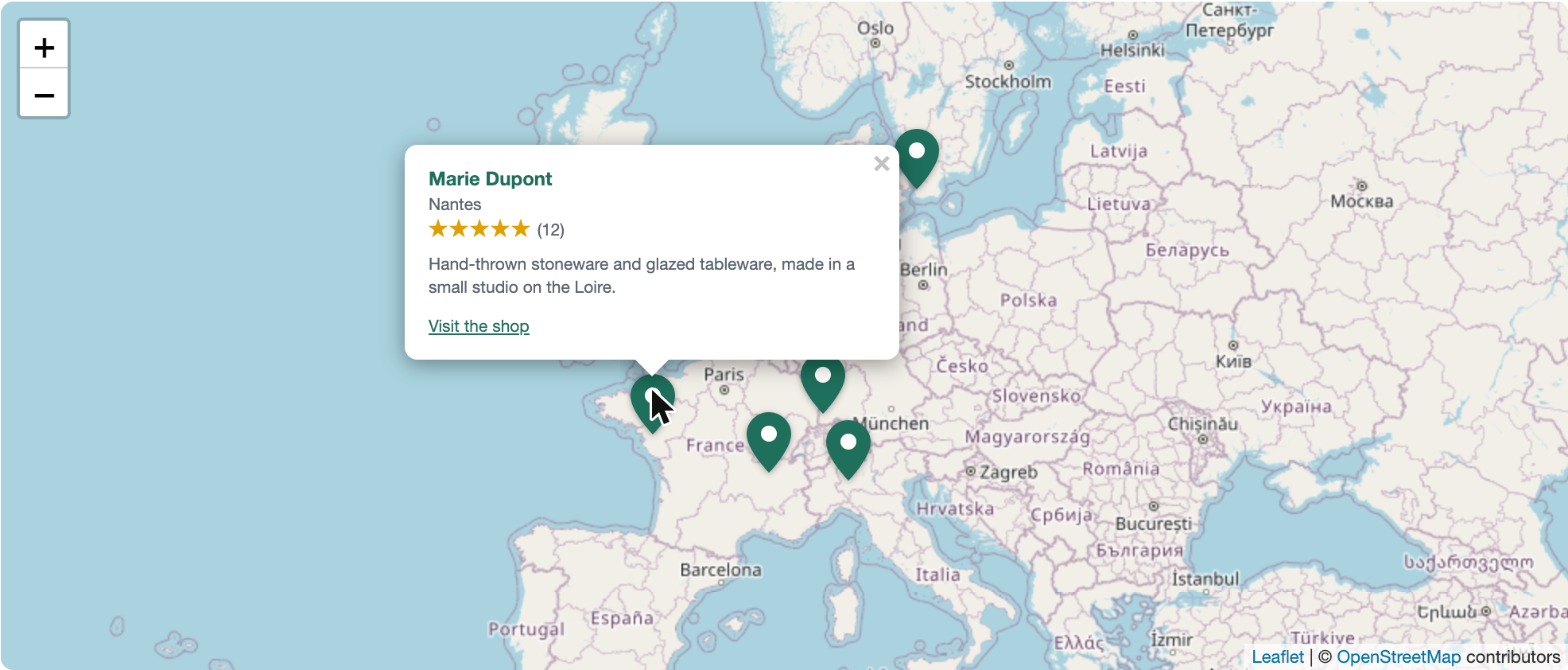
The HikaMarket Vendor Map module puts a map of your marketplace's vendors on any page of your website. Each vendor appears where it set its location, and a click on its pin opens a card with its image, its name, its city, its rating, a short description and a link to its vendor page. It is free, it needs HikaMarket and nothing else, and it works with any Joomla template.
Features- All the published vendors that set a location are on the map. A vendor sets it on its vendor page (a click on the map, or a search of its address), at registration, or you set it in the HikaMarket back-end. A vendor without a location is simply not shown, and the module shows nothing at all when no vendor has one.
- A click or a keypress on a pin opens the vendor's card: image, name, city, average rating with its number of votes, the beginning of its description and a link to its page. Each part can be hidden.
- The map fits all the vendors when it opens, and never zooms closer than the limit you choose: it matters when there is a single vendor, or when they are all in the same town.
- The page scrolls normally when the visitor's mouse is over the map, so it never traps them. The zoom buttons are always there, and the mouse wheel zoom can be turned on.
- OpenStreetMap by default, with no account or key. You can enter the address of another tile provider and its attribution.
- Usable with the keyboard and by screen readers: the pins are focusable and carry the vendor's name, and the map has an accessible name that you can change.
- Several maps on one page, each with its own settings.
- Made to be restyled: the colour of the pins and links, the corners, the colours of the card and of the stars are CSS custom properties that a template overrides, without fighting the module's stylesheet. The module's layout can be overridden in the template like any Joomla module.
- It uses the map library that HikaMarket already loads for its vendor pages, adds nothing to your database and makes no request of its own.
- Available in English and French.
 Installation
- 1) Download the module on our website.
- 2) Install it on your Joomla website via System > Install > Extensions.
- 3) Go to Content > Site Modules, create a new "HikaMarket Vendor Map" module, publish it in the position of your template where the map belongs and choose the pages it shows on.
- 4) Ask your vendors to set their location on their vendor page, or set it for them in the HikaMarket back-end, in the vendor's Location block.
- Height: the height of the map, in pixels (default: 450).
- Maximum vendors: how many vendors the map shows, in alphabetical order (default: 200).
- Closest zoom: from 1 (the world) to 19 (a street), default 14. The map fits all the vendors and never zooms closer than this.
- Zoom with the mouse wheel: off by default, so the page scrolls over the map.
- Show the vendor image, Show the city and Show the rating: show or hide that part of the card.
- Description length: the number of characters of the vendor's description in its card (default: 120). 0 hides it.
- Map tiles address and Tiles attribution: leave them empty for OpenStreetMap. To use another provider, enter its tile address with {z}, {x} and {y}, and the credit it asks you to show.
- Map label: how screen readers name the map. Empty uses "Map of our vendors".
- Layout and Module Class Suffix: an alternative layout from the template, and CSS classes to add.
Use
- This module requires HikaMarket 3.0.0 or later (Multivendor or Frontedition) and HikaShop
- Compatible with PHP 7.4 minimum
- Compatible with Joomla 4.x, 5.x and 6.x
- Free
- No limit of time
- No limit of use
Changelog
1.0.0 on the 30th of October 2026
- Initial release of the module.
Free


The add to cart button will appear once you select the values above
- Type
- Integration