
LLM optimization
This plugin makes your Joomla site easier to read for AI agents and assistants: ChatGPT, Claude, Gemini and the shopping agents that visit shops on behalf of their users. It gives every page a Markdown version, the clean text an agent prefers to a web page, links your llms.txt, declares what kind of site you run and completes the description of your business in your structured data. It works on any Joomla site, with or without HikaShop.
Features- Gives every page of your site a Markdown version, for the agents that ask for it: your product pages, categories, articles and home page, with their prices, stock and options, without the menus, header, footer or scripts.
- Answers an agent with the format it prefers: Markdown or plain text when it asks for them first, the normal page for browsers and everyone else, so your visitors see no difference.
- Tells agents a Markdown version exists, in each page and in its headers, and lets anybody open it by adding ?tmpl=markdown to an address.
- Answers a page that does not exist with a short Markdown message and a real "not found" status, with links back to your home page, your sitemap and your llms.txt.
- Links your llms.txt, the summary of your site written for AI assistants, from every page, as soon as the file is at the root of your site.
- Declares your site type (online store, company site, content site or hosted software) to the agent-readiness scanners, so their report checks what matters for you.
- Completes the description of your business in the structured data of your pages: description, contact page, email, phone, address and your pages on other sites, without replacing what your template or another extension already writes. On the home page it adds it when nothing does.
- Keeps a converted page for the time of your site's cache, for visitors who are not logged in only: a page seen by a logged-in customer is never kept nor shown to anybody else.
- Leaves the administration and the other formats (feeds, downloads) alone.
 How it works
- 1. An agent asks one of your pages and says it prefers Markdown or text, in the Accept header of its request, or opens it with ?tmpl=markdown.
- 2. Joomla builds the page as usual, with your template and its modules.
- 3. The plugin removes what is only there for a browser (header, menus, sidebars, footer, scripts, hidden blocks, buttons that only run a script) and turns the rest into Markdown.
- 4. The agent gets the Markdown, with a link to the normal page as its canonical address. A visitor with a browser gets the normal page, which says in its head where the Markdown version is.
A product page of a HikaShop shop, for instance, comes out like this:
# Recycled Glass Picture Frame A4

197,99 € each

9 items in stock

Add to cart

A recycled glass picture frame finished by hand. Sold on its own or as part of the range.
Installation
- 1) Install the plugin with Joomla's Extensions > Install. It is enabled on install.
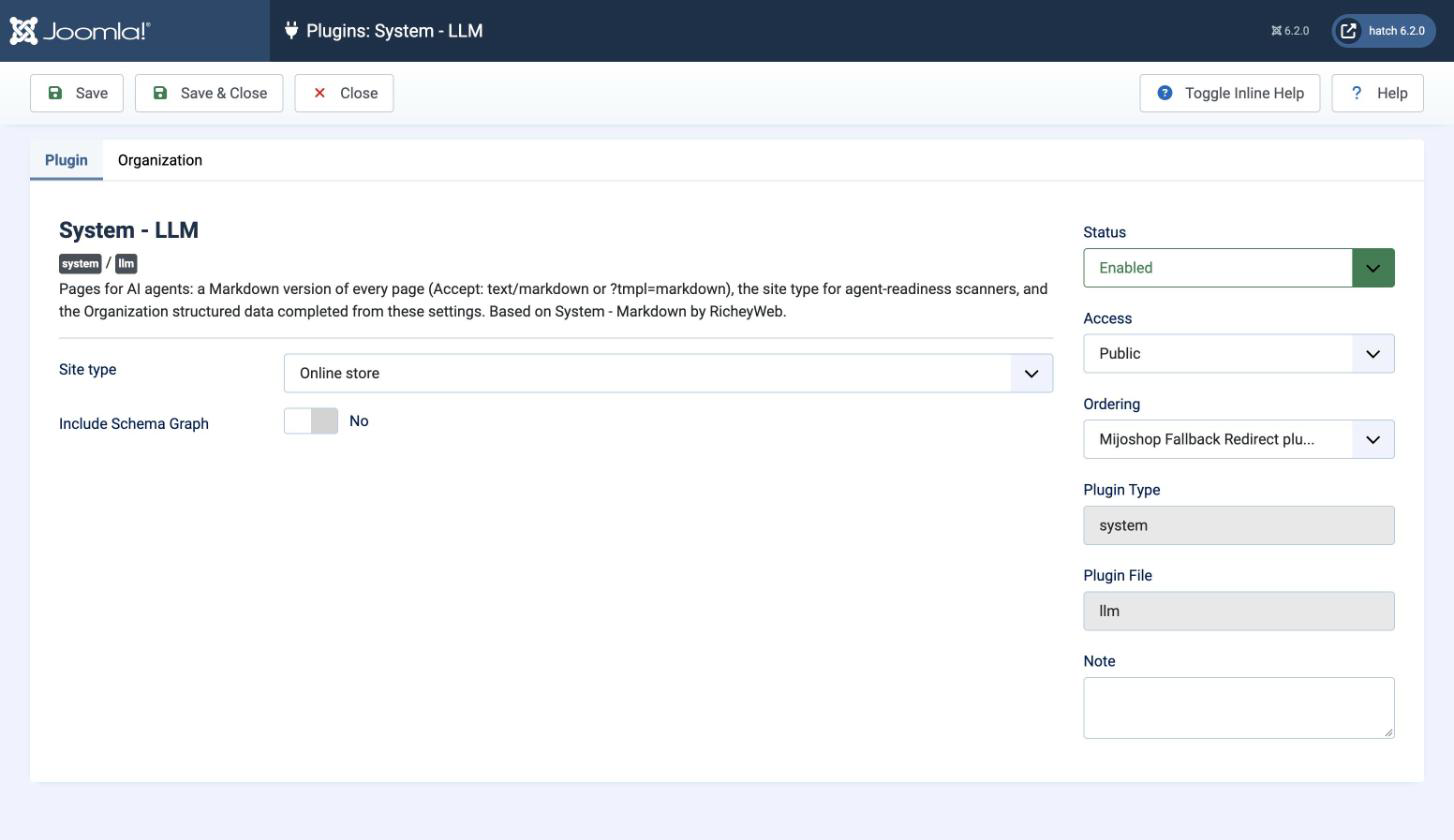
- 2) Open it in Extensions > Plugins ("System - LLM") and choose your site type.
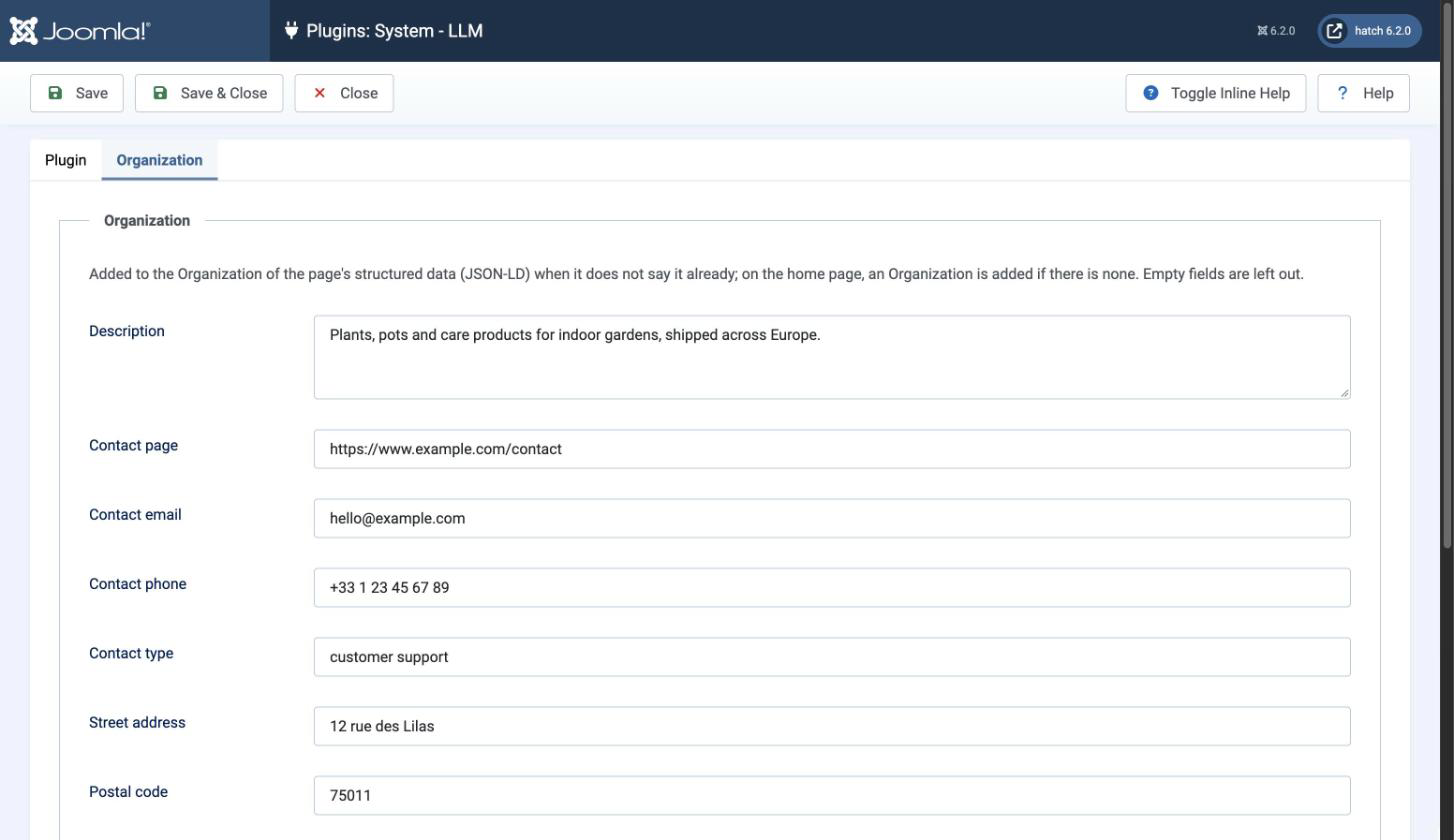
- 3) In the Organization tab, fill in what you want agents and search engines to know about your business. Leave empty what you do not want to publish.
- 4) Optional: put an llms.txt file at the root of your site, next to your robots.txt. The plugin links it from every page once it is there.
- 5) Check the result: add ?tmpl=markdown to the address of one of your product pages, or scan your site with one of the free agent-readiness scanners listed in our documentation page "Selling to AI shopping agents".
If RicheyWeb's System - Markdown plugin is installed, this plugin turns it off when it is installed, since both would answer the same requests. This plugin started from it, with thanks to its author.
Configuration- Site type: what your site is, for the agent-readiness scanners: Online store, Company or marketing site, Documentation or content, Hosted software. It chooses which checks their report puts first, not your score. None: nothing is declared.
- Include Schema Graph: adds Joomla's schema.org data at the end of the Markdown version of a page. Leave it off unless you know an agent needs it.
In the Organization tab, each field is added to your business's structured data when it is filled in, and left out when it is empty:
- Description: one or two sentences on what your business sells or does.
- Contact page, Contact email, Contact phone: how to reach you. The contact page alone is enough.
- Contact type: what this contact is for, "customer support" by default.
- Street address, Postal code, City, Region, Country: your business address. The country is a two-letter code, for example FR or US. The city and the country alone are enough if you do not want to publish more.
- Profiles: one address per line, your pages on other sites: social networks, directory listings, marketplaces.
 Troubleshooting
- The Markdown version is the page of your template as a visitor sees it, without its header, menus and footer. If something useless remains (a block of your template that is not marked as navigation or sidebar), ask us: it can usually be fixed in the template override.
- An agent still gets the normal page: check that it reaches your site at all. A firewall or a bot protection (a security extension, CrowdSec, your host's or Cloudflare's bot protection) may block it before Joomla answers.
- A change to a page does not show in its Markdown version: the version is kept for the time of your site's cache (System > Global Configuration > System > Cache Time). Clear the cache or wait.
- The structured data does not change on a page: the plugin only adds the fields that are missing. If your template or another extension already writes a description or an address, theirs is kept.
- Works on any Joomla site, with or without HikaShop, and with every edition of HikaShop
- Requires Joomla 4, 5 or 6 and PHP 8.1 or later
- Compatible with Joomla (not available for WordPress)
- No limit of time
- No limit of use
1.0.1 on the 22nd of October 2026
- An agent that lists a format your site cannot answer first (JSON, for instance) and Markdown or plain text next now gets the Markdown or the text, in the format it preferred. Before, it got the normal page.
1.0.0 on the 22nd of October 2026
- First version.

- Type
- Integration