
SMS order notifications
This plugin texts your customers when their order changes status: an SMS when the order is confirmed, another when it is shipped, one if it is cancelled, or for any status you choose. It can also text you when a new order comes in. The messages leave from your own account with an SMS provider, Twilio, Vonage, OVHcloud SMS or seven.io, so you choose the sender, the countries and the price you pay per message.
Features- Sends one SMS to the customer when the order reaches a status you chose, and never twice for the same status of the same order.
- Your own text for each status, and for each language of your shop if you wish, with the order number, its total, the customer's name, your shop's name, a link to the order and, when your shipping plugin stores them, the tracking number and tracking link. Confirmed, shipped and cancelled come with a ready text in English and French.
- Finds the customer's mobile number in the shipping or billing address and writes it in international format from the address's country, so a number typed as 06 12 34 56 78 in France is sent to +33 6 12 34 56 78.
- Can send only to the customers who ticked a consent box of your checkout.
- Texts you, or your team, when a new order comes in.
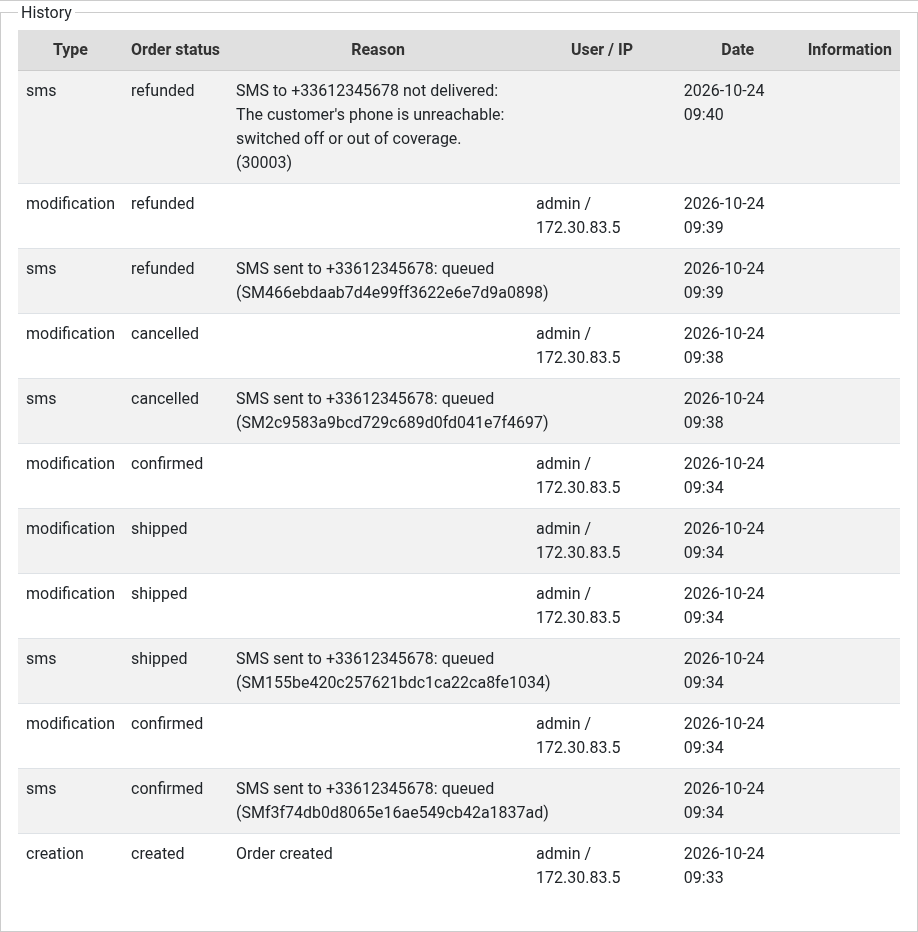
- Shows in the order's history each SMS sent, and on the order page whether it was delivered, or why it was not: a wrong number, a landline, a phone switched off, a customer who replied STOP...
- Tells you how many SMS each of your texts costs, since a long text or a letter such as ê turns one SMS into two.
- A "Check the account" button tells you at once whether your provider accepts your settings, and a "Send a test SMS" button texts your own phone.
How it works
- The customer places an order, with a mobile number in their address.
- When you or a payment plugin change the order's status, the plugin writes the text of that status, in the order's language, with the order's details, and hands it to your SMS provider.
- The provider sends the SMS and, a few seconds later, tells your shop whether it was delivered: the order page shows it, and a failure is written in the order's history with its reason.
Installation
With Twilio:
- Open an account at Twilio (twilio.com) and upgrade it: a trial account only sends Twilio's own sample texts, to the numbers verified in it, so it cannot send your texts to your customers.
- In the Twilio Console, copy the Account SID and the Auth Token from the home page, under Account Info.
- Get a sender: a Twilio phone number, or in the countries that allow it an alphanumeric sender ID such as your shop's name, or a Messaging Service. Under Messaging, Settings, Geo permissions, allow the countries of your customers.
- Install the plugin with the HikaShop or Joomla installer and publish it.
- Open its settings, choose Twilio, paste the Account SID, the Auth Token and the sender, save, then click "Check the account".
- Check the texts by order status, save, type your own mobile number as the test number, save again and click "Send a test SMS".
With Vonage:
- Open an account at Vonage (vonage.com, the API developer dashboard) and top it up: until then the account is in demo mode and only texts the test numbers added in its dashboard, with a demo notice added to each text.
- In the Vonage dashboard, under API settings, copy the API key, the API secret and, under the signature settings, the signature secret. On the same page, set the default SMS setting to the Messages API.
- Install the plugin with the HikaShop or Joomla installer and publish it.
- Open its settings, choose Vonage, paste the API key, the API secret and the signature secret, type your sender (your shop's name, or a Vonage number), save, then click "Check the account".
- Check the texts by order status, save, type your own mobile number as the test number, save again and click "Send a test SMS".
With OVHcloud SMS:
- Order an SMS account at OVHcloud (ovhtelecom.fr) with SMS credits; a sender of your own (your shop's name) is created and validated in the account, or the messages leave from a French short number.
- Make API keys at auth.eu.ovhcloud.com/api/createToken with the rights GET /sms/* and POST /sms/*/jobs, validity unlimited, and copy the Application Key, the Application Secret and the Consumer Key.
- Install the plugin with the HikaShop or Joomla installer and publish it.
- Open its settings, choose OVHcloud SMS, paste the three keys and the name of the SMS account (sms-ab12345-1), type your sender, save, then click "Check the account".
- The message gives an address for the delivery reports: paste it as the callback URL of the SMS account in the OVHcloud Control Panel.
- Check the texts by order status, save, type your own mobile number as the test number, save again and click "Send a test SMS".
With seven.io:
- Open an account at seven.io and add credit.
- In the seven.io dashboard, under Developer, API Access, make an API key of the production environment (a sandbox key never sends anything), and under Developer, API settings, copy the signing key if your account has one.
- Install the plugin with the HikaShop or Joomla installer and publish it.
- Open its settings, choose seven.io, paste the API key and the signing key, type your sender, save, then click "Check the account".
- The message gives an address for the delivery reports: add it as a webhook in the seven.io dashboard, under Developer, Webhooks, for the SMS status reports, with the method POST.
- Check the texts by order status, save, type your own mobile number as the test number, save again and click "Send a test SMS".
Configuration
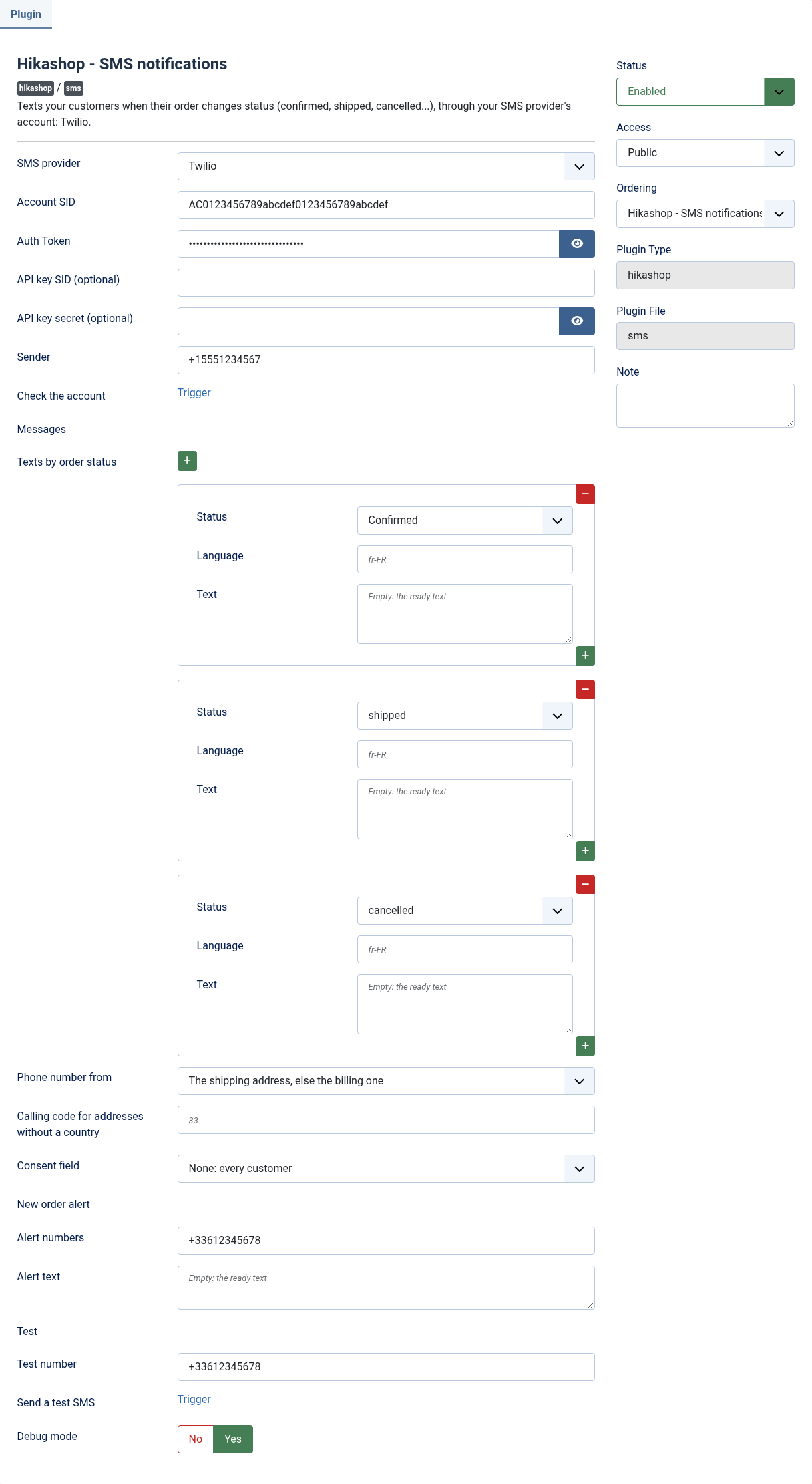
- SMS provider: the service that sends your messages: Twilio, Vonage, OVHcloud SMS or seven.io. Its own settings come below it.
- Account SID: from the home page of your Twilio Console; it starts with AC.
- Auth Token: from the same page. Always needed, even with an API key: Twilio signs its delivery reports with it.
- API key SID (optional) and API key secret (optional): an API key made in the Twilio Console under Account, API keys and tokens. When both are set, messages are sent with the key, which you can revoke on its own. Left empty, the Auth Token is used.
- Sender: one of your Twilio numbers in international format (+15551234567), an alphanumeric sender ID (up to 11 letters and digits; customers cannot reply to it), or a Messaging Service SID (starts with MG).
- API key and API secret (Vonage): from your Vonage dashboard, under API settings.
- Signature secret (Vonage): from the same page, under the signature settings. Vonage signs its delivery reports with it; left empty, the reports are refused and the SMS stay at "sent".
- Sender (Vonage): your shop's name (up to 11 letters and digits, where the country allows it; in France avoid generic names such as INFO or SMS), or one of your Vonage numbers in international format.
- OVHcloud API (OVHcloud SMS): Europe, or Canada for an account opened there.
- Application Key, Application Secret and Consumer Key (OVHcloud SMS): the API keys made with the rights GET /sms/* and POST /sms/*/jobs.
- SMS account (OVHcloud SMS): its name in the Control Panel, Telecom, SMS, such as sms-ab12345-1.
- Sender (OVHcloud SMS): a sender validated in your SMS account. Empty: the messages leave from a French short number customers can reply to, which only texts French numbers and refuses texts with a link.
- API key (seven.io): from your seven.io dashboard, Developer, API Access, a key of the production environment.
- Signing key (seven.io): from Developer, API settings. When your account has one, seven.io refuses unsigned requests and signs its delivery reports with it. Empty: nothing is signed.
- Sender (seven.io): your shop's name (up to 11 letters and digits, where the country allows it) or a phone number. Empty: seven.io's default sender.
- Check the account: save first, then click. The message says whether your provider accepts your settings, whether the account is a trial or demo one, and how many SMS each of your texts costs. With OVHcloud SMS and seven.io it also gives the address for the delivery reports: the callback URL of your OVHcloud SMS account, or the webhook of your seven.io account.
- Texts by order status: one line per status that sends an SMS; a status without a line sends nothing. Language: a language tag such as fr-FR for a text in that language only, empty for every language. Text: empty to use the ready text of confirmed, shipped and cancelled, or your own with the tags {order_number}, {order_status}, {order_full_price}, {customer_name}, {shop_name}, {order_url}, {tracking_number} and {tracking_url}.
- Phone number from: the shipping address (else the billing one), or the billing address (else the shipping one).
- Calling code for addresses without a country: numbers typed without their calling code get the one of their address's country; this code (33 for France) is used for an address without a country. Empty: such numbers are not texted.
- Consent field: a yes/no custom field of the address or of the customer that must be ticked for the customer to get SMS. None: every customer with a mobile number gets them.
- Alert numbers: your own mobile numbers, separated by commas, texted for each new order. Empty: no alert.
- Alert text: the text of that alert, with the same tags. Empty: "New order {order_number}, {order_full_price}, {customer_name}".
- Test number and Send a test SMS: your mobile in international format; save, then click to receive a test SMS and see a few seconds later whether it was delivered.
- Debug mode: writes each call to your provider, and why a delivery report was refused, in HikaShop's log file. Leave it off once things work.
Troubleshooting
- "Twilio refused the Account SID or token": copy both again from the home page of your Twilio Console, without spaces, then save.
- "Twilio refused the API key": check the key's SID and secret, or empty both fields to send with the Auth Token.
- "Your Twilio account is a trial account, which only sends Twilio's sample texts": upgrade the account. To try the plugin on a trial account, type one of Twilio's sample names as the text of a status, for instance sms_order_confirmation or sms_delivery_updates.
- "Your Twilio account is a trial account and this number is not verified in it": verify the number in the Twilio Console, or upgrade the account.
- "Your Twilio account is not allowed to send to this country": allow the country under Messaging, Settings, Geo permissions.
- "The customer replied STOP to your messages": Twilio no longer sends to that number until the customer sends START.
- "Vonage refused the API key or secret": copy both again from your Vonage dashboard, under API settings, then save.
- "Your Vonage account is in demo mode and this number is not one of its test numbers": add the number as a test number in your Vonage dashboard, or top up the account.
- "Your Vonage balance is too low to send": top up the account in your Vonage dashboard.
- "Your OVHcloud API keys do not have the rights the plugin needs": make new API keys with the rights GET /sms/* and POST /sms/*/jobs, and paste the three new values.
- "OVHcloud does not know this SMS account": check its name, such as sms-ab12345-1, in the Control Panel, Telecom, SMS.
- "Without a sender, OVHcloud's short number refuses texts with a link": the ready text of shipped has a link to the order; write your own text without {order_url}, or set a sender.
- "OVHcloud refused the customer's number": without a sender, only French mobile numbers can be texted; set a sender for the other countries.
- "seven.io refused the signature of the request": copy the signing key again from Developer, API settings, or empty the field if your account has none.
- "seven.io or the customer's carrier rejected the message": a seven.io account that is not verified yet has its SMS rejected for some countries, senders and texts with a link. Ask seven.io's support to verify the account.
- "seven.io refused the API key": copy it again from Developer, API Access.
- "SMS sent ... (test mode: nothing was sent)": the seven.io key is a sandbox key; make a key of the production environment.
- "No SMS: no valid mobile number in the order's addresses": the address has no phone number, or one that cannot be written in international format; set the calling code for addresses without a country if your addresses have none.
- An SMS stays "queued" or "sent" on the order page: your provider could not reach your site to report the delivery, or the report was refused. Your site must be reachable from the internet, without a password on the whole site; with Vonage, check the signature secret; with OVHcloud SMS, check that the callback URL of the SMS account is the address given by "Check the account"; with seven.io, check the webhook's address and the signing key.
Use
- Compatible with all the editions of HikaShop
- Compatible with Joomla and WordPress
- Requires the PHP cURL extension
- Requires an upgraded Twilio account, a topped-up Vonage account, an OVHcloud SMS account with credits or a seven.io account with credit; the provider bills each message to that account
- Order notifications only: marketing messages, and the consent rules of your country, are yours to handle
- No limit of time
- No limit of use
Changelog
1.0.0
- First version: Twilio, Vonage, OVHcloud SMS and seven.io as SMS providers, with their delivery reports.
€ 30,00


The add to cart button will appear once you select the values above
- Type
- Integration
Access to updates included for 4 years
A tax rate (between 17% and 27% based on your country) will be added if your address is in the European Union and that you don't provide a valid VAT number or if your address is in France as per the European Union law.