
Booking
This plugin adds a booking and capacity management system to HikaShop. It allows you to limit the number of orders or product purchases per combination of custom field values such as time slots, dates, room types, or any other custom field. It supports both order-level booking (checkout fields shared across the whole order) and item-level booking (per-product fields on the product page).
Features- Order-level booking: limit the number of orders per combination of order custom field values (e.g. delivery time slots at checkout).
- Item-level booking: limit the number of purchases per product per combination of item custom field values (e.g. event dates, room types).
- Configurable default capacity per field combination, with the option to take product quantities into account.
- Capacity overrides: define specific capacities for individual field value combinations, products, weekday patterns (e.g. "friday-sunday"), or date wildcards (e.g. "25/12/*" for every Christmas).
- Date range support: works with the datepicker field type's range mode for hotel-style check-in / check-out bookings with per-night capacity tracking.
- Frontend availability display: color-coded datepicker calendars (green/orange/red), option indicators on dropdowns, radio buttons, and checkboxes, with configurable exact spot count or generic message.
- Real-time AJAX availability checks on both the product page and checkout, preventing customers from selecting fully booked combinations.
- Stock validation on add-to-cart and order creation, with clear error messages when capacity is reached.
- Automatic stock release on order cancellation/refund, and re-consumption on un-cancellation.
- Backend bookings listing with per-column filters: order number, type, product, field values, date period, and order status. Sortable columns and pagination.
- Backend capacity overrides management with add/edit form, product selector, and field-type-specific inputs (multi-select for dropdowns, textarea with date patterns for datepickers).
- Capacity override popup accessible directly from the product edit page for quick per-product configuration.
- Product listing filter integration: when a datepicker or range datepicker filter is configured on a booking item field, the product listing automatically filters by availability, hiding products that are fully booked for the selected date(s). Works with single dates, date ranges, and margin days.
- Filter-to-product pre-fill: when a customer selects dates in the listing filter and clicks on a product, the booking date field on the product page is automatically pre-filled with the selected dates.
- CSV export of bookings, respecting all active filters.
- Booking settings block on the product edit form with enable toggle, item fields multi-select, and default capacity.
- Product copy copies capacity overrides, product delete cleans up overrides and bookings.
- Hotel/lodging structured data: automatically enrich the product page JSON-LD with schema.org Hotel, HotelRoom, LodgingBusiness, or other accommodation types, including check-in/check-out times, occupancy, amenities, star rating, and bed details. Configurable via plugin settings with custom product field mappings or hardcoded values, and per-product schema type override.
- Price per night and per season: a room can be priced per night, so a stay costs the sum of its nights. Seasons (high season, weekends, Christmas) are a short list in the plugin's settings, repeat every year and either add a percentage to the price, give a night price, or give a night price per traveller category (with the Price per category plugin). The total follows the dates picked on the product page, in the cart and in the order.
- Calendar sync with Booking.com, Airbnb and channel managers (iCal): each room priced per night has its own calendar address, giving the nights it can no longer be booked on your site, to paste in Booking.com, Airbnb, Beds24, Smoobu or any site that imports a calendar; and it imports their calendars in turn, so the nights booked or closed there can no longer be booked on your site.
- Events: a product can list its performances (date, time, duration, capacity, status, note); only those dates can be booked, the listing's date filter finds them, and an Add to calendar file (.ics) is offered for each.
- Compatible with Joomla and WordPress.
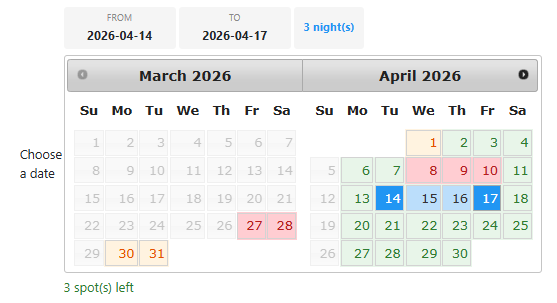
Date range mode on the product page, with per-night availability colors guiding the customer's check-in / check-out selection.
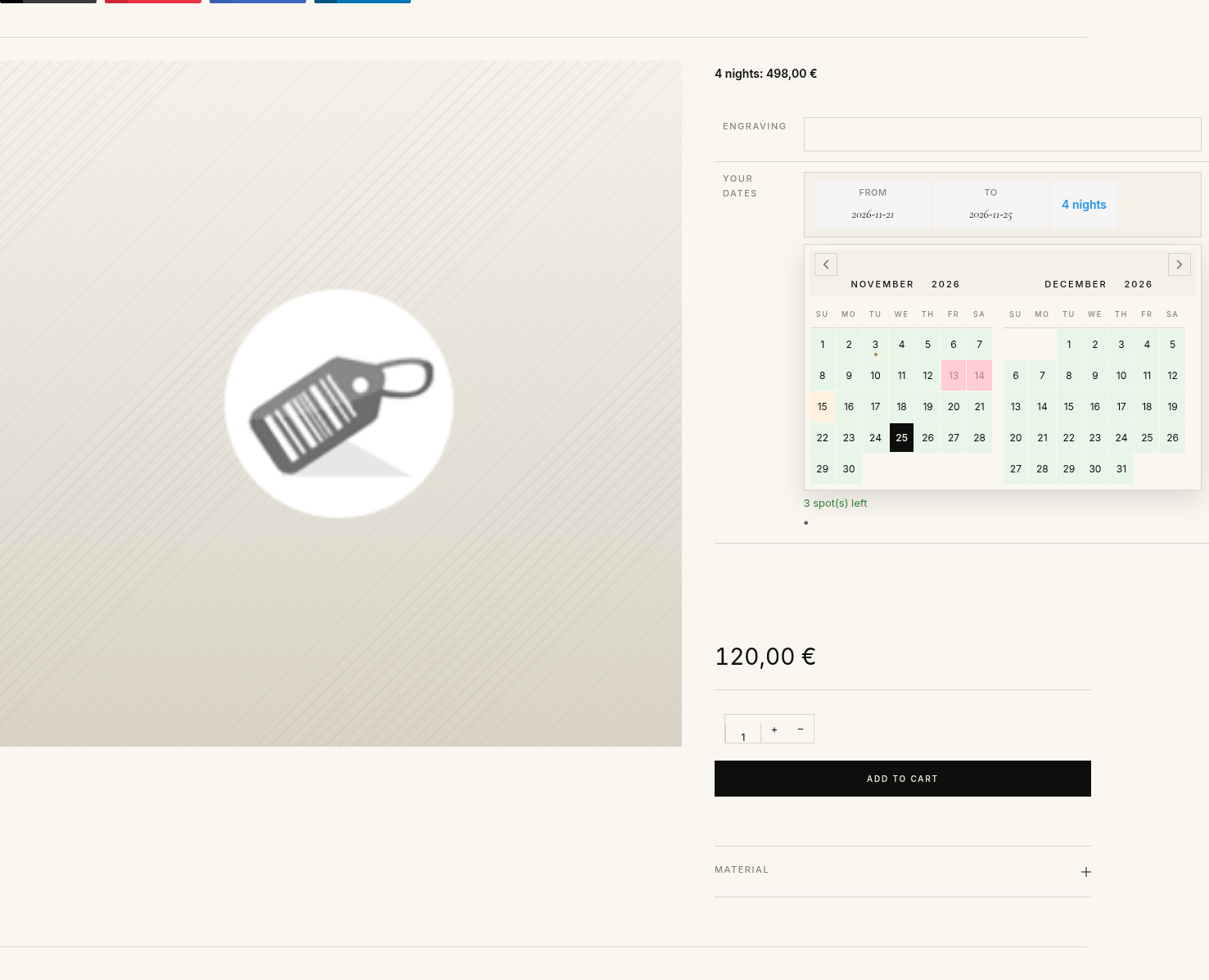
Fully booked nights are shown in red and can not be picked, nights with few spots left are orange, and the total of the stay picked (here 4 nights: 498,00 €, a weekend night costing 15% more) shows above the room, then follows it into the cart and the order.
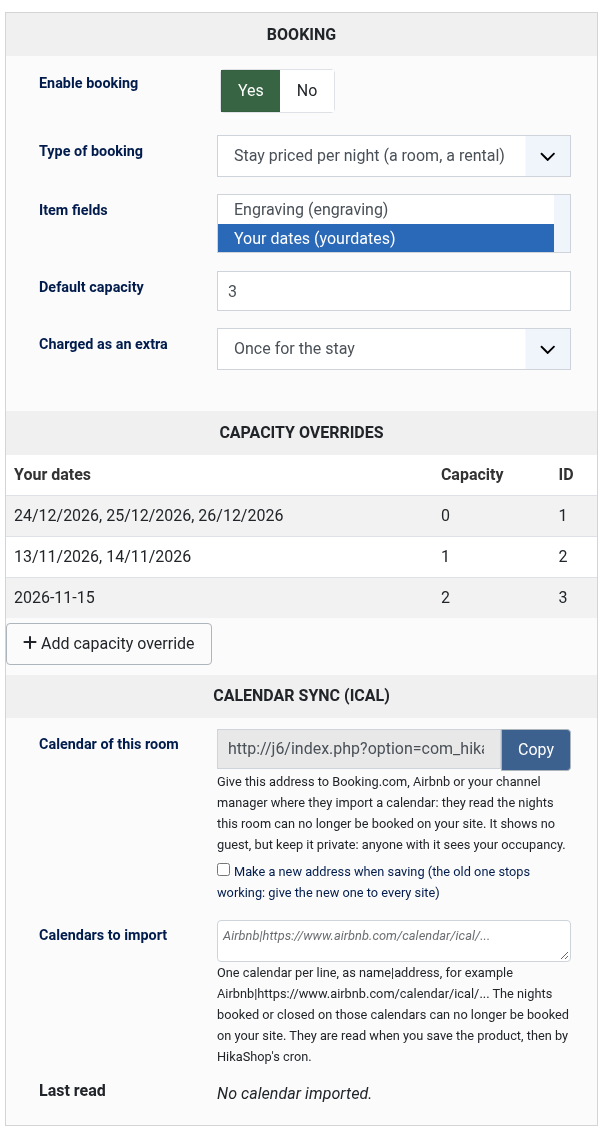
The Booking block of a product: enable booking, choose the type (dates with a capacity, a stay priced per night, an event), the date field, the default capacity and, for a room, the address of its calendar for Booking.com and Airbnb.
Installation- 1) Download the plugin on our website via the download link provided to you after the purchase.
- 2) Install it on your Joomla website via the extension manager and via the "Install plugin" button of System>Plugins on WordPress.
- 3) Enable the plugin in Extensions > Plugins.
- 4) In the plugin settings, select the order custom fields you want to use for booking capacity (e.g. delivery date, time slot).
- 5) Set the default capacity (number of bookings allowed per field combination).
- 6) For per-product booking, edit a product, enable booking in the Booking settings block, and select the item custom fields to track.
- 7) Optionally, create capacity overrides via Orders > Bookings > Capacity Overrides to define specific limits for certain field value combinations.
- Order fields: select the order custom fields to track for booking capacity at checkout.
- Default capacity: the default number of bookings allowed per combination of field values, when no specific capacity override is defined.
- Take into account product quantity: when enabled, the stock reserved is based on the product quantities in the cart. When disabled, each order line counts as 1 regardless of quantity.
- Show availability: display availability indicators (spot count, color-coding) on the frontend next to field options.
- Show exact count: show the exact number of remaining spots. When disabled, a generic message is shown instead.
- Seasons (tab Seasons): one row per season, used by the products where "Price is per night" is on. Nights covered: one line per period, every year:
07-01..08-31(month-day to month-day,12-20..01-05runs over the new year),12-25(one day),2026-12-24..2027-01-02(this period only),friday-saturday(weekdays). Price of a night:+40%or-15%over the product's price, a price such as140, or a price per traveller category such asadult=140, child=70; prices are without tax, in the shop's main currency. A night outside every season costs the product's price; when two seasons cover a night, the one lower in the list wins. - Price is per night (in the Booking block of the product): the price of the product is the price of one night, and a stay costs the sum of its nights (the check-out day is not a night).
- Read the calendars every (minutes) (tab Calendar sync): how often the calendars the rooms import are read, 30 minutes by default, 10 at least. HikaShop's cron task must run at least as often.
- Closed nights in the calendars (tab Calendar sync): when on (the default), the calendar of a room also gives the nights a capacity override of 0 closes, so that the other sites close them too.
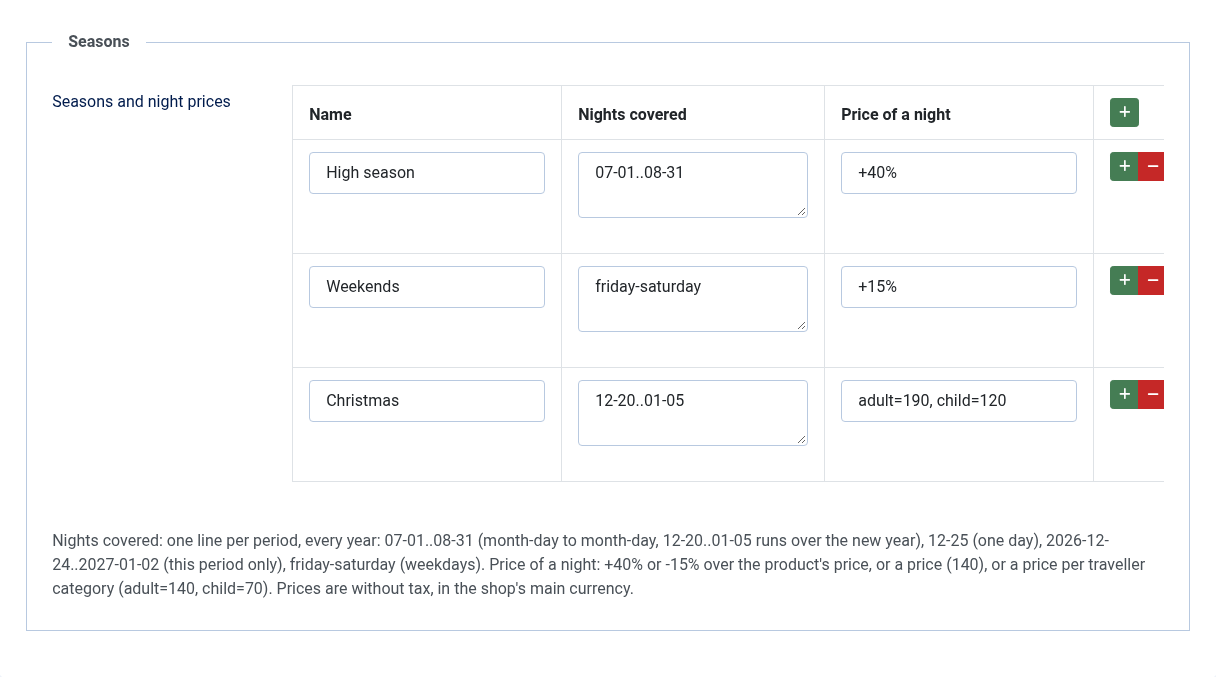
Seasons tab of the plugin: high season +40%, weekends +15%, a night price per traveller category for Christmas. They repeat every year.
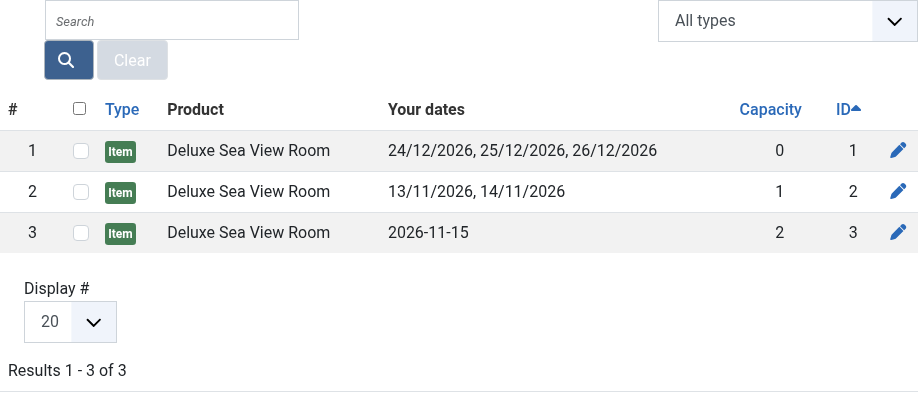
Capacity overrides: close the nights of Christmas (capacity 0) or give a limited number of spots to chosen dates, with weekday patterns and date wildcards.
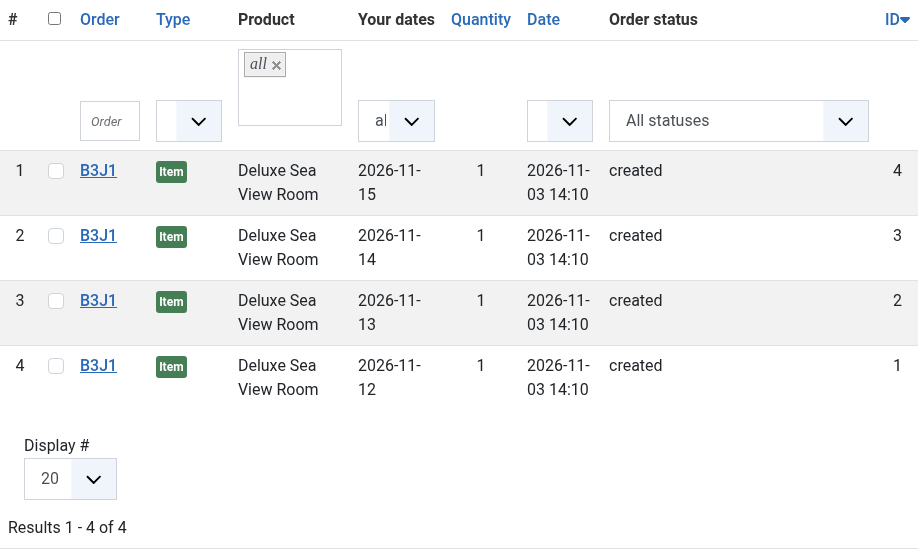
Orders > Bookings: every night booked, with its order, product, dates and order status, filterable and exportable as CSV.
Sync with Booking.com, Airbnb and channel managersFor a room whose type of booking is "Stay priced per night" and whose booking fields include a date field in range mode, the Booking block of the product shows a Calendar sync part.
- Calendar of this room: the address of the room's calendar. Paste it where the other site imports a calendar: on Airbnb, in the listing's Calendar, Availability, Connect calendars, import a calendar; on the Booking.com extranet, in Rates & Availability, Sync calendars, add a calendar connection; in Beds24, Smoobu or another channel manager, in the room's iCal import. It gives the nights the room is full on your site (by your orders and by the calendars it imports) and, if you want, the nights you closed, as "Booked" or "Closed", without any guest data. Keep it private all the same: anyone with it sees your occupancy. Tick "Make a new address when saving" to stop an address that went where it should not; then give the new one to every site.
- Address to give to a calendar you import: the same calendar without the nights imported from that site, the one to give back to it, so that its own bookings do not come back to it.
- Calendars to import: one calendar per line, as a name, a vertical bar and its address, for example
Airbnb|https://www.airbnb.com/calendar/ical/...(Airbnb gives it in Connect calendars, export the calendar; Booking.com in Sync calendars, export). Each event of those calendars blocks its nights on your site: the product page calendar shows them taken, the listing's date filter hides the room and the cart refuses them. They are read when you save the product, then by HikaShop's cron task at the interval of the settings, and the button "Read the saved calendars now" reads them at once. A calendar taken out of the list frees its nights. - Last read: for each calendar, when it was read, how many events and nights it gave, or why it could not be read. A calendar that cannot be read keeps the nights it blocked before; after three failed reads in a row, the shop's email address receives one message.
- In Orders > Bookings, the nights blocked by an imported calendar show its name instead of an order number, with a filter by source, and the CSV export has a Source column.
iCal is not instant: Airbnb reads the calendars it imports about every 3 hours, Booking.com and the channel managers on their own schedule, and your shop at the interval of its settings. A night can be booked on two sites between two reads. For a property in high demand, connect Booking.com and Airbnb to a channel manager, which takes their bookings at once, and sync your shop with the channel manager. Each event blocks one place: a room sold as several identical units blocks one unit per event.
Troubleshooting: "the room has no range date field among its booking fields": select a date field in range mode in the Booking block's item fields. "HTTP 404" or "HTTP 403": the address is wrong or was renewed on the other site; copy it again. "the address does not give a calendar": the address is a web page, not the .ics calendar. Nights that stay blocked after a booking was cancelled elsewhere are freed at the next read of that site's calendar, once that site has updated it.
Microdata settingsThese settings control the structured data (JSON-LD) output on product pages for booking-enabled products. Each field mapping can be either a product custom field name (the value will be read from the product) or a hardcoded value.
- Schema type: the schema.org type to use (Hotel, HotelRoom, LodgingBusiness, BedAndBreakfast, Hostel, Resort). Leave empty to keep the default Product type. Can be overridden per product.
- Check-in time: check-in time (e.g. "14:00" or a custom product field name).
- Check-out time: check-out time (e.g. "11:00" or a custom product field name).
- Occupancy: maximum number of guests.
- Amenities: comma-separated list of amenities (e.g. "WiFi, Air Conditioning, Minibar").
- Star rating: hotel star rating (1-5).
- Bed type: type of bed (e.g. King, Queen, Twin).
- Number of beds: number of beds in the room.
- Number of rooms: number of rooms available.
- Bakery / restaurant: limit the number of orders per delivery time slot (e.g. 10 orders for the 11 AM slot).
- Event / workshop: limit the number of registrations per event date and session.
- Hotel / rental: limit the number of rooms available per night using the datepicker range mode for check-in / check-out selection.
- Appointment / service: limit the number of bookings per time slot per service provider.
- Subscription box: limit the number of subscriptions starting on a given date.
- Requires HikaShop 6.4.1 or later
- Requires the HikaShop Business edition (the plugin relies on custom item and order fields)
- Compatible with PHP 7.4 minimum
- Compatible with Joomla and WordPress
- No limit of time
- No limit of use
1.5.0 on the 3rd of November 2026
- New calendar sync with Booking.com, Airbnb and channel managers (iCal): a room priced per night now has its own calendar address, giving the nights it is full or closed on your site to the other sites, and it imports their calendars, read every 30 minutes by HikaShop's cron task, so the nights booked or closed there can no longer be booked on your site. The bookings listing and its CSV export show which calendar a night comes from. Before, a room sold on other sites had to be closed by hand on each.
- A capacity override for a date written day first, such as 25/12/* for every Christmas as in the help of the field, now applies. Before, the first number was always read as the month, so such a date never matched and the night stayed open; a date with both numbers up to 12 is read in the order of the date field's "exclude days" format, month first by default as before.
- On WordPress, a product can be saved again with the Booking plugin enabled. Before, saving any product failed with "Error Saving", because a setting of the Booking block was written as a column of the product.
- The VAT of a room priced per night is now charged on the whole stay, in the cart, the order and its total, and so is the VAT of an extra charged per night or per traveller. Before, the price of the line was the price of the stay but its VAT, and so the total of the order, counted one night and one traveller only.
- The list of item fields of the Booking block of the product shows each field under its translated name, as the other pages of the plugin do. Before, a field named with a language key, such as the Travelers field of the Price per category plugin, showed the key.
- The Booking block of the product form and the dates shown on the thank-you page can now be changed with a template override (html/com_hikashop/booking/ in the template, hikashop/booking/ in a WordPress theme), as the bookings listing could. Before, their HTML was written by the plugin itself.
- Each booking the shop records, updates or frees now goes through the plugin's own events, so another plugin, such as a channel manager integration, can follow the nights sold and freed and add nights of its own. Before, the bookings were written straight to the database.
- A channel manager integration, such as the Beds24 plugin, can add its settings to the Booking block of the product form, for instance the channel manager's room a product is sold as.
1.4.1 on the 30th of October 2026
- The plugin now creates its tables before a listing or a page reads them, so a shop updated to 1.4.0 no longer shows an error on its listings filtered by date, or on a template that lists the shows, until the first event is saved. Before, those pages failed because the table of the performances did not exist yet.
1.4.0 on the 29th of October 2026
- A product can now be an event with its own dates: the Booking block of the product has a new "Type of booking" (dates with a capacity, a stay priced per night, or an event with dates) and shows only the settings its type needs. For an event, a list of performances (a date, a time, a duration, a capacity, a status and a note for each) replaces the capacity of any day of the calendar; the capacity, the start time and the duration of the event apply to the dates that do not set their own. The "Price is per night" switch is now the "stay priced per night" type. Only the dates of the list can be booked, each with its own capacity, and a cancelled date can not be booked. The listing's dates filter keeps the events that have a performance on the chosen date or within the chosen dates. Before, a show had to be described with one capacity override per date and nothing listed its dates.
- The thank-you page of an order for an event lists its dates, each with its "Add to calendar" links (the file for Apple and Outlook, and Google Calendar), for the dates booked with the date field and for the seats of the Seat Map plugin.
- New "Add to calendar" file: a link gives a visitor, or a customer from their order, the performances of an event as an iCalendar (.ics) file for Apple, Outlook and Google calendars, with the title, the start and end time, the venue and the link of the show. Before, nothing offered the dates to the customer's calendar.
- In the listings of products, the events come first in the order of their next date, then the other products (a setting of the plugin, "Sort the shows by their next date", turns it off). Before, a listing of shows followed the order of the listing, not of the calendar.
1.3.0 on the 23rd of October 2026
- AI agents working in a visitor's browser (the WebMCP tools of HikaShop 6.8.0) can now book a room: they find the rooms free on given dates with your dates filter, read each room's date field, "From" price, seasons and the price of the stay searched, and add the room to the cart with its dates, where the availability check and the price of the stay apply as on the product page. Before, an agent could add a room without its dates, so no night was checked or booked.
1.2.0 on the 12th of October 2026
- A product sold as an option of a room can now be charged once, per night, per traveller or per traveller and night, with the new "Charged as an extra" setting of the Booking block of the product. The price of the option follows the nights and the travellers of its room: on the total of the room's page, in the cart and in the order, where its name says how many (for example "Breakfast (3 travellers × 3 nights)"). Before, an option was charged once whatever the stay. It needs the "Group options" setting of HikaShop on, so that the options stay with their room in the cart.
- In a search over all the rooms (a dates filter on the booking field), the nights on which every room is fully booked are now shown as booked and can not be picked. Before, the calendar of the filter offered them.
- When an administrator confirms again an order that was cancelled and some of its nights were booked by other orders meanwhile, a warning now lists those nights (the order is booked anyway, as before). Before, nothing told the administrator that a room could be sold twice.
- An order that was cancelled and is confirmed again (by the administrator, or by a payment notification) now books its nights again, one row per night as when it was placed. Before, the nights were not booked again when a customer's payment confirmed the order, or were booked as one row for the whole stay which did not take any night from the room, so the same nights could be sold twice.
- A room priced per night now shows "From" its lowest night in the listings when the seasons change the price of a night (the word needs HikaShop 6.7.1 or later), and the product page shows the price of the stay picked ("4 nights: 418,00 €") under the price of a room which has no Price per category.
- A room can now be priced per night: with "Price is per night" on its Booking block, a stay costs the sum of its nights, with seasons (a percentage, a night price or a night price per traveller category, repeating every year) set in a new Seasons tab of the plugin. The total follows the dates on the product page, in the cart and in the order. Before, a stay of five nights cost the same as one night.
- Filtering the product listing by dates no longer ends on a "Failed opening required booking_filter.php" error: the file was missing from the plugin package, so the date filter only worked on a site where the plugin had been copied from the source.
- The checkbox which selects every row of the bookings and of the capacities listing now has a name, so that a screen reader announces what it does instead of reading an unlabelled checkbox.
1.1.1 - 06 August 2026
- Added the update system so the plugin now detects and offers its own new versions in the Joomla updater.
1.1.0 - 07 July 2026
- The plugin interface is now available in 20 languages: English, German (Germany, Austria, Switzerland), French, Dutch, Japanese, Spanish, Italian, Portuguese (Portugal and Brazil), Polish, Swedish, Danish, Norwegian, Finnish, Russian, Chinese, Arabic and Turkish.
1.0.0 - 17 April 2026
- Initial release of the plugin.

- Type
- Integration
Access to updates included for 4 years
A tax rate (between 17% and 27% based on your country) will be added if your address is in the European Union and that you don't provide a valid VAT number or if your address is in France as per the European Union law.