
Adyen
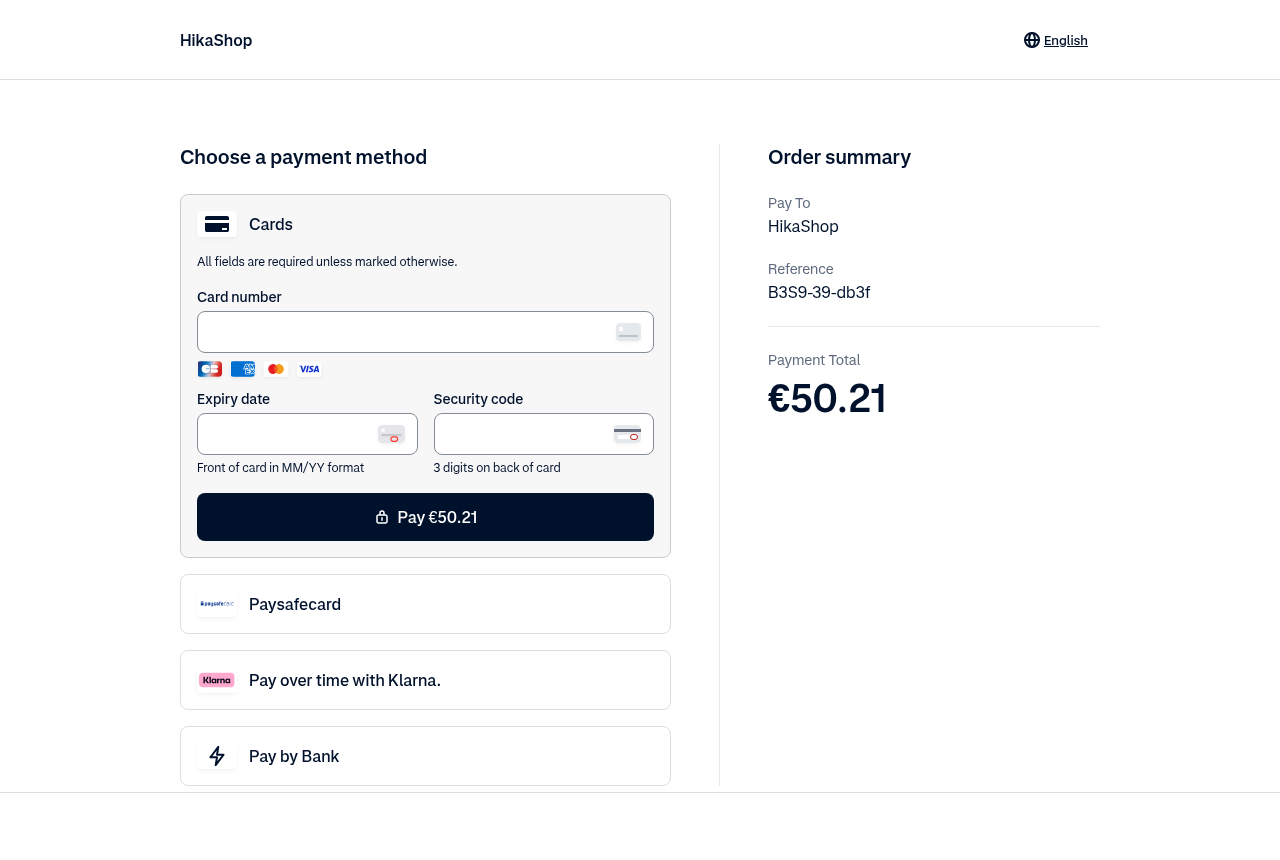
This plugin lets your customers pay with Adyen: cards, wallets and the local payment methods of every country your Adyen account serves (iDEAL, Bancontact, Klarna, SEPA Direct Debit, TWINT, BLIK, Swish, MB WAY, Apple Pay, Google Pay, PayPal...). At the end of the checkout the customer pays on Adyen's secure payment page, and the order is confirmed in your shop as soon as Adyen authorises the payment.
Features- Sends the customer to Adyen's hosted payment page, which shows the payment methods your merchant account offers for the customer's country and the order's currency, 3-D Secure included. No card number is ever typed on your website.
- Confirms the order when Adyen authorises the payment, even when the customer closes the browser before coming back to your shop.
- Checks every notification against the signature Adyen makes with your HMAC key, and ignores the payments of your other shops on the same Adyen account.
- Never takes the status of a payment from the browser: what the customer brings back is checked with Adyen first.
- The same notification delivered twice confirms the order once.
- A refused card leaves the order waiting for its payment: the customer can try again on the payment page, or later from the order in their account.
- Charges the order in its own currency, with Adyen's decimals for each one (no decimals for the yen, three for the Kuwaiti dinar...).
- Sends the order lines, taxes and addresses with the payment, which buy now, pay later methods such as Klarna need.
- Moving an order to the refunded status refunds it on Adyen. Before Adyen has captured the payment, the whole payment is cancelled instead, so you never wait for the capture to refund a customer.
- Writes the refunds, cancellations, captures and chargebacks Adyen tells about in the history of the order, including those you make in your Adyen Customer Area.
- Lets you choose which payment methods are offered or hidden, or leaves the choice to your Adyen account.
- Works with Adyen's test environment, to try the whole flow with Adyen's test cards before going live.
- 1. The customer chooses Adyen at the end of the checkout and is sent to Adyen's payment page.
- 2. They pay with the method of their choice, with 3-D Secure when their bank asks for it.
- 3. Adyen notifies your shop, which checks the notification and confirms the order.
- 4. The customer comes back to the thank you page of your shop.
- 5. Later, moving the order to the refunded status refunds the customer through Adyen.
 Installation
- 1) Have an Adyen account. To try the plugin first, open a free test account at adyen.com/signup: it gives you the test Customer Area (ca-test.adyen.com). A live account (ca-live.adyen.com) is opened with Adyen once your contract is signed; it has its own keys, merchant accounts and webhooks, and you do the steps below again in it.
- 2) In the Customer Area, open Settings, Merchant accounts, and note the code of the merchant account the payments go to (often YourCompanyECOM). If the list is empty, create one there.
- 3) Open Developers, API credentials, and create a new credential of the type "Web service user" (or open the one you have). Keep its default roles, and under Server settings, Authentication, generate an API key and copy it: Adyen shows it only once. No client key or allowed origin is needed.
- 4) Open Pay by Link, Themes, create a theme with your name and logo (or open yours), set it as default, and copy its theme ID.
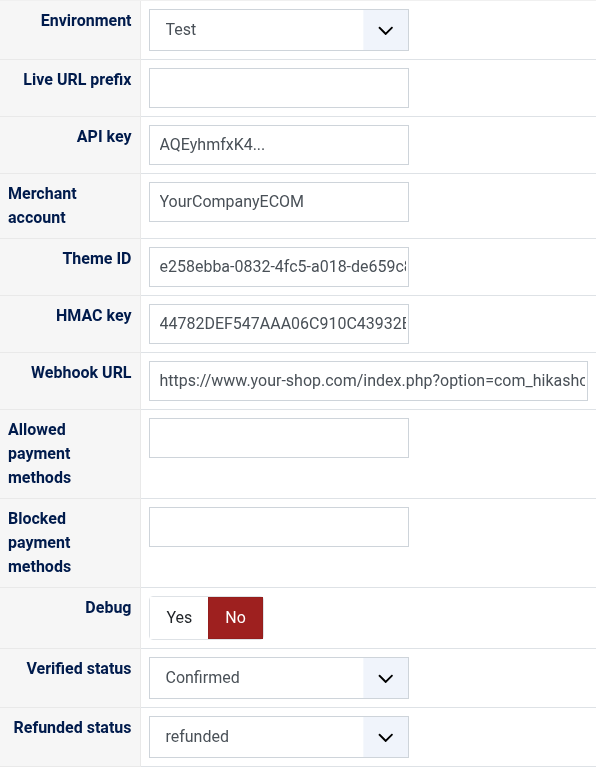
- 5) Install this plugin, then in HikaShop go to System > Payment methods, click "New" and choose Adyen. Fill in the environment, the API key, the merchant account and the theme ID, and save: the settings now show your webhook URL.
- 6) Back in the Customer Area, open Developers, Webhooks, Create new webhook, Standard webhook. Paste the webhook URL of the plugin as the server URL, choose JSON, keep the default events, and add REFUND, REFUND_FAILED, CANCEL_OR_REFUND and CAPTURE. Under Security, generate the HMAC key, copy it into the HMAC key setting of the plugin and save the plugin, then save the webhook. Leave Basic authentication empty.
- 7) In the Customer Area, Account, Payment methods, turn on the methods you want to offer.
- If the Developers menu is missing from your Customer Area, your user lacks the roles to manage API credentials and webhooks: ask the administrator of your Adyen account for the "Manage API credentials" role (step 3) and the "Merchant technical integrator" role (step 6), or for "Merchant admin", which covers both; or have them do these steps.
- Environment: Test takes no real payment and uses the keys of your test Customer Area; Live takes real payments with the keys of your live Customer Area. The checkout shows "(test)" next to the method while it is in Test.
- Live URL prefix: live only. In your live Customer Area, Developers, API URLs: the prefix of your company account, such as 1797a841fbb37ca7-AdyenDemo. You can paste the whole Checkout API URL, the plugin keeps the prefix. Leave it empty in Test; in Live the method does not work without it.
- API key: the API key of step 3.
- Merchant account: the code of the merchant account of step 2. A wrong one makes Adyen answer "Invalid Merchant Account".
- Theme ID: the theme of step 4, which sets the look of the payment page. Empty, the default theme of your account is used.
- HMAC key: the key of your Standard webhook (step 6). The method does not work without it: it is how your shop knows a notification comes from Adyen.
- Webhook URL: the address to paste in the Standard webhook of your Customer Area. It cannot be changed.
- Allowed payment methods: Adyen's payment method types to offer, separated by commas, such as scheme,ideal,paypal (scheme is the cards). Empty, every method of your merchant account is offered for the customer's country and currency.
- Blocked payment methods: Adyen's payment method types never to offer, separated by commas, such as paypal,klarna. Empty, none is hidden.
- Debug: writes every call to Adyen and every notification to the HikaShop payment log file.
- Verified status: the status of an order once Adyen has authorised its payment, usually "confirmed".
- Refunded status: moving an order to this status refunds what is left of its payment on Adyen, usually "refunded".
 Troubleshooting
- "The Adyen payment method is not configured": the API key, the merchant account or the HMAC key is empty (or the live URL prefix, in Live). A method kept from the old Adyen plugins shows it too: fill in the new settings.
- "The payment could not be started (901 Invalid Merchant Account)": the merchant account is not one of the API key's, or the key is a test key and the environment is Live (or the reverse).
- "The payment could not be started" with another message: Adyen refused the payment, for instance for a currency your account does not take. Turn the debug on to see Adyen's whole answer in the payment log.
- The orders stay "created" although the customers paid: Adyen's notifications do not reach your shop or are refused. Check the webhook URL and the HMAC key in your Customer Area (Developers, Webhooks, where Adyen also lists the failed deliveries), and that your site is reachable from the internet.
- "Adyen has not captured this payment yet": your merchant account captures the payments some days after they are authorised (Settings, Account settings, Capture Delay in the Customer Area). Until then only the whole payment can be refunded, which cancels it. With a manual capture, capture the payment in the Customer Area before a partial refund.
- A refund in the history marked "failed" was refused by Adyen; the history gives Adyen's reason.
Use
- Compatible with all the editions of HikaShop
- Compatible with Joomla and WordPress
- Requires an Adyen account (a free test account to try it)
- Requires the PHP cURL extension
- Requires a website reachable from the internet so that Adyen can notify it of the payments
- Replaces the old Adyen plugins, which used Adyen's Hosted Payment Pages, now closed by Adyen
- No limit of time
- No limit of use
Changelog
1.0.0 on the 8th of October 2026
- First version, on Adyen's Hosted Checkout.
€ 40,00
The add to cart button will appear once you select the values above
- Type
- Payment plugin
Access to updates included for 4 years
A tax rate (between 17% and 27% based on your country) will be added if your address is in the European Union and that you don't provide a valid VAT number or if your address is in France as per the European Union law.