
BTCPay Server
This plugin lets your customers pay in Bitcoin, on chain or with Lightning, on the payment page of your own BTCPay Server. BTCPay Server is free, open source software that you run yourself or rent from a host: there is no payment company between you and your customers, no account to have approved, no processing fee, and the coins go straight to your own wallet.
Features- Sends the customer, at the end of the checkout, to the payment page of your BTCPay Server, priced in the currency of the order (euros, dollars and the other currencies your server can convert).
- The coins are paid to the wallet of your store: you keep them. There is no conversion to euros or dollars, so the price risk and the tax treatment of the bitcoin are yours.
- Confirms the order on its own when BTCPay Server tells it the invoice is settled, and also when the customer comes back to your shop.
- Puts the order in a "processing" status while the network confirms the payment, then in your verified status once it is confirmed.
- Cancels the order when its invoice expires before it is paid, or when the payment is not confirmed in time; a payment that still arrives after the invoice expired confirms the order, and its history says so.
- Creates the webhook of your store in BTCPay Server when you save the settings, if your API key allows it, so you have nothing to copy by hand.
- Every notification is checked: it must be signed with the secret of your webhook, and the invoice is always read back from your BTCPay Server, with its amount and currency, before the order changes. A copy of your shop (a staging site) using the same store does not take the orders of the real one.
- The history of the order shows the BTCPay invoice, the amount paid and the payment method, and whether the invoice was marked paid by hand in BTCPay Server.
- Lets you set how long the customer has to pay and how many network confirmations a payment needs, or keep the settings of your store.
 How it works
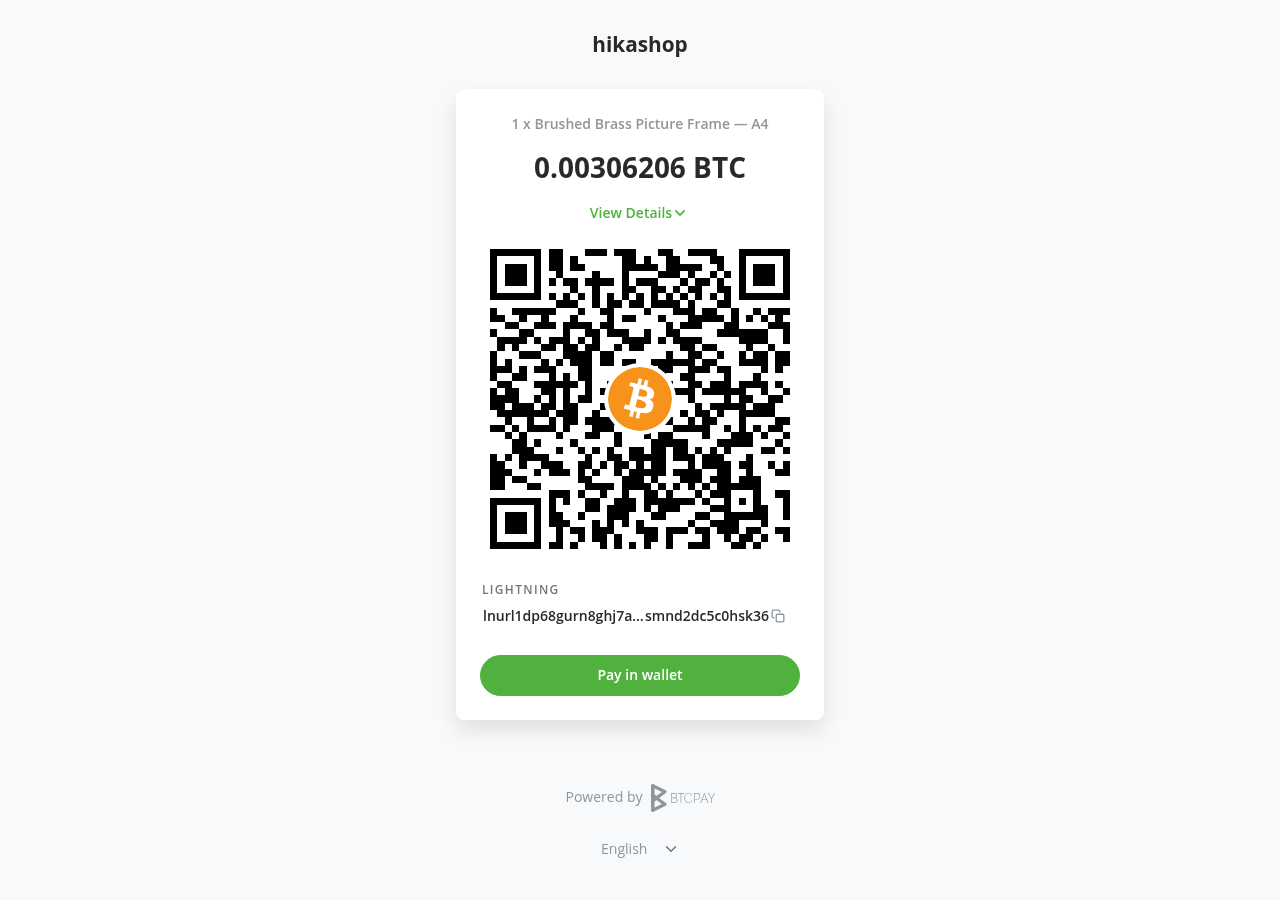
- 1. The customer chooses "Bitcoin (BTCPay Server)" at the checkout and confirms the order.
- 2. The plugin creates the invoice on your BTCPay Server and sends the customer to its payment page.
- 3. The customer pays from their wallet, by scanning the QR code or with the "Pay in wallet" button.
- 4. BTCPay Server notifies your shop: the order goes to the processing status, then to the verified status once the payment is confirmed, and the customer gets the usual confirmation email.
- 5. The customer comes back to the thank you page of your shop.
- 1) Have a BTCPay Server with a store whose wallet is set up: your own server, or a store at a BTCPay Server host. Your server must be reachable over https.
- 2) In BTCPay Server, open your store, Settings, General, and note its Store ID.
- 3) Open your account (Account, Manage Account), API Keys, Generate Key, and give the key, for this store, the rights to view invoices, to create invoices and to modify the webhooks of the store. Copy the key.
- 4) Install this plugin with the Joomla extension manager and enable it.
- 5) In HikaShop, go to System > Payment methods, click New and choose the BTCPay Server plugin.
- 6) Fill in the server URL, the Store ID and the API key, publish the method and save: the plugin checks the key and creates the webhook of your store.
- 7) If your key may not modify webhooks, create the webhook by hand in BTCPay Server (your store, Settings, Webhooks, Create Webhook), with the Webhook URL the plugin shows as its Payload URL, and paste its secret in the Webhook secret setting.
 Configuration
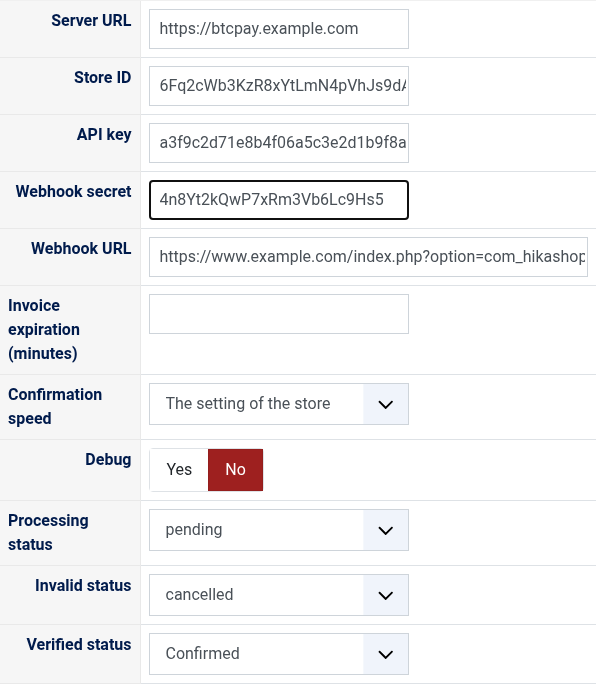
- Server URL: the address of your BTCPay Server, as you open it in your browser (for example https://btcpay.example.com). It must start with https://.
- Store ID: the Store ID of your store, in its Settings, General.
- API key: the key of step 3. A key that may not read the invoices of the store is refused when you save, with the reason BTCPay Server gives.
- Webhook secret: filled in on its own when the plugin creates the webhook. Fill it in yourself only for a webhook you created by hand. Emptied and saved again, the webhook gets a new secret.
- Webhook URL: the address BTCPay Server sends its notifications to, shown for a webhook made by hand. It cannot be changed.
- Invoice expiration (minutes): how long the customer has to pay once the payment page is shown. Empty: the setting of your store (15 minutes unless you changed it).
- Confirmation speed: how many network confirmations an on chain payment needs before the order is confirmed, from none (fast, with the risk of a double spend) to 6. Lightning payments are confirmed at once. Empty: the setting of your store.
- Debug: writes every call to BTCPay Server and every notification to the payment log of HikaShop.
- Processing status: the status of an order paid and waiting for the network's confirmation, "pending" by default.
- Invalid status: the status of an order whose invoice expired or was not paid in time, "cancelled" by default.
- Verified status: the status of a paid order, "confirmed" by default.
- "BTCPay Server refused the API key for this store": check the Store ID, and that the key has the rights of step 3 for this store.
- "The API key may not create the webhook": give the key the right to modify the webhooks of the store and save again, or create the webhook by hand as in step 7.
- "The payment could not be started" at the checkout, with BTCPay Server's reason: often a store with no wallet set up, or a currency the rate source of your store cannot convert (change the rate source in the store's settings, or offer this method only in the currencies it converts).
- Orders stay unpaid although the payment went through: check that the webhook of your store is enabled and that its deliveries in BTCPay Server (Settings, Webhooks) answer 200. BTCPay Server 2.4.5 and later sends no webhook to a shop on a local or private network address unless its administrator allows it.
- A partial payment leaves the order unpaid when the invoice expires: refund it from the invoice in BTCPay Server.
- Refunds are made from the invoice in BTCPay Server, not from HikaShop.
Use
- Compatible with all the editions of HikaShop
- Requires a BTCPay Server (Greenfield API, any recent version) reachable over https, with a store whose wallet is set up
- Requires a shop reachable from your BTCPay Server, so that it can send its notifications
- Requires the PHP cURL extension
- Compatible with Joomla and WordPress
- No limit of time
- No limit of use
Changelog
1.0.0 on the 10th of October 2026
- First version.
€ 40,00
The add to cart button will appear once you select the values above
- Type
- Payment plugin
Access to updates included for 4 years
A tax rate (between 17% and 27% based on your country) will be added if your address is in the European Union and that you don't provide a valid VAT number or if your address is in France as per the European Union law.