
ECPay
This plugin lets your customers in Taiwan pay on the payment page of ECPay (綠界科技), one of the two payment services Taiwanese shops use: cards, ATM transfers, convenience store codes and barcodes (7-ELEVEN, FamilyMart, Hi-Life, OK mart) and the other methods of your ECPay account, such as Apple Pay, TWQR and WeChat Pay, in New Taiwan dollars.
Features- Sends the customer, at the end of the checkout, to the payment page of ECPay, with every method of your account, or with one method only. Create several ECPay payment methods in HikaShop to show cards, ATM and convenience store payments as separate choices at your checkout, as ECPay advises.
- Confirms the order on its own when ECPay tells your shop the payment is made, and also when the customer comes back from a card payment, even if ECPay could not reach your shop.
- For ATM transfers, convenience store codes and barcodes, which the customer pays later: puts the order in a pending status and shows the account, code or barcodes to pay, with their deadline, on the order page and in the order email. The order is confirmed when the customer pays.
- Refunds or cancels a card payment at ECPay when you give the order the refunded status.
- A "Check the payment at ECPay" button on the order in your backend asks ECPay where the payment stands, and confirms the order when it is paid.
- Every message from ECPay is checked with your HashKey and HashIV, and its amount and order number against what was sent, before the order changes. The simulated payments of ECPay's back office never confirm an order.
- ECPay only takes whole New Taiwan dollars: an order total with cents is rounded up to the dollar, and the order history says so.
- The payment page is shown in the language of the order (Traditional or Simplified Chinese, Japanese, Korean, English), or in the one you choose.
- Works with ECPay's test environment and its published test merchant, so you can try everything before going live.
- In English, French and Traditional Chinese.
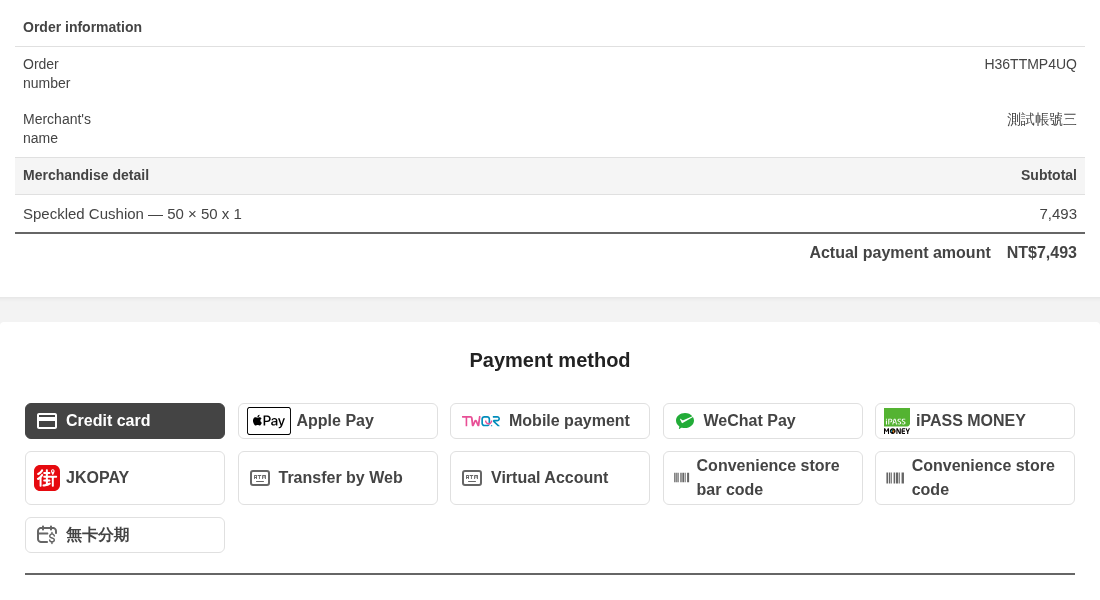 How it works
- 1. The customer chooses ECPay at the checkout of an order in New Taiwan dollars and confirms the order.
- 2. The customer is sent to the payment page of ECPay and chooses how to pay.
- 3. By card: the customer pays and comes back to the thank you page of your shop, and the order is confirmed.
- 4. By ATM, convenience store code or barcode: ECPay gives the customer an account, a code or barcodes to pay; the order goes to the pending status and the customer finds what to pay on the order page and in the email.
- 5. When the customer pays at the ATM or the store, ECPay tells your shop and the order is confirmed, with the usual confirmation email.
 Installation
- 1) Have an ECPay merchant account (特店). For tests, the test merchant ECPay publishes on its developer site (merchant ID 3002607, with its HashKey and HashIV) works without an account.
- 2) In the back office of ECPay, open 系統開發管理, 系統介接設定, and note your merchant ID, HashKey and HashIV.
- 3) Install this plugin with the Joomla extension manager and enable it.
- 4) In HikaShop, make sure your shop sells in New Taiwan dollars (TWD): the method only shows for orders in TWD.
- 5) In HikaShop, go to System > Payment methods, click New and choose the ECPay plugin.
- 6) Choose the environment, fill in the merchant ID, the HashKey and the HashIV, choose the payment methods, publish the method and save.
- 7) Nothing is needed in ECPay's back office for the notifications: your shop sends their address with each order. Your shop must be reachable from the internet, on port 80 or 443.
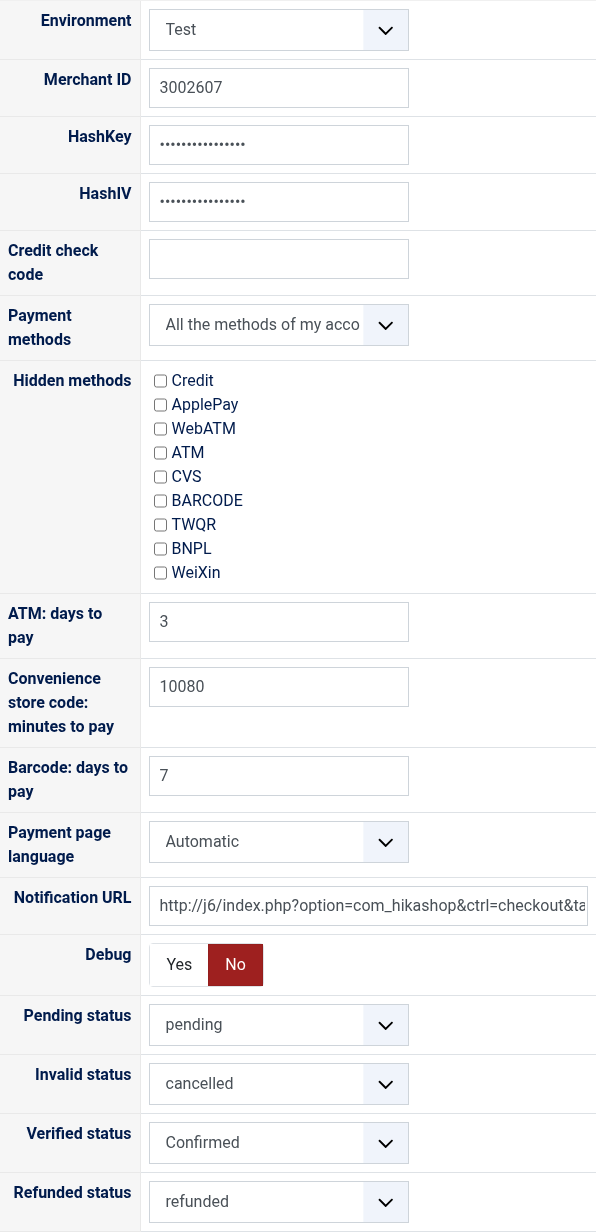 Configuration
- Environment: Test sends the payments to ECPay's test environment, where nothing is charged; Live to the real one. Use the merchant ID, HashKey and HashIV of the same environment.
- Merchant ID: your 特店編號 at ECPay, digits only.
- HashKey and HashIV: the keys of step 2, which sign every message between your shop and ECPay.
- Credit check code: optional, for card refunds: the 商家檢查碼 in ECPay's back office, 信用卡收單, 信用卡授權資訊. With it, the plugin reads the state of the card payment at the bank and cancels or refunds it the right way; without it, it tries a cancellation, then a refund.
- Payment methods: "All the methods of my account" lets the customer choose on ECPay's page; a single method sends the customer straight to it.
- Hidden methods: with all the methods, the ones ECPay's page must not offer.
- ATM: days to pay: from 1 to 60. Empty: 3, ECPay's default.
- Convenience store code: minutes to pay: from 1 to 43200 (30 days), used when the method is the convenience store code. Empty: 10080 (7 days), ECPay's default.
- Barcode: days to pay: from 1 to 30, used when the method is the barcode. Empty: 7, ECPay's default.
- Payment page language: automatic (the language of the order) or always the one chosen.
- Notification URL: the address ECPay sends its notifications to, shown for information. It cannot be changed.
- Debug: writes every order sent, every notification and every call to ECPay to the payment log of HikaShop.
- Pending status: the status of an order waiting for its ATM, convenience store or barcode payment, "pending" by default.
- Invalid status: the status of an order whose payment failed, "cancelled" by default.
- Verified status: the status of a paid order, "confirmed" by default.
- Refunded status: giving an order paid by card this status cancels or refunds its payment at ECPay, "refunded" by default.
- ECPay's page says "CheckMacValue Error" (10200073): the HashKey or the HashIV does not match the merchant ID, or they belong to the other environment.
- The method does not show at the checkout: the cart is not in New Taiwan dollars, or the merchant ID, HashKey or HashIV is missing.
- Orders stay unpaid although the customer paid: ECPay cannot reach your shop (a local address, a firewall, a port other than 80 or 443). Card payments are still confirmed when the customer comes back; for the others, use the "Check the payment at ECPay" button on the order.
- "The status was not changed: ECPay did not refund the card payment": ECPay's answers follow; a refund is not possible on ECPay's test environment, and the credit check code helps pick the right action.
- Payments by ATM, convenience store or barcode are refunded from ECPay's back office, not from HikaShop: the plugin tells you so when you give such an order the refunded status.
- ECPay blocks a shop that asks it too many questions in a short time for 30 minutes: use the check button only when needed.
Use
- Compatible with all the editions of HikaShop
- Requires an ECPay merchant account (a company or an individual in Taiwan) for real payments
- Requires a shop selling in New Taiwan dollars (TWD)
- Requires a shop reachable from the internet, so that ECPay can send its notifications
- Requires the PHP cURL extension
- Compatible with Joomla and WordPress
- No limit of time
- No limit of use
Changelog
1.0.0 on the 10th of October 2026
- First version.
€ 40,00
The add to cart button will appear once you select the values above
- Type
- Payment plugin
Access to updates included for 4 years
A tax rate (between 17% and 27% based on your country) will be added if your address is in the European Union and that you don't provide a valid VAT number or if your address is in France as per the European Union law.