
Xendit
This plugin lets your customers in the Philippines, Indonesia, Malaysia, Thailand, Vietnam and Singapore pay on the payment page of Xendit: by card, with GCash, Maya and the other e-wallets, with a QR code, by bank virtual account or at a retail counter such as 7-Eleven or Cebuana. One Xendit account covers the methods of all these countries.
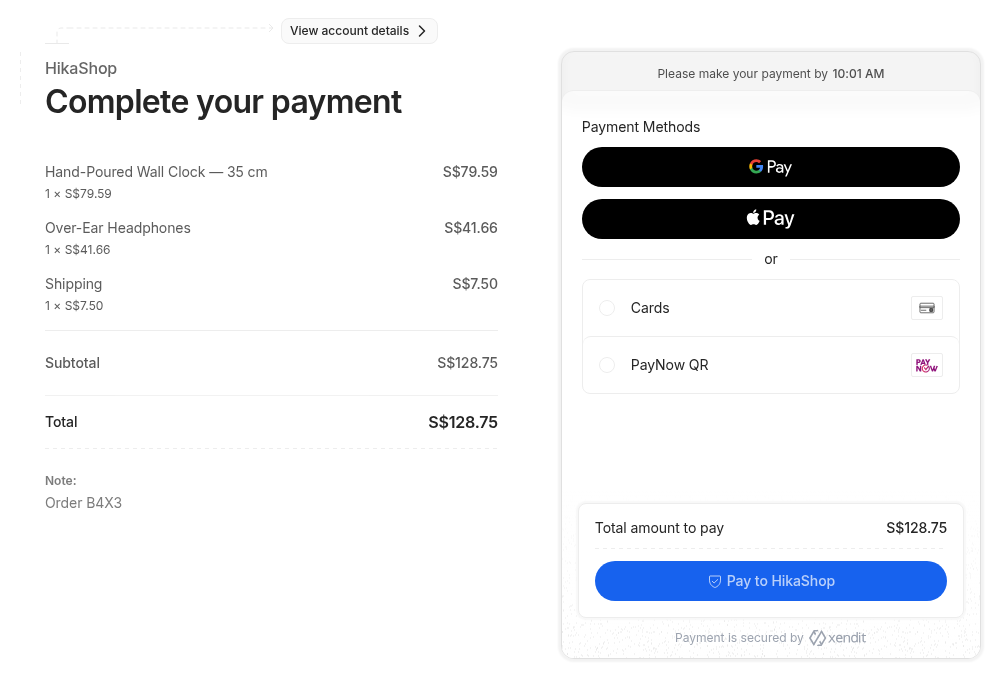
Features- Sends the customer to the Xendit payment page at the end of the checkout, with the amount and the products of the order.
- Offers the payment channels you tick, or every channel activated on your Xendit account for the currency of the order.
- Works with orders in Philippine pesos, Indonesian rupiah, Malaysian ringgit, Thai baht, Vietnamese dong, Singapore dollars and US dollars.
- Confirms the order when Xendit tells your shop the payment is made, including the payments made later at a counter, by virtual account or with a QR code.
- Never trusts what comes in: each webhook must carry your verification token, and the payment is always read back from Xendit, with its amount and currency checked, before the order changes.
- Cancels the order when the payment page expires without a payment.
- Refunds the payment on Xendit when you move the order to the refunded status, and takes partial refunds from the extensions that make them.
- Ends the Xendit payment page of an unpaid order when you cancel the order, so it can no longer be paid.
- Confirms each order once, even when Xendit sends several notifications for the same payment at the same time.
- Runs in test mode with a test key of Xendit, so you can try the whole checkout before taking real payments.
- The customer chooses Xendit at the checkout and confirms the order.
- The shop sends them to the Xendit payment page, where they choose how to pay.
- Once they have paid, Xendit sends its webhook to your shop, which confirms the order. On an HTTPS site the customer comes back to your shop's thank you page.
- A customer who pays later (a QR code, a counter code, a virtual account) keeps the order waiting until the payment is made; if the page expires first, the order is cancelled.
 Installation
- Open a Xendit account on xendit.co and activate the payment channels you want in its dashboard.
- In the Xendit dashboard, Settings, Developers, API Keys, create a secret key with the Write permission of Money-in (a test key first, then a live one once Xendit has verified your business).
- Install the plugin with the extension manager of your site and make sure it is enabled.
- In HikaShop, System, Payment methods, click New and choose Xendit.
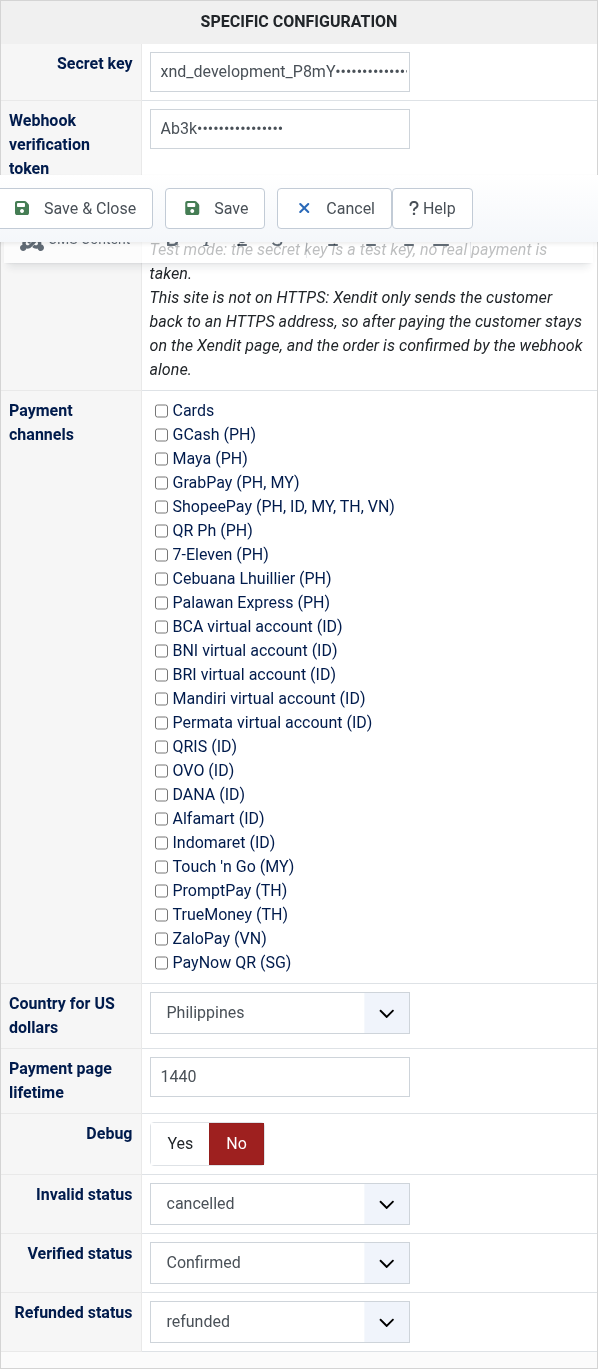
- Paste the secret key and the webhook verification token (in the Xendit dashboard, Settings, Webhooks), and save.
- Copy the Webhook URL shown in the settings and paste it in the Xendit dashboard, Settings, Webhooks, for Payment Session and for Payments v3.
- Secret key: the secret key of your Xendit account. A key starting with xnd_development_ runs in test mode, one starting with xnd_production_ takes real payments.
- Webhook verification token: the token of the Webhooks page of your Xendit dashboard. Without it the webhooks of Xendit are refused and the orders are not confirmed.
- Webhook URL: the address to paste in the Xendit dashboard, Settings, Webhooks. Not a setting to change.
- Payment channels: the channels offered on the payment page. Leave them all unticked to offer every channel your Xendit account has for the currency of the order.
- Country for US dollars: Xendit needs a country with each payment; for orders in US dollars, the country of your Xendit account.
- Payment page lifetime: how many minutes the customer has to pay, counter codes and virtual accounts included. One day when empty.
- Debug: writes the calls to Xendit in the payment log of HikaShop.
- Invalid status: the status of an order whose payment page expired or was cancelled.
- Verified status: the status of a paid order.
- Refunded status: moving an order to this status refunds what is left of its payment on Xendit.
 Troubleshooting
- "No available channels found" or "Channel(s) ... are not available": the channel is not activated on your Xendit account, or does not work with the currency of the order. Activate it in the Xendit dashboard, or untick it in the settings.
- The order stays unconfirmed after the payment: the Webhook URL is not set in the Xendit dashboard, or the verification token in the settings is not the one of your account. The payment log of HikaShop says when a webhook was refused.
- The customer stays on the Xendit page after paying: Xendit only sends customers back to an HTTPS site. The order is still confirmed by the webhook.
- The refund is refused: the order keeps its status and the message of Xendit is shown. Some channels cannot be refunded through Xendit (virtual accounts, counters, online banking), some only in full, and a payment already refunded in part in the Xendit dashboard cannot be refunded in full again; refund what is left in the Xendit dashboard or another way.
- Compatible with all the editions of HikaShop, on Joomla and WordPress
- Requires a Xendit account
- Requires orders in PHP, IDR, MYR, THB, VND, SGD or USD
- Requires a website reachable from the internet so that Xendit can send it its webhooks
- Requires the PHP cURL extension
- No limit of time
- No limit of use
Changelog
1.0.0 on the 13th of October 2026
- First version.
€ 40,00
The add to cart button will appear once you select the values above
- Type
- Payment plugin
Access to updates included for 4 years
A tax rate (between 17% and 27% based on your country) will be added if your address is in the European Union and that you don't provide a valid VAT number or if your address is in France as per the European Union law.