
PayPlug (OAuth2)
This plugin adds PayPlug payments to your HikaShop store with the OAuth2 clients the PayPlug portal now gives instead of the old secret keys. At the end of the checkout your customer is sent to the PayPlug payment page, pays by card, and comes back to your shop, where the order is confirmed.
Features- Card payments (CB, Visa, Mastercard) on the PayPlug payment page, with 3-D Secure handled by PayPlug, so your shop never sees a card number.
- American Express, Bancontact, iDEAL, MyBank, Satispay and Wero too, when they are in your PayPlug offer: make one HikaShop payment method for each, so your customers see its own name and logo at the checkout.
- Payment in 3 or 4 instalments with Oney, with or without fees, and with Scalapay. The cart is sent as Oney and Scalapay ask, and an Oney payment under review waits until Oney accepts it, then the order is confirmed.
- A Connect with PayPlug button: log in to the PayPlug portal from the settings and the clients of the test and live modes are made and filled in for you. The client ID and secret made in the portal can also be typed in, and an account which has no client yet can still use its old secret key.
- The billing and shipping addresses of the order are sent to PayPlug, as the banks ask for 3-D Secure.
- The order is confirmed both when the customer comes back and when PayPlug sends its notification, whichever comes first, and once only.
- The payment is always read back from PayPlug and checked against the order, its amount and its currency, never taken from the notification or from the browser, so a payment cannot be faked.
- Moving an order to the refunded status refunds what is left of its payment on PayPlug; a refund PayPlug refuses leaves the status of the order unchanged. Refunds made in the PayPlug portal are added to the history of the order, which moves to the refunded status once all is refunded.
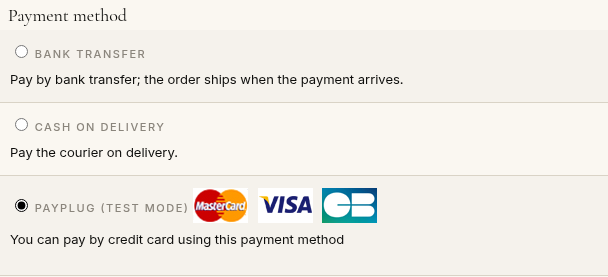
- A test mode runs the whole checkout on PayPlug's test mode, with its test cards. The payment method then shows "test mode" at the checkout.
 How it works
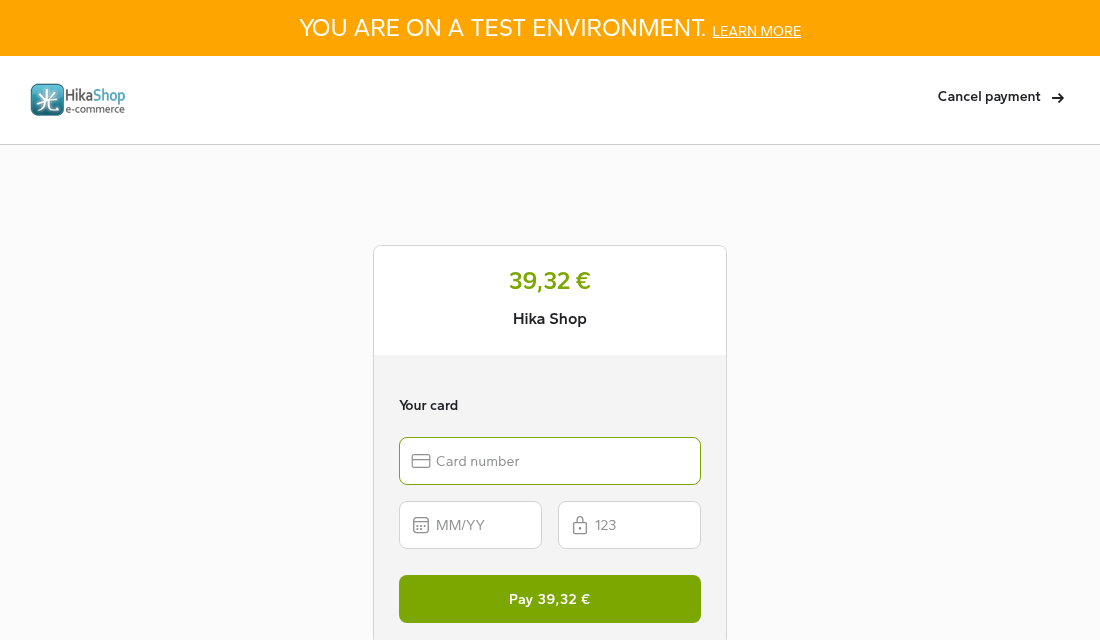
- 1. The customer confirms the order and is sent to the PayPlug payment page.
- 2. They pay by card; PayPlug handles 3-D Secure.
- 3. They come back to your shop, which asks PayPlug whether the order is paid and confirms it.
- 4. PayPlug also notifies your shop, which confirms the order if the customer did not come back.
Use
- Compatible with all the editions of HikaShop
- Requires a PayPlug account; payments in euros only
- Requires the PHP cURL and OpenSSL extensions
- Requires a website reachable from the internet so PayPlug can send it its notifications
- In English and French
- Compatible with PHP 7.4 minimum
- Compatible with Joomla and WordPress
- No limit of time
- No limit of use
Changelog
1.0.0
- First version.
Free


The add to cart button will appear once you select the values above
- Type
- Payment plugin