
DHL Paket shipping plugin
This plugin connects your shop to DHL Paket, Germany's parcel service, through your DHL business customer contract. You print the DHL labels of your orders from HikaShop, your customers can have their parcel delivered to a Packstation or a Postfiliale, and you hand them return labels and tracking links, without typing an address into DHL's portal.
Features- One shipping method per DHL product you offer: DHL Paket, DHL Kleinpaket, DHL Paket International, DHL Europaket and Warenpost International, each with its own price from HikaShop's usual shipping prices (fixed, by weight, by zone...).
- Shows each method only where its product goes: the national products in Germany, Europaket in the EU, the international ones abroad.
- Prints the label of an order from its page in the backend, in A4 or on your label printer's format, after checking the address with DHL if you wish, and keeps the PDF on the order.
- Creates the labels of many orders at once from the order listing, or by itself when an order reaches the status you choose.
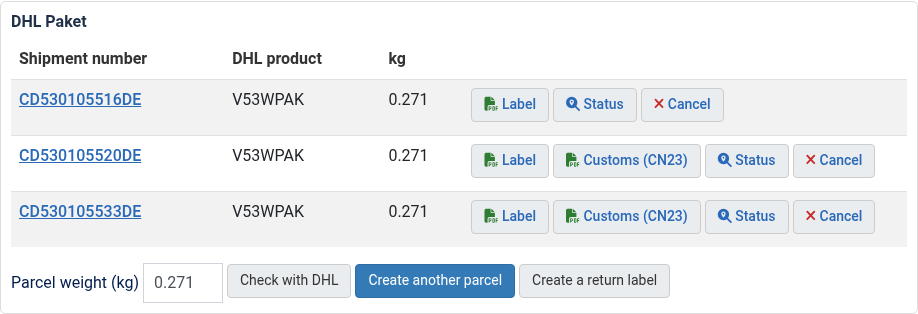
- Cancels a label, and adds another parcel with its own weight for an order too big for one.
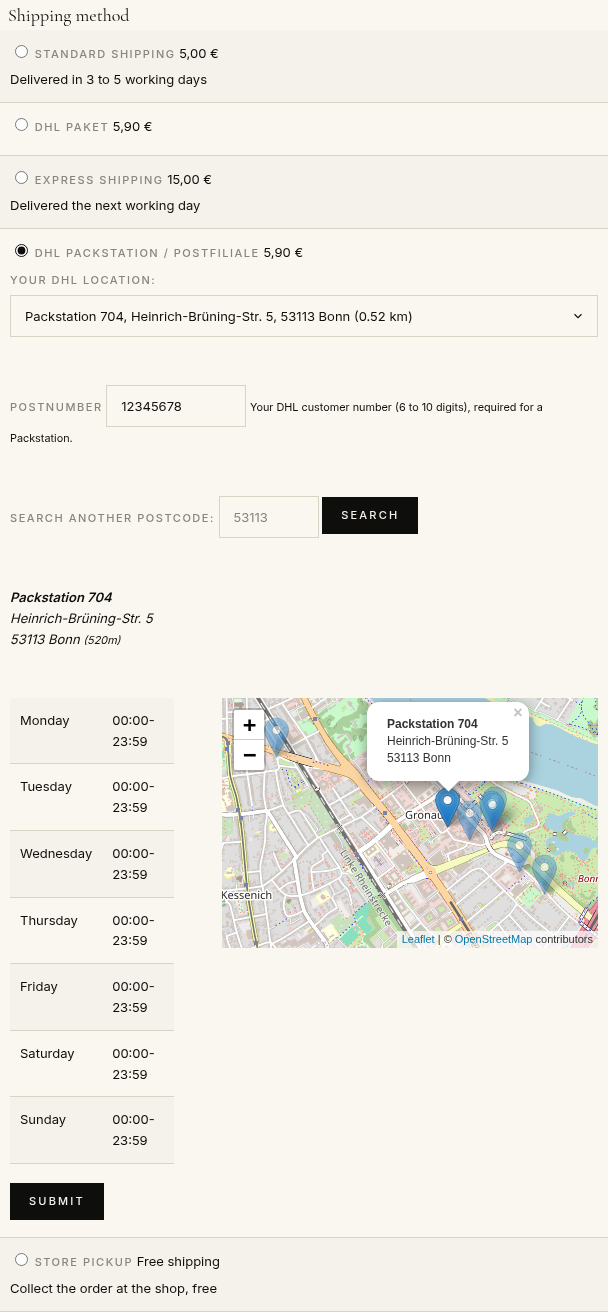
- Lets your customers choose a Packstation or a Postfiliale at checkout, on a list and a map of the nearest ones, with their DHL PostNumber.
- DHL's services: cash on delivery for the payment methods you choose, Ident-Check, visual age check (16 or 18), delivery to the named person only, signature, no delivery to neighbours, GoGreen Plus, Premium abroad.
- Fills the customs declaration (CN23) of parcels leaving the EU from your products: their HS code and country of origin.
- Creates return labels, as a PDF or a QR code to show at a Postfiliale, and sends them to your customer by email; your customers can also get theirs from their order page. A DHL Retoure label can come with each national label.
- Puts the tracking link of the parcel on the order, the customer's order page and the order emails, and shows DHL's latest status of a parcel on request.
- Closes the day's shipments (end of day manifest) from the method's settings.
- Shows in the method's settings whether DHL answers and accepts your credentials, and explains DHL's refusals in DHL's own words (the field and the reason).
 How it works
- 1. Your customer chooses a DHL Paket method at checkout, and a Packstation or Postfiliale if it is one.
- 2. You open the order in the backend and press "Create the label", or the label is made when the order reaches your status.
- 3. DHL answers with the shipment number and the label, kept on the order; you print it and stick it on the parcel.
- 4. Your customer gets the tracking link in their order page and emails, and a return label when needed.
- 5. At the end of the day you close the day's shipments, if your contract asks for it.
Use
- Compatible with all the editions of HikaShop
- Compatible with Joomla and WordPress
- Requires a DHL Paket business customer contract in Germany and an app on developer.dhl.com
- Requires the PHP cURL extension
- Available in English, German and French
- No limit of time
- No limit of use
Changelog
1.0.0 on the 28th of October 2026
- First version.
€ 40,00
The add to cart button will appear once you select the values above
- Type
- Shipping
Access to updates included for 4 years
A tax rate (between 17% and 27% based on your country) will be added if your address is in the European Union and that you don't provide a valid VAT number or if your address is in France as per the European Union law.