
Coinbase Business
This plugin lets your customers pay in USDC or USDT, from any wallet, on the payment page of Coinbase Business, the business account of Coinbase. The order is priced in your currency, Coinbase converts it to USDC when the payment page is made, and the money lands in USDC in your Coinbase Business account, from where you can convert it to dollars. Coinbase Business is open to companies of the United States and Singapore.
Features- Sends the customer, at the end of the checkout, to the payment page of Coinbase, priced in the currency of the order: US dollars, euros, pounds, Singapore dollars, or USDC.
- The customer pays in USDC from any wallet on Base, Ethereum, Polygon, Optimism, Arbitrum or Solana, or in USDT on Ethereum.
- You are credited in USDC in your Coinbase Business account, at the rate of the moment the payment page was made, less the fee of Coinbase.
- Confirms the order on its own when Coinbase tells your shop the payment is completed, and puts it in a "confirming" status while the payment is being confirmed.
- Cancels the order when its payment page expires or the payment fails; a paid order is never moved back.
- Refunds from HikaShop: a refund made on the order, or the order moved to the refunded status, sends the money back to the address the customer paid from. The history of the order says when each refund is done or if it failed.
- Sets up the notification of Coinbase for your shop when you save the settings, so you have no secret to copy by hand.
- Every notification is checked: it must be signed with the secret of your notification, and the payment is always read back from Coinbase, with its amount and currency, before the order changes. A copy of your shop (a staging site) using the same account does not take the orders of the real one.
- The history of the order shows the payment's transaction, the amount in USDC, the fee of Coinbase and what you received.
- A sandbox setting runs the whole flow on the sandbox of Coinbase, with testnet USDC.
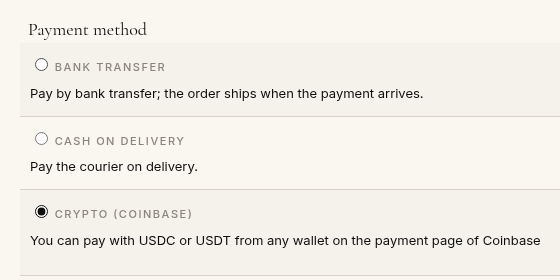
- 1. The customer chooses "Crypto (Coinbase)" at the checkout and confirms the order.
- 2. The plugin creates the payment page on Coinbase for the amount of the order and sends the customer to it.
- 3. The customer pays from their wallet, and Coinbase sends them back to your shop.
- 4. Coinbase notifies your shop: the order goes to the confirming status, then to your verified status once the payment is completed, and the customer gets the usual confirmation email.
 Installation
- 1) Open a Coinbase Business account for your company at coinbase.com/business, and complete its business verification.
- 2) Sign in to the Coinbase Developer Platform (portal.cdp.coinbase.com) with the same account, open API Keys, Secret API Keys, and create a key with the View permission only: it is enough to take payments and refund them, and cannot move your funds. Leave its IP allowlist empty, or put the address of your server in it. Copy its id and its secret, shown only once.
- 3) Install this plugin with the Joomla extension manager and enable it.
- 4) In HikaShop, go to System > Payment methods, click New and choose the Coinbase Business plugin.
- 5) Paste the API key id and secret, publish the method and save: the plugin checks the key and sets up the notification of Coinbase for your shop.
- 6) If the notification could not be set up, the message shows the command to run with the CDP command line of Coinbase; paste the secret it answers in the Notification secret setting and save.
 Configuration
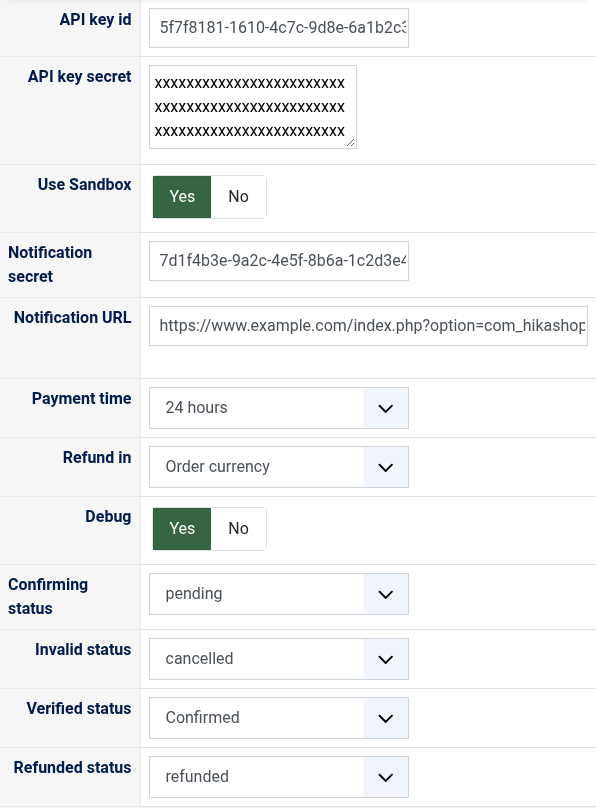
- API key id: the id of the key of step 2, a UUID, or organizations/.../apiKeys/... for an ECDSA key.
- API key secret: the secret of the same key, a line of base64 for an Ed25519 key (the default) or a block starting with -----BEGIN EC PRIVATE KEY----- for an ECDSA key. A key Coinbase refuses is reported when you save.
- Use Sandbox: Yes to take payments of testnet USDC on the sandbox of Coinbase, with the same key. No for real payments.
- Notification secret: filled in on its own when you save. Fill it in yourself only for a notification made with the command line. Emptied and saved again, it is looked up again.
- Notification URL: the address Coinbase sends its notifications to, shown for a notification made by hand. It cannot be changed.
- Payment time: how long the customer has to pay on the page of Coinbase, from 1 hour to 7 days, 24 hours by default.
- Refund in: the currency of a partial refund. In the order currency, it is converted at the rate of the day of the refund, so it may cost you more or less USDC than its share of what you received; in USDC, it sends back that share of the USDC you received. A refund of the whole order, or of what is left of it, is always made in USDC.
- Debug: writes every call to Coinbase and every notification to the payment log of HikaShop.
- Confirming status: the status of an order whose payment was sent and is being confirmed, "pending" by default.
- Invalid status: the status of an order whose payment failed or whose payment page expired, "cancelled" by default.
- Verified status: the status of a paid order, "confirmed" by default.
- Refunded status: the status of an order refunded in full, "refunded" by default. Moving an order to it refunds what is left of its payment.
- "Coinbase refused the API key": check its id and secret, that it was made in the live mode of the portal (or in its sandbox mode with the Sandbox setting on), and that the clock of your server is on time: each request is signed and lives two minutes.
- "This API key has no access to the checkouts of Coinbase Business": make the key while signed in with the account of your Coinbase Business, with the View permission.
- "The notification of Coinbase could not be set up": Coinbase only sends notifications to a site it can reach on the internet, over https. Run the command the message shows, or check the address of your site.
- "The payment could not be started" at the checkout, with the reason of Coinbase: often an amount under 0.01 dollar, or a currency Coinbase does not take. Offer this method only in US dollars, euros, pounds, Singapore dollars or USDC.
- Orders stay unpaid although the customer paid: check the Notification secret, and that your site answers its Notification URL without a redirect. The customer's return alone does not confirm a payment Coinbase has not completed yet.
- "Coinbase refused the refund": a refund must be at least 0.01 USDC (0.50 USDC for a partial refund to a payer on Solana) and no more than what is left of the payment.
Use
- Compatible with all the editions of HikaShop
- Requires a verified Coinbase Business account, open to companies of the United States and Singapore
- Requires a site reachable from the internet over https, so that Coinbase can send its notifications and bring the customer back
- Requires the PHP cURL extension, and the sodium extension for Ed25519 keys (in PHP since 7.2)
- Compatible with Joomla and WordPress
- No limit of time
- No limit of use
Changelog
1.0.0 on the 3rd of November 2026
- First version.
Free
The add to cart button will appear once you select the values above
- Type
- Payment plugin