
Recurring orders
This plugin adds recurring order scheduling to HikaShop. Customers can subscribe to products and receive automated deliveries on a flexible schedule: weekly, monthly, or yearly. The subscription can be optional (customer chooses) or forced by the administrator for all orders. Schedules are fully manageable from the frontend by customers and from the backend by administrators.
Checkout configuration- Once installed, you can add a "Recurring schedule" block to your checkout workflow via the checkout configuration. This block allows customers to enable and configure recurring delivery for their order.
- Flexible scheduling: weekly (choose the day of the week), monthly (choose the day of the month), or yearly (choose the month and day). Configurable interval (e.g. every 2 weeks, every 3 months).
- Granular admin configuration: restrict which frequency types are available, lock the interval to a fixed value, force specific delivery days. When a single frequency type is allowed, the dropdown is hidden and the type is applied automatically.
- The delivery day can also be taken from the order itself, so the customer only ticks the recurring box and picks nothing: an order placed on the 20th repeats on the 20th of each month, and a day missing from a shorter month falls on its last day. Handy for subscription services, where a delivery calendar is beside the point.
- Two checkout modes: optional (customer chooses whether to subscribe via a checkbox) or forced (all orders are recurring). A discount banner can be displayed to encourage subscriptions.
- Optional recurring discount: configure a percentage or flat discount automatically applied to recurring orders. The checkout block shows the savings to the customer before they subscribe.
- Start mode options: immediate delivery then scheduled (first order counts as first delivery), next scheduled date only (first delivery on the next computed date), or customer choice (customer picks the start date via a datepicker).
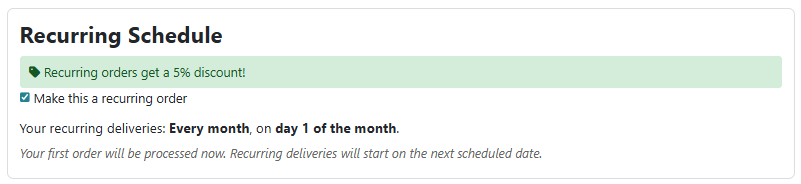
The recurring schedule block on the checkout page, with frequency picker and delivery day selection.
Schedule management- Frontend schedule management page where customers can view their active schedules, upcoming deliveries with product thumbnails, and order history. Accessible from the customer account sidebar.
- Customers can skip specific upcoming deliveries, pause, resume, or cancel their schedule at any time from the frontend.
- Pausing a schedule automatically cancels all pending upcoming orders. Resuming the schedule restores upcoming orders whose delivery date is still in the future.
- Pending recurring orders (upcoming, not yet paid) are automatically hidden from the customer's order listing and account dashboard to avoid confusion.
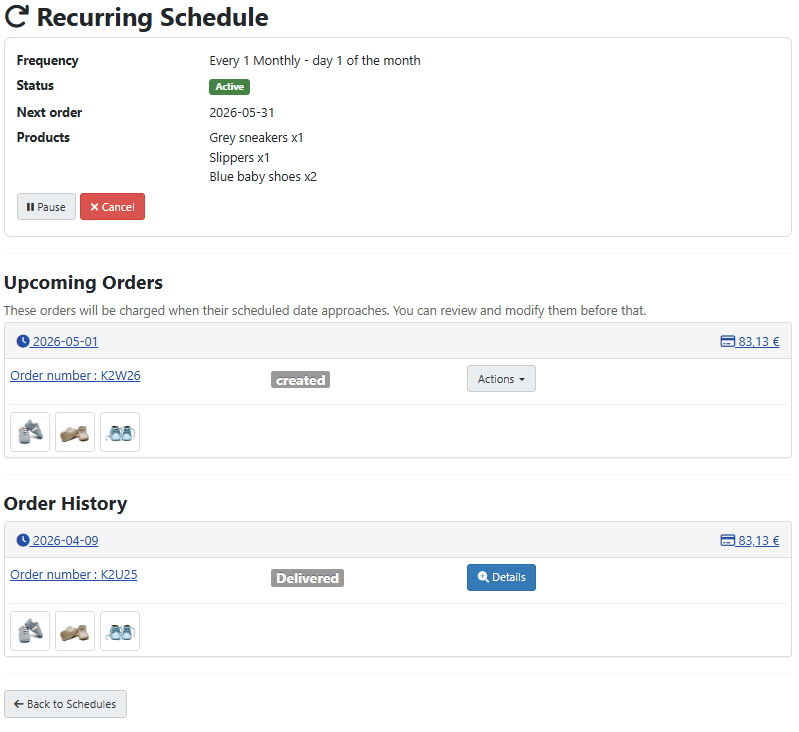
The frontend schedule management page with upcoming deliveries, product thumbnails, and action buttons.
Order processing- Upcoming orders are created in advance (configurable number of days ahead) by cloning the original order, so the customer can review and modify them before they are charged. Product prices are locked in at the time of the initial subscription, so price changes in the catalog do not affect existing schedules.
- Cron-based order processing: a background task runs via HikaShop's cron system, creating new orders when their delivery date approaches (based on the lead time setting) and charging them automatically.
- Stock handling options: backorder (create orders regardless of stock), pause schedule (pause when out of stock), or skip date (skip the delivery and move to the next one).
- Automatic payment via saved payment methods (vault tokens) for payment gateways that support recurring payments (Stripe Checkout, PayPal Checkout since HikaShop 6.4.1, etc.). The plugin triggers the
onOrderAuthorizationRenewevent to charge the saved payment method. - Manual payment fallback: if no vault token is available or the "Allow manual payment" setting is enabled, upcoming orders are created with "manual" payment status for the customer to pay themselves.
- When the recurring option is selected on checkout and manual payment is not allowed, only payment methods that declare the
recurringfeature are displayed, filtering out payment methods that don't support saving payment details. - Payment retry logic: failed payments are retried automatically after a configurable interval, up to a maximum number of retries. After exhausting retries, the schedule is paused and the customer and admin are notified.
- Recurring schedule details displayed on the order edit page with status, frequency, next delivery date, skip dates, and generated orders list.
- A recurring status column and filter dropdown (normal orders, source orders, scheduled orders, upcoming orders) are added to the backend order listing.
- Three email notifications integrated with HikaShop's mail system: new recurring order created, payment failed (sent to customer and admin), and schedule paused. All email templates are editable and can be enabled / disabled in HikaShop's System > Emails.
- Available in English and French.
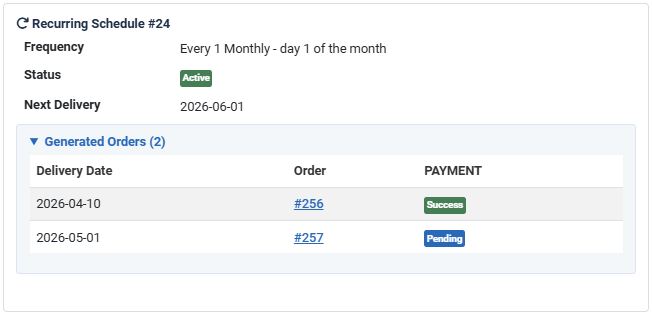
The recurring schedule details on the backend order edit page, showing frequency, status, and generated orders.
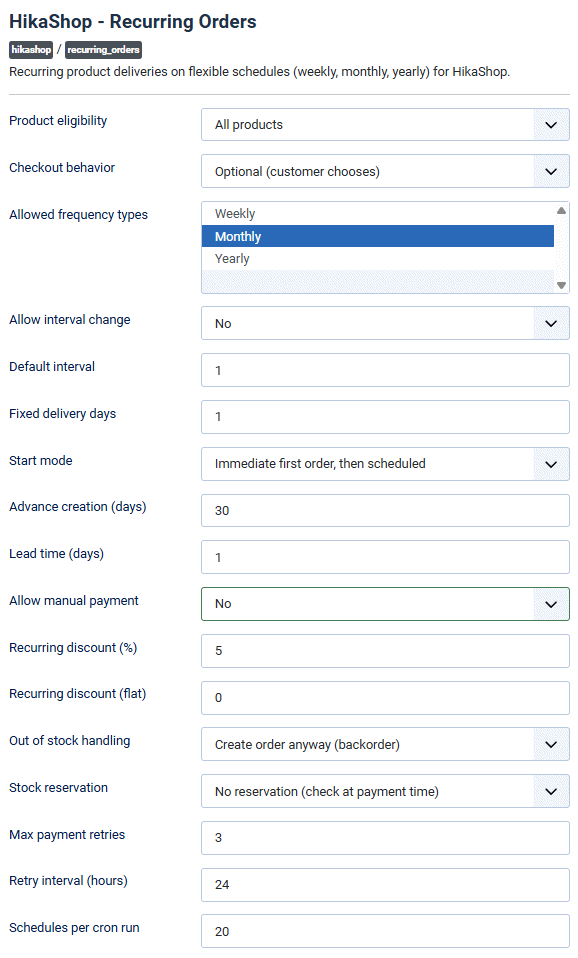
The plugin configuration with scheduling, payment, stock handling, and retry settings.
Installation- 1) Download the plugin on our website via the download link provided to you after the purchase
- 2) Install it on your Joomla / WordPress website (extension manager on Joomla or the "Add plugins" button of System > Plugins on WordPress)
- 3) Enable the plugin in the Joomla Plugin Manager or in HikaShop's System > Plugins on WordPress.
- 4) Go to your checkout workflow configuration and add a "Recurring schedule" block to the checkout steps.
- 5) Configure the plugin settings to match your needs: choose which frequency types to offer, set the checkout mode (optional or forced), configure discounts, and adjust advance order creation days.
- 6) Optionally, install and configure a payment gateway that supports recurring payments (Stripe Checkout, PayPal Checkout, etc) to enable automatic charges for scheduled orders.
- 7) Set up a cron job on your server to trigger HikaShop's cron URL regularly (every 5 minutes recommended). The plugin will process scheduled orders and charge them automatically via the cron.
- HikaShop 5.1.0 or later
- Requires HikaShop Essential or Business.
- Compatible with PHP 7.4 minimum
- No limit of time
- No limit of use
- 30-day money-back guarantee
1.0.2 on the 28th of September 2026
- The payment page of the PayPal Checkout payment plugin now shows the frequency of the subscription and the date of its next charge
1.0.1 on the 27th of August 2026
- Fixed the delivery days chosen on the checkout being lost when the checkout refreshed its blocks, which left the order with the recurring discount but without any schedule
- Fixed a delivery falling on the last day of the advance creation window, or on the end date of the schedule, being skipped
- Fixed the recurring discount being added a second time on the upcoming orders, which showed two discount lines that did not match the order total
- Added a "Delivery day" setting to take the day from the order date instead of asking the customer for it, with a shorter month falling back on its last day
1.0.0 on the 10th of April 2026
- Initial release of the plugin

- Type
- Integration
Access to updates included for 4 years
A tax rate (between 17% and 27% based on your country) will be added if your address is in the European Union and that you don't provide a valid VAT number or if your address is in France as per the European Union law.