
Moyasar
This plugin lets the customers of your Saudi shop pay with Moyasar: mada, the debit card most Saudis pay with, Visa, Mastercard, American Express, Apple Pay, Samsung Pay, STC Pay and the other methods of your Moyasar account, on Moyasar's secure payment page. The order is confirmed as soon as Moyasar receives the payment, and refunds are made from your HikaShop backend.
Features- Sends the customer to Moyasar's payment page, which offers every method your Moyasar account has: mada first, cards, Apple Pay, Samsung Pay, STC Pay, SADAD.
- 3-D Secure is handled by Moyasar on its page: no card number is typed on your site.
- Confirms the order when Moyasar tells your shop the payment is made, even when the customer closes the page before coming back. Each notification is checked with Moyasar before the order changes.
- A declined card leaves the page open: the customer can try another card or method at once.
- Shows the payment page in Arabic or in English, following the language of your shop or the one you choose.
- Refunds the whole payment on Moyasar when you move the order to the refunded status.
- Cancels the payment page of an order you cancel, so it can no longer be paid.
- Optional: refunds and voids made in your Moyasar dashboard change the order too, through Moyasar's webhook.
- A test key puts the method in test mode, shown next to its name at the checkout, to try everything with Moyasar's test cards.
- The order history shows the Moyasar payment, its method and, for a card, its scheme and masked number.
- Available in English, French and Arabic.
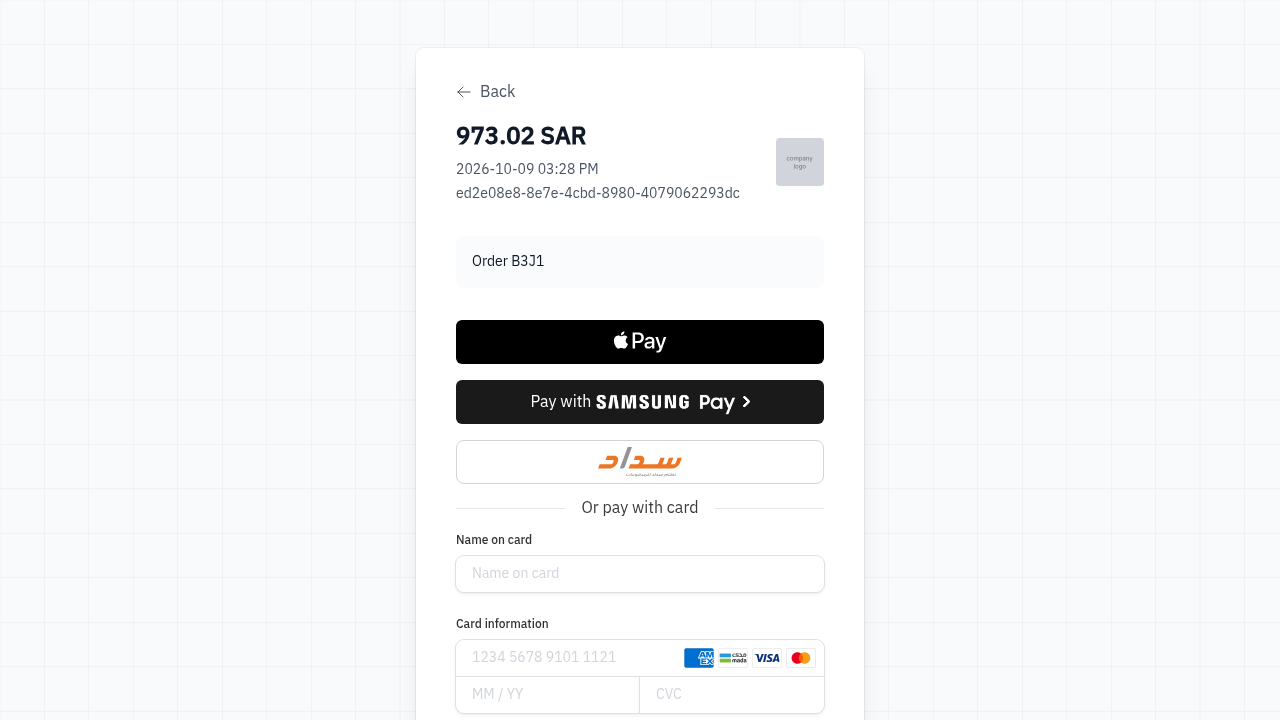 How it works
- 1. The customer chooses Moyasar at the checkout and confirms the order.
- 2. HikaShop creates a Moyasar invoice for the order total and sends the customer to its payment page.
- 3. The customer pays there, with mada, a card, Apple Pay or another method.
- 4. Moyasar tells your shop, and the customer comes back to the thank you page: the order is confirmed.
- 5. A customer who clicks Back on the payment page returns to the shop with the order cancelled and the cart restored.
- 1) Open a Moyasar account at dashboard.moyasar.com. It starts in test mode; Moyasar activates live payments for a business with a Saudi commercial registration (or freelance licence) and a Saudi bank account.
- 2) In your Moyasar dashboard, Settings, API Keys, copy the secret key (sk_test_... to test, sk_live_... for real payments). Moyasar shows a secret key only once, when it is made.
- 3) Install this plugin, then in HikaShop go to System > Payment methods, click New and choose Moyasar.
- 4) Paste the secret key, choose the statuses and save.
- 5) Your shop must use the currency of your Moyasar account, usually the Saudi riyal (SAR): the method is only offered for an order in SAR, AED, BHD, KWD, QAR or USD.
- 6) Optional: in your Moyasar dashboard, Settings, Webhooks, add the Webhook URL shown in the plugin's settings, with a secret token of your choice and the payment events, and type the same token in the plugin's settings.
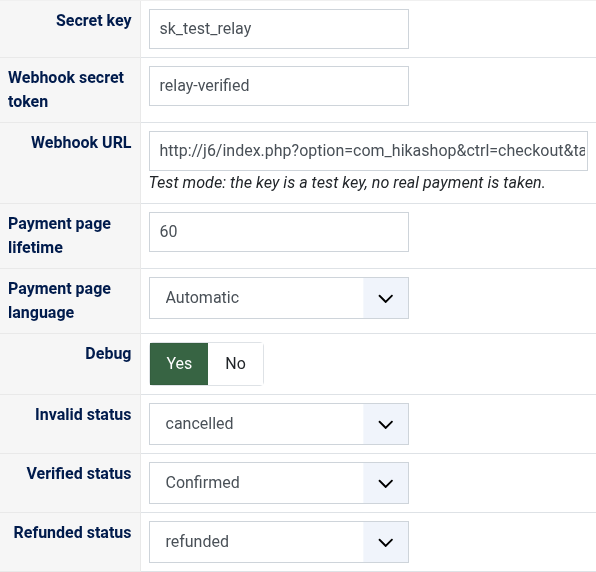
- Secret key: the secret key of your Moyasar account (sk_...). A test key puts the method in test mode. The publishable key (pk_...) does not work here: the plugin warns you when you paste one.
- Webhook secret token: optional, the token you typed for the webhook in your Moyasar dashboard. A webhook without it is refused. Empty, orders are still confirmed, but refunds and voids made in the dashboard do not change them.
- Webhook URL: the address to paste in your Moyasar dashboard, Settings, Webhooks. Under it, "Test mode" tells you the key is a test key.
- Payment page lifetime: how many minutes the payment page of an order can be paid, 1440 (a day) by default. 0 for no limit.
- Payment page language: Automatic shows it in Arabic when your shop is shown in Arabic and in English otherwise; or always Arabic, or always English.
- Debug: writes every call to Moyasar and every notification to the HikaShop payment log file.
- Invalid status: the status of an order whose payment page expired or was cancelled, cancelled by default.
- Verified status: the status of a paid order, confirmed by default.
- Refunded status: moving an order to this status refunds its whole payment on Moyasar, refunded by default.
- "The payment could not be started" at the checkout gives Moyasar's reason: for instance an order total under 1.00 SAR, which Moyasar does not take, or a wrong secret key.
- Moyasar is not offered at the checkout: the order is not in one of the currencies above, or the method is not published.
- A currency other than SAR has to be enabled on your account by Moyasar first.
- "The refund was refused by Moyasar": the order keeps its status and the message gives the reason. Moyasar takes one refund per payment, so a payment already partly refunded cannot be refunded again; the refund must also be covered by your Moyasar balance.
- Turn Debug on and look at the HikaShop payment log file (System > Configuration > Files) to see what Moyasar answered.
Use
- Compatible with all the editions of HikaShop
- Requires the PHP cURL extension
- Compatible with Joomla (not tested on WordPress yet)
- Requires a Moyasar account; live payments need a Saudi business and a Saudi bank account
- No limit of time
- No limit of use
Changelog
1.0.0 on the 9th of October 2026
- First version.
€ 40,00


The add to cart button will appear once you select the values above
- Type
- Payment plugin
Access to updates included for 4 years
A tax rate (between 17% and 27% based on your country) will be added if your address is in the European Union and that you don't provide a valid VAT number or if your address is in France as per the European Union law.