
Coinbase Business
This plugin lets your customers pay in USDC or USDT, from any wallet, on the payment page of Coinbase Business, the business account of Coinbase. The order is priced in your currency, Coinbase converts it to USDC when the payment page is made, and the money lands in USDC in your Coinbase Business account, from where you can convert it to dollars. Coinbase Business is open to companies of the United States and Singapore.
Features- Sends the customer, at the end of the checkout, to the payment page of Coinbase, priced in the currency of the order: US dollars, euros, pounds, Singapore dollars, or USDC.
- The customer pays in USDC from any wallet on Base, Ethereum, Polygon, Optimism, Arbitrum or Solana, or in USDT on Ethereum.
- You are credited in USDC in your Coinbase Business account, at the rate of the moment the payment page was made, less the fee of Coinbase.
- Confirms the order on its own when Coinbase tells your shop the payment is completed, and puts it in a "confirming" status while the payment is being confirmed.
- Cancels the order when its payment page expires or the payment fails; a paid order is never moved back.
- Refunds from HikaShop: a refund made on the order, or the order moved to the refunded status, sends the money back to the address the customer paid from. The history of the order says when each refund is done or if it failed.
- Sets up the notification of Coinbase for your shop when you save the settings, so you have no secret to copy by hand.
- Every notification is checked: it must be signed with the secret of your notification, and the payment is always read back from Coinbase, with its amount and currency, before the order changes. A copy of your shop (a staging site) using the same account does not take the orders of the real one.
- The history of the order shows the payment's transaction, the amount in USDC, the fee of Coinbase and what you received.
- A sandbox setting runs the whole flow on the sandbox of Coinbase, with testnet USDC.
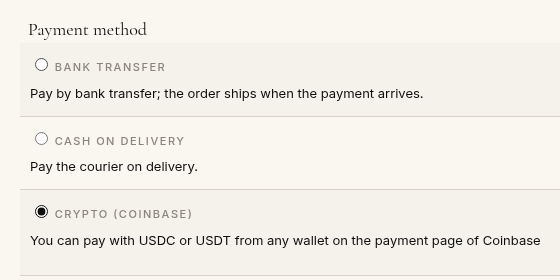
- 1. The customer chooses "Crypto (Coinbase)" at the checkout and confirms the order.
- 2. The plugin creates the payment page on Coinbase for the amount of the order and sends the customer to it.
- 3. The customer pays from their wallet, and Coinbase sends them back to your shop.
- 4. Coinbase notifies your shop: the order goes to the confirming status, then to your verified status once the payment is completed, and the customer gets the usual confirmation email.
Use
- Compatible with all the editions of HikaShop
- Requires a verified Coinbase Business account, open to companies of the United States and Singapore
- Requires a site reachable from the internet over https, so that Coinbase can send its notifications and bring the customer back
- Requires the PHP cURL extension, and the sodium extension for Ed25519 keys (in PHP since 7.2)
- Compatible with Joomla and WordPress
- No limit of time
- No limit of use
Changelog
1.0.0 on the 3rd of November 2026
- First version.
Free


The add to cart button will appear once you select the values above
- Type
- Payment plugin