
Shippo
This plugin connects your shop to Shippo, the multi-carrier shipping platform: USPS, UPS, FedEx and DHL Express at Shippo's discounted rates, your own carrier accounts beside them, and more carriers such as Canada Post, Royal Mail, Evri, DPD UK, Colissimo or Deutsche Post. Your customers choose among the carriers' services at checkout with their real price, and you buy the labels from the order page.
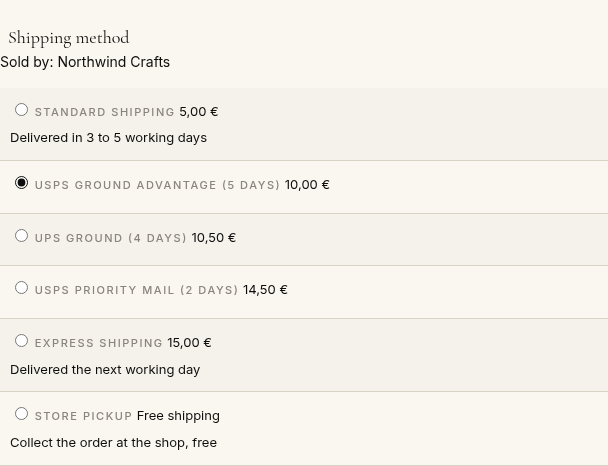
Features- One shipping method shows your customer each carrier service you offer, with its own price and delivery days: "USPS Priority Mail (2 days)", "UPS Ground (4 days)"...
- You choose the services to offer in the list of the carriers and services of your Shippo account; none chosen offers every service Shippo answers for the address.
- Shows in the method's settings whether Shippo accepts your key, in test or live mode, with the carriers of your account.
- Shippo's price for the cart's parcel and the customer's address, in your shop's currency, with your markup (a percentage, an amount) and rounding.
- Or HikaShop's usual shipping prices instead: a fixed price, a percentage, a formula, by weight or with the prices table, the label then taking the cheapest service you offer.
- The parcel is made from the weight and size of the products, in pounds and inches or kilograms and centimetres, with a default parcel for the products that have none.
- Buys the label when the order reaches the status you choose, or with a button on the order page, for the service your customer chose; the label in the format of your printer (4 x 6 in, letter, A4, A6, PNG, ZPL).
- The customs declaration of the international parcels is made from your products: description, quantity, weight, value, HS code, country of origin, product code and manufacturer code.
- Warns you when a parcel of merchandise from outside the EU to a consumer in the EU lacks the product codes that EU customs require since November 2026.
- Voids an unused label with a button, so Shippo refunds it.
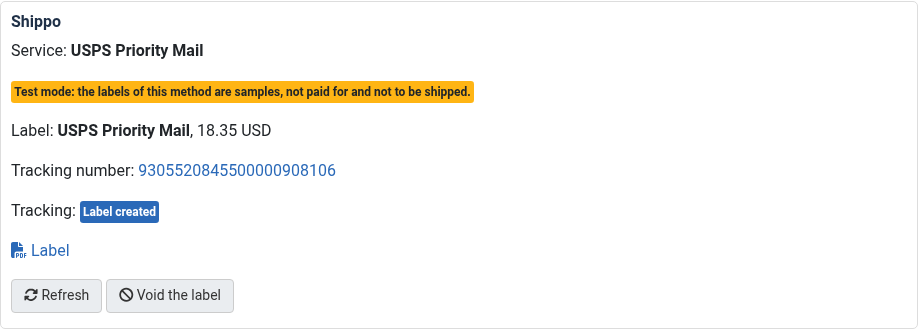
- Shows on the order page the label, the commercial invoice, the tracking number linked to the carrier's tracking page, the tracking status and its events, and keeps each step in the order's history.
- Moves the order to "shipped" when the carrier has the parcel and, if you wish, to another status once it is delivered, as soon as Shippo notifies the shop, and with the HikaShop cron or a button.
- Your customer gets the tracking link on the order page and in the e-mails.
- Optionally checks the shipping address with Shippo when the customer saves it (United States addresses): the customer is told when it cannot be found, or sees the corrected address.
 How it works
- 1. At checkout, the plugin asks Shippo the rates of the cart's parcel to the customer's address, and shows the services you offer with your markup.
- 2. Your customer chooses a service and pays.
- 3. When the order is confirmed (or the status you choose), or when you press the button of the order, the plugin buys the label of that service from Shippo, with the customs declaration for an international parcel.
- 4. You print the label from the order page and hand the parcel to the carrier.
- 5. Shippo tells the shop where the parcel is: the order moves to "shipped", then "delivered" if you wish, and your customer follows it with the tracking link.
- 1) Open a Shippo account at goshippo.com (the API plan is free for the first labels of the month, then Shippo charges a small fee per label), add a payment method for the labels in Shippo, and get your API keys in Shippo: Settings, Advanced, API. The shippo_test_ key buys sample labels only, to try the plugin; the shippo_live_ key ships for real.
- 2) In Shippo, Settings, Carriers, activate the carriers you want (Shippo's own USPS, UPS, DHL Express accounts need "Activate Account" once), or connect your own carrier accounts.
- 3) Install this plugin, then create a shipping method with it in HikaShop: System > Shipping methods > New, Shippo.
- 4) Paste the API key, fill the sender address and save: the connection line turns green and the services of your account fill the list. Choose the services, the price and publish the method.
- 5) Copy the notification address shown in the method's settings into Shippo: Settings, Webhooks, Add webhook, event track_updated (once in test mode, once in live mode). Shippo then tells the shop when a parcel moves.
- 6) Set up the HikaShop cron (System > Configuration > Cron): it reads the tracking every hour when Shippo's notifications cannot reach the shop.
- 7) For international parcels, give your products their weight, add product custom fields for the HS code, the country of origin and the manufacturer code if you need them, and name them in the method's customs settings.
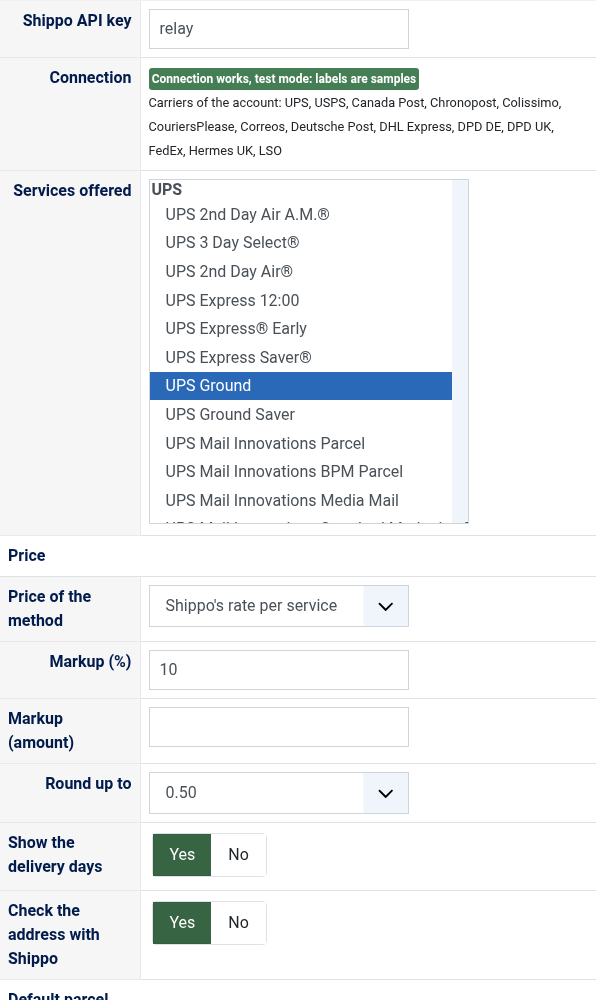
- Shippo API key: the test key (shippo_test_...) to try, the live key (shippo_live_...) to ship (step 1).
- Connection: after saving, says whether Shippo accepts the key, in test mode (sample labels) or live mode, with the carriers of your account.
- Services offered: the carrier services shown at checkout, chosen in the list of your account (hold Ctrl, or Cmd on a Mac, to choose several). None chosen: every service Shippo answers for the address.
- Price of the method: "Shippo's rate per service" shows each service at Shippo's price for the cart (without tax: set the method's tax category for HikaShop to add it); "HikaShop price" shows the method once, at the price settings of the method, and the label takes the cheapest service you offer.
- Markup (%) and Markup (amount): added to Shippo's rate, the percentage first, the amount in the cart's currency. A negative amount gives a discount. Empty: Shippo's price as it is.
- Round up to: rounds the price up to the next 0.10, 0.50 or 1.00.
- Show the delivery days: adds Shippo's estimated delivery days to each service's name.
- Check the address with Shippo: at checkout, Shippo checks the shipping address (United States addresses) and a note under the rates asks the customer to check it when Shippo cannot find it, or shows Shippo's correction. The order is never blocked. Off by default.
- Weight unit sent to Shippo and Size unit sent to Shippo: pounds and inches, or kilograms and centimetres; the products' units are converted.
- Default parcel: Weight, Length, Width, Height: in the units above, the parcel used when the products of the cart have no weight or no dimensions. Empty: 2.2 lb in 12 x 8 x 6 in (1 kg in 30 x 20 x 15 cm). Give your products their weight and dimensions for the best rates.
- Sender address: name, company, street, city, state (two letters in the United States and Canada), postcode, country (two letters: US, CA, GB...), phone and e-mail of the place your parcels leave from, printed on the labels. Carriers check it: give a real address. Empty company: your shop's name.
- Buy the label when the order is: the status at which the plugin buys the label, "confirmed" by default. "Never" leaves it to the "Buy the label" button of the order page.
- Label format: 4 x 6 in for a label printer, letter or A4 for an office printer, A6, PNG or ZPL II.
- Notification address: the address to copy into Shippo's webhooks (step 5). It carries a secret of your shop; the plugin reads every notification back from Shippo before changing an order.
- Order status when shipped: given to the order when Shippo reports the parcel in transit, "shipped" by default. "Unchanged" to keep moving your orders yourself.
- Order status when delivered: given when Shippo reports the parcel delivered; unchanged by default.
- Tell the customer when the status changes: sends HikaShop's status e-mail, with the tracking link, when the plugin moves the order.
- Contents: what the customs declaration says the parcel is, merchandise (a sale) by default, or a gift, a sample, documents.
- Duties and taxes paid by: the customer (DDU, by default) or your shop (DDP, billed to you by the carrier, when it offers it).
- If the parcel cannot be delivered: returned to you, or abandoned.
- Signed by: the name certifying the customs declaration. Empty: the sender's name.
- Export code (from the US): the EEL or PFC code of exports from the United States, NOEEI_30_37_a (no export declaration, under 2,500 USD per tariff number) when empty.
- Product field of the HS code, Product field of the country of origin and Product field of the manufacturer code: the column names of the product custom fields that hold them (a variant takes its main product's). Default HS code and Default country of origin give the value for the products that have none; without an origin, your sender country. The product code of each product is sent as its SKU.
- Debug: writes the plugin's calls to Shippo to the HikaShop log file.
 Troubleshooting
- "Shippo refused the key": check the API key, copied whole from Shippo, Settings, Advanced, API.
- The method does not show at checkout: check that it is published and its restrictions (zone, weight, price). With Shippo's rates it only shows once the customer has a shipping address, and only the services Shippo answers for it. Turn Debug on to see Shippo's answers, and its reasons ("doesn't support one or more shipment options", "out of service area"), in the HikaShop log.
- "Shippo did not give the label": Shippo's and the carrier's reason follows, and stays on the order page with the button to try again. "Recipient address invalid": correct the order's shipping address. "The account is not yet registered, Activate Account": activate that carrier in Shippo, Settings, Carriers.
- "Shippo has no rate for the service ... for this parcel": that service does not serve the address or the parcel any more; change the order's shipping method or offer another service.
- "... has no product code or no manufacturer code": EU customs require both for merchandise sent from outside the EU to a consumer in the EU; fill the products' code and the manufacturer code field.
- "Shippo did not void the label": a label already scanned by the carrier or too old cannot be refunded.
- Test mode: Shippo only tracks its own test numbers, so the tracking of a sample label is not read ("not a valid test tracking carrier").
- The tracking does not come back: check the notification address in Shippo's webhooks and that the HikaShop cron runs, or use the "Refresh" button of the order.
- Shippo answers "too many requests": Shippo limits the calls per minute, much lower in test mode; the rates are kept an hour so that it rarely happens at checkout.
Use
- Compatible with all the editions of HikaShop
- Compatible with Joomla and WordPress
- Requires the PHP cURL extension
- Requires a Shippo account (the labels are paid to Shippo)
- No limit of time
- No limit of use
Changelog
1.0.0 on the 2nd of November 2026
- First version.
€ 40,00


The add to cart button will appear once you select the values above
- Type
- Shipping
Access to updates included for 4 years
A tax rate (between 17% and 27% based on your country) will be added if your address is in the European Union and that you don't provide a valid VAT number or if your address is in France as per the European Union law.