
Installation
- Each domain name must already point to the website on your hosting, with its own certificate. In the Joomla Global Configuration, leave "Site URL" empty.
- Install the plugin with the Joomla extension manager, then publish it in the plugin manager (System - Domains). Joomla 5 or newer is required.
- Open the settings of the plugin and add one line per domain with the + button. List every domain your website answers on, the main one included: a domain which is not in the list is served exactly as before.
- On each line, fill in only what that domain must change. Every setting is optional.
The plugin works on any Joomla website, with or without a shop. The settings that only mean something to a shop (currency, cart, address book, order history, vendor) are displayed only when HikaShop is installed, and the vendor ones when HikaMarket is too. Your domains are part of the plugin settings: disabling the plugin keeps them, uninstalling it does not.
Configuration
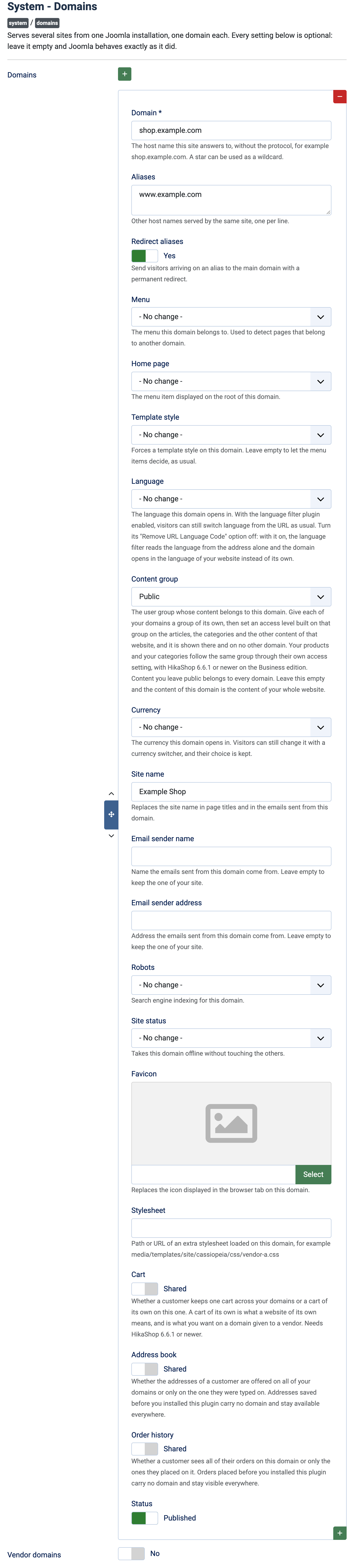
The settings below are those of each domain line.
- Domain: the host name the line answers to, without the protocol, for example shop.example.com. A star can be used as a wildcard. Required.
- Aliases: other host names served by the same site, one per line.
- Redirect aliases: No (default) serves the aliases as the domain. Yes sends visitors arriving on an alias to the main domain with a permanent redirect.
- Menu: the menu this domain belongs to, used to detect pages that belong to another domain. No change: the menu is not used.
- Pages of other domains: shown once a menu is chosen. What happens when a visitor opens a page of another domain's menu: Display them (default), Redirect to their own domain, or Return a page not found error.
- Home page: the menu item displayed on the root of this domain. No change keeps the home page of your website.
- Template style: forces a template style on this domain. No change lets the menu items decide.
- Language: the language the domain opens in; visitors can still switch language. If you use the Joomla language filter plugin, turn its "Remove URL Language Code" option off, otherwise the domain opens in the language of your website. Do not enable a "Language Domains" plugin next to this one.
- Content group: the user group whose content belongs to this domain. Give each domain a group of its own, then set an access level built on that group on the articles, categories and other content of that website: it is shown there and on no other domain. Content left public belongs to every domain. Empty, the content of the domain is the content of your whole website. With HikaShop 6.6.1 or newer on the Business edition, products and categories follow the same group through their own access setting.
- Currency (with HikaShop): the currency the domain opens in; visitors can still change it with a currency switcher and their choice is kept.
- Site name: replaces the site name in page titles and in the emails sent from this domain. Empty, the name of your website is kept.
- Email sender name: the name emails sent from this domain come from. Empty, the one of your website is kept.
- Email sender address: the address emails sent from this domain come from. Empty, the one of your website is kept.
- Robots: search engine indexing for this domain: index or noindex, follow or nofollow. No change keeps the setting of your website.
- Site status: Online or Offline, to take this domain offline without touching the others. No change keeps the status of your website.
- Favicon: replaces the icon in the browser tab on this domain.
- Stylesheet: the path or address of an extra stylesheet loaded on this domain.
- Cart (with HikaShop): Shared (default) keeps one cart across your domains. Its own gives the domain a cart of its own, which is what you want on a domain given to a vendor. It needs HikaShop 6.6.1 or newer.
- Address book (with HikaShop): Shared (default) offers the addresses of a customer on all domains. Its own offers only those typed on this domain. Addresses saved before the plugin was installed stay available everywhere.
- Order history (with HikaShop): Shared (default) shows a customer all their orders. Its own shows only the orders placed on this domain. Earlier orders stay visible everywhere.
- HikaMarket vendor (with HikaMarket): restricts the shop on this domain to one vendor: its listings, categories, manufacturers, feed and cart only show that vendor. It needs HikaShop 6.6.0 or newer.
- Product feed of its own (with a vendor): writes a Google Merchant feed for this domain, with the vendor's products and this domain's links, next to the one of your shop. The Google Products plugin writes it on its usual schedule.
- Restrict the search (with a vendor): restricts the Joomla smart search on this domain to the products of its vendor, articles included. The search index has to be rebuilt once after turning it on.
- Status: Published (default) or Unpublished, to keep a line without using it.
Next to the lines, Vendor domains (with HikaMarket): Yes also serves the domains typed on the HikaMarket vendors themselves, each restricted to its vendor. No (default) if you do not use HikaMarket or prefer to list every domain above. When it is on, the plugin adds a "Domain name" field to your vendors.
Each module also gets a "Domains" setting on its own edit form, to display it on some domains only. Nothing selected shows it on all of them.
Troubleshooting
- A domain is served as before: it is not in the list, or its Domain line is misspelled. List every domain, the main one included.
- The domain opens in the wrong language: turn off "Remove URL Language Code" in the Joomla language filter plugin.
- Articles of another website are still reachable: this is expected. The menu of a domain decides what is linked on it, not what exists; use the Content group and access levels to hide content.
- The cart or the product restrictions have no effect: they need HikaShop 6.6.1 or newer (and the Business edition for products and categories).
- A customer signed up on one domain cannot be found on another: customers have a single account for all domains, since Joomla has one list of users.
- "A Domain name field was added to your HikaMarket vendors.": shown once at install when HikaMarket is present; nothing to do.