

- Posts: 3
- Thank you received: 0
Remove button from the user control panel
11 years 2 months ago #210307
by Ferhanzo
Remove button from the user control panel was created by Ferhanzo
-- HikaShop version -- : 2.5.0
Hello, i have 2 questions.
1- I would like to remove the " manage your addresses " from the user control panel. I've tried some codes posted here in the forum but did not work .
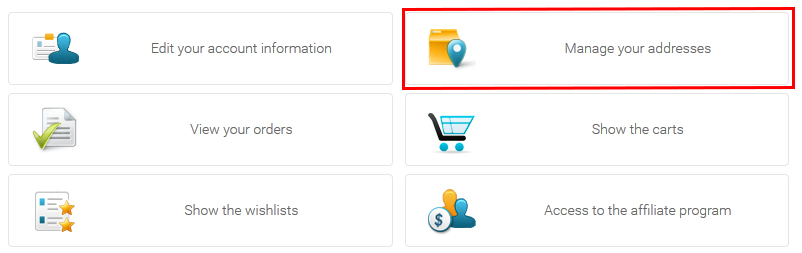
2- How do I insert buttons ( just like this ) on the control panel ? Is there any tutorial or something?
Thanks
Hello, i have 2 questions.
1- I would like to remove the " manage your addresses " from the user control panel. I've tried some codes posted here in the forum but did not work .
2- How do I insert buttons ( just like this ) on the control panel ? Is there any tutorial or something?
Thanks
Please Log in or Create an account to join the conversation.

11 years 2 months ago #210308
by Jerome
Jerome - Obsidev.com
HikaMarket & HikaSerial developer / HikaShop core dev team.
Replied by Jerome on topic Remove button from the user control panel
Hi,
1 - In the view "frontend / your front-end template / user / cpanel", you have to place just before
Some code to remove the buttons you do not want, like
2 - With the same kind of process, you need to add a new entry in the PHP array variable
More about customization and view overrides :
www.hikashop.com/support/support/documen...ize-the-display.html
Regards,
1 - In the view "frontend / your front-end template / user / cpanel", you have to place just before
Code:
foreach($this->buttons as $oneButton) {
Code:
unset($this->buttons['address']);
foreach($this->buttons as $oneButton) {
2 - With the same kind of process, you need to add a new entry in the PHP array variable
Code:
$this->buttons['address'] = array(
'link' => hikashop_completeLink('address'),
'level' => 0,
'image' => 'address',
'text' => JText::_('ADDRESSES'),
'description' => '<ul><li>'.JText::_('MANAGE_ADDRESSES').'</li></ul>'
);
foreach($this->buttons as $oneButton) {
More about customization and view overrides :
www.hikashop.com/support/support/documen...ize-the-display.html
Regards,
Jerome - Obsidev.com
HikaMarket & HikaSerial developer / HikaShop core dev team.
Please Log in or Create an account to join the conversation.
Less
More
- Posts: 6
- Thank you received: 0
11 years 2 months ago - 11 years 2 months ago #210835
by Cossettini
Replied by Cossettini on topic Remove button from the user control panel
Hello
Similar problem in user / cpanel.php ...this works to remove address
but similar code does not move affiliate program button
Is their a problem with the naming ? I tried affiliates, partner, partners etc ...
thanks
Similar problem in user / cpanel.php ...this works to remove address
Code:
unset($this->buttons['address']);
Code:
unset($this->buttons['affiliate']);
thanks
Last edit: 11 years 2 months ago by Jerome. Reason: [code] is nice
Please Log in or Create an account to join the conversation.

11 years 2 months ago #210840
by nicolas
Replied by nicolas on topic Remove button from the user control panel
Hi,
There is no problem with the naming. The naming is just a number for the affiliate button.
Do a var_dump() of the $this->buttons variable and you'll see the key of each element in the array so that you can use it for the affiliate.
But if you don't need the affiliate button, then maybe it means that you don't need the affiliate feature at all, and in that case, it's even better to just disable the HikaShop affiliate plugin via the Joomla plugins manager.
There is no problem with the naming. The naming is just a number for the affiliate button.
Do a var_dump() of the $this->buttons variable and you'll see the key of each element in the array so that you can use it for the affiliate.
But if you don't need the affiliate button, then maybe it means that you don't need the affiliate feature at all, and in that case, it's even better to just disable the HikaShop affiliate plugin via the Joomla plugins manager.
The following user(s) said Thank You: Cossettini
Please Log in or Create an account to join the conversation.
Less
More
- Posts: 6
- Thank you received: 0
11 years 2 months ago #210919
by Cossettini
Replied by Cossettini on topic Remove button from the user control panel
Yes. I disabled the affiliate plugin and it works. Thanks
Please Log in or Create an account to join the conversation.

11 years 6 days ago #217469
by DimLVL
Replied by DimLVL on topic Remove button from the user control panel
Guys, can I ask you to give me a sample code please? Unfortunately I don't know php, and it's quite difficult for me to make it correct. For examle I have a link for new button - site.com/link.html and image for button site.com/image.jpg .Jerome wrote: 2 - With the same kind of process, you need to add a new entry in the PHP array variable
Code:$this->buttons['address'] = array( 'link' => hikashop_completeLink('address'), 'level' => 0, 'image' => 'address', 'text' => JText::_('ADDRESSES'), 'description' => '<ul><li>'.JText::_('MANAGE_ADDRESSES').'</li></ul>' ); foreach($this->buttons as $oneButton) {
Please Log in or Create an account to join the conversation.

11 years 5 days ago - 11 years 5 days ago #217484
by Xavier
Replied by Xavier on topic Remove button from the user control panel
Hi,
You can use that code:
For the image, you will have to add an image in the folder "media/com_hikashop/images/icons" and name it like: "icon-48-image.png"
You can use that code:
Code:
$this->buttons['mybutton'] = array(
'link' => JUri::base().'/link',
'level' => 0,
'image' => 'image',
'text' => JText::_('MY_TEXT'),
'description' => '<ul><li>'.JText::_('MY_DESCRIPTION').'</li></ul>'
);
For the image, you will have to add an image in the folder "media/com_hikashop/images/icons" and name it like: "icon-48-image.png"
Last edit: 11 years 5 days ago by Xavier.
The following user(s) said Thank You: DimLVL
Please Log in or Create an account to join the conversation.
5 years 1 month ago - 5 years 1 month ago #335402
by oxido
Replied by oxido on topic Remove button from the user control panel
For this topic, the solution it is still the same, editing the view or to use css to hide them?
Last edit: 5 years 1 month ago by oxido.
Please Log in or Create an account to join the conversation.
5 years 1 month ago #335406
by nicolas
Replied by nicolas on topic Remove button from the user control panel
Hi,
You don't need to edit the view anymore.
You can just add such CSS:
You don't need to edit the view anymore.
You can just add such CSS:
Code:
.hikashop_cpanel_address_div { display: none; }
The following user(s) said Thank You: oxido
Please Log in or Create an account to join the conversation.
5 years 1 month ago #335431
by oxido
Replied by oxido on topic Remove button from the user control panel
tip: need to use !important
.hikashop_cpanel_address_div { display: none !important; }
.hikashop_cpanel_address_div { display: none !important; }
The following user(s) said Thank You: nicolas
Please Log in or Create an account to join the conversation.
Time to create page: 0.435 seconds