

- Posts: 72
- Thank you received: 5
Lay-out product page Hikashop
6 years 8 months ago #314519
by mlehr
Lay-out product page Hikashop was created by mlehr
Hi,
I want to adjust the layout of the product page. See print screens below. For clarity, I also sent a print screen with the php files.
I want to swap the text and possibly the photos from block 2 with those from block 1. So move the description that now is at block 2 upwards and the information from block 1 downwards.
How can I do that the easiest way?
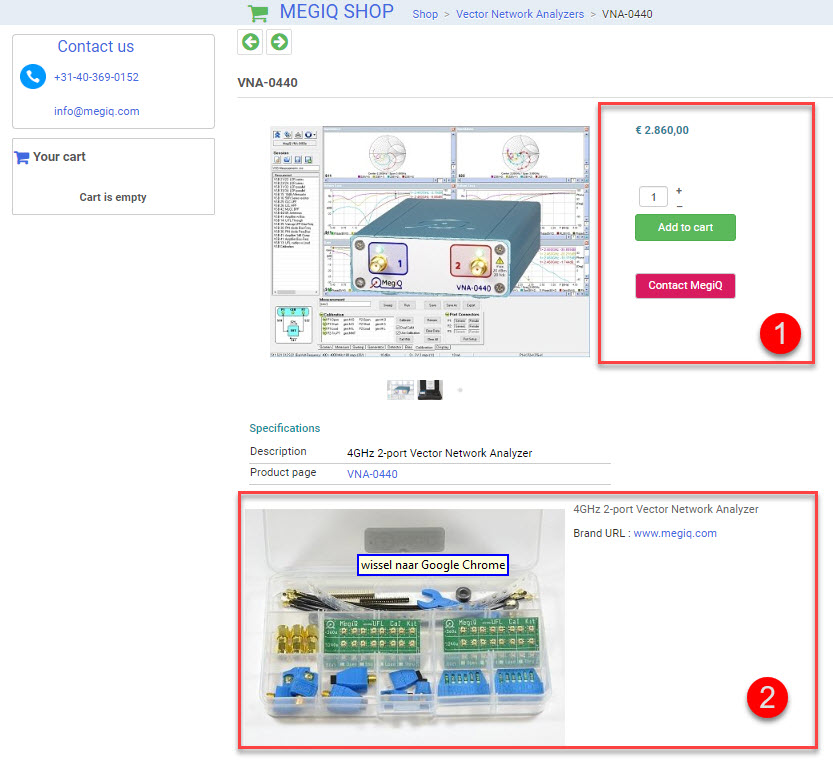
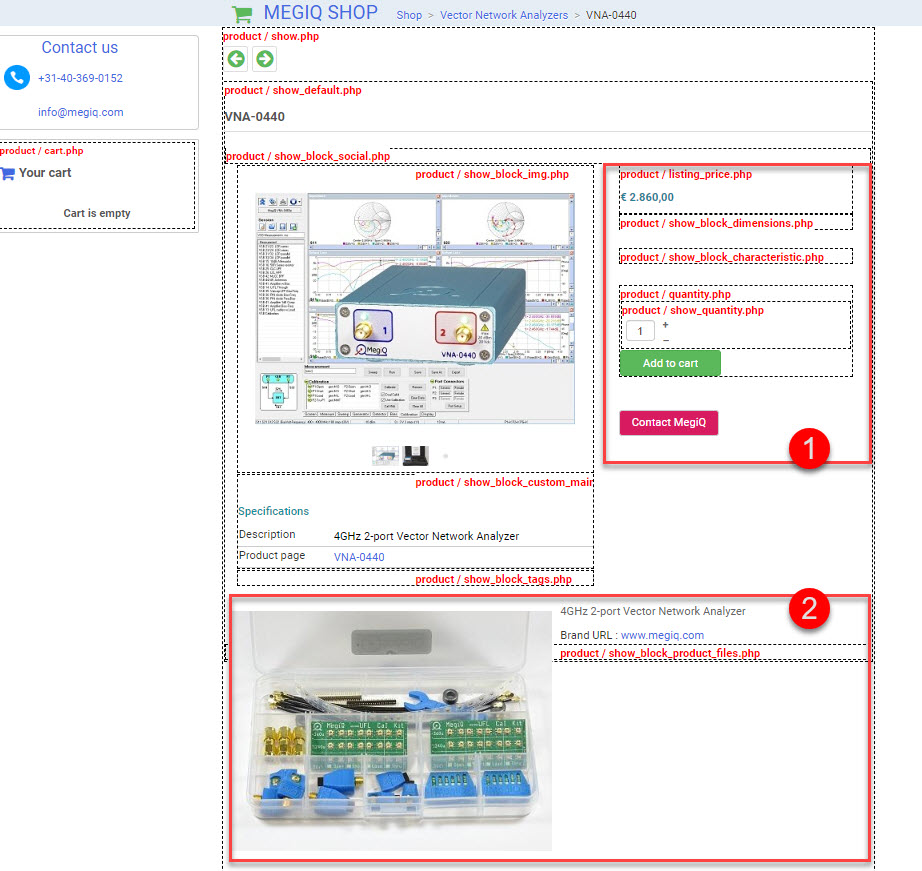
I want to adjust the layout of the product page. See print screens below. For clarity, I also sent a print screen with the php files.
I want to swap the text and possibly the photos from block 2 with those from block 1. So move the description that now is at block 2 upwards and the information from block 1 downwards.
How can I do that the easiest way?
Please Log in or Create an account to join the conversation.

6 years 8 months ago #314524
by nicolas
Replied by nicolas on topic Lay-out product page Hikashop
Hi,
As you can see in your screenshot, the view file which encompass both areas is the "show_default" one. So that's the one you want to edit via the menu Display>Views to do that change.
There, you'll actually see four blocks: top, left, right and bottom :
monosnap.com/file/PLhSfyKYGmiXOhy2Q0xFWuHAHf86bh
So what you want is to locate the divs hikashop_product_right_part and hikashop_product_bottom_part there and swap all the HTML/PHP code inside from one to the other and vice-versa.
As you can see in your screenshot, the view file which encompass both areas is the "show_default" one. So that's the one you want to edit via the menu Display>Views to do that change.
There, you'll actually see four blocks: top, left, right and bottom :
monosnap.com/file/PLhSfyKYGmiXOhy2Q0xFWuHAHf86bh
So what you want is to locate the divs hikashop_product_right_part and hikashop_product_bottom_part there and swap all the HTML/PHP code inside from one to the other and vice-versa.
Please Log in or Create an account to join the conversation.
6 years 8 months ago #314554
by mlehr
Replied by mlehr on topic Lay-out product page Hikashop
Thanks.
I did what you recommended, but it's still not quite right. See print screen.
1. This section (description) is going well and is now in the right place.
2. I want to place this part below the image, but it still remains on the right. How can I solve this?
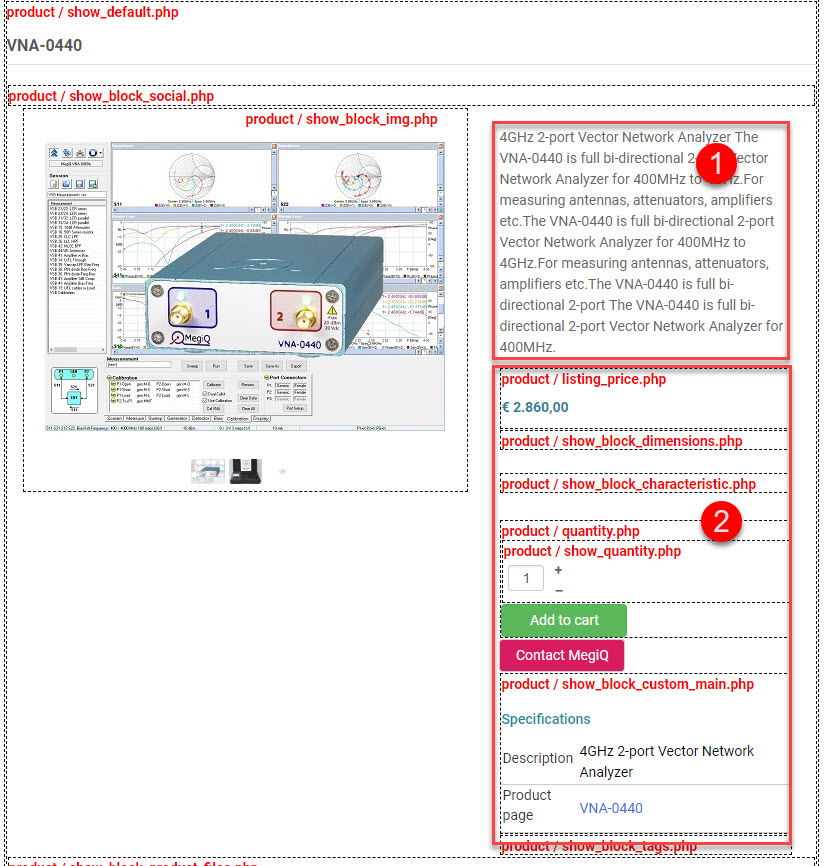
I did what you recommended, but it's still not quite right. See print screen.
1. This section (description) is going well and is now in the right place.
2. I want to place this part below the image, but it still remains on the right. How can I solve this?
Please Log in or Create an account to join the conversation.
6 years 8 months ago #314558
by nicolas
Replied by nicolas on topic Lay-out product page Hikashop
Hi,
1. Looking at your screenshot, it would look like you moved the description area inside the right area but not the content of the right area to the bottom area.
I tried to look at the situation on your link but it displays differently than what I can see on your screenshot and there is no description displayed anymore so I'm not sure what to say to help you.
2. If you move the code of that piece inside the "bottom" area in show_default, you should be good to go.
1. Looking at your screenshot, it would look like you moved the description area inside the right area but not the content of the right area to the bottom area.
I tried to look at the situation on your link but it displays differently than what I can see on your screenshot and there is no description displayed anymore so I'm not sure what to say to help you.
2. If you move the code of that piece inside the "bottom" area in show_default, you should be good to go.
Please Log in or Create an account to join the conversation.
6 years 8 months ago #314933
by mlehr
Replied by mlehr on topic Lay-out product page Hikashop
I want to make some changes to the product page.
See print screen. See also nieuw.megiq.com/shop/vector-network-analyzers/vna-0440
1. Number 3 shows the price with options. I would like to put it above the options (at number 2), so at position at number 1. How should I do that?
2. I want to put a piece of text next to the price, including a tool tip with additional explanation. The part that is currently at number 4.
Is that possible? How do I do that?
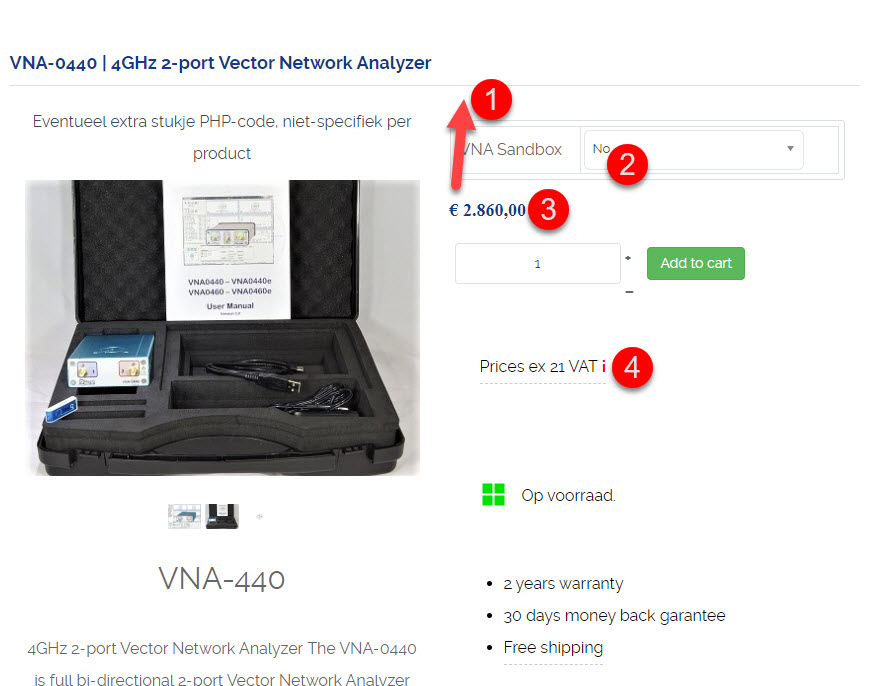
See print screen. See also nieuw.megiq.com/shop/vector-network-analyzers/vna-0440
1. Number 3 shows the price with options. I would like to put it above the options (at number 2), so at position at number 1. How should I do that?
2. I want to put a piece of text next to the price, including a tool tip with additional explanation. The part that is currently at number 4.
Is that possible? How do I do that?
Please Log in or Create an account to join the conversation.

6 years 8 months ago - 6 years 8 months ago #314963
by Philip
Replied by Philip on topic Lay-out product page Hikashop
Hello,
Let's process step by step please because it's hard for us to follow and so help you.
1. Your first message, about switching description block between listing price block, we need to see your screenshot to be able to adjust what you show us in your screenshot with this message
2. You can do it, from the product/listing_price by switching your block that manage these displays, but I suggest to do things one after the other, because there something a little tricky about the price
Awaiting to be able to see the first part in your url link to better understand the context for solve your issue (about the price block on the right side) and better answer you for second part of your message.
Regards
Let's process step by step please because it's hard for us to follow and so help you.
1. Your first message, about switching description block between listing price block, we need to see your screenshot to be able to adjust what you show us in your screenshot with this message
2. You can do it, from the product/listing_price by switching your block that manage these displays, but I suggest to do things one after the other, because there something a little tricky about the price
Awaiting to be able to see the first part in your url link to better understand the context for solve your issue (about the price block on the right side) and better answer you for second part of your message.
Regards
Last edit: 6 years 8 months ago by Philip.
Please Log in or Create an account to join the conversation.
6 years 8 months ago - 6 years 8 months ago #314975
by mlehr
Replied by mlehr on topic Lay-out product page Hikashop
Maybe a little confusing, but my questions only refer to post #314933. All my previous posts are solved and not relevant anymore. So post 314554 is not relevant anymore.
Does this clear what I mean with my questions in post 3149 33?
The screenshot and the URL (nieuw.megiq.com/shop/vector-network-analyzers/vna-0440) are also in this post #314933.
1. Is this question clear now?
2.
Hope you can help!
Does this clear what I mean with my questions in post 3149 33?
The screenshot and the URL (nieuw.megiq.com/shop/vector-network-analyzers/vna-0440) are also in this post #314933.
1. Is this question clear now?
2.
Can you discribe this more in detail how I can do this?You can do it, from the product/listing_price by switching your block that manage these displays, but I suggest to do things one after the other, because there something a little tricky about the price
Hope you can help!
Last edit: 6 years 8 months ago by mlehr.
Please Log in or Create an account to join the conversation.
6 years 8 months ago #314978
by nicolas
Replied by nicolas on topic Lay-out product page Hikashop
Hi,
1. You'll want to edit the product / show_default.php view file via the menu Display>Views and move the blocks of code involved around:
monosnap.com/file/nB9xxDIKP7rhCdTepg1w2umLHVyTpf
2. To add some text after the price, just edit the file product / listing_price.php as philippe proposed and add your text at the end.
1. You'll want to edit the product / show_default.php view file via the menu Display>Views and move the blocks of code involved around:
monosnap.com/file/nB9xxDIKP7rhCdTepg1w2umLHVyTpf
2. To add some text after the price, just edit the file product / listing_price.php as philippe proposed and add your text at the end.
Please Log in or Create an account to join the conversation.
6 years 8 months ago - 6 years 8 months ago #315021
by mlehr
Replied by mlehr on topic Lay-out product page Hikashop
Oke thanks for now.
Last edit: 6 years 8 months ago by mlehr.
Please Log in or Create an account to join the conversation.
6 years 8 months ago - 6 years 8 months ago #315024
by Philip
Replied by Philip on topic Lay-out product page Hikashop
Hello,
The price with option is in the product/show-default view (html class "hikashop_product_price_with_options_main"), you have to move it immediately below the "show_block_social".

Regards
The price with option is in the product/show-default view (html class "hikashop_product_price_with_options_main"), you have to move it immediately below the "show_block_social".
Regards
Last edit: 6 years 8 months ago by Philip.
Please Log in or Create an account to join the conversation.
Time to create page: 0.233 seconds