
HikaShop 6.7.0 gives your emails a new look: two modern templates, a gallery to pick one with your own order in it, and ready-made blocks for your contact details, related products and social networks. The mass actions were fixed throughout and redesigned, with a clearer interface, precise schedules, coupons and discounts, and room for HikaMarket and HikaSerial to add their own. The release also handles withdrawal requests from start to finish, lets your customers save their card with PayPal Checkout, shows what each customer has spent, and speaks the latest version of the protocol AI shopping agents use. In total this release brings 58 new features, 85 improvements, and 164 bug fixes.
Here is a look at the highlights of this release.
- Emails that look like your shop
- Mass actions, rebuilt
- Withdrawal requests, from start to finish
- PayPal Checkout: saved cards and more local payment methods
- What each customer has spent
- Ready for the new AI shopping agents
- Bug fixes and other improvements
- Before you update
The emails your customers receive have been redesigned. HikaShop now comes with two new templates: clean, a light and simple one, and bold, which places a large colored header above the content. Both adapt to the screen of a phone, follow the dark mode of the reader, and display your logo. The order emails themselves were rewritten too: larger text, the content in a card, the product pictures next to their names, and addresses which stay readable on a phone. They also look right in Gmail now, which used to drop the colors and the buttons of every HikaShop email.
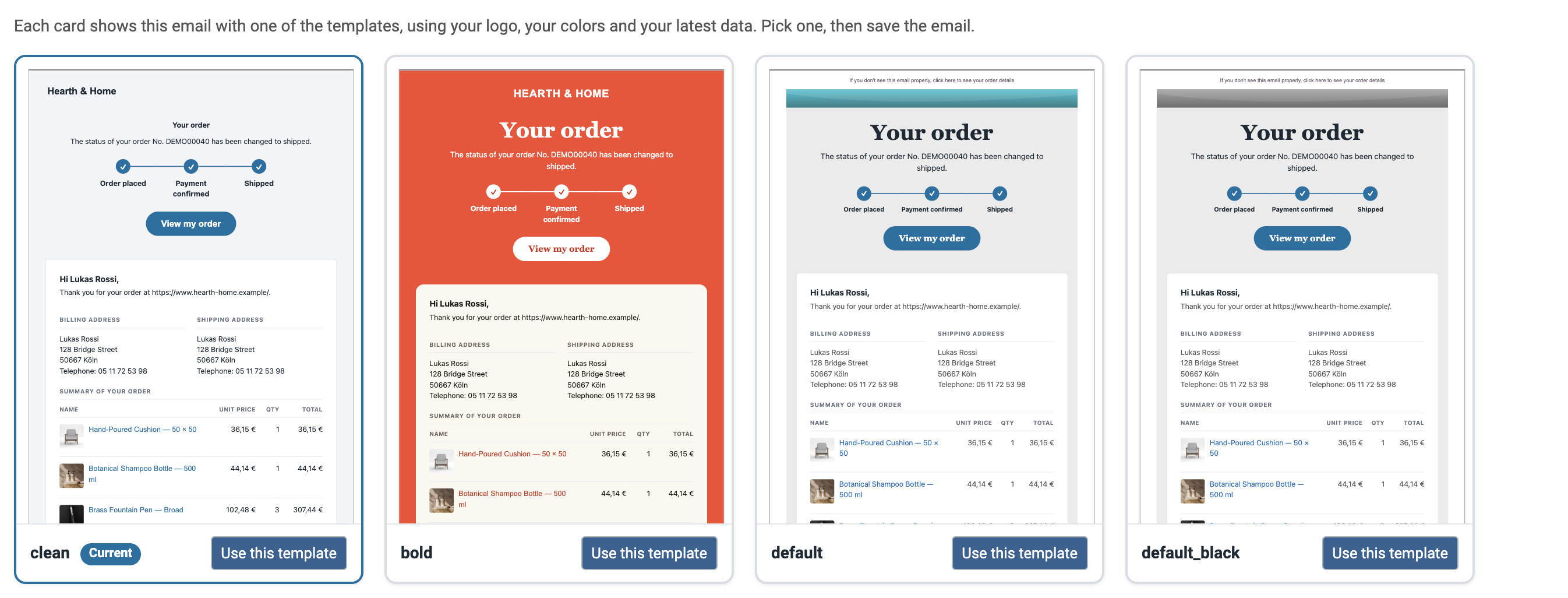
To choose a template, a new "Choose a template" button on each email opens a gallery. Each card is a live preview of that email with one of the templates, filled with your logo, your colors and your latest order, so you see what your customer will receive before you pick one.
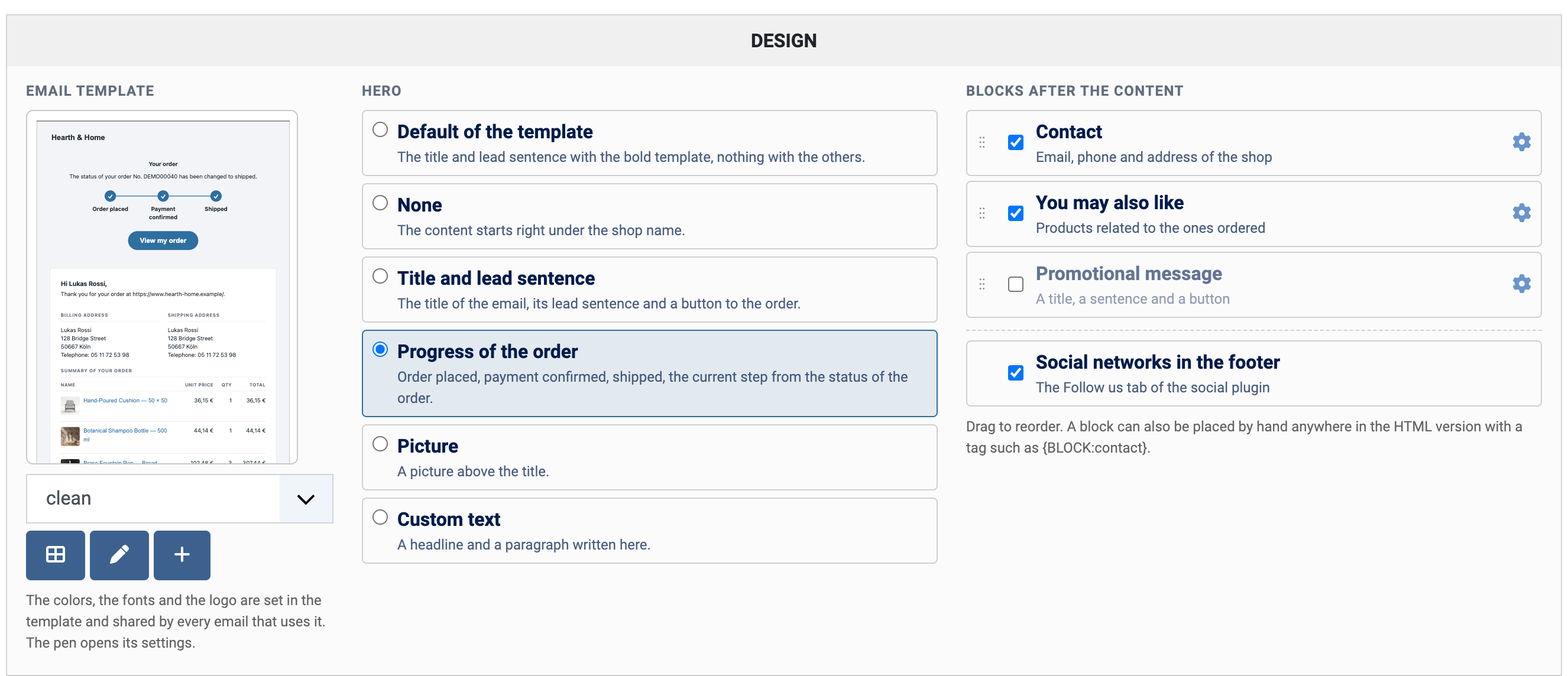
A new Design tile on the email edit page sets what appears around the content. Above it, a hero: the title of the email with a button to the order, a picture you upload, a headline you write, or the progress of the order as steps (order placed, payment confirmed, shipped). After it, blocks you tick and reorder by dragging: your email address, phone and shop address, products related to the ones ordered, a promotional message with a button, and your social networks, entered once in the new "Follow us" tab of the social plugin. The pen button next to the template opens its settings, colors, fonts, corner radius and width, with a preview which follows each change, and your copy of the template is kept when HikaShop updates.
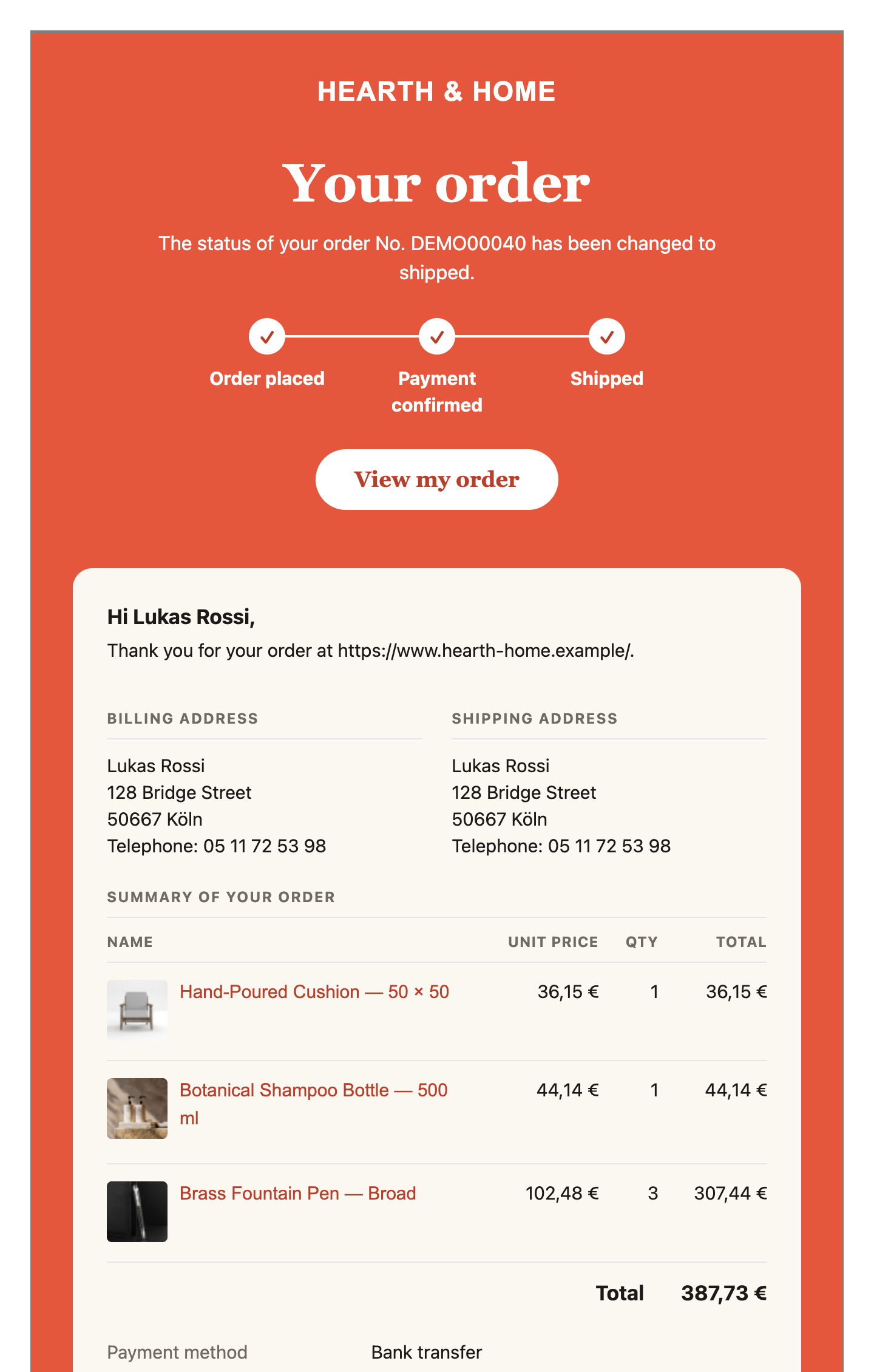
clean is the template of every email on a new shop. A shop which updates keeps its current template until you select another one, so nothing changes for your customers until you decide it should. The text version of each email, for the email programs which do not display HTML, is now written from the HTML version when the email is sent, so you no longer have two versions to keep in step. Everything is described on the email edit page of our documentation.
Mass actions are the tool of HikaShop which selects elements of your shop with filters and does something to all of them. For this release we went through the whole system: a long list of fixes, so that filters, exports, imports and actions do what they say on every table, and a completely redesigned interface. Every setting now comes with a label, its field and a short hint, the filters on a column are listed in rows, the sort and the limit read as a sentence, the columns of an export are grouped in titled boxes, and the email action lists the tags you can use in its message.
The filters, the exports, the imports and the results were also reviewed for safety: nothing typed in a mass action can change the database query it runs, a value written by a customer is escaped when it is displayed, an exported spreadsheet cannot carry a formula, and files are only read and written in the upload folders of the shop.
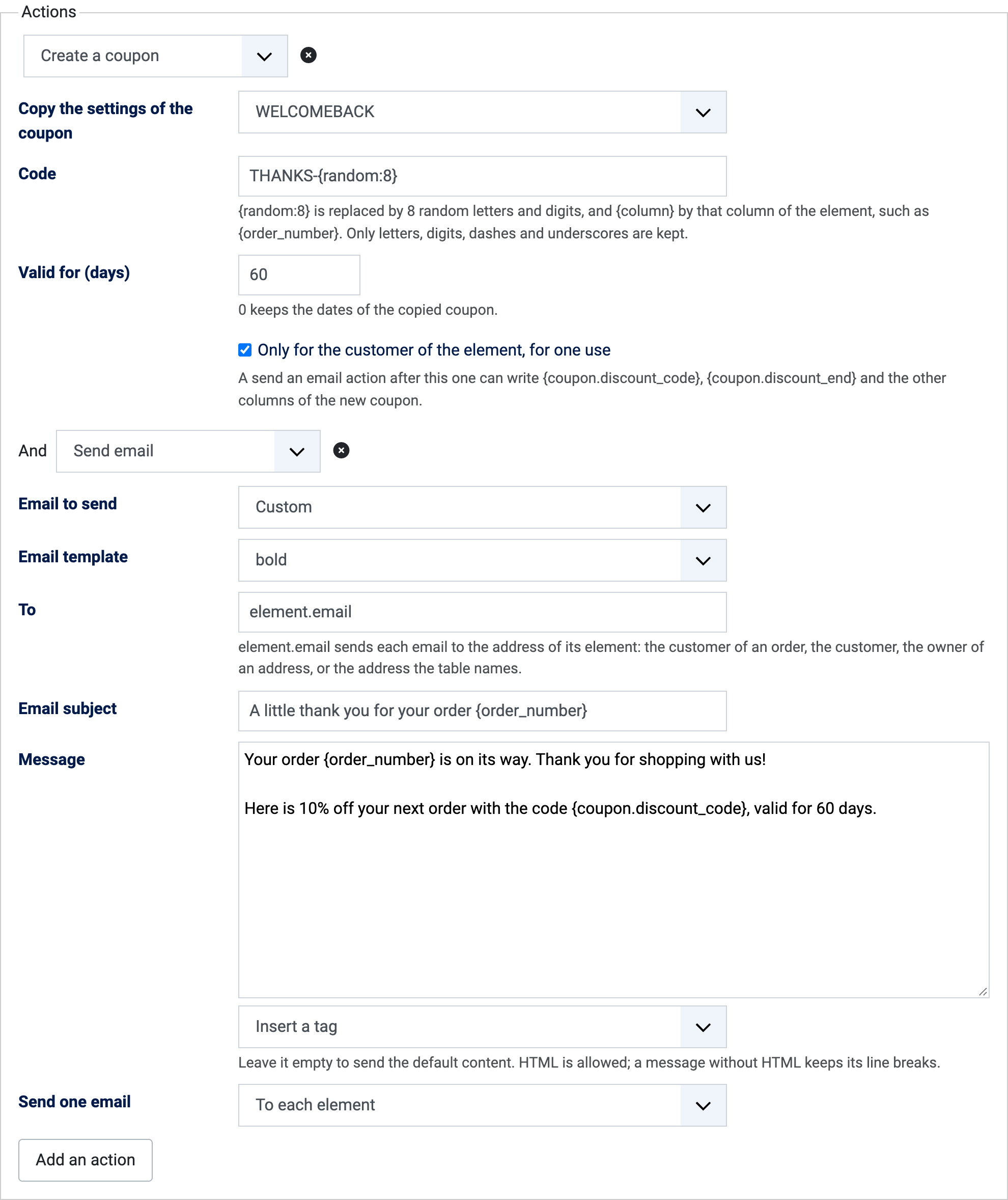
The mass actions can now work on your discounts and coupons, and a new "Create a coupon" action creates a coupon for each order or customer, copied from a coupon of your shop, restricted to that customer and valid for a number of days. The "Send an email" action was rebuilt: it can send one email to each customer rather than one for the whole selection, by writing element.email in its To field, in the language of that customer and with the email template of your choice, and it can give the code of the coupon just created with the tag {coupon.discount_code}. It can also send one of the order emails of the shop, such as the order status notification, or one email for each product of the order. Each email sent to a customer adds a line to the history of the order. Every table can now import a CSV file, as the products already could, and a line naming an order or a customer which does not exist can create it.
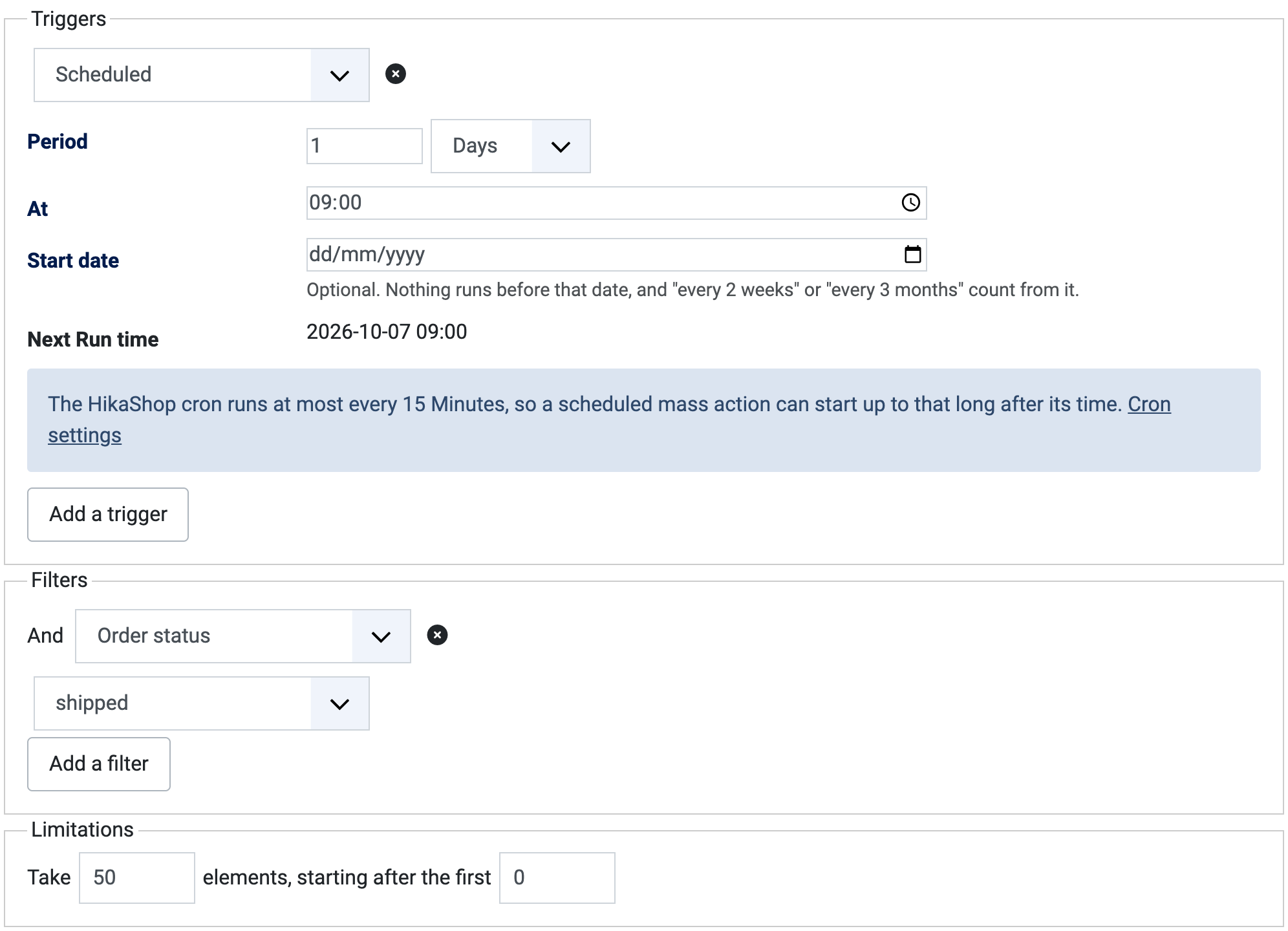
Mass actions could already run every so often. The new Scheduled trigger is far more precise: at a time of day, on some days of the week or on a day of the month, several schedules on one mass action, with the date of the next run shown in the form and a warning when the cron of HikaShop, which runs them, has never run or has stopped. A new "Only once per element" setting makes a mass action remember what it has already handled, so one which runs every day does not do the same thing to the same order twice. Put together, the pictures above are a thank-you coupon sent once to each customer whose order has been shipped, with no one at the keyboard. The mass action documentation walks through it step by step.
Under the hood, the mass actions are now much easier to extend. A table, a filter or an action is registered once, and a filter or an action registered once is offered on every table which can use it. The next versions of HikaMarket and HikaSerial will include an integration plugin with the new mass action system, so that you can configure mass actions on vendors and subscriptions too.
HikaShop already offered the withdrawal button required by the EU directive 2023/2673, through which your customers ask to send back what they bought. The requests it collected can now be handled from start to finish in HikaShop. The Orders > Withdrawals page shows, for each request, what the products asked back are worth, the day it reached you and the day the refund is due, with the late ones in red and a filter to see only those. The refund period is a new setting of the configuration, 14 days by default, separate from the time your customers have to ask.

Opening a request gives you a status to set, a text for the customer, and notes of your own which are never sent. Saving a new status emails your decision to the customer: accepted, refused, or refund sent, with what you wrote for them. A button returns the quantities asked back to the stock of your products. The order says at the top of its page that it has a withdrawal request, and every step is written in its history. The refund itself stays where the money is, on your payment gateway, and the order keeps its total and its invoice.
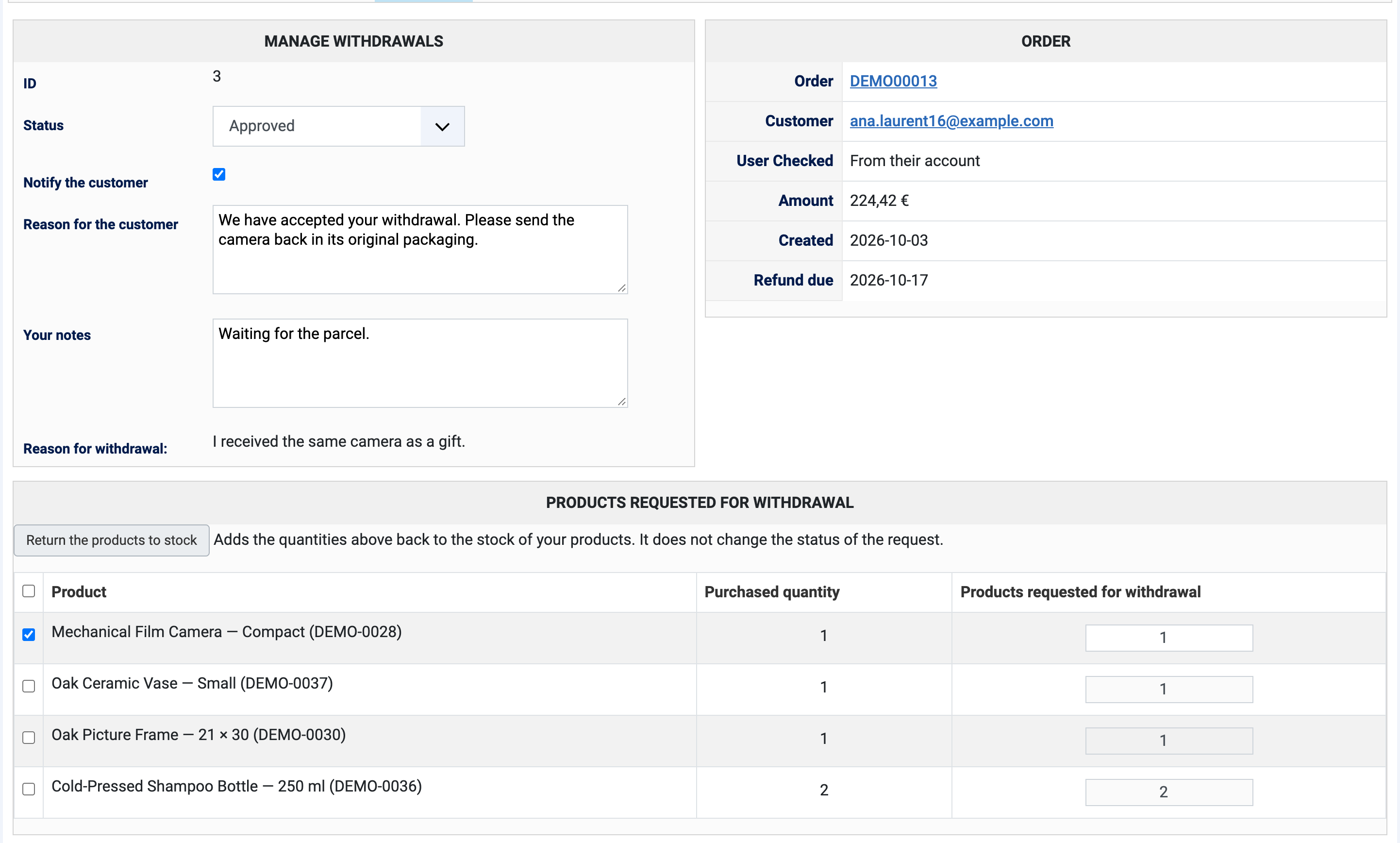
Each request also says how the person proved who they were, from their account or through the order number and email address of the order, and the withdrawal form can show a captcha to visitors who are not logged in, so that it cannot be used to try order numbers one after the other. The withdrawal documentation covers the whole process.
With the PayPal Checkout plugin, your customers can now save their card for their next purchases, with a box under the card form. Their saved cards appear above it on their next payment, with 3D Secure when their bank asks for it, and a new "Payment methods" page in their account lists the cards and PayPal accounts they saved and lets them remove one. PayPal keeps the cards; your site only stores PayPal's reference with the brand, the last digits and the expiry date. The new "Customers can save their cards" setting is off by default.
Subscriptions paid through PayPal Checkout are now charged again at each renewal, with a saved card or a saved PayPal account, and the payment page tells the customer that the order starts a subscription, how often it renews and the date of the next charge.
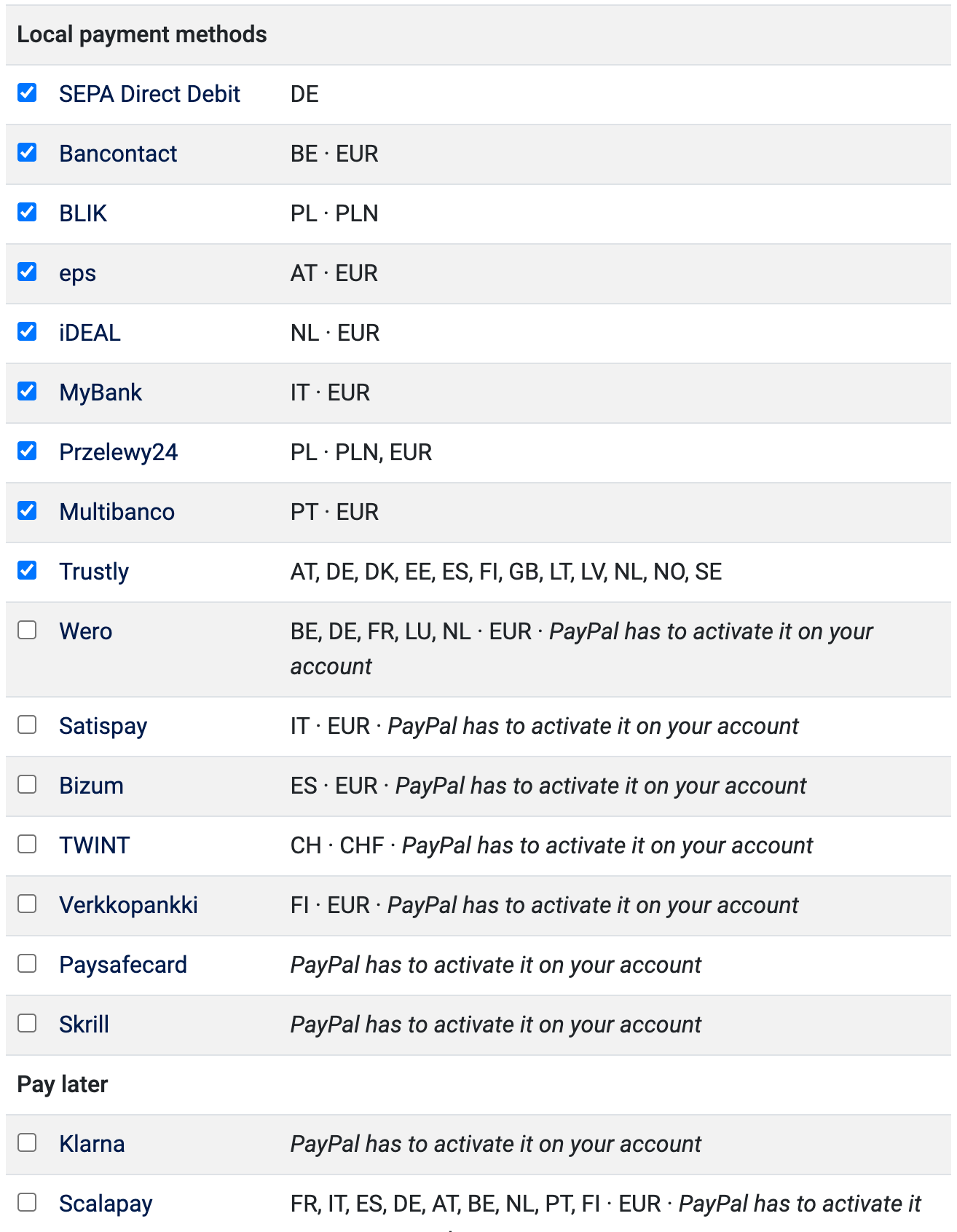
The plugin moved to the new version of PayPal's payment script, which brings new local payment methods: Satispay, Bizum, TWINT, Wero, Verkkopankki, Klarna, Scalapay, Floa, Paysafecard and Skrill, once PayPal has activated them on your account. The settings now list every payment method in one table, with the countries and currencies each one works with, and a "Check availability" button asks PayPal which ones a customer would be offered. A card refused by the bank now tells the customer what to do about it, and a refusal which only needs a stronger authentication sends the card again with 3D Secure instead of losing the order. Until now, such an order was confirmed although no money had been taken. The details are on the PayPal Checkout documentation page.
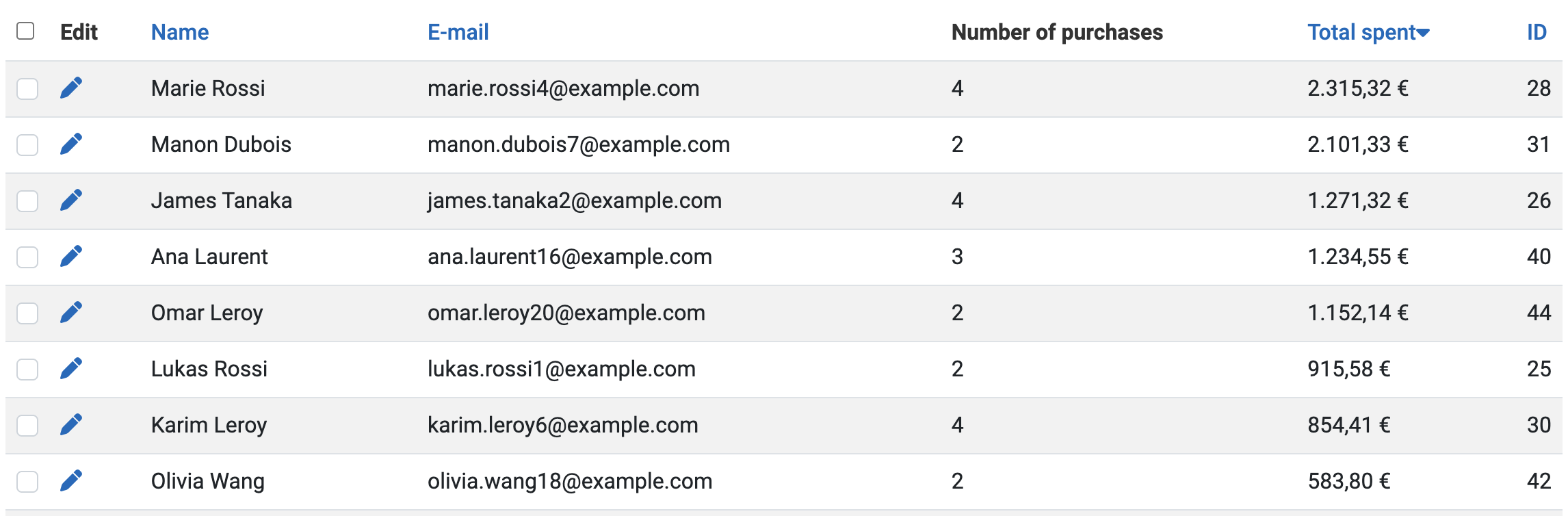
The Customers listing can now show what each customer has spent, and sort them by it, with two new columns, "Total spent" and "Total spent without tax", available through the columns button at the top of the listing. Your best customers are one click away, for a thank-you, a loyalty offer, or simply to know who they are.
The totals count the orders in the statuses your dashboard counts, the ones ticked in the Statistics column of the Order Statuses page, and follow your orders on their own: a confirmed order adds to them, a refunded or cancelled one takes itself back off. Amounts are in the currency of your shop, converted with the rate of the day each order was placed.
On a shop which already has orders, run Configuration > Check database once after the update, so that the totals are worked out for every customer. See the customers listing documentation for the details.
The UCP plugin, which lets AI assistants shop on your store, now speaks the 2026-08-25 version of the Universal Commerce Protocol, the version behind Google's Universal Cart and the current AI shopping agents. An agent can search your catalog with its variants and options, build a cart without paying, choose a shipping method, apply a discount code, and hand the payment to a page of your store, with 3-D Secure when the card needs it. The platforms are recognized by the signature of their requests and your store signs its answers, the orders placed through UCP can be followed by the platform which placed them, and a platform using the payment mandates of Google's Universal Cart can only create an order the customer consented to. The UCP documentation explains how to set it up.
On top of the features highlighted above, HikaShop 6.7.0 ships with many other things for a total of 58 new features, 85 improvements, and 164 bug fixes. Here is a selection of the additional improvements worth mentioning.
Notable additional improvements:
- Better canonical URLs: a product page now names the address of the product itself as its canonical URL, rather than the address it happened to be displayed on, each language of a multilingual shop names its own, category listings fill theirs in on their own, and each page of a paginated listing names its own address.
- Your product reviews on Google Shopping: the Google Products plugin can send the reviews of your products to Google Merchant Center, the ones left by a customer who bought the product as verified purchases. Enter a file path in the new "Product reviews XML file path" setting to turn it on. The weight of your products is also part of the structured data of your product pages now.
- Hide a product in one language: a new "Hide in this language" checkbox in the translation popup of a product leaves it out of the listings, the search and the cart in that language, while it stays on sale in the others.
- A cart of its own for the one page checkout: a product page with the one page checkout can now sell only its own product, leaving the cart the customer filled elsewhere untouched, and one menu item can sell every product of a category, a range of gift certificates for instance.
- A new custom field without leaving the page: the product, variant, category and customer forms have an "Add a new field" button which creates the field in a popup and displays it in the form right away.
- Import only what you need from another HikaShop: the "Import from HikaShop" screen now lets you choose what to bring, the catalog alone for instance, without replacing the settings of a shop already set up.
- Redsys (Servired): refunds and cancellations from your backend, payments taken as preauthorizations, any currency Redsys knows, the newer HMAC_SHA512_V2 signature, the customer data PSD2 asks for so that fewer payments need a confirmation, and the order confirmed even when the notification of Redsys cannot reach your site.
- Payment plugins with today's names: eleven payment plugins carry the name their gateway is sold under today, with the old name in brackets, for example Worldline (Ogone) and Verifone (Paybox).
- Your characteristics at a glance: the preview card of the products listing of your backend writes each characteristic value in green, orange or red depending on whether its variants can still be bought.
- Orders on a phone: on a small screen, the products of an order in the backend are now shown as cards, one per product, instead of a table running off the edge of the screen.
- A cancel button for your customers: the "Cancel Order" button is now also on the order page of the customer account, for the statuses you marked as cancellable.
- Faster listings: product listings load their badges and their links with far fewer database queries, so listings with many products display faster.
- The connector API: customers, orders and products read through the API, by the mobile application for instance, can carry the information and settings of other extensions, a customer lists their paid downloads, and a customer can be found from their exact email address.
- Ready for PHP 8.6: HikaShop and its plugins no longer use what PHP 8.6 deprecates.
The 164 bug fixes include an order placed a second time when the customer reloaded the payment page, a checkout split in several steps which stayed on its first step since 6.6.0, the PayPal Checkout buttons missing from the payment page on some shops since 6.6.0, Google Pay and Apple Pay payments refused by PayPal, several steps of the checkout and the withdrawal form on WordPress, emojis lost when saved in a product name, a review or an email, the Bluepaid, ePay and Skrill payment plugins which stopped confirming orders since PHP 8, and dozens of corrections to the filters and actions of the mass actions, which now give the same answer however they are started.
- Run the database check once: on a shop which already has orders, go to Configuration > Check database after the update, so that the "Total spent" figures of your customers are worked out.
- Your emails keep their template: the new templates are only used by new shops and by the emails you switch to them. A template you modified is kept. The text versions of your emails are now generated from their HTML versions, except where you wrote a text version file by hand, which is still used.
- The legacy checkout is gone: no shop could reach it since HikaShop 4.4.0, and its menu item types and code are now removed. Links made for it still open the current checkout. Some of its old settings, such as the terms and conditions article, the image of the products in the cart and the address selector, are now only set in the blocks of the checkout workflow; a value you had changed is copied there when HikaShop updates.
- Payment plugins whose gateway has closed are removed: Atos SIPS of the first generation, HSBC ePayments, Payza, First Data Global Gateway, Be2bill and MIGS. Each one tells you on screen why it went, and which plugin to use instead where there is one.
- The old USPS and FedEx plugins are removed: USPS and FedEx retired the services they used, so neither could quote a rate anymore. The "FedEx 2" plugin is included with HikaShop, and the USPS plugin is available on our marketplace. New shops also no longer install the legacy UPS, Monetico and PayPlug plugins; shops which use them keep them, and "UPS 2", "Monetico" and "PayPlug 2" are the ones to use.
- PayPal Checkout: the "Slogan" setting is gone, as the new PayPal buttons have none, Mercado Pago is no longer offered, and the Merchant ID is now filled in for you. Check the new payment methods table of your PayPal Checkout method after the update.
- Scheduled mass actions keep their time: the "Every day" and other period triggers no longer drift later with each run, so a daily mass action may start at a slightly different time than it did before.
- For add-on developers: the mass action events onMassactionTableTriggersLoad, onSaveEditionSquareMassAction, onLoadResultMassActionAfterEdition and onReloadPageMassActionAfterEdition are no longer sent, the filter classes are now named hikashopMassactionFilter...Helper in helpers/massaction/filter, and the bundled mass action plugins no longer answer the per-table events such as onProcessOrderMassFilterorderColumn. A filter or an action that your own plugin adds keeps working. The developer documentation describes the registers which replace them.
As always, we recommend updating to benefit from all fixes and improvements. You can download the update from your member area or use the one-click update button in your HikaShop configuration page.
For the complete list of changes, see the full changelog.