

- Posts: 9
- Thank you received: 0
using falang with hikashop starter
9 years 8 months ago #262506
by Marino
using falang with hikashop starter was created by Marino
-- url of the page with the problem -- :
www.tuttobrasileiro.com
-- HikaShop version -- : 2.6.4
-- Joomla version -- : 3.6.4
-- Error-message(debug-mod must be tuned on) -- : "Only available with hikashop market"
My client needs to manage products translated in 3 langages. It seems the best solution is using Falang plugin.
Do you have some guidelines to integrate Falang with hilashop?
In hikashop\configuration\language I see option to activate "modify contents in multilanguage format" that can be used only with hikashop comm
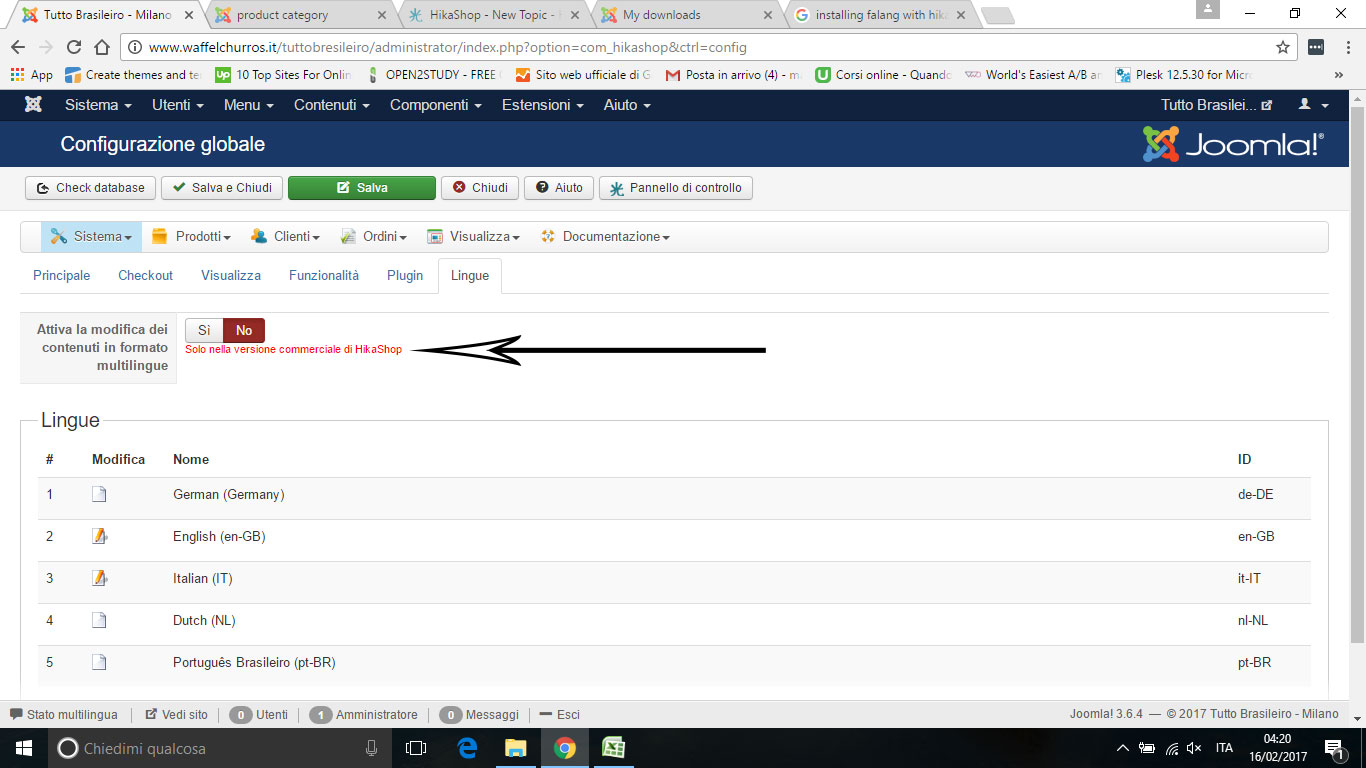 ercial version.
What does it means? I will not be able to translate products and categories?
Thanks for your help
Marco
-- HikaShop version -- : 2.6.4
-- Joomla version -- : 3.6.4
-- Error-message(debug-mod must be tuned on) -- : "Only available with hikashop market"
My client needs to manage products translated in 3 langages. It seems the best solution is using Falang plugin.
Do you have some guidelines to integrate Falang with hilashop?
In hikashop\configuration\language I see option to activate "modify contents in multilanguage format" that can be used only with hikashop comm
What does it means? I will not be able to translate products and categories?
Thanks for your help
Marco
Please Log in or Create an account to join the conversation.

9 years 8 months ago #262511
by nicolas
Replied by nicolas on topic using falang with hikashop starter
Hi,
That option allows you to activate the translation edition interface in HikaShop so that you can easily translate the content of HikaShop in the interface of HikaShop. For example, when you edit a product, you'll get flags you can click on to get the translation fields and simply fill them.
You can still use Falang and HikaShop Starter together without that.
That just means that you'll have to translate your HikaShop content via the Falang interface.
That option allows you to activate the translation edition interface in HikaShop so that you can easily translate the content of HikaShop in the interface of HikaShop. For example, when you edit a product, you'll get flags you can click on to get the translation fields and simply fill them.
You can still use Falang and HikaShop Starter together without that.
That just means that you'll have to translate your HikaShop content via the Falang interface.
Please Log in or Create an account to join the conversation.

8 years 4 months ago - 8 years 4 months ago #293409
by Bouncer
Replied by Bouncer on topic using falang with hikashop starter
-- HikaShop version -- : Essential 3.4.0
-- Joomla version -- : 3.8.8
Hi,
How does this work? Can i skip Falang all together on my multilingual site (using Joomla native language system)?
I have already done a quick test: activated the feature and edited a product: clicked each of the two languages and added info in most fields (which both were empty). Saved and tried the products in both languages; no change...
Rgds,
Petter
-- Joomla version -- : 3.8.8
Hi,
How does this work? Can i skip Falang all together on my multilingual site (using Joomla native language system)?
I have already done a quick test: activated the feature and edited a product: clicked each of the two languages and added info in most fields (which both were empty). Saved and tried the products in both languages; no change...
Rgds,
Petter
Last edit: 8 years 4 months ago by Bouncer. Reason: adding language between native and system ('',)
Please Log in or Create an account to join the conversation.
8 years 4 months ago #293416
by nicolas
Replied by nicolas on topic using falang with hikashop starter
Hi,
The flags translation interface can only work with Falang.
If you don't want to use Falang, then you need to duplicate your products (once per language), duplicate your categories (once per language) and duplicate the menu items and modules of your shop.
That way, you can assign the menu items and modules based on the language and use their "main category" to select their main category of the language selected in them.
It's a lot of duplication, which is not required with Falang, but if you don't plan on changing often your products / categories, and you don't need to manage the stock of your products, then it's not a problem.
In other cases, it's better to use Falang to translate your shop content.
The flags translation interface can only work with Falang.
If you don't want to use Falang, then you need to duplicate your products (once per language), duplicate your categories (once per language) and duplicate the menu items and modules of your shop.
That way, you can assign the menu items and modules based on the language and use their "main category" to select their main category of the language selected in them.
It's a lot of duplication, which is not required with Falang, but if you don't plan on changing often your products / categories, and you don't need to manage the stock of your products, then it's not a problem.
In other cases, it's better to use Falang to translate your shop content.
Please Log in or Create an account to join the conversation.
8 years 4 months ago #293438
by Bouncer
Replied by Bouncer on topic using falang with hikashop starter
Thank you Nicolas,
Is there a step-by-step on how to use Falang and the flags translation interface in combination with Joomla native language system?
Rgds,
Petter
Is there a step-by-step on how to use Falang and the flags translation interface in combination with Joomla native language system?
Rgds,
Petter
Please Log in or Create an account to join the conversation.
8 years 4 months ago #293440
by nicolas
Replied by nicolas on topic using falang with hikashop starter
Hi,
If you have Falang, then it automatically uses the current language to translate the different elements when their translations were are present.
There is nothing particular needed to do for that.
For example, you can translate some joomla modules with Falang, and have other modules use the native language system. Both will display in the correct language on the frontend if you set them up properly.
If you have Falang, then it automatically uses the current language to translate the different elements when their translations were are present.
There is nothing particular needed to do for that.
For example, you can translate some joomla modules with Falang, and have other modules use the native language system. Both will display in the correct language on the frontend if you set them up properly.
Please Log in or Create an account to join the conversation.
Time to create page: 0.243 seconds