

- Posts: 12
- Thank you received: 0
Здесь вы можете свободно общаться на русском языке. Просим отнестись с пониманием к тому, что мы не разговариваем на этом языке и не можем осуществлять поддержку на нем.
Вопрос по внешниму виду категорий
11 years 5 months ago #201051
by Seasafes
Вопрос по внешниму виду категорий was created by Seasafes
-- HikaShop version -- : 1501190205
Добрый день. Прошерстил форум, но так и не нашёл ответа на свой вопрос. Возможно ли сделать, что бы описание категории отображалось не перед товаром, а после него.
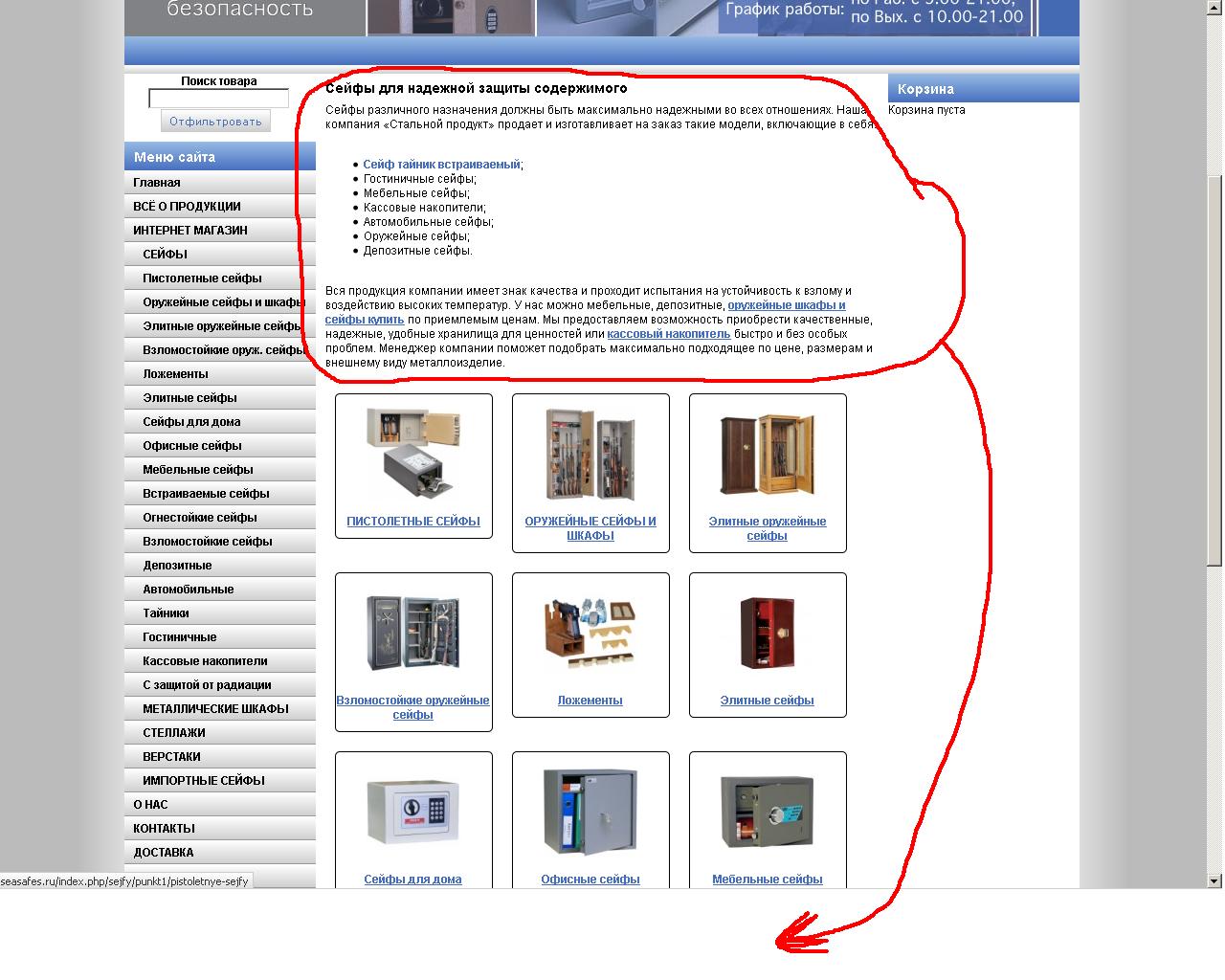
P.S. И ещё небольшой вопрос. Как можно сделать кнопку "Назад" на сайте, что бы можно было возвращаться на предыдущий пункт меню не используя кнопки браузера.
Заранее благодарен за помощи.
Добрый день. Прошерстил форум, но так и не нашёл ответа на свой вопрос. Возможно ли сделать, что бы описание категории отображалось не перед товаром, а после него.
P.S. И ещё небольшой вопрос. Как можно сделать кнопку "Назад" на сайте, что бы можно было возвращаться на предыдущий пункт меню не используя кнопки браузера.
Заранее благодарен за помощи.
Please Log in or Create an account to join the conversation.
- progreccor
-

- Offline
- SEO, webdesign
11 years 5 months ago #201076
by progreccor
Я не явлюсь официальной службой поддержки!
Я здесь добровольно!
Хочешь получить купон на скидку Hikashop? Спроси меня как!
Replied by progreccor on topic Вопрос по внешниму виду категорий
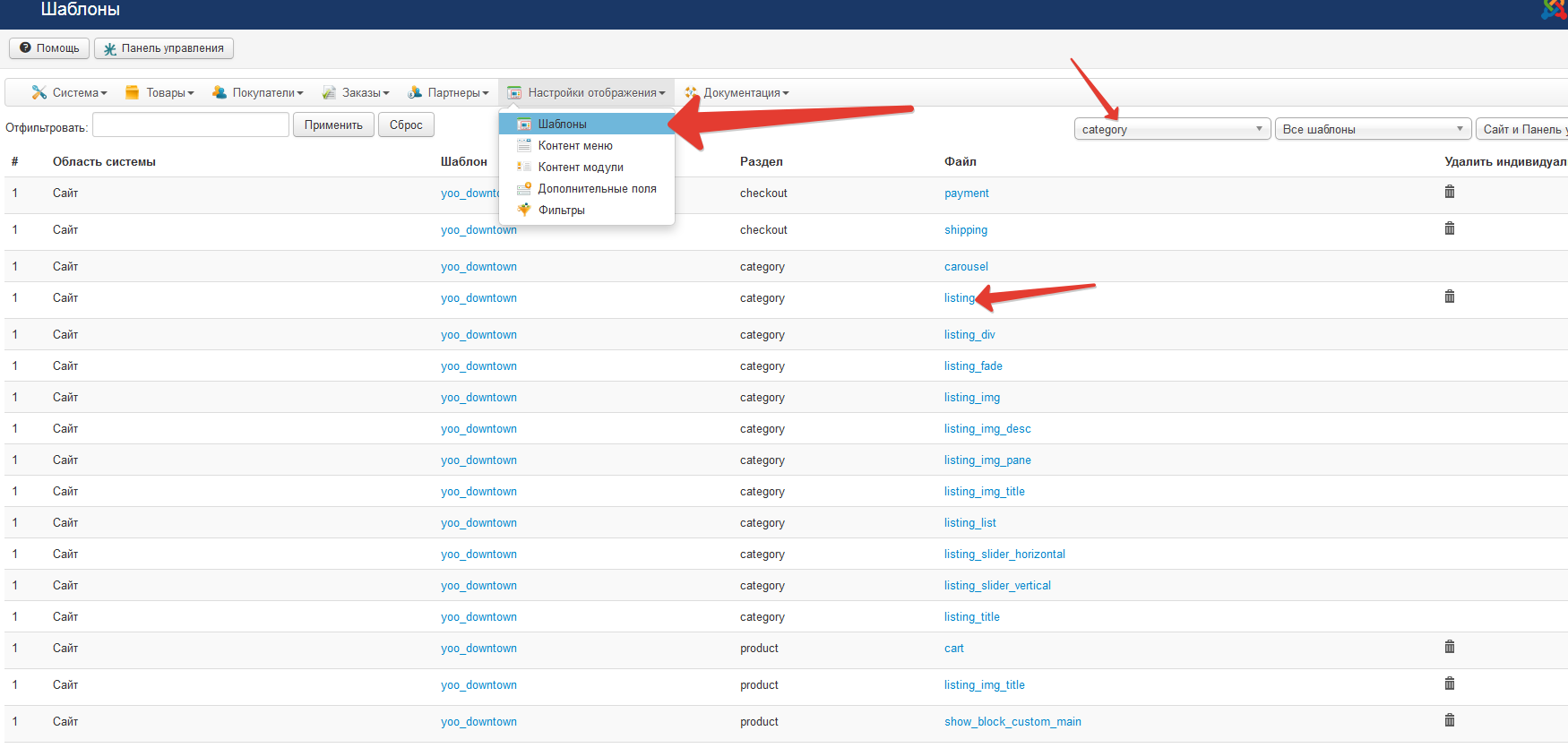
Нужно идти в шаблоны и править файл listing.php из раздела category
вот этот кусок кода переносим в конец файла и получаем нужный результат:
вот этот кусок кода переносим в конец файла и получаем нужный результат:
Code:
if(($this->params->get('show_image') && !empty($this->element->file_path))|| ($this->params->get('show_description')&&!empty($this->element->category_description))){
?>
<div class="hikashop_category_description">
<?php
if($this->params->get('show_image') && !empty($this->element->file_path)){
jimport('joomla.filesystem.file');
if(JFile::exists($this->image->getPath($this->element->file_path,false))){
?>
<img src="<?php echo $this->image->getPath($this->element->file_path); ?>" class="hikashop_category_image"/>
<?php
}
}
if($this->params->get('show_description',1)&&!empty($this->element->category_description)){
?>
<div class="hikashop_category_description_content">
<?php echo JHTML::_('content.prepare',$this->element->category_description); ?>
</div>
<?php
}
?>
</div>
<?php
}
Я не явлюсь официальной службой поддержки!
Я здесь добровольно!
Хочешь получить купон на скидку Hikashop? Спроси меня как!
The following user(s) said Thank You: Seasafes
Please Log in or Create an account to join the conversation.
- progreccor
-
- Offline
- SEO, webdesign
11 years 5 months ago - 11 years 5 months ago #201077
by progreccor
Я не явлюсь официальной службой поддержки!
Я здесь добровольно!
Хочешь получить купон на скидку Hikashop? Спроси меня как!
Replied by progreccor on topic Вопрос по внешниму виду категорий
вот целиком уже переделанный этот файл для джумлы 3.4.1 и hikashop 2.4.0. Можно просто скопировать его на замену.
Code:
!<?php
/**
* @package HikaShop for Joomla!
* @version 2.4.0
* @author hikashop.com
* @copyright (C) 2010-2015 HIKARI SOFTWARE. All rights reserved.
* @license GNU/GPLv3 http://www.gnu.org/licenses/gpl-3.0.html
*/
defined('_JEXEC') or die('Restricted access');
?><?php
ob_start();
if(version_compare(JVERSION,'1.6','<')){
$title = 'show_page_title';
}else{
$title = 'show_page_heading';
}
$titleType='h1';
if($this->module){
$title = 'showtitle';
$titleType='h2';
}
if($this->params->get($title) && JRequest::getVar('hikashop_front_end_main',0)){
if($this->module){
$heading = $this->params->get('title');
}else{
$heading = $this->params->get('page_title');
if($this->params->get('page_heading')){
$heading = $this->params->get('page_heading');
}
}
?>
<<?php echo $titleType; ?>>
<?php echo $heading; ?>
</<?php echo $titleType; ?>>
<?php
}
if(!$this->module){
if(isset($this->element->category_canonical) && !empty($this->element->category_canonical)){
$canonicalUrl = hikashop_cleanURL($this->element->category_canonical);
$doc = JFactory::getDocument();
$doc->addCustomTag( '<link rel="canonical" href="'.$canonicalUrl.'" />' );
}
if(!empty($this->fields)){ ?>
<?php
ob_start();
$this->fieldsClass->prefix = '';
foreach($this->fields as $fieldName => $oneExtraField) {
if(!empty($this->element->$fieldName)){ ?>
<tr class="hikashop_category_custom_<?php echo $oneExtraField->field_namekey;?>_line">
<td class="key">
<span id="hikashop_category_custom_name_<?php echo $oneExtraField->field_id;?>" class="hikashop_category_custom_name">
<?php echo $this->fieldsClass->getFieldName($oneExtraField);?>
</span>
</td>
<td>
<span id="hikashop_category_custom_value_<?php echo $oneExtraField->field_id;?>" class="hikashop_category_custom_value">
<?php echo $this->fieldsClass->show($oneExtraField,$this->element->$fieldName); ?>
</span>
</td>
</tr>
<?php }
}
$custom_fields_html = ob_get_clean();
if(!empty($custom_fields_html)){ ?>
<div id="hikashop_category_custom_info_main" class="hikashop_category_custom_info_main">
<h4><?php echo JText::_('CATEGORY_ADDITIONAL_INFORMATION');?></h4>
<table width="100%">
<?php echo $custom_fields_html; ?>
</table>
</div>
<?php }
}
}
$layout_type = $this->params->get('layout_type');
if(empty($layout_type) || $layout_type=='table') $layout_type = 'div';
$html = $this->loadTemplate($layout_type);
if(!empty($html)) echo '<div class="hikashop_subcategories_listing">'.$html.'</div>';
if(!$this->module){
if(!empty($this->modules)){
$html = '';
jimport('joomla.application.module.helper');
foreach($this->modules as $module){
$html .= JModuleHelper::renderModule($module);
}
if(!empty($html)){
echo '<div class="hikashop_submodules" style="clear:both">'.$html.'</div>';
}
}
}
$html = ob_get_clean();
if(!empty($html)){
$category_id = 0;
if(!empty($this->element->category_id))
$category_id = $this->element->category_id;
if(!empty($this->row->category_id))
$category_id = $this->row->category_id;
?>
<div id="<?php echo $this->params->get('main_div_name');?>" class="hikashop_category_information hikashop_categories_listing_main hikashop_category_listing_<?php echo $category_id; ?>">
<?php echo $html; ?>
</div>
<?php }
if(($this->params->get('show_image') && !empty($this->element->file_path))|| ($this->params->get('show_description')&&!empty($this->element->category_description))){
?>
<div class="hikashop_category_description">
<?php
if($this->params->get('show_image') && !empty($this->element->file_path)){
jimport('joomla.filesystem.file');
if(JFile::exists($this->image->getPath($this->element->file_path,false))){
?>
<img src="<?php echo $this->image->getPath($this->element->file_path); ?>" class="hikashop_category_image"/>
<?php
}
}
if($this->params->get('show_description',1)&&!empty($this->element->category_description)){
?>
<div class="hikashop_category_description_content">
<?php echo JHTML::_('content.prepare',$this->element->category_description); ?>
</div>
<?php
}
?>
</div>
<?php
}
Я не явлюсь официальной службой поддержки!
Я здесь добровольно!
Хочешь получить купон на скидку Hikashop? Спроси меня как!
Last edit: 11 years 5 months ago by progreccor.
The following user(s) said Thank You: Seasafes
Please Log in or Create an account to join the conversation.
11 years 5 months ago - 11 years 5 months ago #201090
by Seasafes
Replied by Seasafes on topic Вопрос по внешниму виду категорий
Если я правильно понял, нужно редактировать файл - listing_img_title.php который лежит в категории - /САЙТ/www/templates/НАЗВАНИЕ ШАБЛОНА/html/com_hikashop/category/
Но после редактирования этого файла возникает ошибка при заходе в каталог интернет магазина.
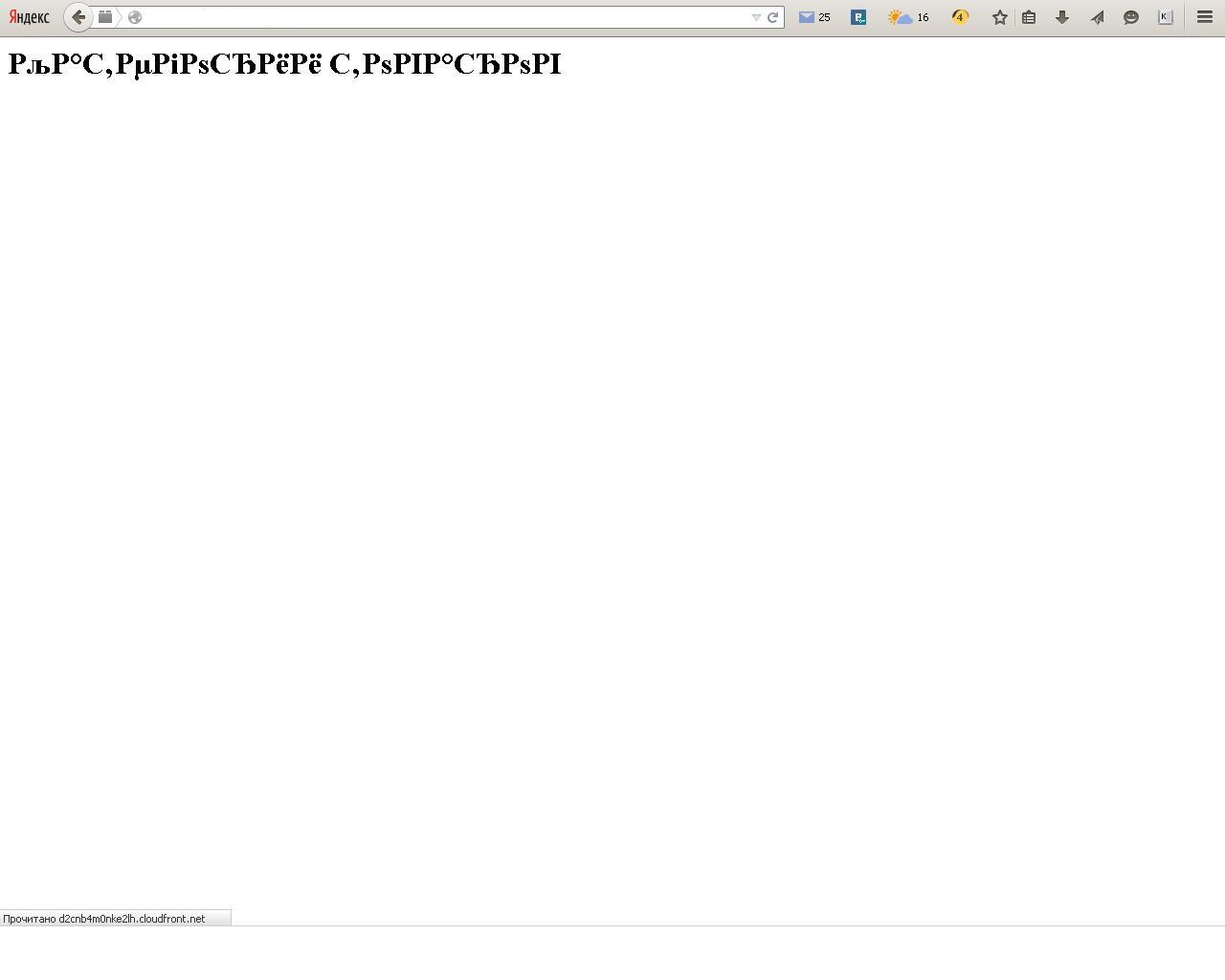
Но после редактирования этого файла возникает ошибка при заходе в каталог интернет магазина.
Last edit: 11 years 5 months ago by Seasafes.
Please Log in or Create an account to join the conversation.
- progreccor
-
- Offline
- SEO, webdesign
11 years 5 months ago #201120
by progreccor
Я не явлюсь официальной службой поддержки!
Я здесь добровольно!
Хочешь получить купон на скидку Hikashop? Спроси меня как!
Replied by progreccor on topic Вопрос по внешниму виду категорий
нет, вы поняли неправильно
Я не явлюсь официальной службой поддержки!
Я здесь добровольно!
Хочешь получить купон на скидку Hikashop? Спроси меня как!
The following user(s) said Thank You: Seasafes
Please Log in or Create an account to join the conversation.
11 years 5 months ago #201123
by Seasafes
Replied by Seasafes on topic Вопрос по внешниму виду категорий
Спасибо огромное. Вы сова помогли.
А по поводу второго моего вопроса, о кнопке "Назад". Вы случайно не сталкивались с данной проблемой?
А по поводу второго моего вопроса, о кнопке "Назад". Вы случайно не сталкивались с данной проблемой?
Please Log in or Create an account to join the conversation.
- progreccor
-
- Offline
- SEO, webdesign
11 years 5 months ago #201181
by progreccor
или так
Я не явлюсь официальной службой поддержки!
Я здесь добровольно!
Хочешь получить купон на скидку Hikashop? Спроси меня как!
Replied by progreccor on topic Вопрос по внешниму виду категорий
Code:
<input type="button" onclick="history.back();" value="Назад"/>
Code:
<a href="#" onclick="history.back();">Назад</a>
Я не явлюсь официальной службой поддержки!
Я здесь добровольно!
Хочешь получить купон на скидку Hikashop? Спроси меня как!
The following user(s) said Thank You: Seasafes
Please Log in or Create an account to join the conversation.
11 years 5 months ago #201502
by Seasafes
Replied by Seasafes on topic Вопрос по внешниму виду категорий
Разобрался! Благодарю.
Please Log in or Create an account to join the conversation.
Moderators: progreccor
Time to create page: 0.308 seconds