

- Posts: 23
- Thank you received: 1
HikaMarket + HikaSerial: Only send Serial Data to appropriate Vendors
6 years 5 months ago #318370
by lisakb
-- HikaShop version -- : 4.2.3
-- HikaSerial version -- : 3.1.0
-- Joomla version -- : 3.9.16
-- PHP version -- : 7.2.14
-- Browser(s) name and version -- : Chrome
My site is running HikaMarket 3.0.3 with HikaSerial 3.1.0.
The shop is configured to allow Multiple Vendors may appear in the same cart.
If a Visitor purchases an item with an attached serial, the "Serial Data Attached to product" table appears at the bottom of every confirmation email sent to every Vendor that has a product in the cart.
Example:
1. A Visitor buys Product 1 (with an attached serial) from Vendor A, and Product 2 (without an attached serial) from Vendor B.
2. Vendor A will receive an email indicating Visitor purchased Product 1.
3. Vendor A's email includes a table at the bottom indicating the Serial along with the Serial attached to Product 1.
4. Vender B will receive an email indicating that Visitor purchased Product 2.
5.Vendor B's email also includes a table at the bottom indicating the Serial along with the Serial attached to Product 1.
How can I stop distributing Purchase & Serial information to all vendors in a cart?
Thanks
-- HikaSerial version -- : 3.1.0
-- Joomla version -- : 3.9.16
-- PHP version -- : 7.2.14
-- Browser(s) name and version -- : Chrome
My site is running HikaMarket 3.0.3 with HikaSerial 3.1.0.
The shop is configured to allow Multiple Vendors may appear in the same cart.
If a Visitor purchases an item with an attached serial, the "Serial Data Attached to product" table appears at the bottom of every confirmation email sent to every Vendor that has a product in the cart.
Example:
1. A Visitor buys Product 1 (with an attached serial) from Vendor A, and Product 2 (without an attached serial) from Vendor B.
2. Vendor A will receive an email indicating Visitor purchased Product 1.
3. Vendor A's email includes a table at the bottom indicating the Serial along with the Serial attached to Product 1.
4. Vender B will receive an email indicating that Visitor purchased Product 2.
5.Vendor B's email also includes a table at the bottom indicating the Serial along with the Serial attached to Product 1.
How can I stop distributing Purchase & Serial information to all vendors in a cart?
Thanks
Please Log in or Create an account to join the conversation.

6 years 5 months ago - 6 years 5 months ago #318372
by Jerome
Jerome - Obsidev.com
HikaMarket & HikaSerial developer / HikaShop core dev team.
Replied by Jerome on topic HikaMarket + HikaSerial: Only send Serial Data to appropriate Vendors
Hello,
Thank you for the report.
We will investigate the issue in details.
In the meantime, you can activate an HikaSerial hidden setting named "no_serial_for_vendors".
You need to add a new entry in the "hikaserial_config" database table with the namekey "no_serial_for_vendors" and the value "1".
That hidden setting do not display the serials in the vendor notification emails.
Regards,
Thank you for the report.
We will investigate the issue in details.
In the meantime, you can activate an HikaSerial hidden setting named "no_serial_for_vendors".
You need to add a new entry in the "hikaserial_config" database table with the namekey "no_serial_for_vendors" and the value "1".
That hidden setting do not display the serials in the vendor notification emails.
Regards,
Jerome - Obsidev.com
HikaMarket & HikaSerial developer / HikaShop core dev team.
Last edit: 6 years 5 months ago by Jerome. Reason: fix typo
Please Log in or Create an account to join the conversation.
6 years 5 months ago - 6 years 5 months ago #318429
by lisakb
Replied by lisakb on topic HikaMarket + HikaSerial: Only send Serial Data to appropriate Vendors
>In the meantime, you can activate an HikaSerial hidden setting named "no_serial_for_vendors".
>You need to add a new entry in the "hikashop_config" database table with the namekey "no_serial_for_vendors" and the value "1".
>That hidden setting do not display the serials in the vendor notification emails.
Okay, I added the entry to the hikashop_config database table. This appears to have no effect. In tests, the
However, if it were to work that wouldn't actually correct the entire problem because we are selling gift cards with serial numbers. We need to have the serials automatically transmitted to the vendors.
I'm attaching a screenshot of what the new row of the database looks like, just to verify that it is what you directed me to insert.
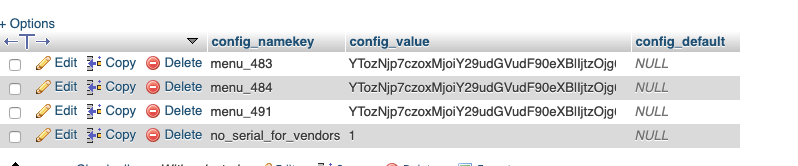
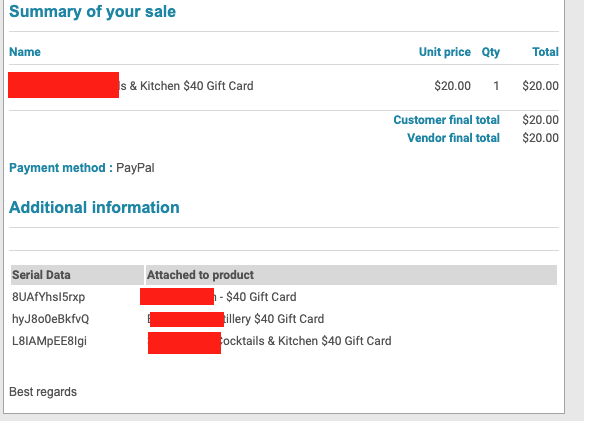
I'm also attaching a screenshot of part of the confirmation emails illustrating the problem.
In one of these images, vendor_a sells a gift card and is not only shown the information about the gift card they sold, but about the gift cards that 2 other vendors sold.
In the other image, vendor_b sells a loaf of bread but is also shown information about 3 other purchases that are not related to vendor_b, along with the gift card serial. This information should not go to other parties not involved in gift card purchase.
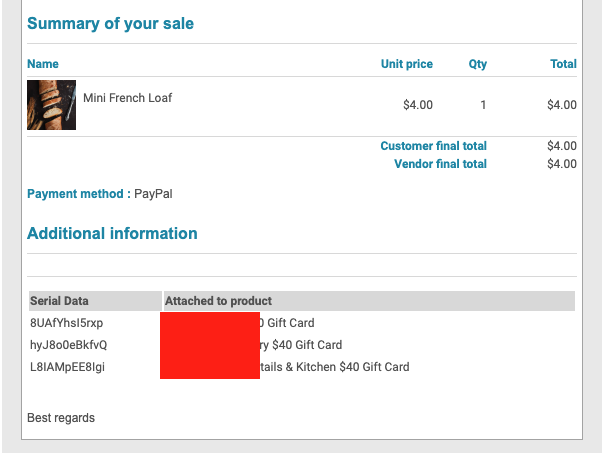
These sales were made after inserting the row into the database. It appears to have no effect.
Thank you in advance for whatever can be done to help this!
>You need to add a new entry in the "hikashop_config" database table with the namekey "no_serial_for_vendors" and the value "1".
>That hidden setting do not display the serials in the vendor notification emails.
Okay, I added the entry to the hikashop_config database table. This appears to have no effect. In tests, the
However, if it were to work that wouldn't actually correct the entire problem because we are selling gift cards with serial numbers. We need to have the serials automatically transmitted to the vendors.
I'm attaching a screenshot of what the new row of the database looks like, just to verify that it is what you directed me to insert.
I'm also attaching a screenshot of part of the confirmation emails illustrating the problem.
In one of these images, vendor_a sells a gift card and is not only shown the information about the gift card they sold, but about the gift cards that 2 other vendors sold.
In the other image, vendor_b sells a loaf of bread but is also shown information about 3 other purchases that are not related to vendor_b, along with the gift card serial. This information should not go to other parties not involved in gift card purchase.
These sales were made after inserting the row into the database. It appears to have no effect.
Thank you in advance for whatever can be done to help this!
Last edit: 6 years 5 months ago by Jerome.
Please Log in or Create an account to join the conversation.
6 years 5 months ago #318435
by Jerome
Jerome - Obsidev.com
HikaMarket & HikaSerial developer / HikaShop core dev team.
Replied by Jerome on topic HikaMarket + HikaSerial: Only send Serial Data to appropriate Vendors
Hello,
I wrote "hikashop_config" but it was indeed the "hikaserial_config", since it's an hidden feature of HIkaSerial.
Regards,
I wrote "hikashop_config" but it was indeed the "hikaserial_config", since it's an hidden feature of HIkaSerial.
Regards,
Jerome - Obsidev.com
HikaMarket & HikaSerial developer / HikaShop core dev team.
Please Log in or Create an account to join the conversation.
6 years 5 months ago #318595
by lisakb
Replied by lisakb on topic HikaMarket + HikaSerial: Only send Serial Data to appropriate Vendors
Is there any way to do what I'm asking about?
Can you restrict Serial Data to just go to the appropriate vendors?
Is there another hidden setting that will do this?
Thanks!
Can you restrict Serial Data to just go to the appropriate vendors?
Is there another hidden setting that will do this?
Thanks!
Please Log in or Create an account to join the conversation.
6 years 5 months ago #318603
by Jerome
Jerome - Obsidev.com
HikaMarket & HikaSerial developer / HikaShop core dev team.
Replied by Jerome on topic HikaMarket + HikaSerial: Only send Serial Data to appropriate Vendors
Hello,
That patch will be integrated into the next HikaSerial release since it is too important to be passed in few lines of code here.
Regards,
We worked on a patch which still require few tests to be entirely validated.Thank you for the report.
We will investigate the issue in details.
In the meantime, you can activate an HikaSerial hidden setting named "no_serial_for_vendors".
That patch will be integrated into the next HikaSerial release since it is too important to be passed in few lines of code here.
Regards,
Jerome - Obsidev.com
HikaMarket & HikaSerial developer / HikaShop core dev team.
Please Log in or Create an account to join the conversation.
Moderators: Obsidev
Time to create page: 0.249 seconds