

- Posts: 237
- Thank you received: 5
Two Questions!
3 years 9 months ago #348272
by ltempest
Two Questions! was created by ltempest
-- HikaShop version -- : 4.7
-- HikaSerial version -- : 4.0.1
Hello,
I have two questions, hopefully with simple answers! I have HikaSerial installed with Hikashop.
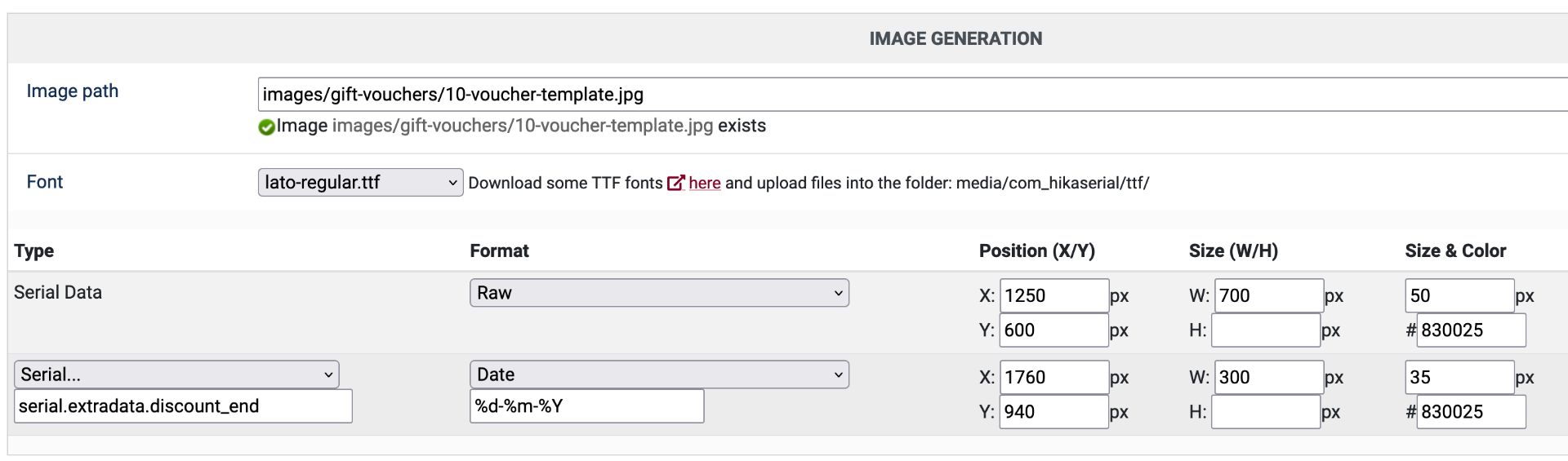
1. The HikaShop system has products that allow customers to purchase money off gift vouchers with a unique code generated by HikaSerial and attached to the email as a JPG voucher. I can print the code onto the voucher template and I also need to add the expire date. From the attached screenshot I tried to follow other forum posts but it is not entering anything on the JPG file. What do I need to change to have the expire date printed (which is 12 months form the created date).
2. As well as these money off gift vouchers, the website also needs to sell vocuhers so customers can book a course via a third party website. This third party website allows us to create unique booking codes that I need to use on the voucher image. I've treid to read the documentation and it states you can use a pre generated list of codes read from a database table. However I cannot figure out how or where to add this list of pre formatted coupon codes, Where can I import this list?
Thanks
Lee
-- HikaSerial version -- : 4.0.1
Hello,
I have two questions, hopefully with simple answers! I have HikaSerial installed with Hikashop.
1. The HikaShop system has products that allow customers to purchase money off gift vouchers with a unique code generated by HikaSerial and attached to the email as a JPG voucher. I can print the code onto the voucher template and I also need to add the expire date. From the attached screenshot I tried to follow other forum posts but it is not entering anything on the JPG file. What do I need to change to have the expire date printed (which is 12 months form the created date).
2. As well as these money off gift vouchers, the website also needs to sell vocuhers so customers can book a course via a third party website. This third party website allows us to create unique booking codes that I need to use on the voucher image. I've treid to read the documentation and it states you can use a pre generated list of codes read from a database table. However I cannot figure out how or where to add this list of pre formatted coupon codes, Where can I import this list?
Thanks
Lee
Please Log in or Create an account to join the conversation.

3 years 9 months ago #348286
by Jerome
Jerome - Obsidev.com
HikaMarket & HikaSerial developer / HikaShop core dev team.
Replied by Jerome on topic Two Questions!
Hello,
1 - The configuration is a bit tricky sometimes.
Because you selected "Serial..." you are already in the "serial." section ; so in the input box below, you just need to enter "extradata.discount_end".
That value in the serial extradata is available if you're using the HikaSerial coupon generator.
If you're using the "time limited" generator, the extradata field would be different.
The best is to open a serial in the backend in order to see the extradata (which would be a timestamp for the value, so it's normal to see a "big" number).
2 - Yes you can import serials. In the HikaSerial menu, below "Packs" and "Serials", you'll find the "Import" page :
www.hikashop.com/support/documentation/1...kaserial-import.html
Once you have imported serials for your pack, you just need to be sure that you do not have selected a "generator" and that the "pack data" is "sql" (to use the serials in your database)
www.hikashop.com/support/documentation/117-pack-edition.html
Regards,
1 - The configuration is a bit tricky sometimes.
Because you selected "Serial..." you are already in the "serial." section ; so in the input box below, you just need to enter "extradata.discount_end".
That value in the serial extradata is available if you're using the HikaSerial coupon generator.
If you're using the "time limited" generator, the extradata field would be different.
The best is to open a serial in the backend in order to see the extradata (which would be a timestamp for the value, so it's normal to see a "big" number).
2 - Yes you can import serials. In the HikaSerial menu, below "Packs" and "Serials", you'll find the "Import" page :
www.hikashop.com/support/documentation/1...kaserial-import.html
Once you have imported serials for your pack, you just need to be sure that you do not have selected a "generator" and that the "pack data" is "sql" (to use the serials in your database)
www.hikashop.com/support/documentation/117-pack-edition.html
Regards,
Jerome - Obsidev.com
HikaMarket & HikaSerial developer / HikaShop core dev team.
Please Log in or Create an account to join the conversation.
3 years 9 months ago #348321
by ltempest
Replied by ltempest on topic Two Questions!
Jerome,
Thank you for your reply, most appreciated, I have followed your advie and now have what I require.
Thanks
Lee
Thank you for your reply, most appreciated, I have followed your advie and now have what I require.
Thanks
Lee
Please Log in or Create an account to join the conversation.
Moderators: Obsidev
Time to create page: 0.054 seconds