

- Posts: 637
- Thank you received: 26
unable to make the generated PDF available for download in the frontend
1 year 5 months ago - 1 year 5 months ago #367480
by Lumiga
Kind regards,
Lumiga
-- HikaShop version -- : 5.1.6
-- HikaSerial version -- : 5.1
-- Joomla version -- : 5.3.1
-- PHP version -- : 8
Hello HikaShop Support,
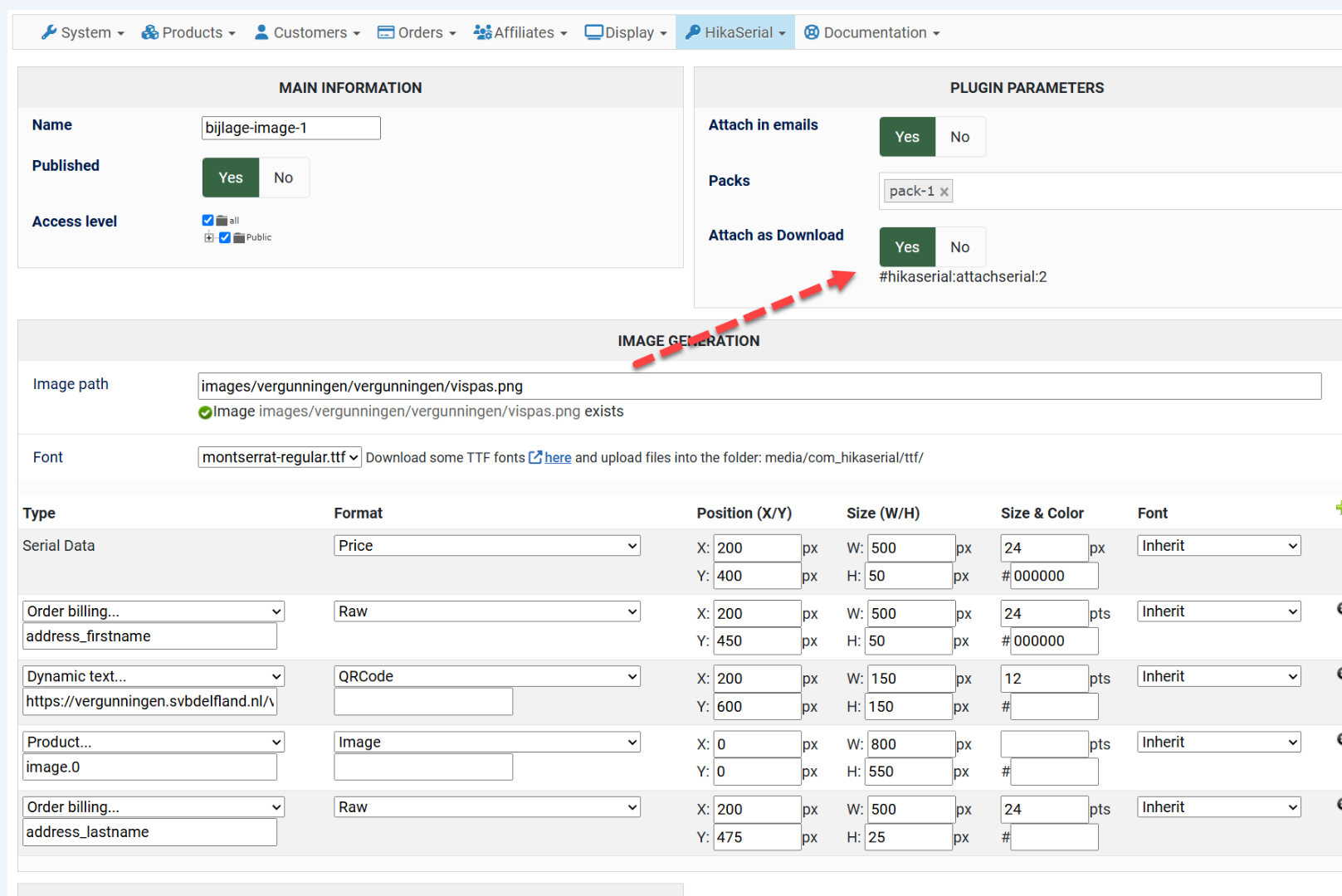
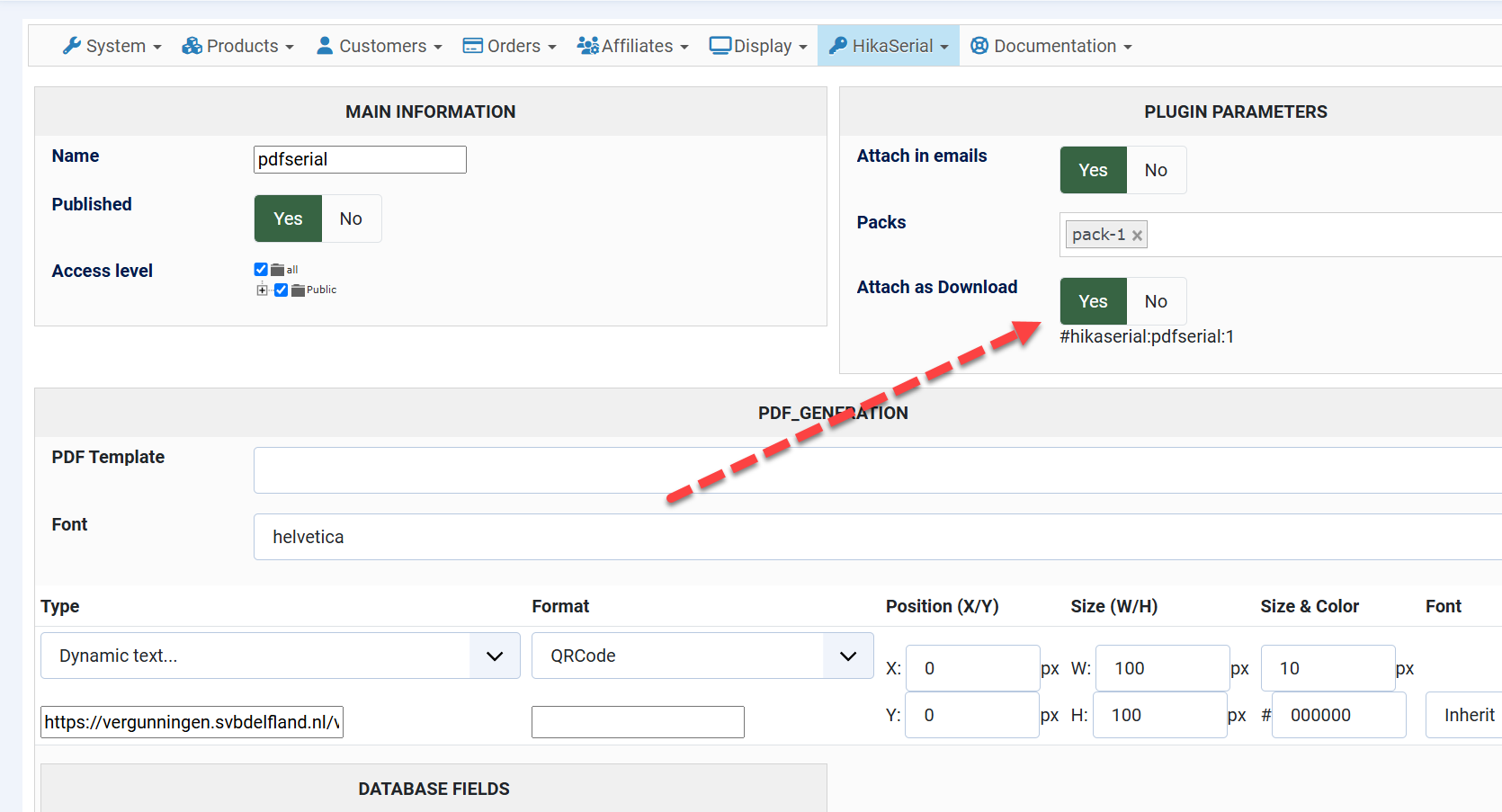
We are currently using HikaSerial in combination with the PDF Serial and Attach Serial plugins. Everything works well in terms of PDF generation and image generation — the PDF and image is successfully created and attached to the confirmation email when an order is confirmed (still manual, see other issue)
However, we are unable to make the generated PDF available for download in the frontend (e.g. in the customer account or order history). The serial is visible to the customer, but no download link appears, even though the "Attach as Download" option is enabled in the plugin settings.
Could you please advise how we can make the generated PDF available for download in the frontend?
Thank you in advance for your help!
Best regards,
Lumiga
-- HikaSerial version -- : 5.1
-- Joomla version -- : 5.3.1
-- PHP version -- : 8
Hello HikaShop Support,
We are currently using HikaSerial in combination with the PDF Serial and Attach Serial plugins. Everything works well in terms of PDF generation and image generation — the PDF and image is successfully created and attached to the confirmation email when an order is confirmed (still manual, see other issue)
However, we are unable to make the generated PDF available for download in the frontend (e.g. in the customer account or order history). The serial is visible to the customer, but no download link appears, even though the "Attach as Download" option is enabled in the plugin settings.
Could you please advise how we can make the generated PDF available for download in the frontend?
Thank you in advance for your help!
Best regards,
Lumiga
Kind regards,
Lumiga
Last edit: 1 year 5 months ago by Lumiga.
Please Log in or Create an account to join the conversation.

1 year 5 months ago #367488
by Jerome
Jerome - Obsidev.com
HikaMarket & HikaSerial developer / HikaShop core dev team.
Replied by Jerome on topic unable to make the generated PDF available for download in the frontend
Hello,
Attach as download requires the creation of a "product file".
You have a sample in the documentation of the "attach serial" plugin : www.hikashop.com/support/documentation/1...ns-attachserial.html
When you edit your HikaShop product (the one linked with a pack) ; you have a section "image and files".
www.hikashop.com/support/documentation/2...op-product-form.html
Click on the "+" button for the "files" section and you will have the popup for the files settings.
Enter the "#hikaserial:attachserial:..." (or "#hikaserial:pdfserial:...") tag for the file path and you'll have your virtual product file !
Regards,
Attach as download requires the creation of a "product file".
You have a sample in the documentation of the "attach serial" plugin : www.hikashop.com/support/documentation/1...ns-attachserial.html
When you edit your HikaShop product (the one linked with a pack) ; you have a section "image and files".
www.hikashop.com/support/documentation/2...op-product-form.html
Click on the "+" button for the "files" section and you will have the popup for the files settings.
Enter the "#hikaserial:attachserial:..." (or "#hikaserial:pdfserial:...") tag for the file path and you'll have your virtual product file !
Regards,
Jerome - Obsidev.com
HikaMarket & HikaSerial developer / HikaShop core dev team.
Please Log in or Create an account to join the conversation.
1 year 4 months ago #367509
by Lumiga
Kind regards,
Lumiga
Replied by Lumiga on topic unable to make the generated PDF available for download in the frontend
Hi Jerome,
Sounds prommising
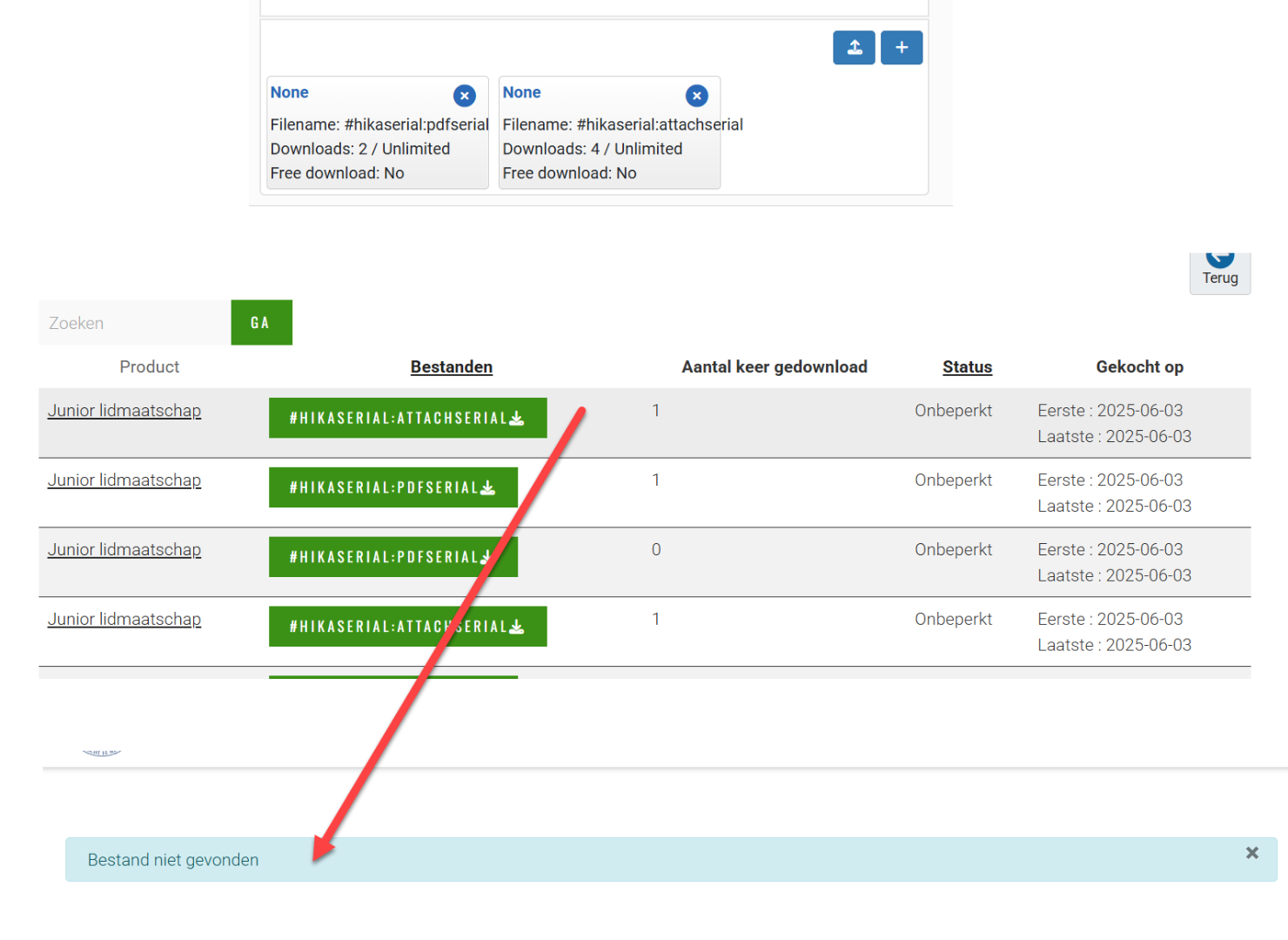
But I'm not entirely sure if I configured it correctly. When I try to access the file, I get a "file not found" message. I also checked the server, but I couldn't locate where the generated files are stored. Could you clarify what I might be missing or where exactly the files should be located?
Also, could you please provide an example of what the file path should look like in this case?
Sounds prommising
But I'm not entirely sure if I configured it correctly. When I try to access the file, I get a "file not found" message. I also checked the server, but I couldn't locate where the generated files are stored. Could you clarify what I might be missing or where exactly the files should be located?
Also, could you please provide an example of what the file path should look like in this case?
Kind regards,
Lumiga
Please Log in or Create an account to join the conversation.
1 year 4 months ago #367521
by Jerome
Jerome - Obsidev.com
HikaMarket & HikaSerial developer / HikaShop core dev team.
Replied by Jerome on topic unable to make the generated PDF available for download in the frontend
Hello,
You need to put the entire tag given by the plugin (under the "yes/no" for the "attach as download"),
Otherwise, attachserial or pdfserial won't be able to retrieve the configuration (and made the verifications with the serials).
Regards,
You need to put the entire tag given by the plugin (under the "yes/no" for the "attach as download"),
Otherwise, attachserial or pdfserial won't be able to retrieve the configuration (and made the verifications with the serials).
Regards,
Jerome - Obsidev.com
HikaMarket & HikaSerial developer / HikaShop core dev team.
The following user(s) said Thank You: Lumiga
Please Log in or Create an account to join the conversation.
Moderators: Obsidev
Time to create page: 0.136 seconds