

- Posts: 28
- Thank you received: 0
General Question
14 years 4 months ago #49713
by cvnet
General Question was created by cvnet
Hi all
We have Pin code for calling cards for $5 ones and $10 ones, I'm confused by the "Pack" what does pack mean?
We have Pin code for calling cards for $5 ones and $10 ones, I'm confused by the "Pack" what does pack mean?
Please Log in or Create an account to join the conversation.

14 years 4 months ago #49723
by Jerome
Jerome - Obsidev.com
HikaMarket & HikaSerial developer / HikaShop core dev team.
Replied by Jerome on topic Re: General Question
Hi,
A "Pack" is a group of serials.
You associate a "pack" with an HikaShop product and each time the product is bought, a serial from this pack is assigned to the order.
All serials have one (and only one) pack.
You may have a pack "calling cards 1" with serials which are PIN codes for $5 and a second pack "calling cards 2" with serials which are PIN codes for $10.
The pack system allow you to create a special HikaShop product which would give 2 serials from the "calling cards 1".
At this moment, the product is linked with the "calling cards 1" pack but with a quantity set to 2 (or more).
Regards,
A "Pack" is a group of serials.
You associate a "pack" with an HikaShop product and each time the product is bought, a serial from this pack is assigned to the order.
All serials have one (and only one) pack.
You may have a pack "calling cards 1" with serials which are PIN codes for $5 and a second pack "calling cards 2" with serials which are PIN codes for $10.
The pack system allow you to create a special HikaShop product which would give 2 serials from the "calling cards 1".
At this moment, the product is linked with the "calling cards 1" pack but with a quantity set to 2 (or more).
Regards,
Jerome - Obsidev.com
HikaMarket & HikaSerial developer / HikaShop core dev team.
Please Log in or Create an account to join the conversation.
14 years 4 months ago #49726
by cvnet
Replied by cvnet on topic Re: General Question
thanks for explaining, but you mean I can not sell single serial ?
Why 2? and not 1 or more?
Why 2? and not 1 or more?
Please Log in or Create an account to join the conversation.
14 years 4 months ago #49727
by Jerome
Jerome - Obsidev.com
HikaMarket & HikaSerial developer / HikaShop core dev team.
Replied by Jerome on topic Re: General Question
When you attach a pack with a product you specify the number of serial which would be assigned.
This number could be 1 or 2, 3 or what you want
It was just an example.
This number could be 1 or 2, 3 or what you want
It was just an example.
Jerome - Obsidev.com
HikaMarket & HikaSerial developer / HikaShop core dev team.
Please Log in or Create an account to join the conversation.
14 years 4 months ago #49728
by cvnet
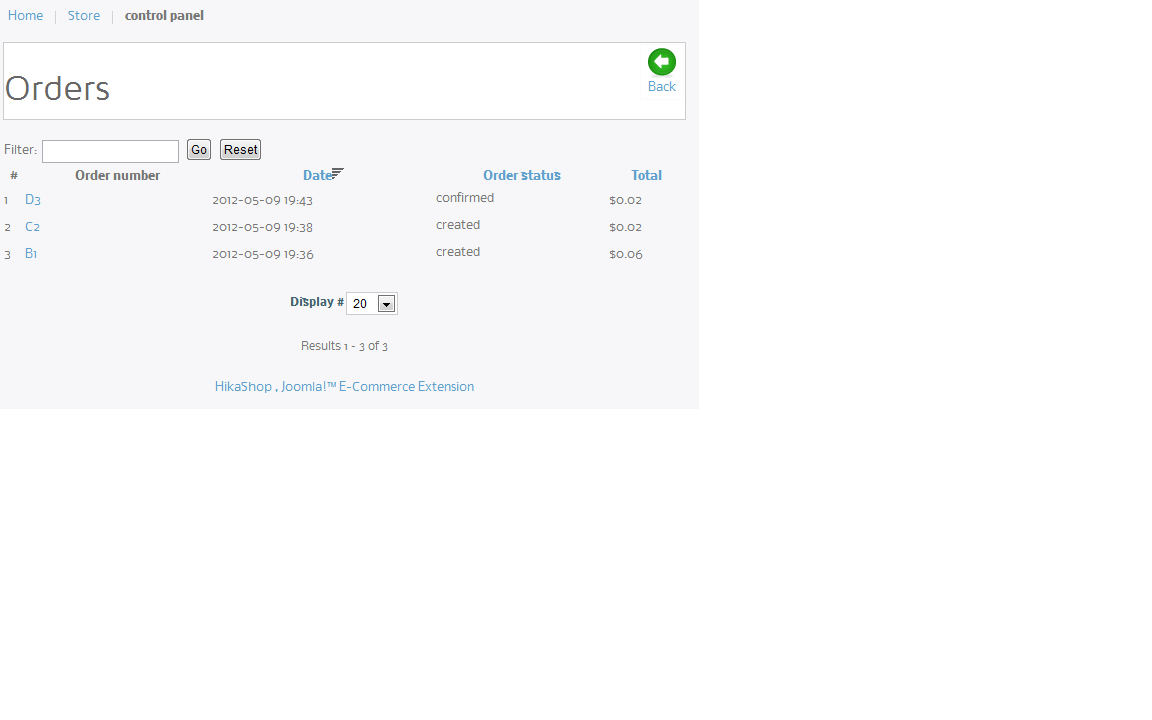
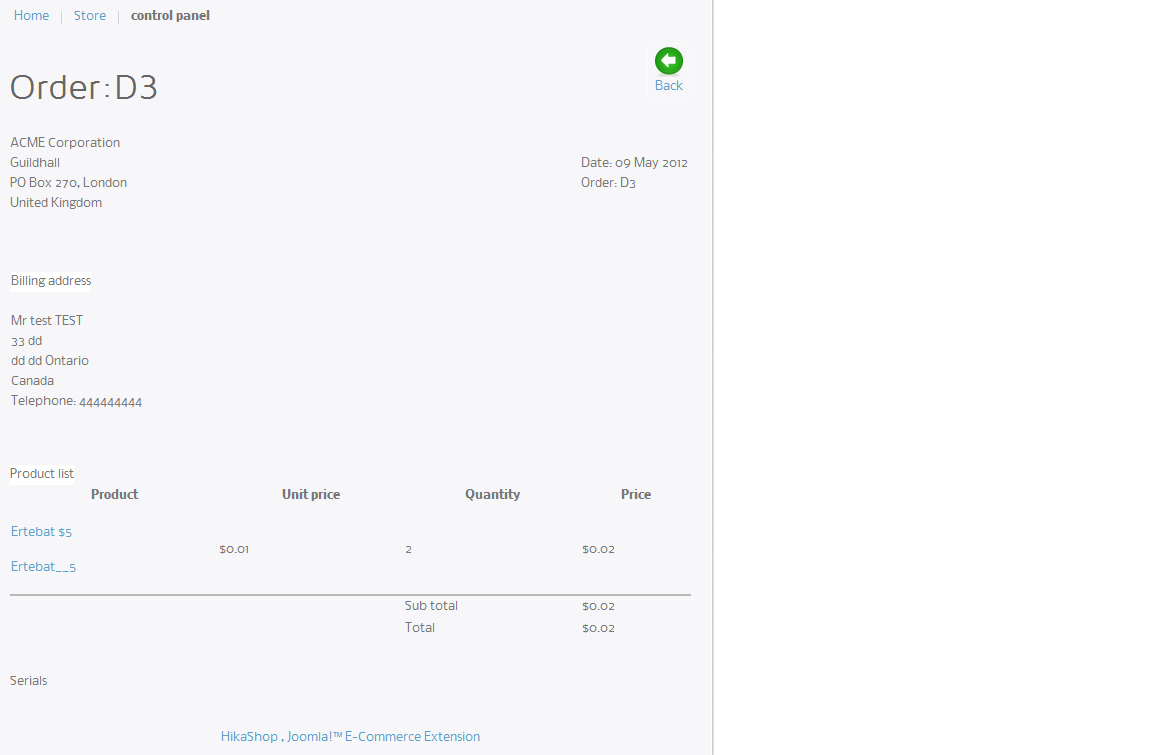
thanks for quick response.
Here is what i did
I created pack with 3 serials
I created a product and linked it to the serial
I place an order for 2 serials
made the payment via paypal
It shows confirmed under my account, however the serials do not shows up, please advise and also look at the attachments
Replied by cvnet on topic Re: General Question
thanks for quick response.
Here is what i did
I created pack with 3 serials
I created a product and linked it to the serial
I place an order for 2 serials
made the payment via paypal
It shows confirmed under my account, however the serials do not shows up, please advise and also look at the attachments
Please Log in or Create an account to join the conversation.
14 years 4 months ago #49729
by Jerome
Jerome - Obsidev.com
HikaMarket & HikaSerial developer / HikaShop core dev team.
Replied by Jerome on topic Re: General Question
Hi,
Is it possible to have an access to your backend in order to check your HikaSerial configuration ?
(You can send me this information by private message or by email jerome at hikashop.com)
Regards,
Is it possible to have an access to your backend in order to check your HikaSerial configuration ?
(You can send me this information by private message or by email jerome at hikashop.com)
Regards,
Jerome - Obsidev.com
HikaMarket & HikaSerial developer / HikaShop core dev team.
Please Log in or Create an account to join the conversation.
14 years 4 months ago #49730
by cvnet
Replied by cvnet on topic Re: General Question
just emailed it to you.
Could you also take a look at the discount? I made it so if there is an order or 5 or more to get 15% discount, it does not work.
Could you also take a look at the discount? I made it so if there is an order or 5 or more to get 15% discount, it does not work.
Please Log in or Create an account to join the conversation.
14 years 4 months ago #49731
by Jerome
Jerome - Obsidev.com
HikaMarket & HikaSerial developer / HikaShop core dev team.
Replied by Jerome on topic Re: General Question
Hi,
The discount is always applied but the price is too low ($0.01) so it couldn't be less.
About your configuration, I have create new serials and update your product (the quantity was 0).
I went in the backend and refresh association on your previous orders and it worked.
I made a test and a serial was assigned correctly.
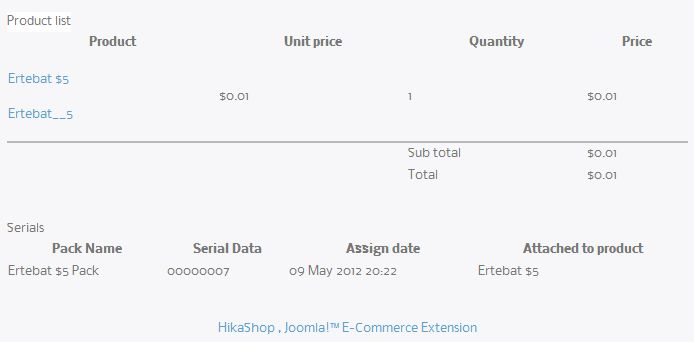
I think it should work good now.
The discount is always applied but the price is too low ($0.01) so it couldn't be less.
About your configuration, I have create new serials and update your product (the quantity was 0).
I went in the backend and refresh association on your previous orders and it worked.
I made a test and a serial was assigned correctly.
I think it should work good now.
Jerome - Obsidev.com
HikaMarket & HikaSerial developer / HikaShop core dev team.
Please Log in or Create an account to join the conversation.
14 years 4 months ago #49732
by cvnet
Replied by cvnet on topic Re: General Question
Thanks a bunch, yes the old orders got serial assigned as well.
I love your fast support btw, and also you product.
One last thing, I purchased the business class, I though the Hakiashop, Joomla Tm E-Commerce Extension will be removed, isnt that the case?
I love your fast support btw, and also you product.
One last thing, I purchased the business class, I though the Hakiashop, Joomla Tm E-Commerce Extension will be removed, isnt that the case?
Please Log in or Create an account to join the conversation.
14 years 4 months ago #49733
by Jerome
Jerome - Obsidev.com
HikaMarket & HikaSerial developer / HikaShop core dev team.
Replied by Jerome on topic Re: General Question
There is an option for HikaShop.
(menu) System => (submenu) Configuration => (tab) Display.
There is a zone called "Footer" at the bottom right of the page and an option called "Show footer".
I have already change it to "no".
Regards,
(menu) System => (submenu) Configuration => (tab) Display.
There is a zone called "Footer" at the bottom right of the page and an option called "Show footer".
I have already change it to "no".
Regards,
Jerome - Obsidev.com
HikaMarket & HikaSerial developer / HikaShop core dev team.
Please Log in or Create an account to join the conversation.
14 years 4 months ago #49735
by cvnet
Replied by cvnet on topic Re: General Question
Hi
About the discount, I increase the price to $5 and it always applies the discount
My goal
1. to give them 15% discount when they puruchase 5 or more of the same product
2. to give them 20% discount when they puruchase 10 or more of the same product
or
1. If the buy the same product and the value of total is more than $25 then give them 15% discount
2. If the buy the same product and the value of total is more than $50 then give them 20% discount
I have set it to quantity to 5 but it also applies even if they purchase one.
Please advise
About the discount, I increase the price to $5 and it always applies the discount
My goal
1. to give them 15% discount when they puruchase 5 or more of the same product
2. to give them 20% discount when they puruchase 10 or more of the same product
or
1. If the buy the same product and the value of total is more than $25 then give them 15% discount
2. If the buy the same product and the value of total is more than $50 then give them 20% discount
I have set it to quantity to 5 but it also applies even if they purchase one.
Please advise
Please Log in or Create an account to join the conversation.
14 years 4 months ago #49736
by Jerome
Jerome - Obsidev.com
HikaMarket & HikaSerial developer / HikaShop core dev team.
Replied by Jerome on topic Re: General Question
Hi,
You have to use an autoload coupon and not a discount.
A discount is a reduction which is always apply. A coupon is more like a conditional reduction.
You can check the documentation:
www.hikashop.com/en/support/documentatio...p-discount-form.html
Regards,
You have to use an autoload coupon and not a discount.
A discount is a reduction which is always apply. A coupon is more like a conditional reduction.
You can check the documentation:
www.hikashop.com/en/support/documentatio...p-discount-form.html
Regards,
Jerome - Obsidev.com
HikaMarket & HikaSerial developer / HikaShop core dev team.
Please Log in or Create an account to join the conversation.
14 years 4 months ago #49742
by cvnet
Replied by cvnet on topic Re: General Question
Jerome thanks for all your help, it worked like magic.
One thing that kind of worries me is this, when you place items to your cart, and go to check out and do not make the payment, the status of the order is "Created"
lets say if i have 5 cards in my cart and did not make the payment.
And lets say there is total of 10 calling cards in system, it deducts the 5 even though the payment has not been made, and I have to click on product and save it to bring those cards back to others to see from front end.
If the person puts calling cards to their cart and do not make the payment, how can I make it cancel the pending order if he/she does not make the payment for x amount of minute?
One thing that kind of worries me is this, when you place items to your cart, and go to check out and do not make the payment, the status of the order is "Created"
lets say if i have 5 cards in my cart and did not make the payment.
And lets say there is total of 10 calling cards in system, it deducts the 5 even though the payment has not been made, and I have to click on product and save it to bring those cards back to others to see from front end.
If the person puts calling cards to their cart and do not make the payment, how can I make it cancel the pending order if he/she does not make the payment for x amount of minute?
Please Log in or Create an account to join the conversation.
14 years 4 months ago #49752
by Jerome
Jerome - Obsidev.com
HikaMarket & HikaSerial developer / HikaShop core dev team.
Replied by Jerome on topic Re: General Question
Hi,
With HikaShop, when an order is created the products quantity are modified.
HikaSerial just assign serials when the order is confirmed (or other statuses that you have configured) but it could be useful that serials became pre-assigned when an order is created and unassigned if the order is canceled.
If you don't use serial generator, it would be better having such feature. I will add it in a future release.
Regards,
With HikaShop, when an order is created the products quantity are modified.
HikaSerial just assign serials when the order is confirmed (or other statuses that you have configured) but it could be useful that serials became pre-assigned when an order is created and unassigned if the order is canceled.
If you don't use serial generator, it would be better having such feature. I will add it in a future release.
Regards,
Jerome - Obsidev.com
HikaMarket & HikaSerial developer / HikaShop core dev team.
Please Log in or Create an account to join the conversation.
14 years 4 months ago #49753
by cvnet
Replied by cvnet on topic Re: General Question
I understand, but most of times ppl create orders but never make the payment, So i dont want my calling card pin numbers to be reserved for orders that are not completed.
Is there a way to set it so it becomes back avaialbe after certian minutes?
And also is it possible to use CB (community builder) registration process? if not what else do you suggest?
Is there a way to set it so it becomes back avaialbe after certian minutes?
And also is it possible to use CB (community builder) registration process? if not what else do you suggest?
Please Log in or Create an account to join the conversation.
14 years 4 months ago #49807
by Jerome
Jerome - Obsidev.com
HikaMarket & HikaSerial developer / HikaShop core dev team.
Replied by Jerome on topic Re: General Question
Hi,
HikaShop have a plugin which will automatically cancel (after few minutes) an order which is still pending.
You can use CB registration process but it would not synchronize data with HikaShop.
Addresses in CB and HikaShop have a different form so it would be a little bit difficult to have a generic plugin.
I don't know which type of registration process you need. You may post the question in the HikaShop forum part.
One thing that I am sure is that HikaShop is fully compatible with Acymailing.
Regards,
HikaShop have a plugin which will automatically cancel (after few minutes) an order which is still pending.
You can use CB registration process but it would not synchronize data with HikaShop.
Addresses in CB and HikaShop have a different form so it would be a little bit difficult to have a generic plugin.
I don't know which type of registration process you need. You may post the question in the HikaShop forum part.
One thing that I am sure is that HikaShop is fully compatible with Acymailing.
Regards,
Jerome - Obsidev.com
HikaMarket & HikaSerial developer / HikaShop core dev team.
Please Log in or Create an account to join the conversation.
14 years 4 months ago #49862
by cvnet
Replied by cvnet on topic Re: General Question
what is the plugin called?
Please Log in or Create an account to join the conversation.
14 years 4 months ago #49874
by Jerome
Jerome - Obsidev.com
HikaMarket & HikaSerial developer / HikaShop core dev team.
Replied by Jerome on topic Re: General Question
"Hikashop Orders Automatic Cancel Plugin"
His little name is : order_auto_cancel
www.demo.hikashop.com/administrator/inde...t&extension_id=10013
This plugin use the HikaShop Cron system to be called periodically.
Regards,
His little name is : order_auto_cancel
www.demo.hikashop.com/administrator/inde...t&extension_id=10013
This plugin use the HikaShop Cron system to be called periodically.
Regards,
Jerome - Obsidev.com
HikaMarket & HikaSerial developer / HikaShop core dev team.
Please Log in or Create an account to join the conversation.
14 years 4 months ago #49875
by cvnet
Replied by cvnet on topic Re: General Question
I enabled that plugin and set the secs, now do i have to add it to cron job or it gets added automaticly?
Please Log in or Create an account to join the conversation.
14 years 4 months ago #49940
by Jerome
Jerome - Obsidev.com
HikaMarket & HikaSerial developer / HikaShop core dev team.
Replied by Jerome on topic Re: General Question
Hi,
We have a beautiful documentation about HikaShop and the Cron task
www.hikashop.com/fr/support/documentatio...ashop-cron-task.html
Regards,
We have a beautiful documentation about HikaShop and the Cron task
www.hikashop.com/fr/support/documentatio...ashop-cron-task.html
Regards,
Jerome - Obsidev.com
HikaMarket & HikaSerial developer / HikaShop core dev team.
Please Log in or Create an account to join the conversation.
Moderators: Obsidev
Time to create page: 0.286 seconds