

- Posts: 5
- Thank you received: 1
Table to use for Attach Serial [solved]
11 years 6 months ago - 11 years 6 months ago #198570
by incode
Table to use for Attach Serial [solved] was created by incode
-- HikaShop version -- : 2.4.0
-- HikaSerial version -- : 1.9.1
-- Joomla version -- : 3.4.1
-- PHP version -- : 5.4.39
-- Browser(s) name and version -- : Firefox 37.0.1
Hi,
I'm very confused with using the right field with the right name in Attach Serial. {table.name_of_field}
-- HikaSerial version -- : 1.9.1
-- Joomla version -- : 3.4.1
-- PHP version -- : 5.4.39
-- Browser(s) name and version -- : Firefox 37.0.1
Hi,
I'm very confused with using the right field with the right name in Attach Serial. {table.name_of_field}
- Where can I find database name for each fields?
- What type is more appropriate for each fields? Is there an exhaustive documentation about existing table?
Last edit: 11 years 6 months ago by incode. Reason: solved
Please Log in or Create an account to join the conversation.

11 years 6 months ago #198571
by Jerome
Jerome - Obsidev.com
HikaMarket & HikaSerial developer / HikaShop core dev team.
Replied by Jerome on topic Table to use for Attach Serial
Hi,
In the "attach serial" documentation, we listed as possible the name of the different tables where the plugin can pick up data.
www.hikashop.com/support/documentation/1...ns-attachserial.html
About the table structure ; you can see directly your database tables thanks to "phpmyadmin" for example.
The HikaShop documentation have also a database schema which will give you a lot of information (even if the database has grown and now have more columns, but no column were removed)
www.hikashop.com/support/support/documen...ocumentation.html#db
I know that the interface is not fully user-friendly but it's the best interface I found in order to have a huge flexibility.
Regards,
In the "attach serial" documentation, we listed as possible the name of the different tables where the plugin can pick up data.
www.hikashop.com/support/documentation/1...ns-attachserial.html
About the table structure ; you can see directly your database tables thanks to "phpmyadmin" for example.
The HikaShop documentation have also a database schema which will give you a lot of information (even if the database has grown and now have more columns, but no column were removed)
www.hikashop.com/support/support/documen...ocumentation.html#db
I know that the interface is not fully user-friendly but it's the best interface I found in order to have a huge flexibility.
Regards,
Jerome - Obsidev.com
HikaMarket & HikaSerial developer / HikaShop core dev team.
The following user(s) said Thank You: incode
Please Log in or Create an account to join the conversation.
11 years 6 months ago #198609
by incode
Replied by incode on topic Table to use for Attach Serial
Great! It's exactely what I expected. I didn't realise it's a developer level so I didn't look at that suport section ...
Thank you very much.
Thank you very much.
Please Log in or Create an account to join the conversation.
11 years 6 months ago - 11 years 6 months ago #198691
by incode
Replied by incode on topic Table to use for Attach Serial
Now if I want to display a characteristic of a product in attach serial. What should I use
{product_characteristic.chacteristic_id} in dynamic type ?
{product_characteristic.chacteristic_id} in dynamic type ?
Last edit: 11 years 6 months ago by incode.
Please Log in or Create an account to join the conversation.
11 years 6 months ago #198695
by Jerome
Jerome - Obsidev.com
HikaMarket & HikaSerial developer / HikaShop core dev team.
Replied by Jerome on topic Table to use for Attach Serial
Hi,
The plugin "attach serial" does not allow to access to the characteristics but thanks to the "order product / order product name" you can display the full name of the product with the selected characteristics.
If you can describe what you want to achieve, it will help us to understand your needs and see how you can realize it.
Regards,
The plugin "attach serial" does not allow to access to the characteristics but thanks to the "order product / order product name" you can display the full name of the product with the selected characteristics.
If you can describe what you want to achieve, it will help us to understand your needs and see how you can realize it.
Regards,
Jerome - Obsidev.com
HikaMarket & HikaSerial developer / HikaShop core dev team.
Please Log in or Create an account to join the conversation.
11 years 6 months ago - 11 years 6 months ago #198825
by incode
Our product is called "Dmitri" an I want to display the size: Dmtri 10cm.
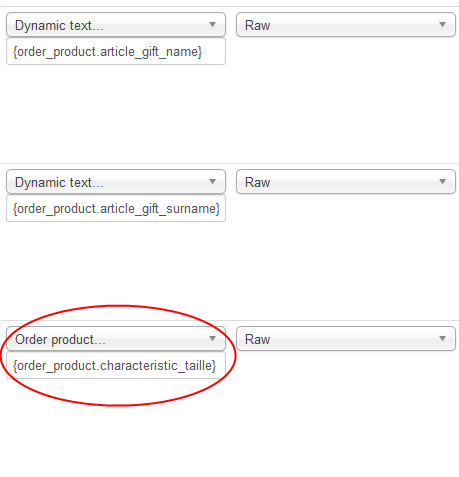
this doesn't work (even with "Dynamic Text ..." type)
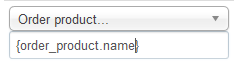
I tried
{order_product.product_name}
{order_product.name}
{product.product_name}
Replied by incode on topic Table to use for Attach Serial
I created personalized gift coupon with the name of the one receiving it and I would like to display the product characteristic.If you can describe what you want to achieve, it will help us to understand your needs and see how you can realize it.
Our product is called "Dmitri" an I want to display the size: Dmtri 10cm.
Indeed variants are called "Dmitri cm". How can I get that variant name?thanks to the "order product / order product name" you can display the full name of the product with the selected characteristics.
this doesn't work (even with "Dynamic Text ..." type)
I tried
{order_product.product_name}
{order_product.name}
{product.product_name}
Last edit: 11 years 6 months ago by incode.
Please Log in or Create an account to join the conversation.
11 years 6 months ago #198833
by Jerome
Jerome - Obsidev.com
HikaMarket & HikaSerial developer / HikaShop core dev team.
Replied by Jerome on topic Table to use for Attach Serial
Hi,
If you're using "Order product..." you just have to enter the name of the field in the input box (not in the "dynamic text" format).
So you just need to enter "characteristic_taille" if you want to display the custom item field "characteristic_taille".
But if you want to display the order product name, you have to enter "order_product_name".
Regards,
If you're using "Order product..." you just have to enter the name of the field in the input box (not in the "dynamic text" format).
So you just need to enter "characteristic_taille" if you want to display the custom item field "characteristic_taille".
But if you want to display the order product name, you have to enter "order_product_name".
Regards,
Jerome - Obsidev.com
HikaMarket & HikaSerial developer / HikaShop core dev team.
Please Log in or Create an account to join the conversation.
11 years 6 months ago #198905
by incode
Replied by incode on topic Table to use for Attach Serial
Thank you. After testing I understand now very well how it work (also dynamic text  who may concat fields )
who may concat fields )
The following user(s) said Thank You: Jerome
Please Log in or Create an account to join the conversation.
Moderators: Obsidev
Time to create page: 0.289 seconds