

- Posts: 6
- Thank you received: 0
Generate Serial based on account email address
14 years 5 months ago #50349
by cwm33
Generate Serial based on account email address was created by cwm33
I'm trying to use hikaserial to generate a serial number for a software license that will be based off of a bit of PHP code that I have for generating the serial numbers. I've looked over the documentation and I'm at a bit of a loss on how to use generated serials on products. I created a Pack that uses Random - HikaSerial Generator plugin for the generator just as a test case, assigned that pack to my product, "purchased" the product via paypal sandbox and it didn't generate a serial number and assign it to the order. It doesn't look like it generated a serial period. Am I missing a configuration step for using the random serial feature?
I would also like a bit of a push in the right direction for where to look to generate the serial number appropriate to my location. I THINK I found the right spot in the randomgen.php file, but I've never dabbled in Joomla Plugin writing before (plus I'm a C# programmer, haven't looked at PHP in probably a year). So any help with that would be greatly appreciated, as this is one of the final things I need to get working before I can launch my product.
I would also like a bit of a push in the right direction for where to look to generate the serial number appropriate to my location. I THINK I found the right spot in the randomgen.php file, but I've never dabbled in Joomla Plugin writing before (plus I'm a C# programmer, haven't looked at PHP in probably a year). So any help with that would be greatly appreciated, as this is one of the final things I need to get working before I can launch my product.
Please Log in or Create an account to join the conversation.

14 years 5 months ago #50350
by Jerome
Jerome - Obsidev.com
HikaMarket & HikaSerial developer / HikaShop core dev team.
Replied by Jerome on topic Re: Generate Serial based on account email address
Hi,
The most important function in a generator plugin is the "generate" one.
When the "generate" function is called, a variable with the name of the plugin (randomgen in my example) is set.
This variable contains the id of the plugin generator.
Thanks to "$order" you can retrieve a lot of information about the current order or the user account.
The "$serial" variable is for output. It is an array which would contains all generated serials.
About HikaSerial configuration, you have to set up all HikaShop order statuses which allow to attach a serial to the order (and to the user).
When an order is validated by PayPal, the order would have another status (generally "confirmed") and HikaSerial would retrieve a serial from the pack.
If the pack is empty, HikaSerial would call the associated generator to create new serials. It is at this moment that the "generate" function is called.
In the pack configuration, you have to select your plugin generator and save. The associated generator is display in the listing so you can easily check if the configuration is right.
Hope it help you !
Regards,
The most important function in a generator plugin is the "generate" one.
Code:
/**
* @param object $pack
* @param object $order
* @param int $quantity
* @param array $serials
*/
public function generate(&$pack, &$order, $quantity, &$serials) {
if(!isset($pack->randomgen)) // replace "randomgen" by your plugin name
return;
// load $this->plugin_params;
parent::pluginParams($pack->randomgen); // replace "randomgen" by your plugin name
for($q = 0; $q < $quantity; $q++) {
$serial = '';
// Generate your serial here
$serials[] = $serial;
}
}
When the "generate" function is called, a variable with the name of the plugin (randomgen in my example) is set.
This variable contains the id of the plugin generator.
Thanks to "$order" you can retrieve a lot of information about the current order or the user account.
The "$serial" variable is for output. It is an array which would contains all generated serials.
About HikaSerial configuration, you have to set up all HikaShop order statuses which allow to attach a serial to the order (and to the user).
When an order is validated by PayPal, the order would have another status (generally "confirmed") and HikaSerial would retrieve a serial from the pack.
If the pack is empty, HikaSerial would call the associated generator to create new serials. It is at this moment that the "generate" function is called.
In the pack configuration, you have to select your plugin generator and save. The associated generator is display in the listing so you can easily check if the configuration is right.
Hope it help you !
Regards,
Jerome - Obsidev.com
HikaMarket & HikaSerial developer / HikaShop core dev team.
Please Log in or Create an account to join the conversation.
14 years 5 months ago - 14 years 5 months ago #50351
by cwm33
That's the exact spot I was looking at for putting in my own serial number generation code, the existing serial number generating code just kinda threw me off a bit as it looked rather strange. :blink:
I'm having a hard time accessing the user email out of the $order variable though, I've tried doing a var_dump and it gave me NULL NULL NULL NULL NULL instead of something useful.
I also did some poking around through code, and arrived at trying out $order->customer->user_email; but that didn't give me anything either. :S
I've managed to get it to assign a random serial from the 'pack' so far, but the serial only shows up after I go into the order and hit "Refresh Associations". I have "Assignable Order Statuses" set to confirmed, shipped in the HikaSerial configuration.
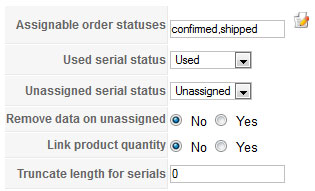
Am I missing something in the HikaShop configuration so that the serial generation code gets called when the payment is confirmed? or could this be related to me still using the PayPal sandbox environment?
Replied by cwm33 on topic Re: Generate Serial based on account email address
Jerome wrote: About HikaSerial configuration, you have to set up all HikaShop order statuses which allow to attach a serial to the order (and to the user).
When an order is validated by PayPal, the order would have another status (generally "confirmed") and HikaSerial would retrieve a serial from the pack.
If the pack is empty, HikaSerial would call the associated generator to create new serials. It is at this moment that the "generate" function is called.
In the pack configuration, you have to select your plugin generator and save. The associated generator is display in the listing so you can easily check if the configuration is right.
Hope it help you !
Regards,
That's the exact spot I was looking at for putting in my own serial number generation code, the existing serial number generating code just kinda threw me off a bit as it looked rather strange. :blink:
I'm having a hard time accessing the user email out of the $order variable though, I've tried doing a var_dump and it gave me NULL NULL NULL NULL NULL instead of something useful.
I also did some poking around through code, and arrived at trying out $order->customer->user_email; but that didn't give me anything either. :S
I've managed to get it to assign a random serial from the 'pack' so far, but the serial only shows up after I go into the order and hit "Refresh Associations". I have "Assignable Order Statuses" set to confirmed, shipped in the HikaSerial configuration.
Am I missing something in the HikaShop configuration so that the serial generation code gets called when the payment is confirmed? or could this be related to me still using the PayPal sandbox environment?
Last edit: 14 years 5 months ago by cwm33. Reason: more details
Please Log in or Create an account to join the conversation.
14 years 5 months ago #50401
by Jerome
Jerome - Obsidev.com
HikaMarket & HikaSerial developer / HikaShop core dev team.
Replied by Jerome on topic Re: Generate Serial based on account email address
Hi,
When an HikaShop order is updated (when the PayPal notification validate the order for example), HikaSerial is called.
But when a plugin update an order, it does not update every fields of the order so HikaSerial load the full order information and store them into " $order->cart ".
So you should access to the information by this variables.
$order->cart->order_user_id
$order->cart->products
I will investigate more about your assignation problem.
An access to your backend might be required (or I can send you a preview version of HikaSerial with some modifications).
Regards,
When an HikaShop order is updated (when the PayPal notification validate the order for example), HikaSerial is called.
But when a plugin update an order, it does not update every fields of the order so HikaSerial load the full order information and store them into " $order->cart ".
So you should access to the information by this variables.
$order->cart->order_user_id
$order->cart->products
I will investigate more about your assignation problem.
An access to your backend might be required (or I can send you a preview version of HikaSerial with some modifications).
Regards,
Jerome - Obsidev.com
HikaMarket & HikaSerial developer / HikaShop core dev team.
The following user(s) said Thank You: cwm33
Please Log in or Create an account to join the conversation.
14 years 5 months ago #50411
by Jerome
Jerome - Obsidev.com
HikaMarket & HikaSerial developer / HikaShop core dev team.
Replied by Jerome on topic Re: Generate Serial based on account email address
Hi,
file: administrator/com_hikaserial/classes/order.php
line: 31-34
Replace:
By:
And it would fix the problem with payment notifications.
I will update the HikaSerial package right now, so you would be able to download HikaSerial 1.1.0 with the fix in several minutes.
Regards,
file: administrator/com_hikaserial/classes/order.php
line: 31-34
Replace:
Code:
if(!isset($p->order_product_id)) {
$orderClass = hikaserial::get('shop.class.order');
$order->cart = $orderClass->loadFullOrder($order->order_id);
}
By:
Code:
if(!isset($p->order_product_id)) {
$orderClass = hikaserial::get('shop.class.order');
$order->cart = $orderClass->loadFullOrder($order->order_id, false, false);
}
And it would fix the problem with payment notifications.
I will update the HikaSerial package right now, so you would be able to download HikaSerial 1.1.0 with the fix in several minutes.
Regards,
Jerome - Obsidev.com
HikaMarket & HikaSerial developer / HikaShop core dev team.
The following user(s) said Thank You: cwm33
Please Log in or Create an account to join the conversation.
14 years 5 months ago #50428
by cwm33
Replied by cwm33 on topic Re: Generate Serial based on account email address
Well how about that, I actually found a bug. Here and I thought I was just being a moron, now I don't feel so bad for not being able to figure it out! 
I'm heading to work soon, and will try out that fix and let you know how it works. Thanks for your help!
I'm heading to work soon, and will try out that fix and let you know how it works. Thanks for your help!
Please Log in or Create an account to join the conversation.
14 years 5 months ago #50457
by cwm33
Replied by cwm33 on topic Re: Generate Serial based on account email address
Just wanted to post back and say that I got everything working. Now I should probably take my serial generation code and put it into my own plugin instead of hacking up the randomgen one.
Please Log in or Create an account to join the conversation.
14 years 5 months ago #50460
by Jerome
Jerome - Obsidev.com
HikaMarket & HikaSerial developer / HikaShop core dev team.
Replied by Jerome on topic Re: Generate Serial based on account email address
Great
Randomgen plugin has been integrated in HikaSerial to be used as example.
If you want to create a new plugin, you just have to rename files, rename the class (and two or three variables/const values) and modify the XML.
randomgen is used for filenames and in the first file to indicate which is the plugin main file (and the internal name of the plugin).
Class names in HikaShop and HikaSerial have some rules : plgHikaserialRandomgen
plg : a plugin class
Hikaserial : for HikaSerial (upercase for the first letter, lowercase otherwise)
Randomgen : name of the plugin (upercase for the first letter, lowercase otherwise)
Regards,
Randomgen plugin has been integrated in HikaSerial to be used as example.
If you want to create a new plugin, you just have to rename files, rename the class (and two or three variables/const values) and modify the XML.
Code:
<name>Random - HikaSerial Generator plugin</name>
<files>
<filename plugin="randomgen">randomgen.php</filename>
<filename>randomgen_configuration.php</filename>
</files>
Class names in HikaShop and HikaSerial have some rules : plgHikaserialRandomgen
plg : a plugin class
Hikaserial : for HikaSerial (upercase for the first letter, lowercase otherwise)
Randomgen : name of the plugin (upercase for the first letter, lowercase otherwise)
Regards,
Jerome - Obsidev.com
HikaMarket & HikaSerial developer / HikaShop core dev team.
Please Log in or Create an account to join the conversation.
Less
More
- Posts: 83
- Thank you received: 1
14 years 4 weeks ago #68869
by manjeshmohan
Replied by manjeshmohan on topic Re: Generate Serial based on account email address
Have you created a plugin of your own? If yes, could you guide me how to create one?
Thanks.
Thanks.
Please Log in or Create an account to join the conversation.
Moderators: Obsidev
Time to create page: 0.107 seconds