

- Posts: 15
- Thank you received: 0
Language translations in email
14 years 2 months ago #60975
by tracer
Language translations in email was created by tracer
Hi,
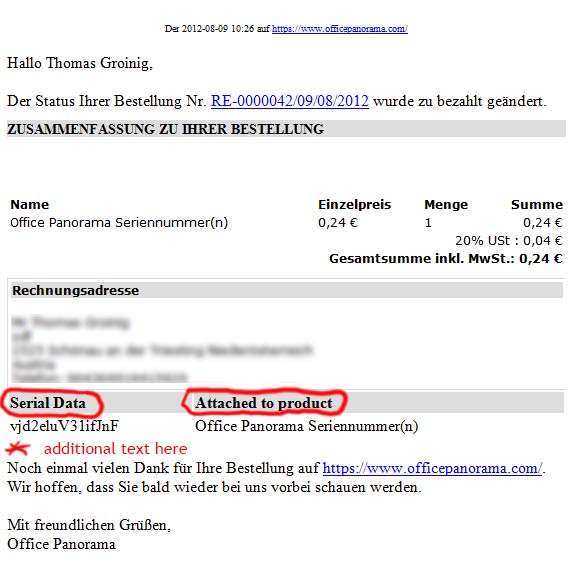
how and where to translate this text parts (see screenshot).
How and where to add text (see screenshot).
Regards,
Thomas
how and where to translate this text parts (see screenshot).
How and where to add text (see screenshot).
Regards,
Thomas
Please Log in or Create an account to join the conversation.

14 years 2 months ago #60979
by Jerome
Jerome - Obsidev.com
HikaMarket & HikaSerial developer / HikaShop core dev team.
Replied by Jerome on topic Re: Language translations in email
Hi,
You can edit the views "orderserial | show_email_notification_html" which are used during email generation.
There is one view for the back-end and one for the front-end.
To access to the HikaSerial views, you can use the HikaSerial menu "System > Views" or the HikaShop menu "Display > Views" (and selecting "HikaSerial" in the first drop down list, near the template selection).
Regards,
You can edit the views "orderserial | show_email_notification_html" which are used during email generation.
There is one view for the back-end and one for the front-end.
To access to the HikaSerial views, you can use the HikaSerial menu "System > Views" or the HikaShop menu "Display > Views" (and selecting "HikaSerial" in the first drop down list, near the template selection).
Regards,
Jerome - Obsidev.com
HikaMarket & HikaSerial developer / HikaShop core dev team.
Please Log in or Create an account to join the conversation.
14 years 1 month ago #61113
by tracer
Replied by tracer on topic Re: Language translations in email
Hi,
need help. I'm no coder.
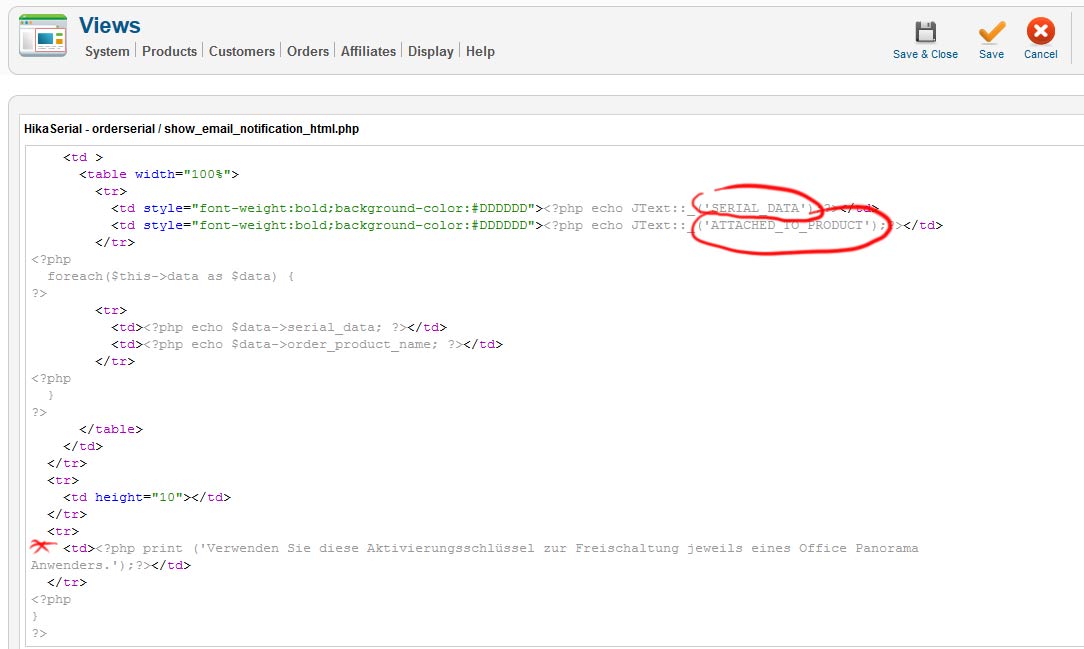
1. Can't find the language files to override for german language.
2. Tried to add text, but does not appear in customers email.
Regards,
Thomas
need help. I'm no coder.
1. Can't find the language files to override for german language.
2. Tried to add text, but does not appear in customers email.
Regards,
Thomas
Please Log in or Create an account to join the conversation.
14 years 1 month ago #61176
by Jerome
Jerome - Obsidev.com
HikaMarket & HikaSerial developer / HikaShop core dev team.
Replied by Jerome on topic Re: Language translations in email
Hi,
There is not German translation file for HikaSerial for the moment.
HikaSerial 1.4.0 should have the same language manager than HikaShop, so you should easily override (and create) the languages files.
There is several solutions:
1. You can create manually your German translation file.
- Copy the en-GB.com_hikaserial.ini to de-DE.com_hikaserial.ini
- Edit the new german translation file and change the wanted translation.
2. Use the language override in HikaShop.
- HikaShop / Configuration (menu) / Language (tab)
- Edit the German language file
- Use the second textbox to create some override which would be used by HikaSerial too.
3. Put some hard coded text in your email.
Note: At the end of your email, you can put directly your text with using some PHP
Or you can use new translation text like
And add a override line into the HikaShop german part:
Regards,
There is not German translation file for HikaSerial for the moment.
HikaSerial 1.4.0 should have the same language manager than HikaShop, so you should easily override (and create) the languages files.
There is several solutions:
1. You can create manually your German translation file.
- Copy the en-GB.com_hikaserial.ini to de-DE.com_hikaserial.ini
- Edit the new german translation file and change the wanted translation.
2. Use the language override in HikaShop.
- HikaShop / Configuration (menu) / Language (tab)
- Edit the German language file
- Use the second textbox to create some override which would be used by HikaSerial too.
3. Put some hard coded text in your email.
Code:
<td style="font-weight:bold;background-color:#DDDDDD">Serial</td>
<td style="font-weight:bold;background-color:#DDDDDD">an Produkt</td>
Note: At the end of your email, you can put directly your text with using some PHP
Code:
<tr>
<td>Verwenden Sie diese Aktivierrungsschlüssel zur Freischaltung jeweils eines Office Panorama</td>
</tr>
Code:
<tr>
<td><?php echo JText::_('BOTTOM_EMAIL_TEXT');?></td>
</tr>
Code:
BOTTOM_EMAIL_TEXT="Verwenden Sie diese Aktivierrungsschlüssel zur Freischaltung jeweils eines Office Panorama"
Regards,
Jerome - Obsidev.com
HikaMarket & HikaSerial developer / HikaShop core dev team.
The following user(s) said Thank You: tracer
Please Log in or Create an account to join the conversation.
Moderators: Obsidev
Time to create page: 0.114 seconds