

- Posts: 69
- Thank you received: 1
Image Generation for Attach Serial Did Not Attach
13 years 9 months ago #86846
by BasketBox
Image Generation for Attach Serial Did Not Attach was created by BasketBox
The image did not show up attached to the email when I did a test purchase. The attach as email and attach as download are enabled. I have the image in the Joomla media manager and I used the full URL. I'm using three packs and included the ID for each separated by comma. I have x and y pixels with color. Not sure what else?
Please Log in or Create an account to join the conversation.

13 years 9 months ago #86896
by Jerome
Jerome - Obsidev.com
HikaMarket & HikaSerial developer / HikaShop core dev team.
Replied by Jerome on topic Image Generation for Attach Serial Did Not Attach
Hi,
The attach as download option works only with special download files which does not point to a real file but to an "@hikaserial:attachserial:ID" file where ID is the id of your plugin configuration.
But you can let the option activate, there is no side effects.
About the attach as email, the image would attached automatically if an email with serials is sent. The plugin check if serials are in right packs and generate the image if so.
The comma separator does not accept spaces. Maybe that's a problem... I will improve it for the next release.
Would it be possible to have a screenshot of your plugin configuration ?
Or with an access to your backend, I could check your configuration, if you want.
Regards,
The attach as download option works only with special download files which does not point to a real file but to an "@hikaserial:attachserial:ID" file where ID is the id of your plugin configuration.
But you can let the option activate, there is no side effects.
About the attach as email, the image would attached automatically if an email with serials is sent. The plugin check if serials are in right packs and generate the image if so.
The comma separator does not accept spaces. Maybe that's a problem... I will improve it for the next release.
Would it be possible to have a screenshot of your plugin configuration ?
Or with an access to your backend, I could check your configuration, if you want.
Regards,
Jerome - Obsidev.com
HikaMarket & HikaSerial developer / HikaShop core dev team.
Please Log in or Create an account to join the conversation.
13 years 9 months ago #86933
by BasketBox
Replied by BasketBox on topic Image Generation for Attach Serial Did Not Attach
I sent the backend access. I think the problem is the comma separator.
Please Log in or Create an account to join the conversation.
13 years 9 months ago - 13 years 9 months ago #86950
by Jerome
Jerome - Obsidev.com
HikaMarket & HikaSerial developer / HikaShop core dev team.
Replied by Jerome on topic Image Generation for Attach Serial Did Not Attach
Hi,
Thanks for the access.
I have fix your configuration.
1/ The path for an image is not an url but a file path. So I have remove the " yourwebsite.com/ " letting just the "images/my_image_filename.jpg".
2/ I have fix your main configuration of HikaSerial about serial display and valid order statuses.
You can send test email by modifying the order status in the backend.
Change an order from "confirmed" to "shipped" (or "shipped" to "confirmed"). Both statuses are valid for serials.
In the popup, check the "notify user" and change the "to email" value in order to send the email to your email.
You would receive the mail with the image attached (I have made a test, it's working).
The position X/Y is not right adujst. I will see more a X:75 / Y:60. The point would be the top-left position for the text.
Regards,
Thanks for the access.
I have fix your configuration.
1/ The path for an image is not an url but a file path. So I have remove the " yourwebsite.com/ " letting just the "images/my_image_filename.jpg".
2/ I have fix your main configuration of HikaSerial about serial display and valid order statuses.
You can send test email by modifying the order status in the backend.
Change an order from "confirmed" to "shipped" (or "shipped" to "confirmed"). Both statuses are valid for serials.
In the popup, check the "notify user" and change the "to email" value in order to send the email to your email.
You would receive the mail with the image attached (I have made a test, it's working).
The position X/Y is not right adujst. I will see more a X:75 / Y:60. The point would be the top-left position for the text.
Regards,
Jerome - Obsidev.com
HikaMarket & HikaSerial developer / HikaShop core dev team.
Last edit: 13 years 9 months ago by Jerome.
Please Log in or Create an account to join the conversation.
13 years 9 months ago #86955
by BasketBox
Replied by BasketBox on topic Image Generation for Attach Serial Did Not Attach
Thanks for your help.
I've adjusted the x/y and it works fine.
Questions:
I would like to send this gift certificate directly to the recipient when I order. Can I do this? I think I asked this before. But now I have to forward my email or serial code to my friend to use the coupon on the website.
How can I add more text to the image besides just the serial code?
I've adjusted the x/y and it works fine.
Questions:
I would like to send this gift certificate directly to the recipient when I order. Can I do this? I think I asked this before. But now I have to forward my email or serial code to my friend to use the coupon on the website.
How can I add more text to the image besides just the serial code?
Please Log in or Create an account to join the conversation.
13 years 9 months ago #86959
by Jerome
Jerome - Obsidev.com
HikaMarket & HikaSerial developer / HikaShop core dev team.
Replied by Jerome on topic Image Generation for Attach Serial Did Not Attach
Hi,
The next version of the plugin "attach serial" I would like to add more option in order to print more things than just the serial.
But it requires some quite important development time.
About the mail copy, it would depends on what you want to send.
You can modify the mail content thanks to HikaShop business and read a custom field in order to add the second email in recipients.
At the end of the email "order status notification", you can modify the email like this:
(this example modification put the administrator in copy of every emails).
You can read a custom field instead and put it if the order status is confirmed or shipped.
Regards,
The next version of the plugin "attach serial" I would like to add more option in order to print more things than just the serial.
But it requires some quite important development time.
About the mail copy, it would depends on what you want to send.
You can modify the mail content thanks to HikaShop business and read a custom field in order to add the second email in recipients.
At the end of the email "order status notification", you can modify the email like this:
Code:
<?php
$data->customer = $customer;
$config =& hikashop_config();
$data->customer->user_email .= ',' . $config->get('payment_notification_email');
?>
You can read a custom field instead and put it if the order status is confirmed or shipped.
Regards,
Jerome - Obsidev.com
HikaMarket & HikaSerial developer / HikaShop core dev team.
Please Log in or Create an account to join the conversation.
Less
More
- Posts: 4
- Thank you received: 0
13 years 4 months ago - 13 years 4 months ago #110000
by joe.vrolijk
Replied by joe.vrolijk on topic Image Generation for Attach Serial Did Not Attach
Hi Jerome,
I also have difficulties, with the attach. My order doesnt attach a the nice looking ticket.
I want to start a raffle and i followed the entire tutorial, and double checked every setting, everything works and i do get a serial. Only as plain text in the email.
Tried everything! Still no luck and no attachment (It does give a serial in the text, but i really like the ticket look. Do you have any tips? (see my attachment for the settings)
I'm willing to give you access to my joomla.
Thanks so much!
I also have difficulties, with the attach. My order doesnt attach a the nice looking ticket.
I want to start a raffle and i followed the entire tutorial, and double checked every setting, everything works and i do get a serial. Only as plain text in the email.
Tried everything! Still no luck and no attachment (It does give a serial in the text, but i really like the ticket look. Do you have any tips? (see my attachment for the settings)
I'm willing to give you access to my joomla.
Thanks so much!
Last edit: 13 years 4 months ago by Jerome.
Please Log in or Create an account to join the conversation.
13 years 4 months ago - 13 years 2 months ago #110030
by Jerome
Jerome - Obsidev.com
HikaMarket & HikaSerial developer / HikaShop core dev team.
Replied by Jerome on topic Image Generation for Attach Serial Did Not Attach
Hi,
Don't worry, we answer to all messages and I am notified to all messages in the HikaSerial forum.
But I can't answer in the minute, I have to sleep sometimes too
Regarding your attach serial configuration, it seems good but I am wondering if you have right upload the "images/ticket.png" file in the images folder.
www.hikashop.com/support/documentation/1...tachserial-form.html
Regards,
Don't worry, we answer to all messages and I am notified to all messages in the HikaSerial forum.
But I can't answer in the minute, I have to sleep sometimes too
Regarding your attach serial configuration, it seems good but I am wondering if you have right upload the "images/ticket.png" file in the images folder.
www.hikashop.com/support/documentation/1...tachserial-form.html
If you want to create your first ticket, you can use this example which would provide you a little configuration.
First, you can download our Template ticket and upload it into your "images" directory.
Use it as your "Image path" : images\ticket.png

Regards,
Jerome - Obsidev.com
HikaMarket & HikaSerial developer / HikaShop core dev team.
Last edit: 13 years 2 months ago by Jerome.
The following user(s) said Thank You: joe.vrolijk
Please Log in or Create an account to join the conversation.
Less
More
- Posts: 4
- Thank you received: 0
13 years 4 months ago #110034
by joe.vrolijk
Replied by joe.vrolijk on topic Image Generation for Attach Serial Did Not Attach
Hi Jerome,
My apologies, for the hurry. Won't do that anymore, and i appriciate all your help!
Thanks for you reply, i think my ticket.png file is uploaded correctly though (see attachment of the media manager).
Dont know what to do
My apologies, for the hurry. Won't do that anymore, and i appriciate all your help!
Thanks for you reply, i think my ticket.png file is uploaded correctly though (see attachment of the media manager).
Dont know what to do
Please Log in or Create an account to join the conversation.
13 years 4 months ago #110046
by Jerome
Jerome - Obsidev.com
HikaMarket & HikaSerial developer / HikaShop core dev team.
Replied by Jerome on topic Image Generation for Attach Serial Did Not Attach
Hi,
You can send me an access to your website (by private message) and I will make some checks.
Regards,
You can send me an access to your website (by private message) and I will make some checks.
Regards,
Jerome - Obsidev.com
HikaMarket & HikaSerial developer / HikaShop core dev team.
Please Log in or Create an account to join the conversation.
Less
More
- Posts: 4
- Thank you received: 0
13 years 4 months ago #110048
by joe.vrolijk
Replied by joe.vrolijk on topic Image Generation for Attach Serial Did Not Attach
Thanks, I sent you the details through private message
Please Log in or Create an account to join the conversation.
13 years 4 months ago #110073
by Jerome
Jerome - Obsidev.com
HikaMarket & HikaSerial developer / HikaShop core dev team.
Replied by Jerome on topic Image Generation for Attach Serial Did Not Attach
Hi,
I change the image file name to "/images/ticket.png".
I guess that, the plugin didn't find correctly the image with "images/ticket.png".. I will investigate on that and make a fix for the next release.
Regards,
I change the image file name to "/images/ticket.png".
I guess that, the plugin didn't find correctly the image with "images/ticket.png".. I will investigate on that and make a fix for the next release.
Regards,
Jerome - Obsidev.com
HikaMarket & HikaSerial developer / HikaShop core dev team.
The following user(s) said Thank You: joe.vrolijk
Please Log in or Create an account to join the conversation.
Less
More
- Posts: 4
- Thank you received: 0
13 years 4 months ago #110074
by joe.vrolijk
Replied by joe.vrolijk on topic Image Generation for Attach Serial Did Not Attach
Thank you so much Jerome! It works!
Please Log in or Create an account to join the conversation.
13 years 2 months ago #119107
by lionel75
Replied by lionel75 on topic Image Generation for Attach Serial Did Not Attach
I still reading hikaserial forum . Does the image ticket.jpg is the same ( location) for all users/products ?
Regard"s
Regard"s
Please Log in or Create an account to join the conversation.
13 years 2 months ago #119108
by Jerome
Jerome - Obsidev.com
HikaMarket & HikaSerial developer / HikaShop core dev team.
Replied by Jerome on topic Image Generation for Attach Serial Did Not Attach
Hi,
It is written in the documentation:
And yes all Joomla contains a "images" folder but you have to put the file in this folder before, as explained.
Regards,
It is written in the documentation:
We will update the documentation with the coupon now include in HikaSerial but for the moment, you have to follow all instructions of this tutorial if you want to make it work.First, you can download our Template ticket and upload it into your "images" directory.
Use it as your "Image path" : images\ticket.png
And yes all Joomla contains a "images" folder but you have to put the file in this folder before, as explained.
Regards,
Jerome - Obsidev.com
HikaMarket & HikaSerial developer / HikaShop core dev team.
Please Log in or Create an account to join the conversation.
12 years 11 months ago #131033
by gtartjr
Replied by gtartjr on topic Image Generation for Attach Serial Did Not Attach
I'm also having a problem with the SerialAttach download. I get a download link in the email but the attached file is empty (0 bytes). I have confirmed that my template file is in the /images folder and my product file references the Plugin with #hikaserial:attachserial:2. The Plugin ID is 2. What else should I check?
Please Log in or Create an account to join the conversation.
12 years 11 months ago #131040
by Jerome
Jerome - Obsidev.com
HikaMarket & HikaSerial developer / HikaShop core dev team.
Replied by Jerome on topic Image Generation for Attach Serial Did Not Attach
Hi,
Please try to download the file in the HikaShop backend (when seeing the full order). If you have a blank image it can be a problem opening the file ; if it is a blank html page it can be a PHP error ; If you got a 404 page, it means that the file is not found.
If you are using a Linux server, please check the name case (better to have all in lowercase, without spaces or special characters).
Regards,
Please try to download the file in the HikaShop backend (when seeing the full order). If you have a blank image it can be a problem opening the file ; if it is a blank html page it can be a PHP error ; If you got a 404 page, it means that the file is not found.
If you are using a Linux server, please check the name case (better to have all in lowercase, without spaces or special characters).
Regards,
Jerome - Obsidev.com
HikaMarket & HikaSerial developer / HikaShop core dev team.
Please Log in or Create an account to join the conversation.
12 years 11 months ago #131050
by gtartjr
Replied by gtartjr on topic Image Generation for Attach Serial Did Not Attach
I receive the same empty file when attempting to open it from the backend. I am able to open and view it successfully via FTP. I also renamed the file to the more Unix-friendly format, (all lower-case). My error log is clear. Same problem.
Please Log in or Create an account to join the conversation.
12 years 11 months ago #131131
by Jerome
Jerome - Obsidev.com
HikaMarket & HikaSerial developer / HikaShop core dev team.
Replied by Jerome on topic Image Generation for Attach Serial Did Not Attach
Hi,
Please provide a screenshot of your attach serial configuration.
Regards,
Please provide a screenshot of your attach serial configuration.
Regards,
Jerome - Obsidev.com
HikaMarket & HikaSerial developer / HikaShop core dev team.
Please Log in or Create an account to join the conversation.
12 years 11 months ago #131210
by gtartjr
Replied by gtartjr on topic Image Generation for Attach Serial Did Not Attach
Configuration is attached:
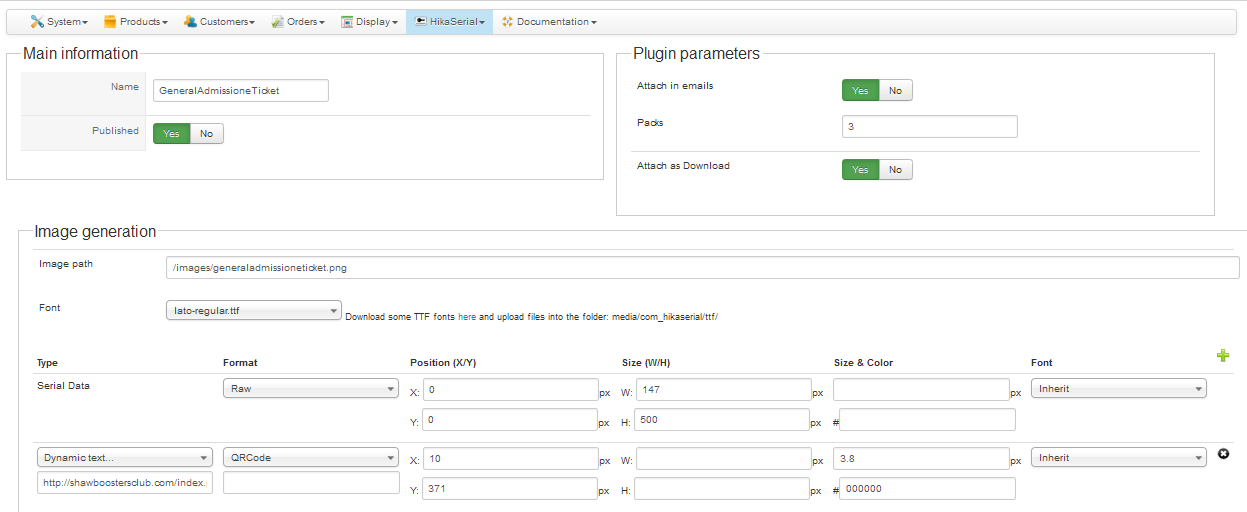
Please Log in or Create an account to join the conversation.
Moderators: Obsidev
Time to create page: 0.186 seconds