

- Posts: 3
- Thank you received: 0
How to assign only one serial number to one user
13 years 3 months ago #111714
by efx2011
How to assign only one serial number to one user was created by efx2011
I am running a gaming website that gives away free item key codes to our users.
Is there a way to assign one serial number to one user, so that he would receive always
the same serial data assigned to him, no matter how often he requests?
I haven't figured out how to set this up in HikaSerial and any help is much appreciated.
Jay
Is there a way to assign one serial number to one user, so that he would receive always
the same serial data assigned to him, no matter how often he requests?
I haven't figured out how to set this up in HikaSerial and any help is much appreciated.
Jay
Please Log in or Create an account to join the conversation.

13 years 3 months ago #111729
by Jerome
Jerome - Obsidev.com
HikaMarket & HikaSerial developer / HikaShop core dev team.
Replied by Jerome on topic How to assign only one serial number to one user
Hi,
You can assign a serial to a user so he will receive this (these) serial(s) when making an order.
But in HikaSerial you can't make a restriction on the number of serials. If the customer buy several times a product, he will receive as many serials he has bought products.
So if you want to add such restriction, you have to use the "limit" feature in HikaShop (you can access to it in the product listing in the backend, icon "limit").
Regards,
You can assign a serial to a user so he will receive this (these) serial(s) when making an order.
But in HikaSerial you can't make a restriction on the number of serials. If the customer buy several times a product, he will receive as many serials he has bought products.
So if you want to add such restriction, you have to use the "limit" feature in HikaShop (you can access to it in the product listing in the backend, icon "limit").
Regards,
Jerome - Obsidev.com
HikaMarket & HikaSerial developer / HikaShop core dev team.
Please Log in or Create an account to join the conversation.
13 years 2 months ago #117974
by efx2011
Replied by efx2011 on topic How to assign only one serial number to one user
thanks, Jerome,
I bought HikaShop Essentials with the "limit feature", but it did not work like expected.
I could not find also documentation on the limit feature.
A customer can only add one item into the cart, but I found out that he could still
go to the product page, make a new order and get the serial key with the email as many
times as he orders. I run a test and some users got quite many keys, so I need to limit this
to one member.
How should I configure HikaShop to prevent this, so for example a customer can really
receive exactly one serial key and no more?
Furthermore I had problems with the import function in HikaSerials. The CSV import did not work
and when I did manual import, it would strangely always import the first 50 serial keys of a longer list.
Your help is much appreciated, I am really desparate to get this working.
cheers
I bought HikaShop Essentials with the "limit feature", but it did not work like expected.
I could not find also documentation on the limit feature.
A customer can only add one item into the cart, but I found out that he could still
go to the product page, make a new order and get the serial key with the email as many
times as he orders. I run a test and some users got quite many keys, so I need to limit this
to one member.
How should I configure HikaShop to prevent this, so for example a customer can really
receive exactly one serial key and no more?
Furthermore I had problems with the import function in HikaSerials. The CSV import did not work
and when I did manual import, it would strangely always import the first 50 serial keys of a longer list.
Your help is much appreciated, I am really desparate to get this working.
cheers
Please Log in or Create an account to join the conversation.
13 years 2 months ago #118050
by Jerome
Jerome - Obsidev.com
HikaMarket & HikaSerial developer / HikaShop core dev team.
Replied by Jerome on topic How to assign only one serial number to one user
Hi,
Here the limit configuration that you need
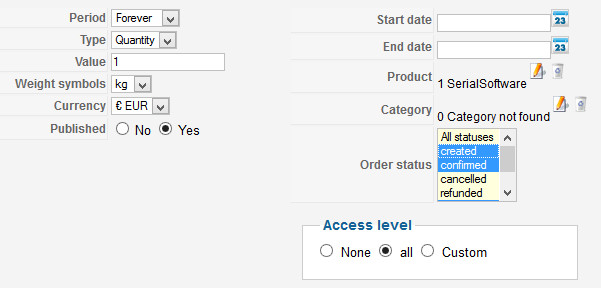
You will limit to 1 the quantity for the product: forever.
I will look at the import system and make some tests.
Could you provide me an example file (by email) ? So I will be able to check your CSV file and make a test in the same conditions than yours.
Regards,
Here the limit configuration that you need
You will limit to 1 the quantity for the product: forever.
I will look at the import system and make some tests.
Could you provide me an example file (by email) ? So I will be able to check your CSV file and make a test in the same conditions than yours.
Regards,
Jerome - Obsidev.com
HikaMarket & HikaSerial developer / HikaShop core dev team.
The following user(s) said Thank You: efx2011
Please Log in or Create an account to join the conversation.
13 years 2 months ago #118214
by efx2011
Replied by efx2011 on topic How to assign only one serial number to one user
Works like charm with these settings. Thanks!
I will send you a sample CSV.
cheers!
I will send you a sample CSV.
cheers!
Please Log in or Create an account to join the conversation.
Moderators: Obsidev
Time to create page: 0.093 seconds