

- Posts: 8
- Thank you received: 1
Configuring QR Code Reader
10 years 10 months ago #224734
by amadeusny
Configuring QR Code Reader was created by amadeusny
-- HikaShop version -- : 2.6.0
-- Joomla version -- : 3.4
-- PHP version -- : 5.7
-- Error-message(debug-mod must be tuned on) -- : QR code reader
I setup my attach serial to email qr code and it works fine. I see the qrcode image (for Etickets) but I am stumped on how to configure the scanner (iphone QR Reader) to send the scanned qr image to my website to check the ticket.
I am logged in with my iphone browser but when I scan the image it take me to my homepage.
Any help would be appreciated!
Thank you
-- Joomla version -- : 3.4
-- PHP version -- : 5.7
-- Error-message(debug-mod must be tuned on) -- : QR code reader
I setup my attach serial to email qr code and it works fine. I see the qrcode image (for Etickets) but I am stumped on how to configure the scanner (iphone QR Reader) to send the scanned qr image to my website to check the ticket.
I am logged in with my iphone browser but when I scan the image it take me to my homepage.
Any help would be appreciated!
Thank you
Please Log in or Create an account to join the conversation.

10 years 10 months ago #224760
by Jerome
Jerome - Obsidev.com
HikaMarket & HikaSerial developer / HikaShop core dev team.
Replied by Jerome on topic Configuring QR Code Reader
Hi,
Would it be possible to have details about your "attach serial" configuration ?
So we can see how you have configure the data for the QRcode part.
Regards,
Would it be possible to have details about your "attach serial" configuration ?
So we can see how you have configure the data for the QRcode part.
Regards,
Jerome - Obsidev.com
HikaMarket & HikaSerial developer / HikaShop core dev team.
Please Log in or Create an account to join the conversation.
10 years 10 months ago - 10 years 10 months ago #224816
by amadeusny
Replied by amadeusny on topic Configuring QR Code Reader
Thanks for the reply! Here's an image of attach serial plugin setting:
Dynamic text:
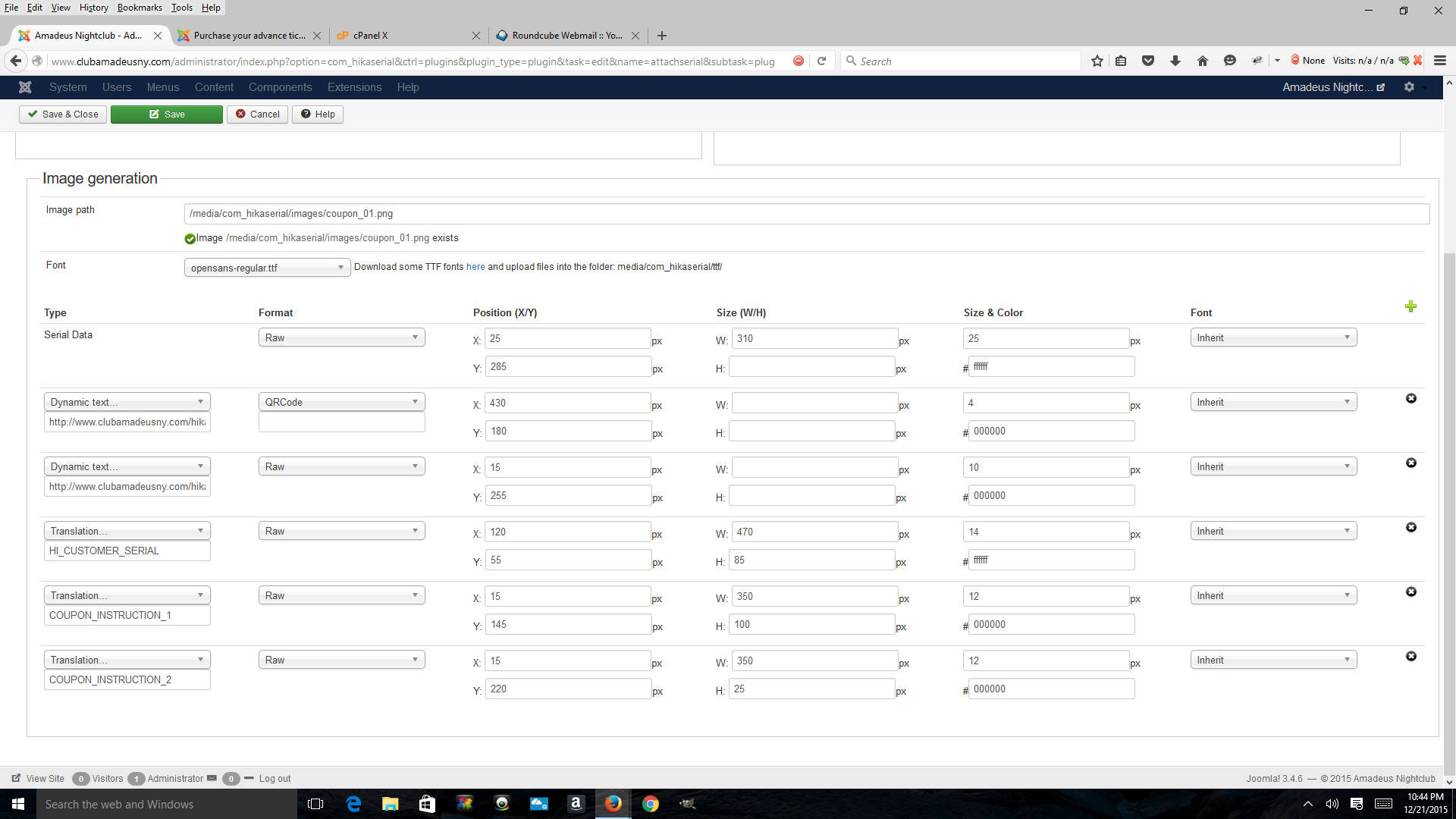
Dynamic text:
Code:
http://www.clubamadeusny.com/hikashop/product/{order_product.product_id}-{order_product.order_product_code}
Last edit: 10 years 10 months ago by Jerome. Reason: [code] is nice
Please Log in or Create an account to join the conversation.
10 years 10 months ago #224855
by Jerome
Jerome - Obsidev.com
HikaMarket & HikaSerial developer / HikaShop core dev team.
Replied by Jerome on topic Configuring QR Code Reader
Hi,
Regarding your website and the URL of your products, it looks partially good.
In HikaShop I think that you're using the canonical URLs ; so the link that you generated for the product is not the right one because the last part is based on the "product name" (in a SEF mode) and not on the "product code".
So I think it will be easier for you to use
to get the real URL of the product.
Regards,
Regarding your website and the URL of your products, it looks partially good.
In HikaShop I think that you're using the canonical URLs ; so the link that you generated for the product is not the right one because the last part is based on the "product name" (in a SEF mode) and not on the "product code".
So I think it will be easier for you to use
Code:
http://www.clubamadeusny.com/{product.product_canonical}
Regards,
Jerome - Obsidev.com
HikaMarket & HikaSerial developer / HikaShop core dev team.
Please Log in or Create an account to join the conversation.
10 years 10 months ago #225049
by amadeusny
Replied by amadeusny on topic Configuring QR Code Reader
Ok tried your suggestion was able to generate qr code that when scanned takes me to my product page not homepage.
But the object is to scan qr code and have the data sent to serial consume page of my website (logged in) where it will check to see if its a valid serial.
I'm lost on how to achieve this, I can get the qr code to take me to serial consume page but how do i post the serial info into the qr code link so that it will query the database and check to see if its a valid serial?
But the object is to scan qr code and have the data sent to serial consume page of my website (logged in) where it will check to see if its a valid serial.
I'm lost on how to achieve this, I can get the qr code to take me to serial consume page but how do i post the serial info into the qr code link so that it will query the database and check to see if its a valid serial?
Please Log in or Create an account to join the conversation.
10 years 10 months ago #225057
by Jerome
Jerome - Obsidev.com
HikaMarket & HikaSerial developer / HikaShop core dev team.
Replied by Jerome on topic Configuring QR Code Reader
Hi,
The technical documentation on consumption is there:
www.hikashop.com/support/documentation/1...onsume-features.html
But that previous page is very technical ; that's why I'll more recommend you to use the tutorial documentation on "how selling e-tickets".
www.hikashop.com/support/documentation/2...ticket-tutorial.html
In the last section, it talks about the e-ticket image and the URL that you can use for the QRCode.
These URLs already contains the right parameters with the serial info.
Regards,
The technical documentation on consumption is there:
www.hikashop.com/support/documentation/1...onsume-features.html
But that previous page is very technical ; that's why I'll more recommend you to use the tutorial documentation on "how selling e-tickets".
www.hikashop.com/support/documentation/2...ticket-tutorial.html
In the last section, it talks about the e-ticket image and the URL that you can use for the QRCode.
These URLs already contains the right parameters with the serial info.
Regards,
Jerome - Obsidev.com
HikaMarket & HikaSerial developer / HikaShop core dev team.
The following user(s) said Thank You: amadeusny
Please Log in or Create an account to join the conversation.
10 years 10 months ago #225081
by amadeusny
Replied by amadeusny on topic Configuring QR Code Reader
Got it to work!
Thank you!
Thank you!
Please Log in or Create an account to join the conversation.
Moderators: Obsidev
Time to create page: 0.302 seconds