

- Posts: 366
- Thank you received: 26
White QR code
5 years 6 months ago #330644
by Thrane
White QR code was created by Thrane
-- HikaShop version -- : 4.4.1
Hi
Is it possible to get the generated QR code white?
Nothing happens when I insert #FFFFFF, the QR is still black ...
Thanks!
Thomas
Hi
Is it possible to get the generated QR code white?
Nothing happens when I insert #FFFFFF, the QR is still black ...
Thanks!
Thomas
Please Log in or Create an account to join the conversation.

5 years 6 months ago #330686
by Jerome
Jerome - Obsidev.com
HikaMarket & HikaSerial developer / HikaShop core dev team.
Also helping the HikaShop support team when having some time or couldn't sleep.
By the way, do not send me private message, use the "contact us" form instead.
Replied by Jerome on topic White QR code
Hello,
Please provide a screenshot of your attach serial configuration.
Regards,
Please provide a screenshot of your attach serial configuration.
Regards,
Jerome - Obsidev.com
HikaMarket & HikaSerial developer / HikaShop core dev team.
Also helping the HikaShop support team when having some time or couldn't sleep.
By the way, do not send me private message, use the "contact us" form instead.
Please Log in or Create an account to join the conversation.
5 years 6 months ago #330749
by Thrane
Replied by Thrane on topic White QR code
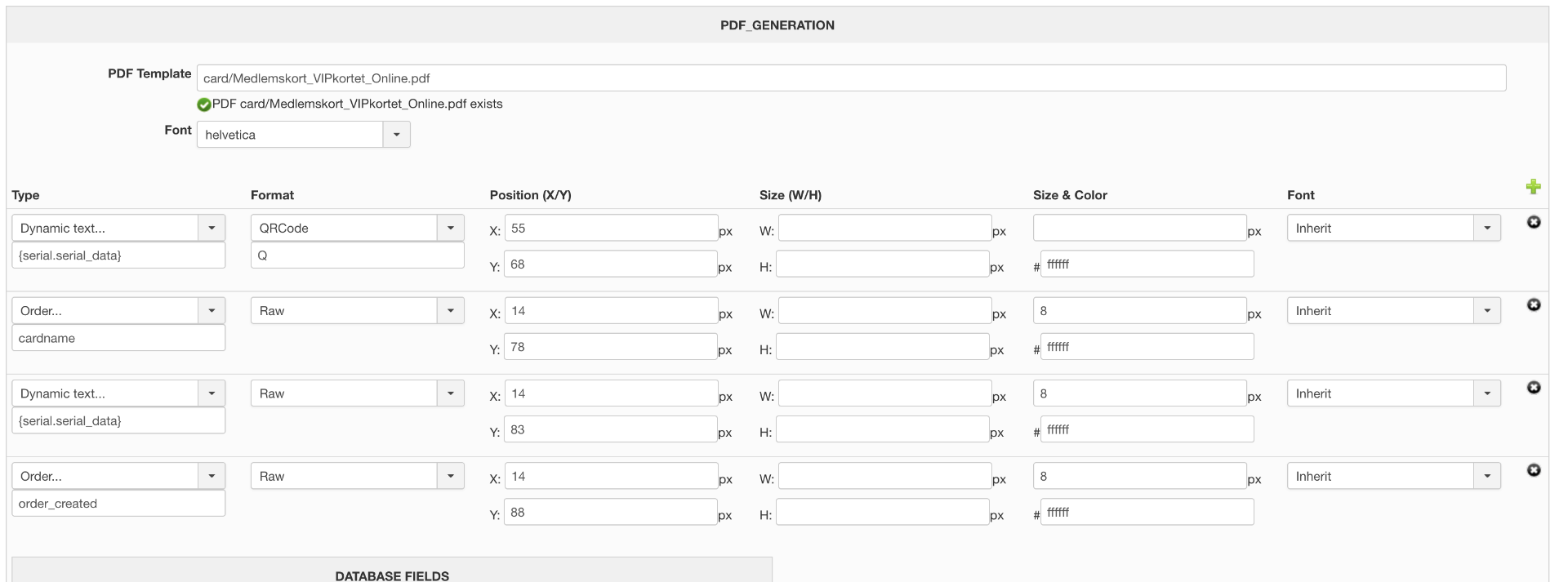
I'm using PDFSerial:
Please Log in or Create an account to join the conversation.
5 years 6 months ago #330750
by Jerome
Jerome - Obsidev.com
HikaMarket & HikaSerial developer / HikaShop core dev team.
Also helping the HikaShop support team when having some time or couldn't sleep.
By the way, do not send me private message, use the "contact us" form instead.
Replied by Jerome on topic White QR code
Hello,
Thanks for the precision ; I was looking in the wrong plugin source code !
If the PDF library you're using does have the "write2DBarcode" function, then the color might not be handle correctly.
It looks like the library is asking for the color in decimal format while the lib is sending the data in hexadecimal.
Thus, it requires a little conversion of the value before sending it to the PDF Lib.
Regards,
Thanks for the precision ; I was looking in the wrong plugin source code !
If the PDF library you're using does have the "write2DBarcode" function, then the color might not be handle correctly.
It looks like the library is asking for the color in decimal format while the lib is sending the data in hexadecimal.
Thus, it requires a little conversion of the value before sending it to the PDF Lib.
Regards,
Jerome - Obsidev.com
HikaMarket & HikaSerial developer / HikaShop core dev team.
Also helping the HikaShop support team when having some time or couldn't sleep.
By the way, do not send me private message, use the "contact us" form instead.
Please Log in or Create an account to join the conversation.
5 years 6 months ago #330764
by Thrane
Replied by Thrane on topic White QR code
So I should just enter 255,255,255?
Please Log in or Create an account to join the conversation.
5 years 6 months ago #330771
by Jerome
Jerome - Obsidev.com
HikaMarket & HikaSerial developer / HikaShop core dev team.
Also helping the HikaShop support team when having some time or couldn't sleep.
By the way, do not send me private message, use the "contact us" form instead.
Replied by Jerome on topic White QR code
Hello,
The format for colors is in hexadecimal ; you can't provide a value in decimal.
It requires modifications in the plugin to perform the conversion ; it will be include in the next release.
Regards,
The format for colors is in hexadecimal ; you can't provide a value in decimal.
It requires modifications in the plugin to perform the conversion ; it will be include in the next release.
Regards,
Jerome - Obsidev.com
HikaMarket & HikaSerial developer / HikaShop core dev team.
Also helping the HikaShop support team when having some time or couldn't sleep.
By the way, do not send me private message, use the "contact us" form instead.
Please Log in or Create an account to join the conversation.
5 years 6 months ago #330784
by Thrane
Replied by Thrane on topic White QR code
Great, thanks!
So nothing I can do at the moment?
//Thomas
So nothing I can do at the moment?
//Thomas
Please Log in or Create an account to join the conversation.
5 years 6 months ago #330823
by Jerome
Jerome - Obsidev.com
HikaMarket & HikaSerial developer / HikaShop core dev team.
Also helping the HikaShop support team when having some time or couldn't sleep.
By the way, do not send me private message, use the "contact us" form instead.
Replied by Jerome on topic White QR code
Hello,
If you want a white color for all of your generate pdf, you can edit the plugin and force a value, replacing
By
Regards,
If you want a white color for all of your generate pdf, you can edit the plugin and force a value, replacing
Code:
'fgcolor' => str_split(ltrim($d['color'], '#'), 2),
Code:
'fgcolor' => array(255,255,255),
Jerome - Obsidev.com
HikaMarket & HikaSerial developer / HikaShop core dev team.
Also helping the HikaShop support team when having some time or couldn't sleep.
By the way, do not send me private message, use the "contact us" form instead.
Please Log in or Create an account to join the conversation.
5 years 6 months ago #330911
by Thrane
Replied by Thrane on topic White QR code
Thanks!
I better wait for the update
I better wait for the update
Please Log in or Create an account to join the conversation.
Moderators: Obsidev
Time to create page: 0.250 seconds