
- Posts: 25
- Thank you received: 0
vendors list
- orchideelab
-
 Topic Author
- Offline
Less
More
13 years 7 months ago #94232
by orchideelab
vendors list was created by orchideelab
Hi,
How can i show a vendors list?
thanks
How can i show a vendors list?
thanks
Please Log in or Create an account to join the conversation.

13 years 7 months ago #94235
by Jerome
Jerome - Obsidev.com
HikaMarket & HikaSerial developer / HikaShop core dev team.
Replied by Jerome on topic vendors list
Hi,
For the moment, the best way to display a vendor listing is to create a category listing on the vendor root category.
You have to use the option which would create a category per vendor and, at this moment, you would have a well good structure.
Each vendor would have a category and his products would be automatically added in this category when the vendor would create a product.
So, you can have a vendor listing with the product listing associated.
If you have some ideas to improve it, we are open for suggestions
Best regards,
For the moment, the best way to display a vendor listing is to create a category listing on the vendor root category.
You have to use the option which would create a category per vendor and, at this moment, you would have a well good structure.
Each vendor would have a category and his products would be automatically added in this category when the vendor would create a product.
So, you can have a vendor listing with the product listing associated.
If you have some ideas to improve it, we are open for suggestions
Best regards,
Jerome - Obsidev.com
HikaMarket & HikaSerial developer / HikaShop core dev team.
Please Log in or Create an account to join the conversation.
- orchideelab
-
Topic Author
- Offline
Less
More
- Posts: 25
- Thank you received: 0
13 years 7 months ago #94303
by orchideelab
Replied by orchideelab on topic vendors list
Ok,
i've set the option, but may i create a sub-categories in vendor's root?
i've set the option, but may i create a sub-categories in vendor's root?
Please Log in or Create an account to join the conversation.
13 years 7 months ago #94311
by Jerome
Jerome - Obsidev.com
HikaMarket & HikaSerial developer / HikaShop core dev team.
Replied by Jerome on topic vendors list
Hi,
HikaMarket would create automatically categories for your vendors. If can "force" the category creation by editing (saving) a vendor.
The vendor category could contains sub categories without any problem and your vendors would be able to create some using the front-end category management.
Regards,
HikaMarket would create automatically categories for your vendors. If can "force" the category creation by editing (saving) a vendor.
The vendor category could contains sub categories without any problem and your vendors would be able to create some using the front-end category management.
Regards,
Jerome - Obsidev.com
HikaMarket & HikaSerial developer / HikaShop core dev team.
Please Log in or Create an account to join the conversation.
- orchideelab
-
Topic Author
- Offline
Less
More
- Posts: 25
- Thank you received: 0
13 years 7 months ago #94317
by orchideelab
Replied by orchideelab on topic vendors list
ok,.... i ask it because in may test site sub-categories creation doesn't work (the page is white) . Insert of product works fine.
Please Log in or Create an account to join the conversation.
13 years 7 months ago #94330
by Jerome
Jerome - Obsidev.com
HikaMarket & HikaSerial developer / HikaShop core dev team.
Replied by Jerome on topic vendors list
Hi,
Please edit the file "administrator/com_hikamarket/helper/helper.php" and replace the line:
With:
It should fix your problem.
We are currently finishing a new feature in HikaMarket and a new version, with this patch, would be published.
Regards,
Please edit the file "administrator/com_hikamarket/helper/helper.php" and replace the line:
Code:
' WHERE a.category_id = ' . (int)$category_id.' AND b.category_namekey = ' . $this->db->Quote('vendor_'.$vendor_id);
Code:
' WHERE a.category_id = ' . (int)$category_id.' AND b.category_namekey = ' . $db->Quote('vendor_'.$vendor_id);
We are currently finishing a new feature in HikaMarket and a new version, with this patch, would be published.
Regards,
Jerome - Obsidev.com
HikaMarket & HikaSerial developer / HikaShop core dev team.
Please Log in or Create an account to join the conversation.
- orchideelab
-
Topic Author
- Offline
Less
More
- Posts: 25
- Thank you received: 0
13 years 7 months ago #94349
by orchideelab
Replied by orchideelab on topic vendors list
Thanks for your prompt replay.
Now the page will not be blank but the sub-category will not be created....
You can find the attached the configuration of HikaMarket
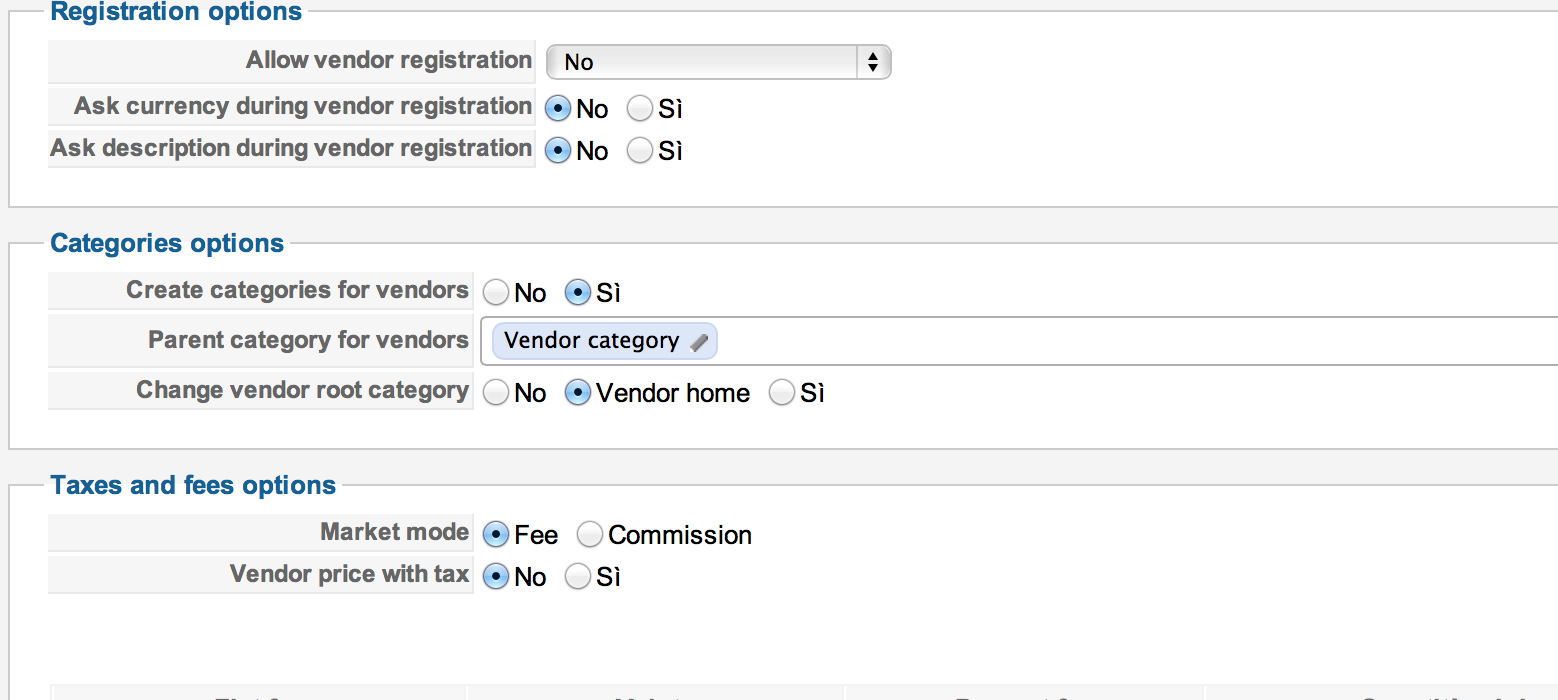
Now the page will not be blank but the sub-category will not be created....
You can find the attached the configuration of HikaMarket
Please Log in or Create an account to join the conversation.
13 years 7 months ago #94460
by Jerome
Jerome - Obsidev.com
HikaMarket & HikaSerial developer / HikaShop core dev team.
Replied by Jerome on topic vendors list
Hi,
What do you mean with "the sub-category will not be created" ?
Do you mean the vendor category ?
Your configuration seams good.
If your vendor does not have his category, the category would be automatically created when you would update the vendor (edit the vendor in the backend and just save it without changing anything).
If you still have some problem, you can send me a private message with credentials and I will check your website.
Regards,
What do you mean with "the sub-category will not be created" ?
Do you mean the vendor category ?
Your configuration seams good.
If your vendor does not have his category, the category would be automatically created when you would update the vendor (edit the vendor in the backend and just save it without changing anything).
If you still have some problem, you can send me a private message with credentials and I will check your website.
Regards,
Jerome - Obsidev.com
HikaMarket & HikaSerial developer / HikaShop core dev team.
Please Log in or Create an account to join the conversation.
- orchideelab
-
Topic Author
- Offline
Less
More
- Posts: 25
- Thank you received: 0
13 years 7 months ago #94508
by orchideelab
Replied by orchideelab on topic vendors list
Hi Jerome,
I re-installed Joomla, now it seems to work better.
Now the system creates a category for each user, but if I try to create a
sub-category it returns back with the following error: "The access to this
page is forbidden"
The creation of the items works well.
I re-installed Joomla, now it seems to work better.
Now the system creates a category for each user, but if I try to create a
sub-category it returns back with the following error: "The access to this
page is forbidden"
The creation of the items works well.
Please Log in or Create an account to join the conversation.
- orchideelab
-
Topic Author
- Offline
Less
More
- Posts: 25
- Thank you received: 0
13 years 7 months ago #94530
by orchideelab
Replied by orchideelab on topic vendors list
If you want i'll try to send credentials
Please Log in or Create an account to join the conversation.
13 years 7 months ago #94551
by Jerome
Jerome - Obsidev.com
HikaMarket & HikaSerial developer / HikaShop core dev team.
Replied by Jerome on topic vendors list
Hi,
I reproduced your problem and fix it.
The new release of HikaMarket is planned for today ( www.hikashop.com/en/hikashop/147-hikamarket-change-log.html )
There is just one improvement to finish about the invoices on vendor payments.
Regards,
I reproduced your problem and fix it.
The new release of HikaMarket is planned for today ( www.hikashop.com/en/hikashop/147-hikamarket-change-log.html )
There is just one improvement to finish about the invoices on vendor payments.
Regards,
Jerome - Obsidev.com
HikaMarket & HikaSerial developer / HikaShop core dev team.
Please Log in or Create an account to join the conversation.
- orchideelab
-
Topic Author
- Offline
Less
More
- Posts: 25
- Thank you received: 0
13 years 7 months ago #94600
by orchideelab
Replied by orchideelab on topic vendors list
thanks!
Please Log in or Create an account to join the conversation.
- orchideelab
-
Topic Author
- Offline
Less
More
- Posts: 25
- Thank you received: 0
13 years 7 months ago #95146
by orchideelab
Replied by orchideelab on topic vendors list
Hi Jerome,
I realized that sub-category creation works fine but now item creation dosn't work.
I realized that sub-category creation works fine but now item creation dosn't work.
Please Log in or Create an account to join the conversation.
13 years 7 months ago #95237
by Jerome
Jerome - Obsidev.com
HikaMarket & HikaSerial developer / HikaShop core dev team.
Replied by Jerome on topic vendors list
Hi,
Item creation ? Do you mean "product creation" ?
Would it be possible to have an access to your store in order to see/test it ?
Regards,
Item creation ? Do you mean "product creation" ?
Would it be possible to have an access to your store in order to see/test it ?
Regards,
Jerome - Obsidev.com
HikaMarket & HikaSerial developer / HikaShop core dev team.
Please Log in or Create an account to join the conversation.
- orchideelab
-
Topic Author
- Offline
Less
More
- Posts: 25
- Thank you received: 0
13 years 7 months ago #95351
by orchideelab
Replied by orchideelab on topic vendors list
Yes product creation.
I noticed that are created but in the the main root NO in vendor's root
No i've a local installation.... i try to re-install on a webserver.
I noticed that are created but in the the main root NO in vendor's root
No i've a local installation.... i try to re-install on a webserver.
Please Log in or Create an account to join the conversation.
13 years 7 months ago #95506
by Jerome
Jerome - Obsidev.com
HikaMarket & HikaSerial developer / HikaShop core dev team.
Replied by Jerome on topic vendors list
Hi,
I have create a product with a vendor, removing the category root pre-filled by HikaMarket and save it.
The product has been created correctly in the vendor's root.
Do you use the latest version (1.1.1) ?
Regards,
I have create a product with a vendor, removing the category root pre-filled by HikaMarket and save it.
The product has been created correctly in the vendor's root.
Do you use the latest version (1.1.1) ?
Regards,
Jerome - Obsidev.com
HikaMarket & HikaSerial developer / HikaShop core dev team.
Please Log in or Create an account to join the conversation.
13 years 7 months ago #95598
by Jerome
Jerome - Obsidev.com
HikaMarket & HikaSerial developer / HikaShop core dev team.
Replied by Jerome on topic vendors list
Hi,
I have finally reproduce the problem.
I will fix it and make a new package as soon as possible.
Regards,
I have finally reproduce the problem.
I will fix it and make a new package as soon as possible.
Regards,
Jerome - Obsidev.com
HikaMarket & HikaSerial developer / HikaShop core dev team.
Please Log in or Create an account to join the conversation.
- orchideelab
-
Topic Author
- Offline
Less
More
- Posts: 25
- Thank you received: 0
13 years 7 months ago #95599
by orchideelab
Replied by orchideelab on topic vendors list
thanks!
Please Log in or Create an account to join the conversation.
13 years 7 months ago #95601
by Jerome
Jerome - Obsidev.com
HikaMarket & HikaSerial developer / HikaShop core dev team.
Replied by Jerome on topic vendors list
Hi,
Solved !
You can edit the file "component/com_hikamarket/views/productmarket/view.html.php" and replace the block:
With:
Sorry for the inconvenient.
Regards,
Solved !
You can edit the file "component/com_hikamarket/views/productmarket/view.html.php" and replace the block:
Code:
if(!empty($rootCategory)) {
if(empty($product->categories))
$product->categories = array( $categoryClass->get($rootCategory) );
else {
array_unshift($product->categories, $categoryClass->get($rootCategory));
}
}
Code:
if(!empty($rootCategory)) {
if(empty($product->categories))
$product->categories = array( $rootCategory => $categoryClass->get($rootCategory) );
else
$product->categories[$rootCategory] = $categoryClass->get($rootCategory);
}
Sorry for the inconvenient.
Regards,
Jerome - Obsidev.com
HikaMarket & HikaSerial developer / HikaShop core dev team.
Please Log in or Create an account to join the conversation.
- orchideelab
-
Topic Author
- Offline
Less
More
- Posts: 25
- Thank you received: 0
13 years 7 months ago #95630
by orchideelab
Replied by orchideelab on topic vendors list
No problem, thanks for your prompt support, now it works fine!
I will ask you for more help, I hope I can still trust on you
I will ask you for more help, I hope I can still trust on you
Please Log in or Create an account to join the conversation.
Moderators: Obsidev
Time to create page: 0.180 seconds