
- Posts: 22
- Thank you received: 1
Front end drag&drop fail, Can't upload picture
- suppasinka.com
-
 Topic Author
- Offline
Less
More
13 years 7 months ago #99265
by suppasinka.com
Front end drag&drop fail, Can't upload picture was created by suppasinka.com
Hi Hikashop
My site www.suppasinka.com (underconstruction) allow normal user to freely become a vendor
after crate the vendor account I found the vendor can't upload
and can't use drag&drop feature. After look a round in this forum
I guest it should some kind of "javascrip error" or "jQuery"
I try to solve problem by install jQuery easy
extensions.joomla.org/extensions/core-en...jquery-scripts/18327
but after I try to customize it nothing seem to work for me:S (I'm a newbie)
This problem can be solve by change template but I don't want to do that.
It will be great if you can solve it with using current template.
Best regards
info@suppasinka.com
My site www.suppasinka.com (underconstruction) allow normal user to freely become a vendor
after crate the vendor account I found the vendor can't upload
and can't use drag&drop feature. After look a round in this forum
I guest it should some kind of "javascrip error" or "jQuery"
I try to solve problem by install jQuery easy
extensions.joomla.org/extensions/core-en...jquery-scripts/18327
but after I try to customize it nothing seem to work for me:S (I'm a newbie)
This problem can be solve by change template but I don't want to do that.
It will be great if you can solve it with using current template.
Best regards
info@suppasinka.com
Please Log in or Create an account to join the conversation.

13 years 7 months ago #99269
by Jerome
Jerome - Obsidev.com
HikaMarket & HikaSerial developer / HikaShop core dev team.
Replied by Jerome on topic Front end drag&drop fail, Can't upload picture
Hi,
In HikaShop 2.1.2 and HikaMarket 1.1.3 we updated the jQuery library and we add some security for the javascript conflicts.
Please update HikaShop by downloading the lastest version in the "your subscriptions" page : www.hikashop.com/en/account/your-subscriptions.html
Without HikaShop 2.1.2 (you have currently the 2.1.1 one), HikaMarket can't use the latest jQuery library from HikaShop which contains our securities.
Regards,
In HikaShop 2.1.2 and HikaMarket 1.1.3 we updated the jQuery library and we add some security for the javascript conflicts.
Please update HikaShop by downloading the lastest version in the "your subscriptions" page : www.hikashop.com/en/account/your-subscriptions.html
Without HikaShop 2.1.2 (you have currently the 2.1.1 one), HikaMarket can't use the latest jQuery library from HikaShop which contains our securities.
Regards,
Jerome - Obsidev.com
HikaMarket & HikaSerial developer / HikaShop core dev team.
The following user(s) said Thank You: suppasinka.com
Please Log in or Create an account to join the conversation.
- suppasinka.com
-
Topic Author
- Offline
Less
More
- Posts: 22
- Thank you received: 1
13 years 7 months ago #99272
by suppasinka.com
Replied by suppasinka.com on topic Front end drag&drop fail, Can't upload picture
Thank you for you quickly reply
I already download and install
Hikashop 2.1.2
Hikamarket 1.1.3
Nothing change. After I upload picture
it display the bar code picture, the product picture is not show
www.suppasinka.com/vendor-management/product/edit/cid-6
[?] admin can add product picture but can't drag&drop
vendor cat't add product picture and can't drag&drop too.
Is it mean permission issue?
I already download and install
Hikashop 2.1.2
Hikamarket 1.1.3
Nothing change. After I upload picture
it display the bar code picture, the product picture is not show
www.suppasinka.com/vendor-management/product/edit/cid-6
[?] admin can add product picture but can't drag&drop
vendor cat't add product picture and can't drag&drop too.
Is it mean permission issue?
Please Log in or Create an account to join the conversation.
13 years 7 months ago #99322
by Jerome
Jerome - Obsidev.com
HikaMarket & HikaSerial developer / HikaShop core dev team.
Replied by Jerome on topic Front end drag&drop fail, Can't upload picture
Hi,
I tried to upload an image with the account that I created on your website.
Now we can see that the upload library is loaded correctly. Previously the input field for the upload was not hidden.
I upload an image using drag & drop (tested with "Google Chrome" and "Mozilla Firefox") and it works good.
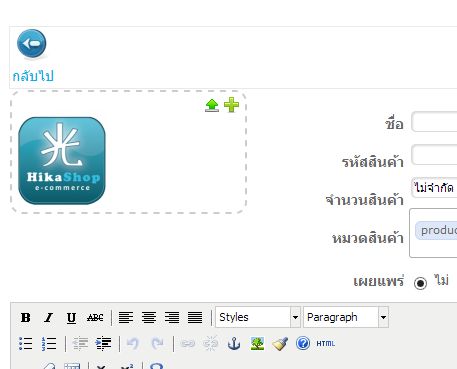
Which file did you upload ?
Note: The upload by drag & drop does not work with old version of Internet Explorer.
It works fine with Internet Explorer 10 but with the the version 6,7,8,9 it doesn't.
The "file drag & drop" is a HTML5 feature which has been introduce is recent browser. When IE9 came, the specifications where too young for microsoft so it wasn't implemented.
But even if the drag & drop does not work, it is possible to upload with old version of IE (using the upload icon).
Regards,
I tried to upload an image with the account that I created on your website.
Now we can see that the upload library is loaded correctly. Previously the input field for the upload was not hidden.
I upload an image using drag & drop (tested with "Google Chrome" and "Mozilla Firefox") and it works good.
Which file did you upload ?
Note: The upload by drag & drop does not work with old version of Internet Explorer.
It works fine with Internet Explorer 10 but with the the version 6,7,8,9 it doesn't.
The "file drag & drop" is a HTML5 feature which has been introduce is recent browser. When IE9 came, the specifications where too young for microsoft so it wasn't implemented.
But even if the drag & drop does not work, it is possible to upload with old version of IE (using the upload icon).
Regards,
Jerome - Obsidev.com
HikaMarket & HikaSerial developer / HikaShop core dev team.
Please Log in or Create an account to join the conversation.
- suppasinka.com
-
Topic Author
- Offline
Less
More
- Posts: 22
- Thank you received: 1
13 years 7 months ago #99343
by suppasinka.com
Replied by suppasinka.com on topic Front end drag&drop fail, Can't upload picture
After I exhausted of customize, I decide to Uninstall and Reinstall
both Hikashop and Hikamarket latest version again and it works!
the result is as your post, vendor can upload picture normally.
But I still got another problem after vendor upload pictures
and input product detail, after hit save bottom the browser (Chrome) said
Server error
The website encountered an error while retrieving www.suppasinka.com/vendor-control-panel/product/add . It may be down for maintenance or configured incorrectly.
Here are some suggestions:
Reload this webpage later.
HTTP Error 500 (Internal Server Error): An unexpected condition was encountered while the server was attempting to fulfill the request.
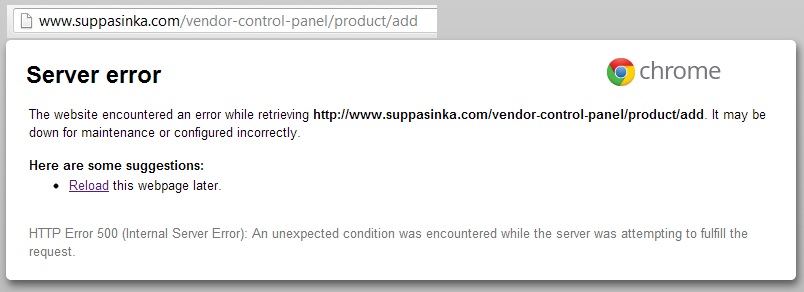
Error appear but product can be created successfully
I want to get rid of the Error page, any advise please.
both Hikashop and Hikamarket latest version again and it works!
the result is as your post, vendor can upload picture normally.
But I still got another problem after vendor upload pictures
and input product detail, after hit save bottom the browser (Chrome) said
Server error
The website encountered an error while retrieving www.suppasinka.com/vendor-control-panel/product/add . It may be down for maintenance or configured incorrectly.
Here are some suggestions:
Reload this webpage later.
HTTP Error 500 (Internal Server Error): An unexpected condition was encountered while the server was attempting to fulfill the request.
Error appear but product can be created successfully
I want to get rid of the Error page, any advise please.
Please Log in or Create an account to join the conversation.
13 years 7 months ago #99350
by Jerome
Jerome - Obsidev.com
HikaMarket & HikaSerial developer / HikaShop core dev team.
Replied by Jerome on topic Front end drag&drop fail, Can't upload picture
Hi,
I can't reproduce your problem in our local websites on in the demo website.
Could you activate the Joomla debug mode ? It would thrown exception messages instead of returning a "500 error page".
At this moment, we would know the source of the error and we would be able to fix it.
Regards,
I can't reproduce your problem in our local websites on in the demo website.
Could you activate the Joomla debug mode ? It would thrown exception messages instead of returning a "500 error page".
At this moment, we would know the source of the error and we would be able to fix it.
Regards,
Jerome - Obsidev.com
HikaMarket & HikaSerial developer / HikaShop core dev team.
Please Log in or Create an account to join the conversation.
- suppasinka.com
-
Topic Author
- Offline
Less
More
- Posts: 22
- Thank you received: 1
13 years 7 months ago #99356
by suppasinka.com
Replied by suppasinka.com on topic Front end drag&drop fail, Can't upload picture
I already set joomla to debug mode.
Please Log in or Create an account to join the conversation.
13 years 7 months ago #99360
by Jerome
Jerome - Obsidev.com
HikaMarket & HikaSerial developer / HikaShop core dev team.
Replied by Jerome on topic Front end drag&drop fail, Can't upload picture
Hi,
In Joomla Global configuration, tab "server", there is an option called "Error Reporting".
You have to set it to "Development".
Regards,
In Joomla Global configuration, tab "server", there is an option called "Error Reporting".
You have to set it to "Development".
Regards,
Jerome - Obsidev.com
HikaMarket & HikaSerial developer / HikaShop core dev team.
Please Log in or Create an account to join the conversation.
- suppasinka.com
-
Topic Author
- Offline
Less
More
- Posts: 22
- Thank you received: 1
13 years 7 months ago #99364
by suppasinka.com
Replied by suppasinka.com on topic Front end drag&drop fail, Can't upload picture
I already change "Error Reporting" tap to "Development".
Please Log in or Create an account to join the conversation.
- suppasinka.com
-
Topic Author
- Offline
Less
More
- Posts: 22
- Thank you received: 1
13 years 7 months ago #99367
by suppasinka.com
Replied by suppasinka.com on topic Front end drag&drop fail, Can't upload picture
After vendor add product by save the result is
Notice: Undefined property: stdClass::$mailer in /home/thaimicr/domains/suppasinka.com/public_html/administrator/components/com_hikamarket/classes/product.php on line 264 Fatal error: Call to a member function addReplyTo() on a non-object in /home/thaimicr/domains/suppasinka.com/public_html/administrator/components/com_hikamarket/classes/product.php on line 264
Notice: Undefined property: stdClass::$mailer in /home/thaimicr/domains/suppasinka.com/public_html/administrator/components/com_hikamarket/classes/product.php on line 264 Fatal error: Call to a member function addReplyTo() on a non-object in /home/thaimicr/domains/suppasinka.com/public_html/administrator/components/com_hikamarket/classes/product.php on line 264
The following user(s) said Thank You: Jerome
Please Log in or Create an account to join the conversation.
13 years 7 months ago #99383
by Jerome
Jerome - Obsidev.com
HikaMarket & HikaSerial developer / HikaShop core dev team.
Replied by Jerome on topic Front end drag&drop fail, Can't upload picture
Thanks !
We fix the problem on the HikaMarket package.
Please re-download HikaMarket and sorry for the inconvenient.
Regards,
We fix the problem on the HikaMarket package.
Please re-download HikaMarket and sorry for the inconvenient.
Regards,
Jerome - Obsidev.com
HikaMarket & HikaSerial developer / HikaShop core dev team.
The following user(s) said Thank You: suppasinka.com
Please Log in or Create an account to join the conversation.
Moderators: Obsidev
Time to create page: 0.085 seconds