
- Posts: 22
- Thank you received: 1
Want add new product published default to be Yes.
- suppasinka.com
-
 Topic Author
- Offline
Less
More
13 years 6 months ago #100158
by suppasinka.com
Want add new product published default to be Yes. was created by suppasinka.com
Hi
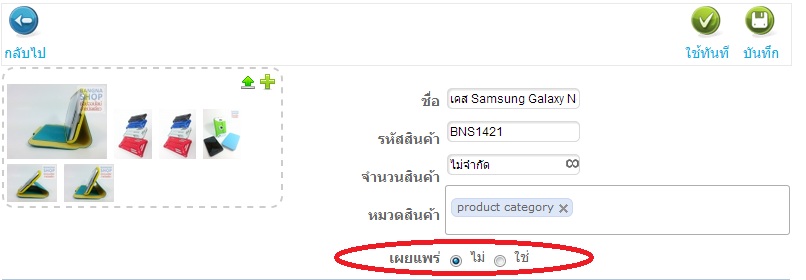
I want to set default product published status to be "Yes"
where to change it?
Regards
www.suppasinka.com
I want to set default product published status to be "Yes"
where to change it?
Regards
www.suppasinka.com
Please Log in or Create an account to join the conversation.

13 years 6 months ago #100165
by Jerome
Jerome - Obsidev.com
HikaMarket & HikaSerial developer / HikaShop core dev team.
Replied by Jerome on topic Want add new product published default to be Yes.
Hi,
You can create a product template in the HikaMarket backend.
The "product template" would define the default values so if the product template have "published" to yes, when a vendor would create a product, it would be pre-filled to "yes".
(You can set default values for all product fields)
Best regards,
You can create a product template in the HikaMarket backend.
The "product template" would define the default values so if the product template have "published" to yes, when a vendor would create a product, it would be pre-filled to "yes".
(You can set default values for all product fields)
Best regards,
Jerome - Obsidev.com
HikaMarket & HikaSerial developer / HikaShop core dev team.
The following user(s) said Thank You: suppasinka.com
Please Log in or Create an account to join the conversation.
- suppasinka.com
-
Topic Author
- Offline
Less
More
- Posts: 22
- Thank you received: 1
13 years 5 months ago - 13 years 5 months ago #101747
by suppasinka.com
Replied by suppasinka.com on topic Want add new product published default to be Yes.
Solved
Thank you.
Thank you.
Last edit: 13 years 5 months ago by suppasinka.com.
Please Log in or Create an account to join the conversation.
- suppasinka.com
-
Topic Author
- Offline
Less
More
- Posts: 22
- Thank you received: 1
13 years 5 months ago #102515
by suppasinka.com
Replied by suppasinka.com on topic Want add new product published default to be Yes.
Hi
I want to modify the HTML source file
for default template it can modify at Hikasop=> Display => View
HikaMarket - productmarket / form.php
for the new template where should I find HTML source file?
Thank you in advance.
I want to modify the HTML source file
for default template it can modify at Hikasop=> Display => View
HikaMarket - productmarket / form.php
for the new template where should I find HTML source file?
Thank you in advance.
Please Log in or Create an account to join the conversation.
13 years 5 months ago #102517
by Jerome
Jerome - Obsidev.com
HikaMarket & HikaSerial developer / HikaShop core dev team.
Replied by Jerome on topic Want add new product published default to be Yes.
Hi,
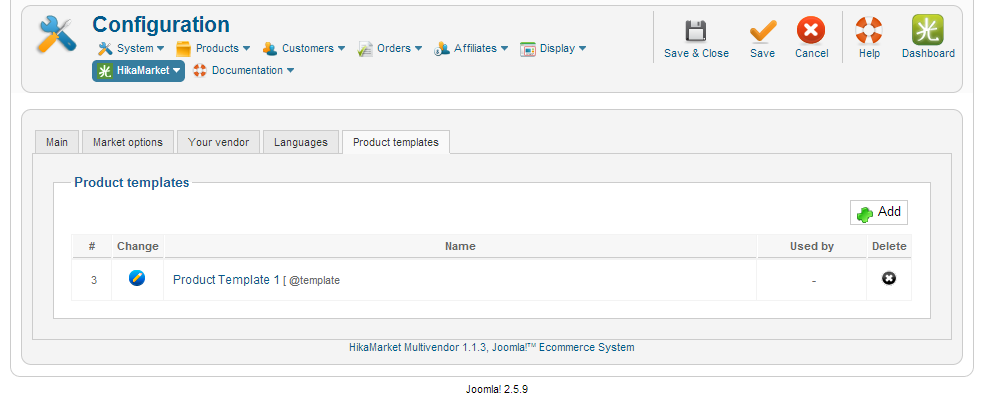
There is a difference between a "product template" which is an "object" in the database for HikaMarket and a joomla view which contains HTML.
The "Product Template 1" is a product, like any other HikaShop product but it will be used as a "template" when you want to create a new product in HikaMarket.
Regards,
There is a difference between a "product template" which is an "object" in the database for HikaMarket and a joomla view which contains HTML.
The "Product Template 1" is a product, like any other HikaShop product but it will be used as a "template" when you want to create a new product in HikaMarket.
Regards,
Jerome - Obsidev.com
HikaMarket & HikaSerial developer / HikaShop core dev team.
Please Log in or Create an account to join the conversation.
- suppasinka.com
-
Topic Author
- Offline
Less
More
- Posts: 22
- Thank you received: 1
13 years 5 months ago - 13 years 5 months ago #102527
by suppasinka.com
Replied by suppasinka.com on topic Want add new product published default to be Yes.
Hi
My target for Product add page are
1.) Set "Product publish" default to be Yes
2.) Modify product add page for display Local language description and add necessary link
If I use default product add form
1st target=NG
2nd target=OK (I can modify it freely)
If I use add new product add template (Product Tempalte1)
1st target=OK
2nd target=NG
If you know how to modify default form to be default publish please tell me
I'm trying to modify the below code
FYI (Personal Opinion)
The product publish default should be "Yes"
Why hikashop team think it should be "No"?
after I invite some friends to try my new BETA website
ALL OF THEM forget to change the publish to be Yes
and they ask me that where is my product, it does't show
in the website. And I have to tell them one by one to
change product publish to be "Yes". It's sound like not a big deal
but I worry a lot if I launch website to be Commercial phase
it should drain man-hour for my support team.
Regards
My target for Product add page are
1.) Set "Product publish" default to be Yes
2.) Modify product add page for display Local language description and add necessary link
If I use default product add form
1st target=NG
2nd target=OK (I can modify it freely)
If I use add new product add template (Product Tempalte1)
1st target=OK
2nd target=NG
If you know how to modify default form to be default publish please tell me
I'm trying to modify the below code
Code:
if(hikamarket::acl('product_edit_published')) { ?>
<dt class="hikamarket_product_published"><label><?php echo JText::_('HIKA_PUBLISHED'); ?><font color=red>*</font></label></dt>
<dd class="hikamarket_product_published"><?php echo JHTML::_('hikaselect.booleanlist', "data[product][product_published]" , '', @$this->product->product_published); ?></dd>
<?php }
FYI (Personal Opinion)
The product publish default should be "Yes"
Why hikashop team think it should be "No"?
after I invite some friends to try my new BETA website
ALL OF THEM forget to change the publish to be Yes
and they ask me that where is my product, it does't show
in the website. And I have to tell them one by one to
change product publish to be "Yes". It's sound like not a big deal
but I worry a lot if I launch website to be Commercial phase
it should drain man-hour for my support team.
Regards
Last edit: 13 years 5 months ago by suppasinka.com.
Please Log in or Create an account to join the conversation.
13 years 5 months ago #102536
by Jerome
Jerome - Obsidev.com
HikaMarket & HikaSerial developer / HikaShop core dev team.
Replied by Jerome on topic Want add new product published default to be Yes.
Hi,
I don't know what "NG" means and I don't know what is the problem.
If in your product template, you save that the "product published" is yes so, every product that a vendor will create using the "add" button will have this value by default.
You can configure the product template in the global configuration and you can override it by vendor.
Modifying the view is not require.
Just setting the "product publish" to yes in the product template you're using for your vendors.
After that, the default value for publishing is "no" because when you create a product, you can save it while you still working on it (in order to not loose data) so you don't want that the product become online directly.
Other thing around multi-vendor. When you have several vendors, you may not want that their product became directly online, you may want to check the content before (giving an approval).
Regards,
I don't know what "NG" means and I don't know what is the problem.
If in your product template, you save that the "product published" is yes so, every product that a vendor will create using the "add" button will have this value by default.
You can configure the product template in the global configuration and you can override it by vendor.
Modifying the view is not require.
Just setting the "product publish" to yes in the product template you're using for your vendors.
After that, the default value for publishing is "no" because when you create a product, you can save it while you still working on it (in order to not loose data) so you don't want that the product become online directly.
Other thing around multi-vendor. When you have several vendors, you may not want that their product became directly online, you may want to check the content before (giving an approval).
Regards,
Jerome - Obsidev.com
HikaMarket & HikaSerial developer / HikaShop core dev team.
Please Log in or Create an account to join the conversation.
Moderators: Obsidev
Time to create page: 0.107 seconds