
- Posts: 25
- Thank you received: 0
problem to show icons in vendor panel
- orchideelab
-
 Topic Author
- Offline
Less
More
13 years 2 months ago - 13 years 2 months ago #117785
by orchideelab
problem to show icons in vendor panel was created by orchideelab
-- HikaShop version -- : 2.1.3
-- HikaMarket version -- : 1.2.0
-- Joomla version -- : 2.5
-- PHP version -- : x.x.x
I have a problem to display the icons in the panel vendor.
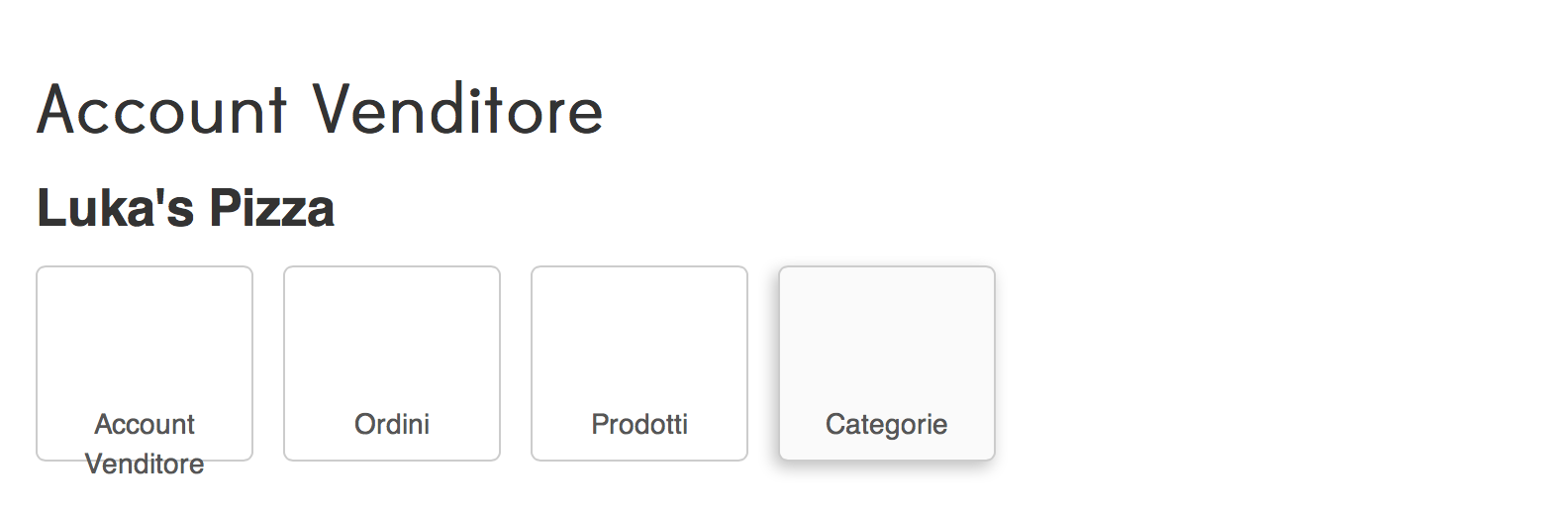
-- HikaMarket version -- : 1.2.0
-- Joomla version -- : 2.5
-- PHP version -- : x.x.x
I have a problem to display the icons in the panel vendor.
Last edit: 13 years 2 months ago by Jerome.
Please Log in or Create an account to join the conversation.

13 years 2 months ago #117827
by Jerome
Jerome - Obsidev.com
HikaMarket & HikaSerial developer / HikaShop core dev team.
Replied by Jerome on topic problem to show icons in vendor panel
Hi,
For these icons, HikaMarket uses some rules from the HikaShop CSS file.
Regards,
For these icons, HikaMarket uses some rules from the HikaShop CSS file.
Code:
.icon-48-user {background-image: url(/../images/icons/icon-48-user.png);}
.icon-48-order {background-image:url(../images/icons/icon-48-order.png);}
.icon-48-product {background-image:url(../images/icons/icon-48-product.png);}
.icon-48-category {background-image:url(../images/icons/icon-48-category.png);}
Regards,
Jerome - Obsidev.com
HikaMarket & HikaSerial developer / HikaShop core dev team.
Please Log in or Create an account to join the conversation.
- orchideelab
-
Topic Author
- Offline
Less
More
- Posts: 25
- Thank you received: 0
13 years 2 months ago #117835
by orchideelab
Replied by orchideelab on topic problem to show icons in vendor panel
ok,
icons are in the folder, but I can not see them ...
icons are in the folder, but I can not see them ...
Please Log in or Create an account to join the conversation.
13 years 2 months ago #117850
by Jerome
Jerome - Obsidev.com
HikaMarket & HikaSerial developer / HikaShop core dev team.
Replied by Jerome on topic problem to show icons in vendor panel
Hi,
You have to check your CSS in your website.
Do you have a custom CSS ?
If so, do you see these rules in your CSS ?
If not, you will have to insert it directly in your hikashop custom CSS file.
Otherwise we will need more information about your website (like a url and a vendor account) in order to check what's wrong.
Please note that HikaMarket 1.2.0 requires HikaShop 2.2.0 or newer.
You note that you have HikaShop 2.1.3 so you might have some compatibility troubles because HikaMarket could use some function or files from HikaShop 2.2.0 which are not present in HikaShop 2.1.3
The HikaShop required version is noted in the change log (and in the release note in our forum).
www.hikashop.com/support/documentation/1...arket-changelog.html
We will see to add warning notices during the installation.
Regards,
You have to check your CSS in your website.
Do you have a custom CSS ?
If so, do you see these rules in your CSS ?
If not, you will have to insert it directly in your hikashop custom CSS file.
Otherwise we will need more information about your website (like a url and a vendor account) in order to check what's wrong.
Please note that HikaMarket 1.2.0 requires HikaShop 2.2.0 or newer.
You note that you have HikaShop 2.1.3 so you might have some compatibility troubles because HikaMarket could use some function or files from HikaShop 2.2.0 which are not present in HikaShop 2.1.3
The HikaShop required version is noted in the change log (and in the release note in our forum).
www.hikashop.com/support/documentation/1...arket-changelog.html
We will see to add warning notices during the installation.
Regards,
Jerome - Obsidev.com
HikaMarket & HikaSerial developer / HikaShop core dev team.
Please Log in or Create an account to join the conversation.
- orchideelab
-
Topic Author
- Offline
Less
More
- Posts: 25
- Thank you received: 0
13 years 2 months ago #117869
by orchideelab
Replied by orchideelab on topic problem to show icons in vendor panel
Hi,
i don't have a custom css.
Rules are in default css.
I've upgraded my HikaShop now but the problem is always present.
I send in your mail info to enter in website
Thanks
i don't have a custom css.
Rules are in default css.
I've upgraded my HikaShop now but the problem is always present.
I send in your mail info to enter in website
Thanks
Please Log in or Create an account to join the conversation.
13 years 2 months ago #117965
by Jerome
Jerome - Obsidev.com
HikaMarket & HikaSerial developer / HikaShop core dev team.
Replied by Jerome on topic problem to show icons in vendor panel
Hi,
Your template override the "icon-" rules and set a background-image to "none".
So you have to edit the HikaShop CSS file in order to set the background-image as important for our rules:
Regards,
Your template override the "icon-" rules and set a background-image to "none".
So you have to edit the HikaShop CSS file in order to set the background-image as important for our rules:
Code:
.icon-48-order {background-image: url(/../images/icons/icon-48-order.png) !important;}
.icon-48-category {background-image:url(../images/icons/icon-48-category.png) !important;}
.icon-48-user {background-image:url(../images/icons/icon-48-user.png) !important;}
.icon-48-product {background-image:url(../images/icons/icon-48-product.png) !important;}
Regards,
Jerome - Obsidev.com
HikaMarket & HikaSerial developer / HikaShop core dev team.
Please Log in or Create an account to join the conversation.
Moderators: Obsidev
Time to create page: 0.083 seconds