

- Posts: 49
- Thank you received: 0
the currency can not be changed in frontend
10 years 9 months ago - 10 years 9 months ago #225767
by likunzhou
the currency can not be changed in frontend was created by likunzhou
-- url of the page with the problem -- :
zaihaiwai.net/index.php/manager
-- HikaShop version -- : 2.6.0
-- HikaMarket version -- : 1.6.7
-- Joomla version -- : 3.4.8
-- PHP version -- : 5.5.9
-- Browser(s) name and version -- : chrome 47
-- Error-message(debug-mod must be tuned on) -- : the currency can not be changed in frontend
Hi
first,
the currency can not be changed in frontend. Whatever what I set, it still be EUR. there is no such a problem in backend.
secondly,
there is a message said "Not enough columns given to draw the requested chart." in order part of vendor control page.
[EDIT : Don't write directly log in references in the forum, you MUST send us this references via our "Contact Us" form to pass it.
Just put this topic subject in the message subject of the contact us form, right now, I have collect your references to solve your issue]
Thank you
-- HikaShop version -- : 2.6.0
-- HikaMarket version -- : 1.6.7
-- Joomla version -- : 3.4.8
-- PHP version -- : 5.5.9
-- Browser(s) name and version -- : chrome 47
-- Error-message(debug-mod must be tuned on) -- : the currency can not be changed in frontend
Hi
first,
the currency can not be changed in frontend. Whatever what I set, it still be EUR. there is no such a problem in backend.
secondly,
there is a message said "Not enough columns given to draw the requested chart." in order part of vendor control page.
[EDIT : Don't write directly log in references in the forum, you MUST send us this references via our "Contact Us" form to pass it.
Just put this topic subject in the message subject of the contact us form, right now, I have collect your references to solve your issue]
Thank you
Last edit: 10 years 9 months ago by Philip.
Please Log in or Create an account to join the conversation.

10 years 9 months ago #225790
by Jerome
Jerome - Obsidev.com
HikaMarket & HikaSerial developer / HikaShop core dev team.
Replied by Jerome on topic the currency can not be changed in frontend
Hi,
There is no currency switcher in the HikaMarket front-end dashboard.
The graphics are multi-currencies.
Because the account does not have any confirmed order (just one created order), there is nothing to display in the graphics.
And the google chart is displaying that error because it does not have any data to process.
You can change your HikaMarket configuration in order to include the "created" orders in the statistics.
Otherwise, the display you currently have, is normal.
Regards,
There is no currency switcher in the HikaMarket front-end dashboard.
The graphics are multi-currencies.
Because the account does not have any confirmed order (just one created order), there is nothing to display in the graphics.
And the google chart is displaying that error because it does not have any data to process.
You can change your HikaMarket configuration in order to include the "created" orders in the statistics.
Otherwise, the display you currently have, is normal.
Regards,
Jerome - Obsidev.com
HikaMarket & HikaSerial developer / HikaShop core dev team.
Please Log in or Create an account to join the conversation.
10 years 9 months ago #225808
by likunzhou
Replied by likunzhou on topic the currency can not be changed in frontend
Sorry, I didn't explain correctly.
I mean the currency after"price" in the payment plugin configuration can not be changed in frontend as show in the image
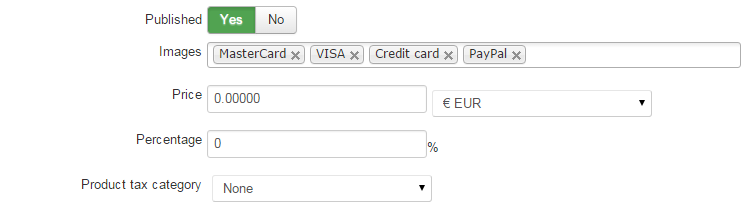
Whatever what I select, it always be EUR.
I mean the currency after"price" in the payment plugin configuration can not be changed in frontend as show in the image
Whatever what I select, it always be EUR.
Please Log in or Create an account to join the conversation.
10 years 9 months ago #225819
by Jerome
Jerome - Obsidev.com
HikaMarket & HikaSerial developer / HikaShop core dev team.
Replied by Jerome on topic the currency can not be changed in frontend
Hi,
Thanks for the explanations, it helped !
In the file "components/com_hikamarket/views/pluginmarket/view.html.php" please replace
By
It will fix the name of the currency selector and will be read correctly during the save.
We will include that patch in the next HikaMarket release.
Regards,
Thanks for the explanations, it helped !
In the file "components/com_hikamarket/views/pluginmarket/view.html.php" please replace
Code:
$html .= $this->currenciesType->display('data['.$type.']['.$paramsTypeForm.']['.$key2.']', $data2);
Code:
$html .= $this->currenciesType->display('data['.$type.']'.$paramsTypeForm.'['.$key2.']', $data2);
We will include that patch in the next HikaMarket release.
Regards,
Jerome - Obsidev.com
HikaMarket & HikaSerial developer / HikaShop core dev team.
The following user(s) said Thank You: allaspects
Please Log in or Create an account to join the conversation.
Moderators: Obsidev
Time to create page: 0.234 seconds