

- Posts: 490
- Thank you received: 2
how to disable certain fields?
10 years 1 month ago - 10 years 1 month ago #247959
by ronron
how to disable certain fields? was created by ronron
-- HikaShop version -- : 2.6.3
-- HikaMarket version -- : 1.7.0
-- Joomla version -- : 3.4.3
-- PHP version -- : 5.5
-- Error-message(debug-mod must be tuned on) -- : none
i would like to disable this on the front end temporarily. the settings on the back end is enough
quantity
code
brand
tags - what is the difference between keyword?
publish yes/no - can i disable unpublish for this?
also there is unpgrade for hikamarket. what will be affected? i have a lot of customization
thanks
-- HikaMarket version -- : 1.7.0
-- Joomla version -- : 3.4.3
-- PHP version -- : 5.5
-- Error-message(debug-mod must be tuned on) -- : none
i would like to disable this on the front end temporarily. the settings on the back end is enough
quantity
code
brand
tags - what is the difference between keyword?
publish yes/no - can i disable unpublish for this?
also there is unpgrade for hikamarket. what will be affected? i have a lot of customization
thanks
Last edit: 10 years 1 month ago by ronron.
Please Log in or Create an account to join the conversation.

10 years 1 month ago #247966
by Jerome
Jerome - Obsidev.com
HikaMarket & HikaSerial developer / HikaShop core dev team.
Replied by Jerome on topic how to disable certain fields?
Hi,
So you have to edit temporally your HikaMarket ACL to deactivate these fields.
Regards,
So you have to edit temporally your HikaMarket ACL to deactivate these fields.
Regards,
Jerome - Obsidev.com
HikaMarket & HikaSerial developer / HikaShop core dev team.
Please Log in or Create an account to join the conversation.
10 years 1 month ago - 10 years 1 month ago #248145
by ronron
Replied by ronron on topic how to disable certain fields?
thanks
but i cant find brand,where is it please?
also i created custom fields for the user and not for the vendor registration. the problem is every time i apply as a vendor an error occurs informing me to fill in the user fields. its not visible on the registration form but it is requested when i apply as vendor
thanks
but i cant find brand,where is it please?
also i created custom fields for the user and not for the vendor registration. the problem is every time i apply as a vendor an error occurs informing me to fill in the user fields. its not visible on the registration form but it is requested when i apply as vendor
thanks
Last edit: 10 years 1 month ago by ronron.
Please Log in or Create an account to join the conversation.
10 years 1 month ago #248146
by Jerome
Jerome - Obsidev.com
HikaMarket & HikaSerial developer / HikaShop core dev team.
Replied by Jerome on topic how to disable certain fields?
Manufacturer
Jerome - Obsidev.com
HikaMarket & HikaSerial developer / HikaShop core dev team.
Please Log in or Create an account to join the conversation.
10 years 1 month ago #248216
by ronron
Replied by ronron on topic how to disable certain fields?
thank you but i cant find brands here.
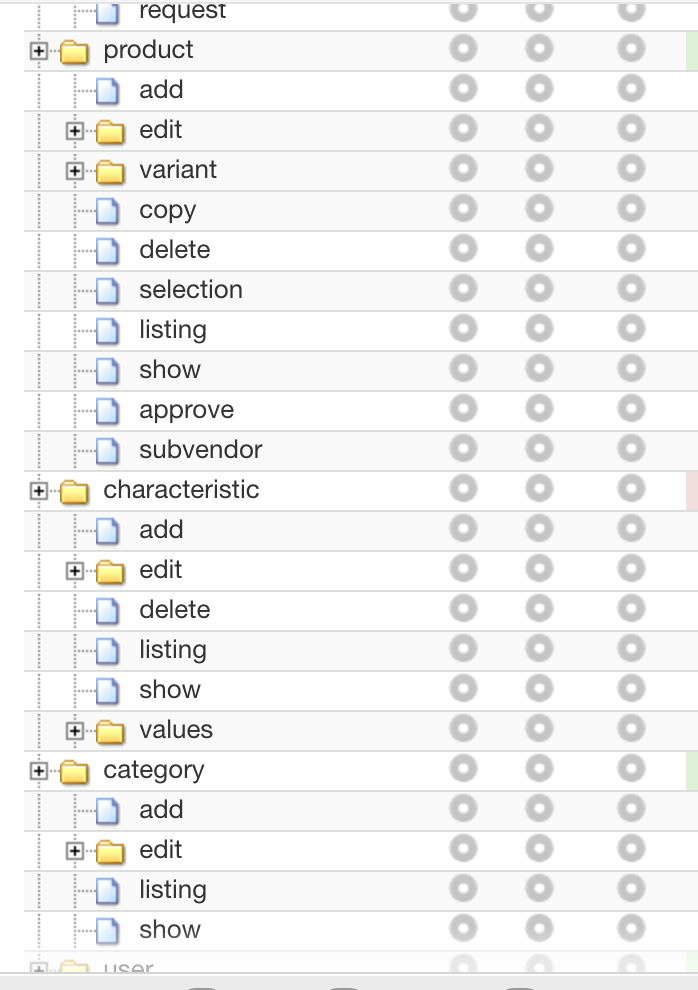
thanks
thanks
Please Log in or Create an account to join the conversation.
10 years 1 month ago #248218
by Jerome
Jerome - Obsidev.com
HikaMarket & HikaSerial developer / HikaShop core dev team.
Replied by Jerome on topic how to disable certain fields?
Jerome - Obsidev.com
HikaMarket & HikaSerial developer / HikaShop core dev team.
Please Log in or Create an account to join the conversation.
Moderators: Obsidev
Time to create page: 0.203 seconds