

- Posts: 33
- Thank you received: 0
How to edit the Hikamarket email notification to Vendor
10 years 2 weeks ago #251406
by robertma
How to edit the Hikamarket email notification to Vendor was created by robertma
-- url of the page with the problem -- :
www.realflightshop.com
-- HikaShop version -- : 2.6.4
-- Joomla version -- : 3.6.2
Hi
As title, how to edit the email notification to vendor when order created, I want to add customer email in the notification email .
Thanks!
-- HikaShop version -- : 2.6.4
-- Joomla version -- : 3.6.2
Hi
As title, how to edit the email notification to vendor when order created, I want to add customer email in the notification email .
Thanks!
Please Log in or Create an account to join the conversation.

10 years 2 weeks ago #251417
by Jerome
Jerome - Obsidev.com
HikaMarket & HikaSerial developer / HikaShop core dev team.
Replied by Jerome on topic How to edit the Hikamarket email notification to Vendor
Hi,
The email edition is a feature provided by HikaShop Business ; in that interface you can access to the HikaShop email but also to the HikaSerial and HikaMarket emails.
If you do not have the Business edition you can override manually an email by copying the file within the folder /media/com_hikamarket/mail/ and set the suffix ".modified.php".
Regards,
The email edition is a feature provided by HikaShop Business ; in that interface you can access to the HikaShop email but also to the HikaSerial and HikaMarket emails.
If you do not have the Business edition you can override manually an email by copying the file within the folder /media/com_hikamarket/mail/ and set the suffix ".modified.php".
Regards,
Jerome - Obsidev.com
HikaMarket & HikaSerial developer / HikaShop core dev team.
Please Log in or Create an account to join the conversation.
10 years 2 weeks ago #251578
by robertma
Replied by robertma on topic How to edit the Hikamarket email notification to Vendor
Hi is there an example for email sent to vendor when product creation, I just want to add customer email in the original email?
And can language of email force to English no matter which language customer use?
Thanks!
And can language of email force to English no matter which language customer use?
Thanks!
Please Log in or Create an account to join the conversation.
10 years 2 weeks ago #251583
by Jerome
Jerome - Obsidev.com
HikaMarket & HikaSerial developer / HikaShop core dev team.
Replied by Jerome on topic How to edit the Hikamarket email notification to Vendor
Hi,
If you edit directly a core file ; that file will be restore during updates, that is why we have an override system.
Regards,
There is already an email and like I wrote you have to copy that file so you will be able to edit freely the new file.If you do not have the Business edition you can override manually an email by copying the file within the folder
If you edit directly a core file ; that file will be restore during updates, that is why we have an override system.
Regards,
Jerome - Obsidev.com
HikaMarket & HikaSerial developer / HikaShop core dev team.
Please Log in or Create an account to join the conversation.
10 years 2 weeks ago #251678
by robertma
Replied by robertma on topic How to edit the Hikamarket email notification to Vendor
Hi
Thanks for the reply. Sorry for misunderstanding.
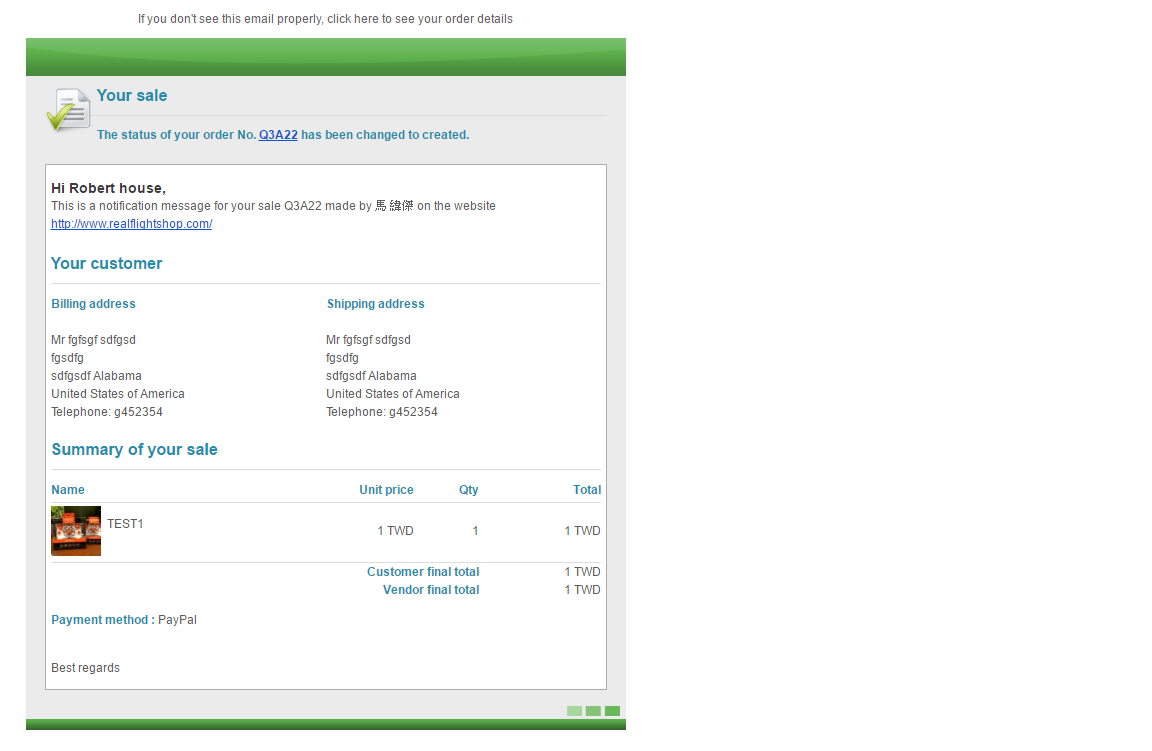
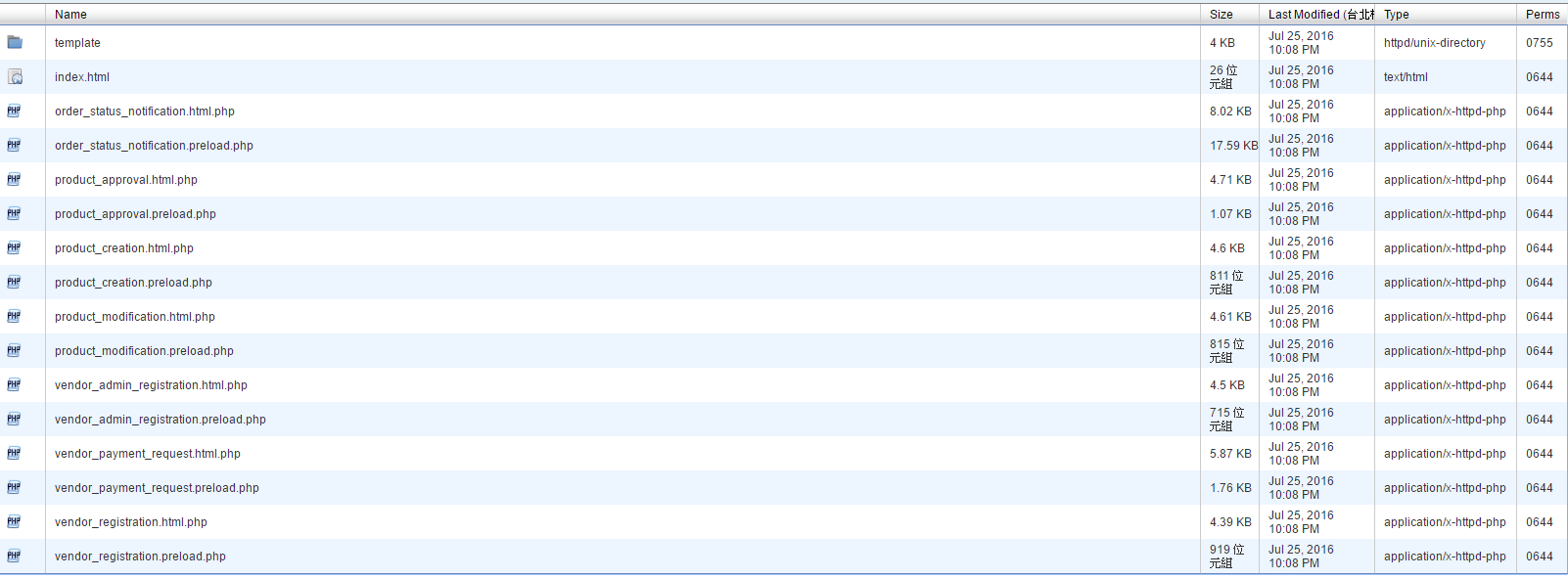
As attachment show, in the mail folder have a lot of php file, which file should I edit so I can edit the mail sent to vendor as order created (as attachment show).
And what command line I need to add to get the customer email into email.
Sorry for irritating, but really do not know how to do this.
Many thanks!
Thanks for the reply. Sorry for misunderstanding.
As attachment show, in the mail folder have a lot of php file, which file should I edit so I can edit the mail sent to vendor as order created (as attachment show).
And what command line I need to add to get the customer email into email.
Sorry for irritating, but really do not know how to do this.
Many thanks!
Please Log in or Create an account to join the conversation.
10 years 2 weeks ago #251679
by Jerome
Jerome - Obsidev.com
HikaMarket & HikaSerial developer / HikaShop core dev team.
Replied by Jerome on topic How to edit the Hikamarket email notification to Vendor
Hi,
Here the documentation about the email edition (which is a little old but should be rewrite soon)
www.hikashop.com/support/documentation/1...shop-email-form.html
The emails are composed of three parts : HTML, Text and Preload.
HTML and Text are the content of the email.
Preload contains the PHP data.
In your case, you want only to override the "html" part ; so that's the file "order_status_notification.html.php" which will give "order_status_notification.html.modified.php".
Regards,
Here the documentation about the email edition (which is a little old but should be rewrite soon)
www.hikashop.com/support/documentation/1...shop-email-form.html
The emails are composed of three parts : HTML, Text and Preload.
HTML and Text are the content of the email.
Preload contains the PHP data.
In your case, you want only to override the "html" part ; so that's the file "order_status_notification.html.php" which will give "order_status_notification.html.modified.php".
Regards,
Jerome - Obsidev.com
HikaMarket & HikaSerial developer / HikaShop core dev team.
Please Log in or Create an account to join the conversation.
10 years 1 week ago #251801
by robertma
Replied by robertma on topic How to edit the Hikamarket email notification to Vendor
Hi
Thanks for useful information, I now know which file I should edit, but after several try, I could not add customer's email into email.
Could you teach me what php code should I insert into the "order_status_notification.html.modified.php". file.
Many thanks!
Thanks for useful information, I now know which file I should edit, but after several try, I could not add customer's email into email.
Could you teach me what php code should I insert into the "order_status_notification.html.modified.php". file.
Many thanks!
Please Log in or Create an account to join the conversation.
10 years 1 week ago #251829
by Jerome
Jerome - Obsidev.com
HikaMarket & HikaSerial developer / HikaShop core dev team.
Replied by Jerome on topic How to edit the Hikamarket email notification to Vendor
Hi,
You can directly add some PHP and use the object :
Otherwise if you want to use the tag system, it will requires also an override of the "preload" file to include the "customer" in the array "$vars".
Regards,
You can directly add some PHP and use the object :
Code:
$data->customer
Regards,
Jerome - Obsidev.com
HikaMarket & HikaSerial developer / HikaShop core dev team.
Please Log in or Create an account to join the conversation.
10 years 1 week ago #251831
by robertma
Replied by robertma on topic How to edit the Hikamarket email notification to Vendor
Hi
So for using the object @data->customer
Do I need to add it into TEXT or just add into HTML file?
Thanks!
So for using the object @data->customer
Do I need to add it into TEXT or just add into HTML file?
Thanks!
Please Log in or Create an account to join the conversation.
10 years 1 week ago #251845
by Jerome
Jerome - Obsidev.com
HikaMarket & HikaSerial developer / HikaShop core dev team.
Replied by Jerome on topic How to edit the Hikamarket email notification to Vendor
Hi,
I'm afraid that I don't understand your question.
Otherwise it means that you missed things I explained you, so please read my messages carefully : www.hikashop.com/forum/19-hikamarket/886...o-vendor.html#251679
Regards,
I'm afraid that I don't understand your question.
Otherwise it means that you missed things I explained you, so please read my messages carefully : www.hikashop.com/forum/19-hikamarket/886...o-vendor.html#251679
Regards,
Jerome - Obsidev.com
HikaMarket & HikaSerial developer / HikaShop core dev team.
Please Log in or Create an account to join the conversation.
10 years 1 week ago - 10 years 1 week ago #251988
by robertma
Replied by robertma on topic How to edit the Hikamarket email notification to Vendor
Hi
Thanks!
I still can not add customer email into the mail send to vendor.
Is business version easier to edit?
Because I try for a very long time but can not figure out, the following is my code of order_creation_notification.html.php
Thanks!
I still can not add customer email into the mail send to vendor.
Is business version easier to edit?
Because I try for a very long time but can not figure out, the following is my code of order_creation_notification.html.php
Last edit: 10 years 1 week ago by Jerome. Reason: removing entire file code from the post
Please Log in or Create an account to join the conversation.
10 years 1 week ago #252046
by Jerome
Jerome - Obsidev.com
HikaMarket & HikaSerial developer / HikaShop core dev team.
Replied by Jerome on topic How to edit the Hikamarket email notification to Vendor
Hi,
HikaShop Business will give you an interface to directly edit the different parts of the email.
I added a patch in HikaMarket which will be available in the next release.
In the "preload" file, you will find in the "top" of the file the line
You have to replace it by
Thanks to that patch, in the "html" file you will be able to use a tag
To display the value of the field "user_email" of the HikaShop customer.
Regards,
HikaShop Business will give you an interface to directly edit the different parts of the email.
I added a patch in HikaMarket which will be available in the next release.
In the "preload" file, you will find in the "top" of the file the line
Code:
'vendor' => $data->vendor,
Code:
'vendor' => $data->vendor,
'customer' => @$data->customer,
Thanks to that patch, in the "html" file you will be able to use a tag
Code:
{VAR:customer.user_email}
Regards,
Jerome - Obsidev.com
HikaMarket & HikaSerial developer / HikaShop core dev team.
Please Log in or Create an account to join the conversation.
Moderators: Obsidev
Time to create page: 0.289 seconds