

- Posts: 490
- Thank you received: 2
clarification on custom fields display properties
9 years 11 months ago #251440
by ronron
clarification on custom fields display properties was created by ronron
-- HikaShop version -- : 2.6.3
-- HikaMarket version -- : 1.7.0
-- Joomla version -- : 3.4
-- PHP version -- : 5.5
-- Error-message(debug-mod must be tuned on) -- : none
hi
can you please clarify how to use the display properties for the custom fields?
i created a menu for vendor listing and added a custom field for the vendors. i dont want it to appear on the listing but i want to display it on the vendor page.
i tried to set "no" for vendor listing but its still on the FE list.
what to do?
thanks
-- HikaMarket version -- : 1.7.0
-- Joomla version -- : 3.4
-- PHP version -- : 5.5
-- Error-message(debug-mod must be tuned on) -- : none
hi
can you please clarify how to use the display properties for the custom fields?
i created a menu for vendor listing and added a custom field for the vendors. i dont want it to appear on the listing but i want to display it on the vendor page.
i tried to set "no" for vendor listing but its still on the FE list.
what to do?
thanks
Please Log in or Create an account to join the conversation.

9 years 11 months ago #251447
by Jerome
Jerome - Obsidev.com
HikaMarket & HikaSerial developer / HikaShop core dev team.
Replied by Jerome on topic clarification on custom fields display properties
Hi,
In the configuration of your custom field, you will see "display" settings.
In these settings, you will see "vendor page" and "vendor listing".
Regards,
In the configuration of your custom field, you will see "display" settings.
In these settings, you will see "vendor page" and "vendor listing".
Regards,
Jerome - Obsidev.com
HikaMarket & HikaSerial developer / HikaShop core dev team.
Please Log in or Create an account to join the conversation.
9 years 11 months ago #251688
by ronron
Replied by ronron on topic clarification on custom fields display properties
hi thank you
i think i missed something
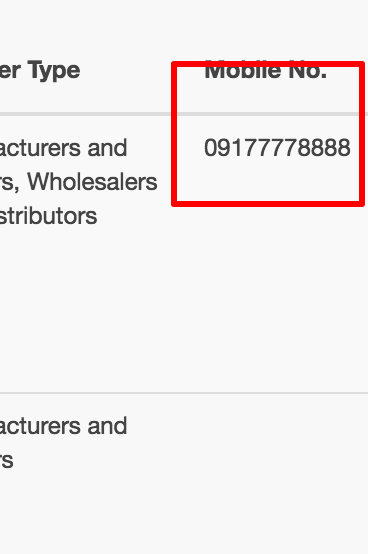
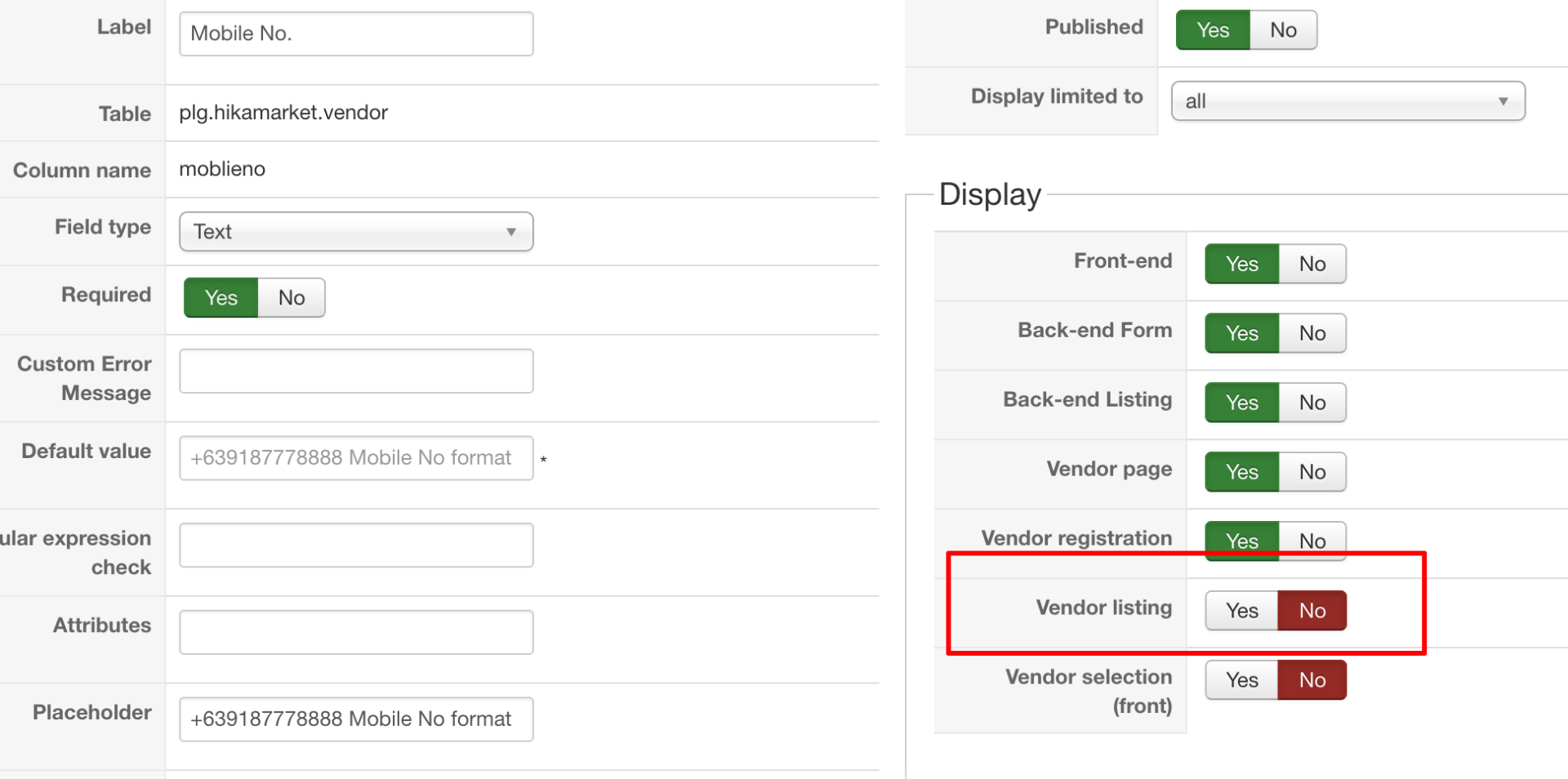
i disabled or set to no display > vendor listing > no. Yet my custom field named "mobile no" still appears in the front end.
vendor list
setting of custom field
thanks
i think i missed something
i disabled or set to no display > vendor listing > no. Yet my custom field named "mobile no" still appears in the front end.
vendor list
setting of custom field
thanks
Please Log in or Create an account to join the conversation.
9 years 11 months ago #251696
by Jerome
Jerome - Obsidev.com
HikaMarket & HikaSerial developer / HikaShop core dev team.
Replied by Jerome on topic clarification on custom fields display properties
Hi,
Please be more specific ; the screenshot do not explain where it has been taken.
Regards,
Please be more specific ; the screenshot do not explain where it has been taken.
Regards,
Jerome - Obsidev.com
HikaMarket & HikaSerial developer / HikaShop core dev team.
Please Log in or Create an account to join the conversation.
9 years 11 months ago #251806
by ronron
Replied by ronron on topic clarification on custom fields display properties
thank you, let me clarify please.
i created a custom field for vendors. it is called mobile no. i want this to behave as follows
1. vendor page = visible > this is ok
2. vendor listing = invisible > this is not ok
3. vendor edition page = visible > ok
4. vendor registration = visible > ok
the photo above displays the configuration of the display for the field. Vendor listing is set to no, with red box. the other photo is the menu for the vendor listing. It still displays the mobile no field with data. It is suppose to be hidden.
what to do please?
thanks
i created a custom field for vendors. it is called mobile no. i want this to behave as follows
1. vendor page = visible > this is ok
2. vendor listing = invisible > this is not ok
3. vendor edition page = visible > ok
4. vendor registration = visible > ok
the photo above displays the configuration of the display for the field. Vendor listing is set to no, with red box. the other photo is the menu for the vendor listing. It still displays the mobile no field with data. It is suppose to be hidden.
what to do please?
thanks
Please Log in or Create an account to join the conversation.
9 years 11 months ago #251807
by Jerome
Jerome - Obsidev.com
HikaMarket & HikaSerial developer / HikaShop core dev team.
Replied by Jerome on topic clarification on custom fields display properties
Hi,
I think we will need a link in order to see what listing you're talking about.
Regards,
I think we will need a link in order to see what listing you're talking about.
Regards,
Jerome - Obsidev.com
HikaMarket & HikaSerial developer / HikaShop core dev team.
The following user(s) said Thank You: ronron
Please Log in or Create an account to join the conversation.
9 years 11 months ago #251838
by ronron
thank you,here it is...
Replied by ronron on topic clarification on custom fields display properties
This message contains confidential information
thank you,here it is...
Please Log in or Create an account to join the conversation.
9 years 11 months ago #251846
by Jerome
Jerome - Obsidev.com
HikaMarket & HikaSerial developer / HikaShop core dev team.
Replied by Jerome on topic clarification on custom fields display properties
Hi,
I see, you have a vendor listing in table ! Thanks !
So first, please sure that you do not have any override for your view "vendormarket / listingcontainer_table".
Temporally, in the file "components/com_hikamarket/views/vendormarket/view.html.php", replace :
By
And then the custom field will be filtering.
There is a pending code which will provide "extraFields" and "displayFields" to the views so they will be able to access to all fields even if they should not be displayed in the listing ; so the view "listingcontainer" will use "displayFields" instead of "extraFields" when the pending code will be merged.
Even if you're modifying a core file, in the next HikaMarket release, that issue (and the table view) will be fixed.
But I have to admit that with the work on HK3 ; I forgot that I got that issue in my tracker..
Regards,
I see, you have a vendor listing in table ! Thanks !
So first, please sure that you do not have any override for your view "vendormarket / listingcontainer_table".
Temporally, in the file "components/com_hikamarket/views/vendormarket/view.html.php", replace :
Code:
$vendorFields = null;
$extraFields = array(
'vendor' => $fieldsClass->getFields('frontcomp', $vendorFields, 'plg.hikamarket.vendor')
);
Code:
$vendorFields = null;
$extraFields = array(
'vendor' => $fieldsClass->getFields('display:vendor_listing=1', $vendorFields, 'plg.hikamarket.vendor')
);
There is a pending code which will provide "extraFields" and "displayFields" to the views so they will be able to access to all fields even if they should not be displayed in the listing ; so the view "listingcontainer" will use "displayFields" instead of "extraFields" when the pending code will be merged.
Even if you're modifying a core file, in the next HikaMarket release, that issue (and the table view) will be fixed.
But I have to admit that with the work on HK3 ; I forgot that I got that issue in my tracker..
Regards,
Jerome - Obsidev.com
HikaMarket & HikaSerial developer / HikaShop core dev team.
The following user(s) said Thank You: ronron
Please Log in or Create an account to join the conversation.
Moderators: Obsidev
Time to create page: 0.188 seconds