

- Posts: 136
- Thank you received: 7
Main Vendor Groups - whats it for?
9 years 11 months ago #252293
by flexsus
.ninja { color: black; visibility: hidden; }
In case of fire:
1. git commit
2. git push
3. exit building
Main Vendor Groups - whats it for? was created by flexsus
-- HikaShop version -- : 2.6.4
-- HikaMarket version -- : 1.7.2
-- Joomla version -- : 3.6.2
-- PHP version -- : 7.0
-- Browser(s) name and version -- : All
Hi
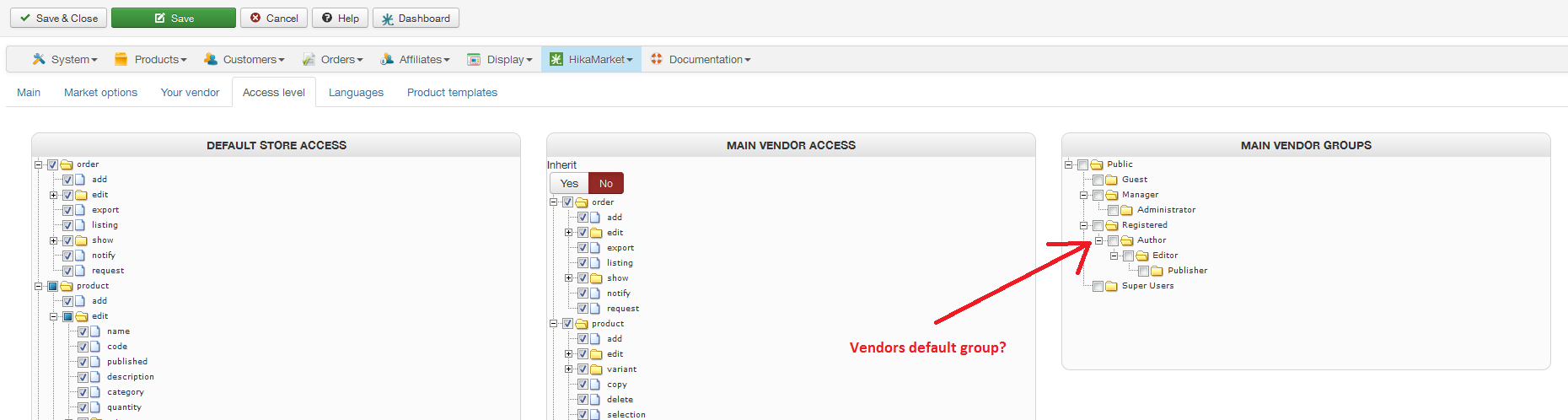
I'm setting default ACL for my vendors, but I cannot find any documentation on, what the last group is for?
Should the "Main Vendor Groups" have checkmark in 'Author'?
When my vendors sign up, I default them to 'Author' group in Joomla.
What does it do?
-- HikaMarket version -- : 1.7.2
-- Joomla version -- : 3.6.2
-- PHP version -- : 7.0
-- Browser(s) name and version -- : All
Hi
I'm setting default ACL for my vendors, but I cannot find any documentation on, what the last group is for?
Should the "Main Vendor Groups" have checkmark in 'Author'?
When my vendors sign up, I default them to 'Author' group in Joomla.
What does it do?
.ninja { color: black; visibility: hidden; }
In case of fire:
1. git commit
2. git push
3. exit building
Please Log in or Create an account to join the conversation.

9 years 11 months ago #252297
by Jerome
Jerome - Obsidev.com
HikaMarket & HikaSerial developer / HikaShop core dev team.
Replied by Jerome on topic Main Vendor Groups - whats it for?
Hi,
The "main vendor groups" is the groups for your main vendor.
The groups are used in the section "HikaShop > Accesses" ; there you can configure specific ACL for groups.
And you can put your vendors into groups so they can inherit fo the ACL rules you put for their groups.
There is a plugin to link the Joomla user groups to his vendor (the account need to be administrator of a vendor configuration).
And about the registration, the settings are in the second tab.
There you will find a setting for the usergroups during registration (specific for the HikaMarket registration).
www.hikashop.com/support/documentation/1...nfig_market_register
Regards,
The "main vendor groups" is the groups for your main vendor.
The groups are used in the section "HikaShop > Accesses" ; there you can configure specific ACL for groups.
And you can put your vendors into groups so they can inherit fo the ACL rules you put for their groups.
There is a plugin to link the Joomla user groups to his vendor (the account need to be administrator of a vendor configuration).
And about the registration, the settings are in the second tab.
There you will find a setting for the usergroups during registration (specific for the HikaMarket registration).
www.hikashop.com/support/documentation/1...nfig_market_register
Regards,
Jerome - Obsidev.com
HikaMarket & HikaSerial developer / HikaShop core dev team.
Please Log in or Create an account to join the conversation.
9 years 10 months ago - 9 years 10 months ago #256604
by flexsus
.ninja { color: black; visibility: hidden; }
In case of fire:
1. git commit
2. git push
3. exit building
Replied by flexsus on topic Main Vendor Groups - whats it for?
Hi
I still don't understand the connection here.
I have a top Administrator of this Joomla/HikaShop/Hikamarket website:
Joomla username: flexsus (Super User ACL)
Besides controlling everything in Joomla back-end as a Super User admin, I have a top Vendor, me - a Vendor which controls all the vendors, right? = "Your Vendor" (3rd tab in config)
How is this "Your Vendor" associated with a Joomla User? By it's e-mail address?
Is the purpose with this Your Vendor to give some special access in front-end of Joomla?
If, Your Vendor is associated with a Joomla User, should this user then be put into e.g. group 'Administrator'?
And then this 3rd block "Main Vendor Groups" should have checkmark in 'Administrator'? - right now I have nothing checked here.
About the registration, I understand this part. My vendors are put into group "Author" when the sign up as vendors.
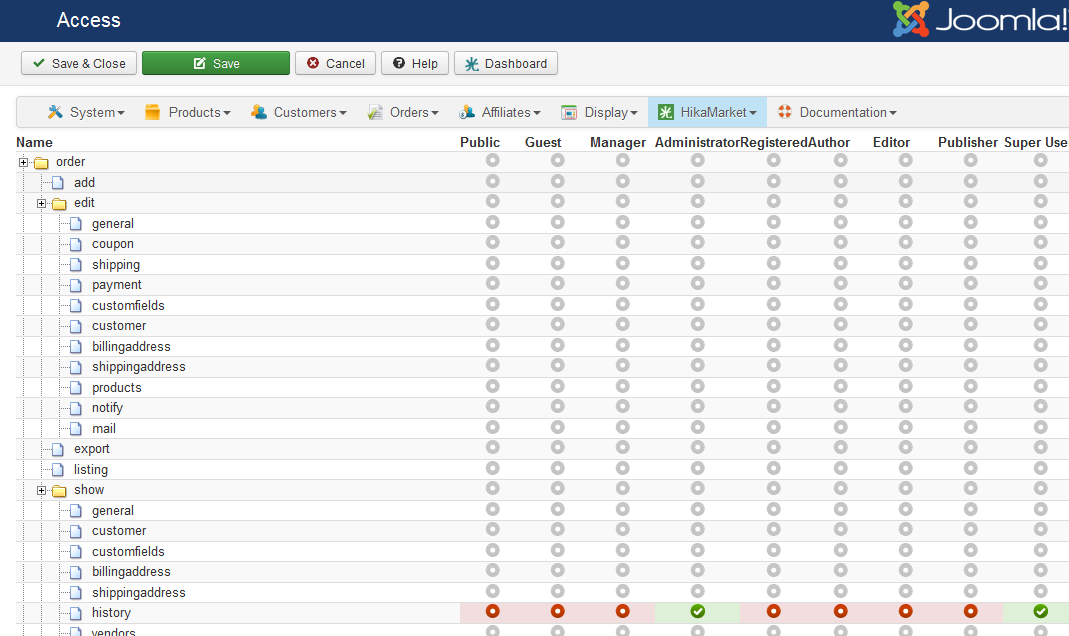
Something that I'm trying to achieve is, that I as that Super User administrator and as the main Your Vendor has access to the Order History in show i front-end. But all my vendors should not see and have access to this part.
Best regards,
Henrik
I still don't understand the connection here.
I have a top Administrator of this Joomla/HikaShop/Hikamarket website:
Joomla username: flexsus (Super User ACL)
Besides controlling everything in Joomla back-end as a Super User admin, I have a top Vendor, me - a Vendor which controls all the vendors, right? = "Your Vendor" (3rd tab in config)
How is this "Your Vendor" associated with a Joomla User? By it's e-mail address?
Is the purpose with this Your Vendor to give some special access in front-end of Joomla?
If, Your Vendor is associated with a Joomla User, should this user then be put into e.g. group 'Administrator'?
And then this 3rd block "Main Vendor Groups" should have checkmark in 'Administrator'? - right now I have nothing checked here.
About the registration, I understand this part. My vendors are put into group "Author" when the sign up as vendors.
Something that I'm trying to achieve is, that I as that Super User administrator and as the main Your Vendor has access to the Order History in show i front-end. But all my vendors should not see and have access to this part.
Best regards,
Henrik
.ninja { color: black; visibility: hidden; }
In case of fire:
1. git commit
2. git push
3. exit building
Last edit: 9 years 10 months ago by flexsus. Reason: typo
Please Log in or Create an account to join the conversation.
9 years 10 months ago #256613
by Jerome
Jerome - Obsidev.com
HikaMarket & HikaSerial developer / HikaShop core dev team.
Replied by Jerome on topic Main Vendor Groups - whats it for?
Hi,
How manage users in the main vendor account :
www.hikashop.com/support/documentation/2...tml#tuto_your_vendor
Details about the access level system in HikaMarket :
www.hikashop.com/support/documentation/1...l#tuto_configure_acl
The fact that you can put "groups" on vendor accounts is just there to help "mass configuration" using the "access level" interface.
That's all and that's nothing more.
Regards,
How manage users in the main vendor account :
www.hikashop.com/support/documentation/2...tml#tuto_your_vendor
Details about the access level system in HikaMarket :
www.hikashop.com/support/documentation/1...l#tuto_configure_acl
The fact that you can put "groups" on vendor accounts is just there to help "mass configuration" using the "access level" interface.
That's all and that's nothing more.
Regards,
Jerome - Obsidev.com
HikaMarket & HikaSerial developer / HikaShop core dev team.
Please Log in or Create an account to join the conversation.
Moderators: Obsidev
Time to create page: 0.188 seconds