

- Posts: 490
- Thank you received: 2
add toolbar
9 years 10 months ago #254988
by ronron
add toolbar was created by ronron
-- HikaShop version -- : 2.6.3
-- HikaMarket version -- : 1.7.0
-- Joomla version -- : 3.4.5
-- PHP version -- : 5.5
-- Error-message(debug-mod must be tuned on) -- : none
hi
how do i add another tool bar below HikaMarket - productmarket / form.php
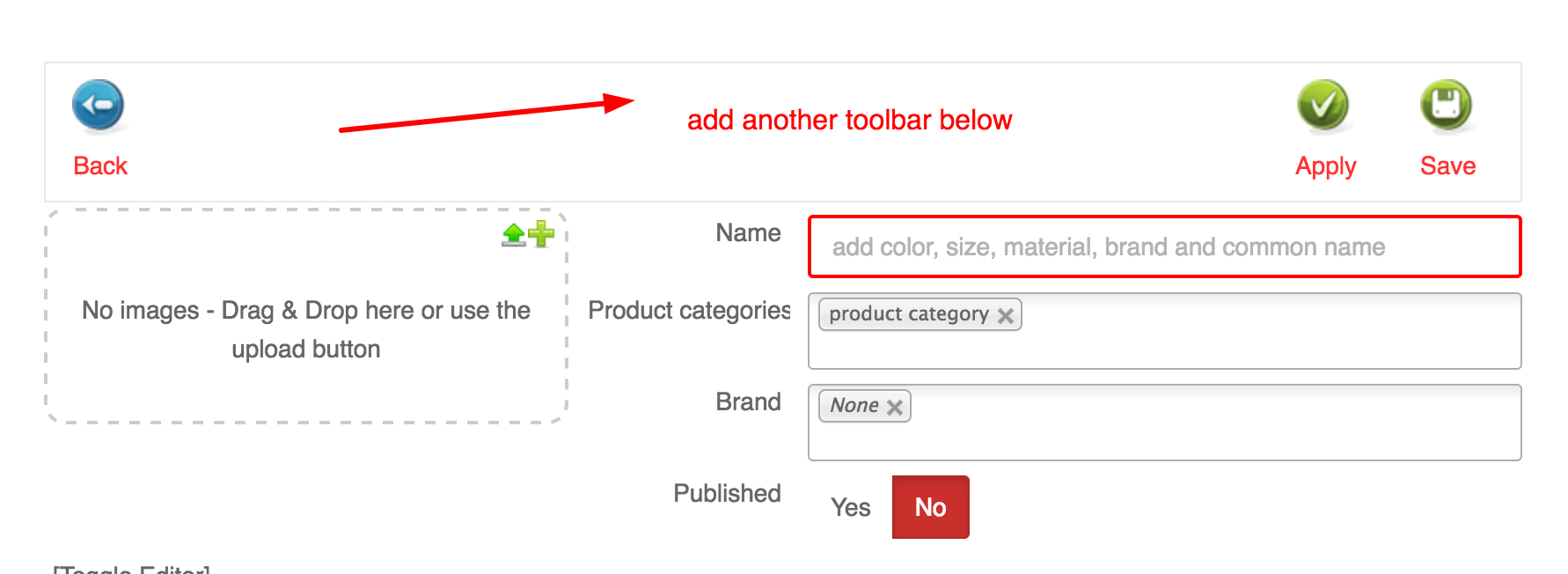
thanks
-- HikaMarket version -- : 1.7.0
-- Joomla version -- : 3.4.5
-- PHP version -- : 5.5
-- Error-message(debug-mod must be tuned on) -- : none
hi
how do i add another tool bar below HikaMarket - productmarket / form.php
thanks
Please Log in or Create an account to join the conversation.

9 years 10 months ago #255010
by Jerome
Jerome - Obsidev.com
HikaMarket & HikaSerial developer / HikaShop core dev team.
Replied by Jerome on topic add toolbar
Hi,
If you want to add item in the current toolbar, you need to use a custom plugin or an override of the HikaMarket toolbar (view: toolbar / default).
Please note that the toolbar view is used almost everywhere in the front-end so you'll need to perform some context checks to add you elements just in the targeted page.
If you want to add a second toolbar in the view, you just need to put it at the beginning of "productmarket / form".
Regards,
If you want to add item in the current toolbar, you need to use a custom plugin or an override of the HikaMarket toolbar (view: toolbar / default).
Please note that the toolbar view is used almost everywhere in the front-end so you'll need to perform some context checks to add you elements just in the targeted page.
If you want to add a second toolbar in the view, you just need to put it at the beginning of "productmarket / form".
Regards,
Jerome - Obsidev.com
HikaMarket & HikaSerial developer / HikaShop core dev team.
Please Log in or Create an account to join the conversation.
9 years 10 months ago - 9 years 10 months ago #255058
by ronron
Replied by ronron on topic add toolbar
hi
thanks
i just want to add a second toolbar below. This will prevent users from scrolling all the way up.
Can you tell me what the exact code to add to HikaMarket - productmarket / form.php.
i tried to add this below so i would have a toolbar above and below the form but i get an error
thanks
thanks
i just want to add a second toolbar below. This will prevent users from scrolling all the way up.
Can you tell me what the exact code to add to HikaMarket - productmarket / form.php.
i tried to add this below so i would have a toolbar above and below the form but i get an error
Code:
full content of the view "toolbar / default" removed.
content irrelevant here ; specially if it is the full untouched code of an official view
thanks
Last edit: 9 years 10 months ago by Jerome. Reason: removing irrelevant code
Please Log in or Create an account to join the conversation.
9 years 10 months ago #255064
by Jerome
Jerome - Obsidev.com
HikaMarket & HikaSerial developer / HikaShop core dev team.
Replied by Jerome on topic add toolbar
Hi,
If you just want to duplicate the toolbar, the best would be to just include the view :
Regards,
If you just want to duplicate the toolbar, the best would be to just include the view :
Code:
$toolbarHelper = hikamarket::get('helper.toolbar');
$toolbarHelper->process($this->toolbar);
Regards,
Jerome - Obsidev.com
HikaMarket & HikaSerial developer / HikaShop core dev team.
Please Log in or Create an account to join the conversation.
Moderators: Obsidev
Time to create page: 0.155 seconds