

- Posts: 252
- Thank you received: 1
an error message in vendor's control pannel
9 years 10 months ago #255826
by twscott
an error message in vendor's control pannel was created by twscott
-- HikaShop version -- : 2.6.4
-- HikaMarket version -- : 1.7.2
-- Joomla version -- : 3.51
-- PHP version -- : 5.5.13
Hi,
I got the error message of "not enough columns to draw the request chart", as shown in the attached screenshot file.
Would you tell me how to correct this error message?
Best regards
-- HikaMarket version -- : 1.7.2
-- Joomla version -- : 3.51
-- PHP version -- : 5.5.13
Hi,
I got the error message of "not enough columns to draw the request chart", as shown in the attached screenshot file.
Would you tell me how to correct this error message?
Best regards
Please Log in or Create an account to join the conversation.

9 years 10 months ago #255833
by Jerome
Jerome - Obsidev.com
HikaMarket & HikaSerial developer / HikaShop core dev team.
Replied by Jerome on topic an error message in vendor's control pannel
Hi,
Because you do not have any order (data), the Google chart cannot display a chart.
Previously, HikaMarket were displaying a nicer message but, when we added the dropdown to let the vendor select the date range, we had to let the google chart and initialize it even if there is no data ; otherwise it wouldn't be possible to change the date range and dynamically load the data into the chart.
So, unfortunately, the message you see is not made by HikaMarket ; but by the google chart itself.
Regards,
Because you do not have any order (data), the Google chart cannot display a chart.
Previously, HikaMarket were displaying a nicer message but, when we added the dropdown to let the vendor select the date range, we had to let the google chart and initialize it even if there is no data ; otherwise it wouldn't be possible to change the date range and dynamically load the data into the chart.
So, unfortunately, the message you see is not made by HikaMarket ; but by the google chart itself.
Regards,
Jerome - Obsidev.com
HikaMarket & HikaSerial developer / HikaShop core dev team.
Please Log in or Create an account to join the conversation.
9 years 10 months ago #255883
by twscott
Replied by twscott on topic an error message in vendor's control pannel
Hi Jerome,
Thanks. But I don't understand why I don't have order data, I have a lot of order records.
attached is my screenshot, the records in the left bottom conner, shows some of my records.
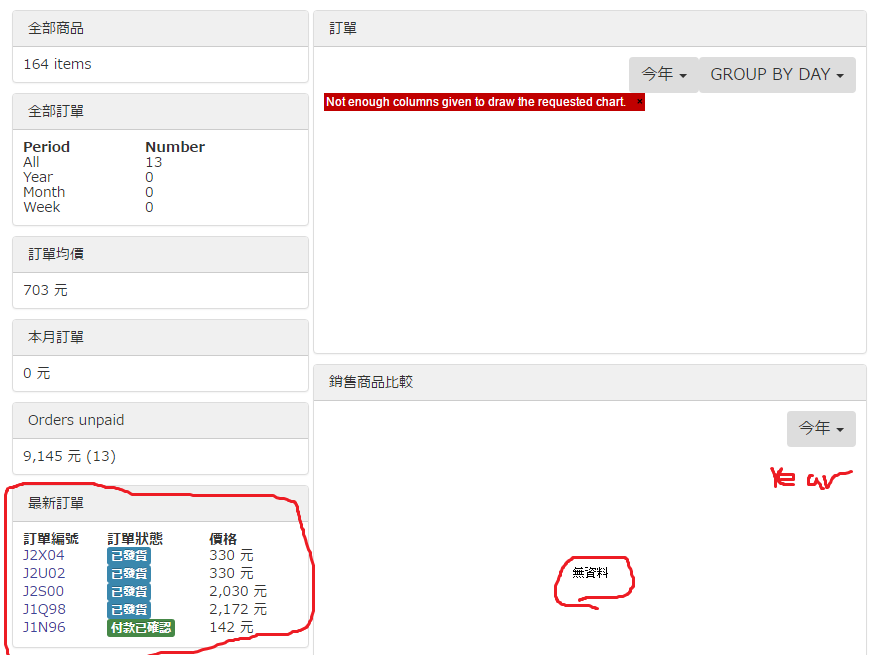
Best regards
Thanks. But I don't understand why I don't have order data, I have a lot of order records.
attached is my screenshot, the records in the left bottom conner, shows some of my records.
Best regards
Please Log in or Create an account to join the conversation.
9 years 10 months ago #255911
by Jerome
Jerome - Obsidev.com
HikaMarket & HikaSerial developer / HikaShop core dev team.
Replied by Jerome on topic an error message in vendor's control pannel
Hi,
You have statistics options in order to configure what data will be used by the graphs.
www.hikashop.com/support/documentation/1...ml#config_main_stats
If you take a look at the second block in the first column, you will see that you have 13 orders but all are older than one year.
Afterwards, I'm sorry but I am not able to read Chinese.
Regards,
You have statistics options in order to configure what data will be used by the graphs.
www.hikashop.com/support/documentation/1...ml#config_main_stats
If you take a look at the second block in the first column, you will see that you have 13 orders but all are older than one year.
Afterwards, I'm sorry but I am not able to read Chinese.
Regards,
Jerome - Obsidev.com
HikaMarket & HikaSerial developer / HikaShop core dev team.
Please Log in or Create an account to join the conversation.
9 years 10 months ago #255957
by twscott
Replied by twscott on topic an error message in vendor's control pannel
Thanks Jerome.
As long as I know a little English we can communicate well. Anyway, I don't understand why it says my orders are older than one year, all my orders are generated recently. In the attached screenshot, all the orders are in this month.
Best regards
As long as I know a little English we can communicate well. Anyway, I don't understand why it says my orders are older than one year, all my orders are generated recently. In the attached screenshot, all the orders are in this month.
Best regards
Please Log in or Create an account to join the conversation.
9 years 10 months ago #255989
by Jerome
Jerome - Obsidev.com
HikaMarket & HikaSerial developer / HikaShop core dev team.
Replied by Jerome on topic an error message in vendor's control pannel
Hi,
Without any details about the orders and your HikaMarket configuration ; I won't be able to tell you more.
But please read my previous message and check your configuration
Regards,
Without any details about the orders and your HikaMarket configuration ; I won't be able to tell you more.
But please read my previous message and check your configuration
You have statistics options in order to configure what data will be used by the graphs.
www.hikashop.com/support/documentation/1...ml#config_main_stats
Regards,
Jerome - Obsidev.com
HikaMarket & HikaSerial developer / HikaShop core dev team.
Please Log in or Create an account to join the conversation.
Moderators: Obsidev
Time to create page: 0.191 seconds