

- Posts: 178
- Thank you received: 5
Vendor's contact information in Checkout Finish step.
9 years 9 months ago #257938
by alikon1
Vendor's contact information in Checkout Finish step. was created by alikon1
-- HikaShop version -- : Demo site
-- HikaMarket version -- : Demo site
-- Joomla version -- : Demo site
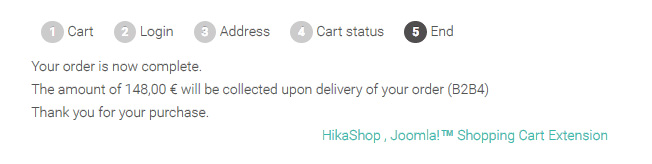
How to display for example vendor's phone number/address information in finish checkout page, where order was made.
I will have 30+ vendors and customer should know phone number of vendor, where he ordered.
-- HikaMarket version -- : Demo site
-- Joomla version -- : Demo site
How to display for example vendor's phone number/address information in finish checkout page, where order was made.
I will have 30+ vendors and customer should know phone number of vendor, where he ordered.
Please Log in or Create an account to join the conversation.

9 years 9 months ago #257960
by Jerome
Jerome - Obsidev.com
HikaMarket & HikaSerial developer / HikaShop core dev team.
Replied by Jerome on topic Vendor's contact information in Checkout Finish step.
Hi,
Like for the addition of "commerce trackers", the customization of that view can be made by changing the "checkout / after_end" or by creating an override for the "end" of the specific payment method (depending which payment you're using).
Now, in that view you will have access to the order ID ; so you can add a little query in order to load the "sub order" and then display the details of the vendor(s).
It requires a small PHP code to put in the view but that is not something really big.
Regards,
Like for the addition of "commerce trackers", the customization of that view can be made by changing the "checkout / after_end" or by creating an override for the "end" of the specific payment method (depending which payment you're using).
Now, in that view you will have access to the order ID ; so you can add a little query in order to load the "sub order" and then display the details of the vendor(s).
It requires a small PHP code to put in the view but that is not something really big.
Regards,
Jerome - Obsidev.com
HikaMarket & HikaSerial developer / HikaShop core dev team.
Please Log in or Create an account to join the conversation.
9 years 9 months ago #258246
by alikon1
Replied by alikon1 on topic Vendor's contact information in Checkout Finish step.
Try to cnange checkout / after_end.php and checkout / end.php. Add echo to that files. On last step I see checkout / end.php. How can I get order number? I saw $this in checkout / end.php, but print_r didn't show order number. My PHP is very bad) Which variable contents order number?
Please Log in or Create an account to join the conversation.
9 years 9 months ago #258250
by Jerome
Jerome - Obsidev.com
HikaMarket & HikaSerial developer / HikaShop core dev team.
Replied by Jerome on topic Vendor's contact information in Checkout Finish step.
Hi,
In the view "checkout / end" (or "after_end) you will have access to
which is the object of the HikaShop (full) order.
In that object you can already access to a lot of details (but not the vendors)
Afterwards, thanks to that order_id, you can load the vendors.
Regards,
In the view "checkout / end" (or "after_end) you will have access to
Code:
$this->order
In that object you can already access to a lot of details (but not the vendors)
Code:
$this->order->order_id
Afterwards, thanks to that order_id, you can load the vendors.
Code:
$db = JFactory::getDBO();
$query = 'SELECT hmv.* '.
' FROM ' . hikashop_table('order'). ' AS hko '.
' INNER JOIN ' .'#__hikamarket_vendor'. ' AS hmv ON hmv.vendor_id = hko.order_vendor_id '.
' WHERE hko.order_type = \'subsale\' AND hko.order_parent_id = '. (int)$this->order->order_id .
' ORDER BY hko.order_id DESC';
$db->setQuery($query);
$vendors = $db->loadObjectList('vendor_id');
Regards,
Jerome - Obsidev.com
HikaMarket & HikaSerial developer / HikaShop core dev team.
The following user(s) said Thank You: alikon1
Please Log in or Create an account to join the conversation.
9 years 9 months ago #258271
by alikon1
Replied by alikon1 on topic Vendor's contact information in Checkout Finish step.
Tried, but $this->order or $this->order->order_id don't display anything.
I'm using "HikaShop collect on delivery payment plugin" and "HikaShop manual shipping plugin".
I'm using "HikaShop collect on delivery payment plugin" and "HikaShop manual shipping plugin".
Please Log in or Create an account to join the conversation.
9 years 9 months ago #258274
by alikon1
Replied by alikon1 on topic Vendor's contact information in Checkout Finish step.
Order id shows only in $this->html as html formatted text.
Part of the message is hidden for the guests. Please log in or register to see it.
Part of the message is hidden for the guests. Please log in or register to see it.
Please Log in or Create an account to join the conversation.
9 years 9 months ago - 9 years 9 months ago #258275
by alikon1
Replied by alikon1 on topic Vendor's contact information in Checkout Finish step.
Disable in configuration "Advanced checkout workflow edition".
My Checkout workflow looks like: cart_status_shipping_payment_fields_confirm,end.
All customers are guests without registration.
My Checkout workflow looks like: cart_status_shipping_payment_fields_confirm,end.
All customers are guests without registration.
Last edit: 9 years 9 months ago by alikon1.
Please Log in or Create an account to join the conversation.
9 years 9 months ago #258272
by Jerome
Jerome - Obsidev.com
HikaMarket & HikaSerial developer / HikaShop core dev team.
Replied by Jerome on topic Vendor's contact information in Checkout Finish step.
Hi,
Okay, so you need to override the collect on delivery "end" view.
In that view there is no access to the order object ; but if you perform a little modification in the plugin (that I will add in HikaShop 3 too), you will gain that access.
In the plugin you need to replace :
By
And then, for the override of the view "collectondelivery_end.php", you have copy the plugin file into :
/templates/YOUR_TEMPLATE/hikashoppayment/collectondelivery_end.php
Regards,
Okay, so you need to override the collect on delivery "end" view.
In that view there is no access to the order object ; but if you perform a little modification in the plugin (that I will add in HikaShop 3 too), you will gain that access.
In the plugin you need to replace :
Code:
$this->order_number = $order->order_number;
$this->showPage('end');
Code:
$this->order_number = $order->order_number;
$this->order = $order;
$this->showPage('end');
And then, for the override of the view "collectondelivery_end.php", you have copy the plugin file into :
/templates/YOUR_TEMPLATE/hikashoppayment/collectondelivery_end.php
Regards,
Jerome - Obsidev.com
HikaMarket & HikaSerial developer / HikaShop core dev team.
The following user(s) said Thank You: alikon1
Please Log in or Create an account to join the conversation.
Moderators: Obsidev
Time to create page: 0.211 seconds